Article
JES2 resiliency - privilege support
How to enable JES2 privilege supportArchive date: 2022-10-27
This content is no longer being updated or maintained. The content is provided “as is.” Given the rapid evolution of technology, some content, steps, or illustrations may have changed.Introduction
This article reviews JES2 privilege support, which is part of the JES2 resiliency strategy to improve JES2 availability and reduce mean time to recovery (MTTR) during certain JES2 resource shortages. It explains the requirements, scope of resources, and implementation details. This article is intended to supplement the official JES2 documentation.
What is JES2 privilege support?
What happens when JES2 spool utilization reaches 100%? Users are unable to log on; new batch jobs won’t start; and the system seems to grind to a halt. Hopefully you have automations routines to handle the $HASP050 message (spool shortage message) and you can identify and resolve the spool problem before it reaches 100%, but if not, then what? If you weren’t logged on before the shortage, you may not be able to log on because JES2 spool space has been exhausted (that is, spool hit 100%). During spool shortages, typically your choices are to purge output greater than xx days, purge the largest piece of output, or add a spool volume. If you are going to purge output, what if the output was just created that day or maybe it is not just one job, maybe it is hundreds of jobs that all just ran that day and together they created the spool shortage? It is a lot harder to relieve the JES2 spool shortage in those conditions.
With IBM® z/OS® V2R3, JES2 has provided a new function called privilege support, part of the JES2 resiliency strategy. With this new function, JES2 automatically reserves space for privileged users. So, these privileged users can log on or submit batch jobs during certain resource shortages, such as a spool shortage.
Note: Do not confuse the term “privileged user” with the privileged user concept where a user ID has elevated security authority. To control users who can log on or submit batch jobs during these situations, a RACF FACILITY class profile is provided (which will be discussed in the “Next step – define a RACF FACILITY profile” section. The users who have access to this profile are considered privileged users.
JES2 will automatically attempt to activate this new support when all the members of the multi-access spool (MAS) are running z/OS V2R3 and the checkpoint level is at z22. There are some cases, in “smaller environments”, where JES2 will not be able to automatically reserve space, so you will need to enable the function; which we will discuss later in the “How to check if JES2 privilege support is enabled and activate if needed” section.
Another aspect of JES2 resiliency support is providing diagnostic capabilities such as the ability to identify the top consumers of a resource with new JES2 commands (which is discussed in the “JES2 command to identify top consumers” section.
Requirements
JES2 automatically attempts to enable privilege support after the following requirements are met:
- All systems in the JES2 MAS are at JES2 z/OS V2R3
- JES2 checkpoint level must be z22 (verify with the JES2 $DACTIVATE command)
Refer to more free resources, discussed in the "How to check if JES2 privilege support is active and activate if needed?" section.
What JES2 resources are enabled for JES2 privilege support?
The following resources are eligible for JES2 privilege support:
- Spool (spool space also known as track groups or TGs)
- JQE (job queue elements)
- JOE (job output elements)
- BERT (Block Extension Reuse Table)
How to check if JES2 privilege support is active and activate if needed?
After all the systems in the MAS are at z/OS V2R3 and the JES2 checkpoint level is at z22 mode, you can issue the JES2 $DLIMITS command to check the status of each of the four resources. Example 1 provides sample output from a default environment (we will discuss default environment versus small environment in a few, so hold tight):
Example 1 - Sample $DLIMITS output from a default environment
$DLIMITS
$HASP1490 LIMITS(1)
LIMITS(1)
PRIVILEGE SUPPORT IS ON
spool PRIVILEGE SUPPORT IS ON
spool UTILIZATION ON 5 APR 2019 AT 13:19:29
----------  NON-PRIVILEGE  ---------|---  PRIVILEGE  --
    MAXIMUM   WARN%       IN-USE    %|  MAX  AVAILABLE
    449,700      85      314,269   70|  300        300
*********************************************************
$HASP1490 LIMITS(2)
LIMITS(2)
PRIVILEGE SUPPORT IS ON
JQE PRIVILEGE SUPPORT IS ON
JQE UTILIZATION ON 5 APR 2019 AT 13:19:29
----------  NON-PRIVILEGE  ---------|---  PRIVILEGE  --
    MAXIMUM   WARN%       IN-USE    %|  MAX  AVAILABLE
     31,700      85       17,831   56|  300        300
*********************************************************
$HASP1490 LIMITS(3)
LIMITS(3)
PRIVILEGE SUPPORT IS ON
JOE PRIVILEGE SUPPORT IS ON
JOE UTILIZATION ON 5 APR 2019 AT 13:19:29
----------  NON-PRIVILEGE  ---------|---  PRIVILEGE  --
    MAXIMUM   WARN%       IN-USE    %|  MAX  AVAILABLE
     47,400      88       21,176   45|  600        600
*********************************************************
$HASP1490 LIMITS(4)
LIMITS(4)
PRIVILEGE SUPPORT IS ON
BERT PRIVILEGE SUPPORT IS ON
BERT UTILIZATION ON 5 APR 2019 AT 13:19:29
----------  NON-PRIVILEGE  ---------|---  PRIVILEGE  --
    MAXIMUM   WARN%       IN-USE    %|  MAX  AVAILABLE
     63,344      80        1,223    2|  756        756
*********************************************************
As you can see from Example 1, privilege support is enabled for all four resources. There were enough available resources, so JES2 was automatically able to reserve space for privileged support. JES2 uses the Privilege resource activation rules to determine if there is enough free space to reserve space.
Now, what’s the difference between a default environment and a small environment? The term small environment is used to describe environments that have limited resources, may be a test system. Refer to Default versus small environment.
Refer to Example 2 for a sample $DLIMITS output from a small environment.
Example 2 - Sample $DLIMITS output from a small environment
$DLIMITS
$HASP1490 LIMITS(1)
LIMITS(1)
PRIVILEGE SUPPORT IS ON
spool PRIVILEGE SUPPORT IS ON
spool UTILIZATION ON 5 APR 2019 AT 13:16:55
----------  NON-PRIVILEGE  ---------|---  PRIVILEGE  --
    MAXIMUM   WARN%       IN-USE    %|  MAX  AVAILABLE
    107,100      85       12,517   12|  400        400
*********************************************************
$HASP1490 LIMITS(2)
LIMITS(2)
PRIVILEGE SUPPORT IS ON
JQE PRIVILEGE SUPPORT IS ON
JQE UTILIZATION ON 5 APR 2019 AT 13:16:55
----------  NON-PRIVILEGE  ---------|---  PRIVILEGE  --
    MAXIMUM   WARN%       IN-USE    %|  MAX  AVAILABLE
     15,845      85          726    5|  155        155
*********************************************************
$HASP1490 LIMITS(3)
PRIVILEGE SUPPORT IS ON
JOE PRIVILEGE SUPPORT IS OFF
JOE UTILIZATION ON 5 APR 2019 AT 13:16:55
----------  NON-PRIVILEGE  ---------|---  PRIVILEGE  --
    MAXIMUM   WARN%       IN-USE    %|  MAX  AVAILABLE
     15,000      88          493    3|    0          0
*********************************************************
$HASP1490 LIMITS(4)
LIMITS(4)
PRIVILEGE SUPPORT IS ON
BERT PRIVILEGE SUPPORT IS OFF
BERT UTILIZATION ON 5 APR 2019 AT 13:16:55
----------  NON-PRIVILEGE  ---------|---  PRIVILEGE  --
    MAXIMUM   WARN%       IN-USE    %|  MAX  AVAILABLE
     19,850      80          459    2|    0          0
*********************************************************
Notice that SPOOL and JQE privilege support is ON, but JOE and BERT privilege are OFF. Why? That’s because in this small environment, the available values are below the threshold required to activate the support. If we want to enable privilege support for all four resources, we need to enable the small environment option with the JES2 $TLIMITS command. But first, we need to disable privilege support and then re-enable privilege support with the small environment option:
$TLIMITS,PRIV=OFF
$TLIMITS,PRIV=ON,SMALLENV=ON
Now, when we issue the JES2 $DLIMITS command, privilege support is enabled for all four resources.
Next step – define a RACF FACILITY profile
After enabling privilege support, the next step (optional, but recommended) is to define a RACF FACILITY profile for the JES2 emergency subsystem. This profile controls which users can logon and submit batch jobs to the JES2 emergency subsystem. The FACILITY class profile is called JES.EMERGNCY.<subsys> where subsys is the subsystem name defined by the ESUBSYS parameter in the MASDEF statement (the default is HASP). After defining the profile, permit the appropriate user IDs (typically support or operations user IDs) to that profile with READ access.
RDEF FACILITY JES.EMERGNCY.* UACC(NONE) OWNER(MVSSPT) AUDIT(ALL(READ)) NOTIFY(xxxxx)
PE JES.EMERGNCY.* CLASS(FACILITY) ID(MVSSPT) ACC(READ)
SETR REFRESH RACLIST(FACILITY)
If you choose not to define the profile, then any user can log on to the JES2 emergency subsystem.
How to logon to the JES2 emergency subsystem
Now that we have enabled JES2 privilege support and defined the RACF profile, how do we log on to the emergency JES2 subsystem?
As we mentioned above, JES2 has an emergency subsystem called HASP. This HASP subsystem provides access to the same environment – that is, spool, checkpoint. Time Sharing Option (TSO) allows you to logon to an alternate subsystem using the SUBSYS(xxxx) keyword in the LOGON command. So, we can logon to the HASP subsystem with the following TSO LOGON command:
LOGON <userid> SUBSYS(HASP)
Or, from the LOGON panel, specify the user ID followed by the SUBSYS parameter:
Figure 1 - LOGON with the SUBSYS parameter
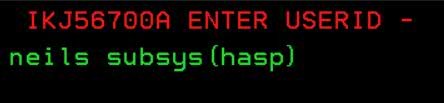
On the next panel, notice that the subsystem says HASP:
Figure 2 - Logon panel with the HASP subsystem text

After logging in, we can verify if we are a privileged user to JES2 by issuing the JES2 $DT’userid’,LONG command:
Example 3 - $DTxxxx,LONG command to verify privilege status
$DT'NEILS',LONG
$HASP890 JOB(NEILS)     STATUS=(EXECUTING/AQHO),CLASS=TSU,
$HASP890                PRIORITY=15,SYSAFF=(AQHO),HOLD=(NONE),
$HASP890                CMDAUTH=(LOCAL),OFFS=(),SECLABEL=,
$HASP890                USERID=NEILS,SPOOL=(VOLUMES=(SPLHO1),
$HASP890                TGS=1,PERCENT=0.0009),ARM_ELEMENT=NO,
$HASP890                CARDS=3,DUBIOUS=NO,PRIVILEGE=YES,DJC=NO,
$HASP890                REBUILD=NO,SRVCLASS=,SCHENV=,
$HASP890                SCHENV_AFF=(ANY),CC=(),DELAY=(),
$HASP890                CRTIME=(2019.095,17:50:48),JOBGROUP=,
$HASP890                BERTNUM=2,JOENUM=0,JOEBERTS=0
Or, use the System Display and Search Facility (SDSF) status (ST) panel and scroll right until you see the Status column (as shown in Figure 3).
Figure 3 - SDSF ST panel to verify privilege status
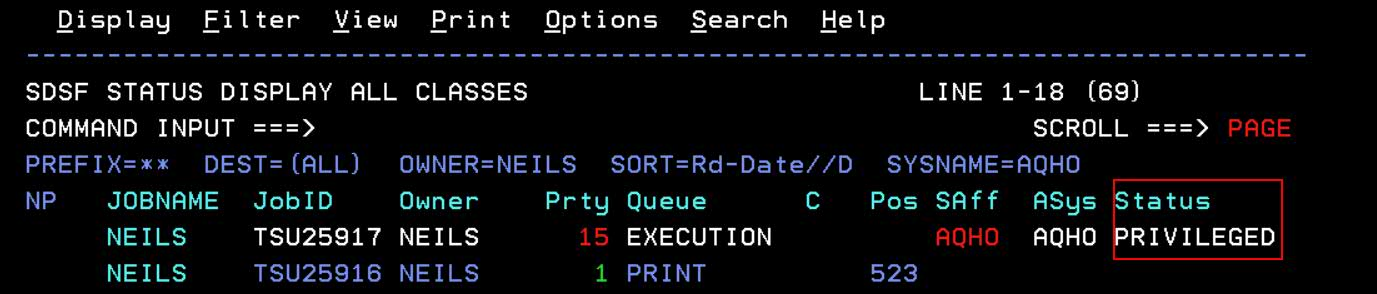
Any job we submit will also be privileged.
Testing
Next, we wanted to test this new function. We created a spool shortage and observed the behavior without privilege support and with privilege support. We ran a job called SPOOLHOG which created a lot of output and generated a spool shortage.
Without privilege support, our spool volumes filled up and we got the dreaded $HASP355 message (as shown in Example 4).
Example 4 - Messages during spool shortage without privilege support
*$HASP050 JES2 RESOURCE SHORTAGE OF TGS - 99% UTILIZATION REACHED
 LOGON
 $HASP355 SPOOL VOLUMES ARE FULL
And we couldn’t log on.
Next, we enabled privilege support and ran the SPOOLHOG batch job. Notice the $HASP050 message – it stopped at 97%, it didn’t go to 100%! And we didn’t get the $HASP355 message (refer to Example 5).
Example 5 - Messages during spool shortage with privilege support
*$HASP1405 Resource shortage encountered for SPOOL/Tracks.
*$HASP050 JES2 RESOURCE SHORTAGE OF TGS - 97% UTILIZATION REACHED
If we issue the $DLIMITS(SPOOL) command, it confirms the spool shortage, but as you can see from the output in Example 6, JES2 sets aside space for privileged users.
Example 6 - $DLIMITS(SPOOLl) output during spool shortage
$DLIMITS(SPOOL)
$HASP1490 LIMITS(SPOOL) 645
LIMITS(SPOOL)
PRIVILEGE SUPPORT IS ON
SPOOLPRIVILEGE SUPPORT IS ON
SPOOL UTILIZATION ON 4 APR 2019 AT 19:52:30
----------  NON-PRIVILEGE  ---------|---  PRIVILEGE  --
    MAXIMUM   WARN%       IN-USE    %|  MAX  AVAILABLE
    107,100      85      105,103   98|  400      2,397
RESOURCE SHORTAGE REPORTED FOR SPOOL
NON-PRIVILEGE RESOURCE EXHAUSTED FOR SPOOL
And we were able to log on using the SUBSYS(HASP) command.
JES2 command to identify top consumers
Another aspect of the JES2 resiliency effort is the ability to quickly and easily identify the top consumers of a resource. JES2 provided the $DLIMITS(SPOOL|JQE|JOE|BERT),LONG command, which identifies the top 10 consumers by count and by rate. So, for spool shortages, we would issue the JES2 $DLIMITS(SPOOL),LONG command.
Example 7 - $DLIMITS(SPOOL),LONG output during spool shortage
$DLIMITS(SPOOL),LONG
$HASP1490 LIMITS(SPOOL) 845
LIMITS(SPOOL)
PRIVILEGE SUPPORT IS ON
spool PRIVILEGE SUPPORT IS ON
spool UTILIZATION ON 4 APR 2019 AT 19:47:46
----------  NON-PRIVILEGE  ---------|---  PRIVILEGE  --
    MAXIMUM   WARN%       IN-USE    %|  MAX  AVAILABLE
    107,100      85       84,370   79|  400        400
---------------------------------------------------------
TOP 10 CONSUMERS OF SPOOL BY COUNT
                          TOTAL           COUNT  ACTIVE
JOB NAME    JOB ID        COUNT     %     PER M  ON MBR
--------    --------     ------   --- ---------  ------
SPOOLHOG    JOB16948      72257    86 18105.830   AQHO
CSSMTP      STC10546       2516     3     0.000
CSSMTP      STC14064       1991     2     0.000
CSSMTP      STC12778       1846     2     0.000
CSSMTP      STC15203       1516     2     0.000
CSSMTP      STC16312       1070     1     0.000   AQHO
CSSMTP      STC11916        590     1     0.000
GPMSERVE    STC16279        461     1    38.506   AQHO
CSSMTP      STC12411        374     0     0.000
BBOS001     STC16251        150     0     3.198   AQHO
---------------------------------------------------------
TOP 10 CONSUMERS OF SPOOL BY RATE
                           COUNT    TOTAL        ACTIVE
JOB NAME    JOB ID         PER M    COUNT     %  ON MBR
--------    --------   ---------   ------   ---  ------
SPOOLHOG    JOB16948   18105.830    72257    86   AQHO
GPMSERVE    STC16279      38.506      461     1   AQHO
BBOS001     STC16251       3.198      150     0   AQHO
$MASCOMM    STC00001       0.000        0     0
SMFDRSL     STC15719       0.000        2     0
SMFDRSL     STC16365       0.000        2     0
SMFDRSL     STC16744       0.000        2     0
SMFDRSL     STC16937       0.000        2     0
SMFDRSL     STC15414       0.000        2     0
SMFDRSL     STC15914       0.000        2     0
*********************************************************
In both cases, you can see job name SPOOLHOG is the culprit!
Additional resources
For additional information on JES2 privilege support and the emergency subsystem, see URL: https://www.ibm.com/support/knowledgecenter/en/SSLTBW_2.3.0/com.ibm.zos.v2r3.izsh200/izsh200_v2r3_priv_emer.htm
Conclusion
JES2 privilege support provided with z/OS V2R3 provides a new function to improve the availability and resiliency of JES2 during certain resource shortages.