Blog post
How to customize the OpenShift Compliance Operator by using a tailored profile
An adaptive way to run scans that verify whether a Kubernetes cluster and its underlying nodes comply with one or more specified regulatory profilesDevelopers no longer just build applications, but also play essential roles for infrastructure operations in DevOps and infrastructure as code (IaC) areas. In those situations, you may also be responsible for the operation of test infrastructure that runs on a managed service such as Red Hat OpenShift on IBM Cloud. Ensuring its security and regulatory compliance is also important and you may want to automate such work. That automation can be facilitated by an OpenShift Operator called Compliance Operator, which is a compliance status check engine for OpenShift clusters.
However, it is not straightforward to use Compliance Operator for an OpenShift cluster running on IBM Cloud because its installation is customized to provide it as managed service. As a result, some of default rules and parameters do not match the actual state and such mismatches cause false positives. Therefore, you must create a tailored profile to align the customized installation.
Part 1: Introduction of rules, variables, profiles, and tailored profiles
Rules and variables
All the rules verified by the Compliance Operator are defined in the ComplianceAsCode/content project repository. For example, consider the rule with the kubelet_eviction_thresholds_set_hard_imagefs_available ID as follows:
git clone https://github.com/ComplianceAsCode/content
...
cd content
tree applications/openshift/kubelet
applications/openshift/kubelet
...
├── kubelet_eviction_thresholds_set_hard_imagefs_available
│   ├── rule.yml
│   └── tests
...
├── var_kubelet_evictionhard_imagefs_available.var
...
The rule ID is represented by the directory name, while the actual rule is defined in rule.yml under the rule directory:
...
title: 'Ensure Eviction threshold Settings Are Set - evictionHard: imagefs.available'
...
template:
  name: yamlfile_value
  vars:
    filepath: /etc/kubernetes/kubelet.conf
    yamlpath: ".evictionHard['imagefs.available']"
    xccdf_variable: var_kubelet_evictionhard_imagefs_available
For this rule, the expected parameter value in the /etc/kubernetes/kubelet.conf YAML file is specified at yamlpath with a JSONPath expression called .evictionHard['imagefs.available'], and it should match the value of the var_kubelet_evictionhard_imagefs_available configuration variable. The configuration variable value is stored in a different file; in this case, the file is var_kubelet_evictionhard_imagefs_available.var under the kubelet directory:
...
title: 'Configure Kubelet EvictonHard Image FS Avilable'
...
type: string
operator: equals
options:
  default: "10%"
  5pc: "5%"
  10pc: "10%"
  15pc: "15%"
  20pc: "20%"
With the variable values illustrated above, the result of this rule assessment is a PASS if .evictionHard['imagefs.available'] is equal to "10%" (the default value).
Profiles
In a typical use case, an internal compliance officer or an external auditor requests validation against industry regulation baselines or best practices such as NIST SP 800-53 moderate or CIS Benchmarks. These regulation baselines and best practices are represented in the ComplianceAsCode project as a profile. For example, you can find the NIST 800-53 Moderate-Impact Baseline for Red Hat OpenShift defined in ocp4/profiles/moderate.profile, and the CIS Red Hat OpenShift Container Platform 4 Benchmark defined in ocp4/profiles/cis-node.profile as follows:
...
title: 'CIS Red Hat OpenShift Container Platform 4 Benchmark'
...
selections:
...
    - kubelet_eviction_thresholds_set_hard_imagefs_available
...
Each profile contains its specific set of rules. The following diagram illustrates the relationships between the rules and the profiles.
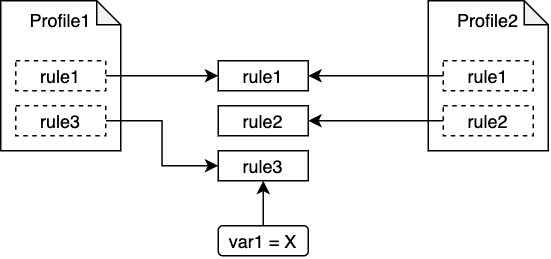
In the ComplianceAsCode/content repository, many profiles are already defined for well-known, industry regulations. See the Compliance Operator Custom Resource Definitions documentation for details on how admins and compliance engineers can specify a profile for their Compliance Operator scans by using ComplianceScan or ComplianceSuite objects.
Check results
The check results for each profile are registered as compliancecheckresult resources. Its name consists of the following three parts:
${profile_name}-${role_name}-${rule_name}
profile_nameis the name of theProfileorTailoredProfilespecified in theScanSettingBinding,ComplianceScan, orComplianceSuiteresource.role_nameis the.rolesin theScanSettingresource.rule_nameis the rule ID where its underscores (_) were replaced with hyphens (-).
Therefore, for example, a compliancecheckresult resource named ocp-worker-kubelet-eviction-thresholds-set-hard-imagefs-available is the result of a rule in which the rule_id is kubelet_eviction_thresholds_set_hard_imagefs_available.
You can specify multiple profiles (and tailored profiles) for a single cluster. For example, when you configure the profiles named profile1 and profile2 for a rule called rule1, you will see two compliancecheckresult resources with names that are profile1_rule1 and profile2_rule1 for each profile. The results may differ because each profile has its own custom variables, which we will discuss in Part 3.
TailoredProfile
As you may have noticed, the Compliance Operator rules and profiles are written in YAML format. However, the Compliance Operator scans are executed in a Kubernetes cluster and its nodes with the oscap command, which only accepts rules and profiles defined in XCCDF format. Therefore, you must compile the rules and the profiles that are in YAML format into an XCCDF data stream file prior to using Compliance Operator, and package the compiled contents as a Docker image, which is often referred to as the content image. When you attempt to customize the rules and the profiles, you must rebuild the XCCDF data stream files as a content image in addition to modifying the contents.
To mitigate the customization workload, you can customize the profile and the variables by using a Compliance Operator mechanism called TailoredProfile, which takes less work than building your own content image. With a tailored profile, you can disable rules selected in predefined profiles and set custom values for XCCDF variables. The following diagram describes the relationships between a predefined profile, a tailored profile, rules, and variables. In this example, only rule3 and the var1 = Y custom variable are applied when you use this tailored profile for the Compliance Operator scan.
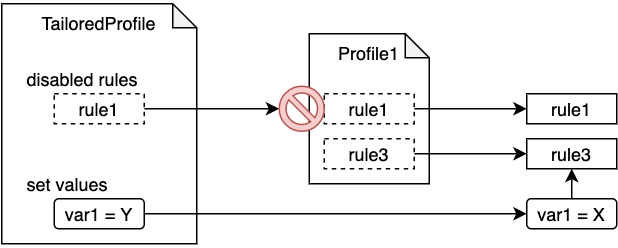
A tailored profile can be applied using ScanSetting and ScanSettingBinding resources. Learn more in the TailoredProfile section and ScanSetting and ScanSettingBinding section of the Custom Resource Definitions documentation for Compliance Operator.
Part 2: Tailoring process
The actual tailoring process consists of the following steps:
- Select a predefined (also known as a base) profile (for example,
cis-node), and perform a scan with that profile. Get the
FAILrule names with the following command:oc get compliancecheckresult | grep FAILYou should see results similar to the following:
ocp-master-kubelet-eviction-thresholds-set-hard-imagefs-available    FAIL     medium
ocp-worker-kubelet-eviction-thresholds-set-hard-imagefs-available    FAIL     medium
For each
FAILrule, when the remediation is not an option, consider disabling the rule itself or customizing the variables of the rule in a tailored profile.In this step, you must first find the actual check logic of a rule. As we described earlier in the Check results section, you can extract
rule_idfrom the name of acompliancecheckresultresource. By using therule_id, you can now findrule.yml, which contains the actual check logic for that rule. To do so, use the following command:cd content # go to ComplianceAsCode/content directory find . -name kubelet_eviction_thresholds_set_hard_imagefs_available./applications/openshift/kubelet/kubelet_eviction_thresholds_set_hard_imagefs_available cat ./applications/openshift/kubelet/kubelet_eviction_thresholds_set_hard_imagefs_available/rule.yml ... title: 'Ensure Eviction threshold Settings Are Set - evictionHard: imagefs.available' ... template: name: yamlfile_value vars: filepath: /etc/kubernetes/kubelet.conf yamlpath: ".evictionHard['imagefs.available']" xccdf_variable: var_kubelet_evictionhard_imagefs_availableIf a check logic contains references to a variable, you can find the file that defines the variable by linking together the
xccdf_variablestring with the.varsuffix. For example, the XCCDF variable calledvar_kubelet_evictionhard_imagefs_availablecan be found in thevar_kubelet_evictionhard_imagefs_available.varfile:cd content # go to ComplianceAsCode/content directory find . -name var_kubelet_evictionhard_imagefs_available.var./applications/openshift/kubelet/var_kubelet_evictionhard_imagefs_available.varFinally, create the tailored profile resource by specifying the disabled rules and new expected values. The rule name convention is
${profile_bundle_name}-${rule_name}:${profile_bundle_name}is usuallyocp4because OpenShift rules are owned by anocp4profile bundle by default.${rule_name}is a hyphen-joined name (for example,kubelet-eviction-thresholds-set-hard-imagefs-available), while a rule ID is a underscore-joined name (for example,kubelet_eviction_thresholds_set_hard_imagefs_available).The following
TailoredProfileexample shows how to specify a custom value for thevar_kubelet_evictionhard_imagefs_availablevariable and how to disable thefile_permissions_kube_apiserverrule. Note that the rule and variable names start withocp4-, while the underscores (_) in the names are replaced with hyphens (-).apiVersion: compliance.openshift.io/v1alpha1 kind: TailoredProfile metadata: name: my-tailored-profile spec: setValues: - name: ocp4-var-kubelet-evictionhard-imagefs-available rationale: "stricter than default" value: "5%" disableRules: - name: ocp4-file-permissions-kube-apiserver rationale: Target file is hidden and no need to check extends: ocp4-cis-node title: CIS Benchmark for OpenShift on IBM Cloud
Part 3: Executing concurrent scans of tailored profiles of the same base profile
Assume that two compliance engineers tailored the same base profile, cis-node.profile, as mycis-node-tailored-profile1 and mycis-node-tailored-profile2 with different values for the ocp4-var-kubelet-evictionhard-imagefs-available variable. The Compliance Operator checks the rules in both tailored profiles according to the set expected variable values, and stores two results for one rule as ComplianceCheckResults resources.
For example, the check results for the kubelet-eviction-thresholds-set-hard-imagefs-available rule are stored as follows (note that the naming convention of ComplianceCheckResults is ${profile_name}-${role_name}-${rule_name} as described above):
NAME                                                                                         STATUS   SEVERITY
mycis-node-tailored-profile1-worker-kubelet-eviction-thresholds-set-hard-imagefs-available   PASS     medium
...
mycis-node-tailored-profile2-worker-kubelet-eviction-thresholds-set-hard-imagefs-available   FAIL     medium
Conclusion
The OpenShift Compliance Operator provides an adaptive way for an infrastructure operator to run compliance scans and verify whether a Kubernetes cluster and its underlying nodes comply with one or more specified regulatory profiles.
Our next step is to facilitate the integration of Compliance Operator into the IBM Cloud Security and Compliance Center for a compliance officer to manage security and compliance controls and regulatory profiles across the IBM Cloud platform, including Kubernetes, from a unified dashboard.