Article
Build an AI-driven chatbot for smarter data protection
Enhance your security and user experience by integrating IBM Guardium and watsonx AssistantFor data security and protection, seamless access to functionalities helps ensure efficiency and ease of use. By integrating IBM watsonx Assistant, IBM watsonx.ai, and IBM Guardium Data Protection (GDP), you can manage your data security through a conversational interface, eliminating the need to navigate the GDP console. Whether you're an IT security analyst, compliance officer, data protection manager, or another security professional, this integration offers seamless access to essential functionalities, simplifying tasks such as report generation, database information retrieval, and user management. These capabilities are just a glimpse of what's possible, showcasing the potential for even more advanced use cases. IBM watsonx.ai can further enhance this experience by summarizing reports, offering quick insights to help you make informed decisions and ensure operational efficiency.
If you’re a security decision-maker, this integration helps "future-proof" your data protection strategies. It demonstrates the potential AI-driven automation and smarter tools to meet the evolving data security demands. This streamlined, intuitive approach helps you manage your security more effectively while minimizing risks and enhancing your user experience.
Key challenges and issues
Guardium Data Protection offers robust capabilities through its extensive set of APIs, but these tools are often underutilized because you have to interact directly with the GDP console. Logging into the console can be a time-consuming and can impact your efficiency in:
Report management: Users might need to generate and send compliance or regulation reports to customers swiftly, without the hassle of accessing the GDP console.
User management: New users might require immediate access to the GDP console or need to be assigned to specific groups for their roles, requiring quick action.
Report summarization: Senior executives, like chief information security officers (CISOs), may require concise summaries of lengthy reports to make informed decisions quickly.
Basic database information access: Accessing essential information related to databases monitored by GDP—such as STAP configuration, data source status, and installed policies—can be slow and cumbersome through the console.
These scenarios highlight the need for a more efficient way to interact with GDP. By integrating IBM watsonx Assistant and watsnonx.ai , you can perform these tasks more effectively, bypassing the traditional console interaction and streamlining your workflows.
Preparing to integrate
Before you can integrate Guardium and watsonx Assistant, be sure to:
Establish connection: Ensure that a connection between Guardium Data Protection and the remote source has been properly established. Refer to the IBM Guardium documentation for detailed instructions on setting up this connection.
Verify user roles: Ensure that users are assigned appropriate roles like "admin" or "accessmgr" to effectively carry out the required tasks.
Benefits
Benefits of the integration include:
Enhanced user experience: Users can interact with Guardium functions through a chat interface, making the process more intuitive and reducing the need for complex navigation within the GDP console.
Increased efficiency: The chat interface streamlines workflows by enabling users to quickly perform actions and retrieve data, reducing task completion time.
Centralized management: Accessing multiple Guardium functions from a single chat interface simplifies management and improves overall productivity.
Component technologies
The Guardium chatbot is built using a combination of technologies, including:
IBM Guardium Data Protection
IBM Guardium Data Protection is data security software that guards on-premises and cloud data stores through features such as data activity monitoring and analytics, near real-time threat response workflows, and automated compliance auditing and reporting.
IBM watsonx.ai
IBM watsonx.ai is IBM's next-generation enterprise studio for AI builders to train, validate, tune, and deploy both traditional machine learning and new generative AI capabilities powered by foundation models. This platform combines best-of-breed architectures with a rigorous focus on data acquisition, provenance, and quality, to serve enterprise needs. It expedites the development of AI applications while requiring less data and significantly reducing the manual effort involved.
A primary feature of watsonx.ai is its utilization of generative AI, which can produce various types of content. It supports a collection of open source and IBM foundation models that you can prompt to obtain a result. All these foundation models support a range of use cases for both natural languages and programming languages.
The mistralai/mixtral-8x7b-instruct-v01 model in the watsonx.ai library has been leveraged to generate guardium report summary, with suitable prompts. This is the Decoder-only, Instruct type of model. The Mixtral-8x7B Large Language Model (LLM) is a pretrained generative Sparse Mixture of Experts. It handles English, French, Italian, German and Spanish.
IBM watsonx Assistant
IBM watsonx Assistant is a conversational AI platform to help you provide support to prospects, customers, and employees.
Powered by large language models (LLMs) you can trust and an intuitive user interface, watsonx Assistant helps you build AI-powered voice agents and chatbots that deliver automated self-service support across all channels and touch-points with seamless tool integration.
OpenAPI
The OpenAPI initiative establishes an open standard for describing and documenting REST APIs. An OpenAPI document defines the resources and operations that are supported by an API, including request parameters and response data, along with details such as server URLs and authentication methods.
An OpenAPI document describes a REST API in terms of paths and operations. A path identifies a particular resource that can be accessed by using the API (for example, a hotel reservation or a customer record). An operation defines a particular action that can be performed on that resource (such as creating, retrieving, updating, or deleting it).
OpenAPI specifies all of the details for each operation, including the HTTP method that is used, request parameters, the data included in the request body, and the structure of the response body.
IBM Cloud Code Engine
IBM Cloud Code Engine is a fully managed, serverless platform. IBM Cloud Code Engine manages and secures the underlying infrastructure for container images, batch jobs, source code, or functions. You don't need to size, deploy, or scale container clusters yourself, and no networking skills are required.
IBM Security Guardium REST API
The Guardium REST API serves as a wrapper for Guardium API (GuardAPI) command-line interface functions. After you register the REST API client on the Guardium collector, as described in the Calling REST APIs example, you can use REST API calls for many of the GuardAPI functions. Providing a REST interface to the Guardium API simplifies integrating Guardium into your system.
Workflow
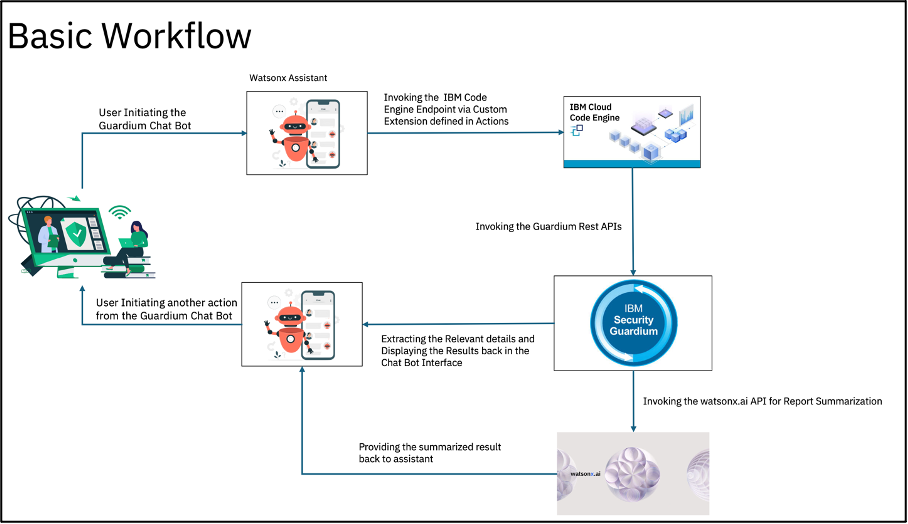
User interaction: The process begins with the user invoking the Guardium chatbot by entering a prompt, such as "Need to get some information for GDP," "Have to get some details of a report," or simply typing "Guardium."
Option listing: The chatbot responds by presenting a list of available options that the user can perform, such as accessing specific Guardium functions or retrieving reports.
User selection: The user selects an option from the list provided by the chatbot.
Custom extension invocation: Upon selection, the Guardium chatbot triggers a custom extension, which is written in OpenAPI. This extension serves as a bridge, invoking the necessary code deployed in IBM Code Engine through a predefined IBM Code Engine Endpoint.
Information retrieval: The invoked code gathers the required information from Guardium Data Protection (GDP) and returns the results to the chatbot interface.
Watsonx.ai report summarization: If the user selects the "Get Report Summary" option, the chatbot will prompt the user to provide a keyword. This keyword filters relevant reports, which are then presented for the user to choose from.
Summary generation: After the user selects a report, the chatbot again invokes the custom extension. This extension triggers the code in IBM Code Engine, which retrieves the report content and passes it to a Watsonx.ai model to generate a concise summary.
Result delivery: The summarized report is sent back to the chatbot interface for the user to review. Simultaneously, the summary is also emailed to relevant distribution lists (DLs) as an attachment.
This streamlined workflow ensures that users can efficiently interact with Guardium Data Protection, access critical information, and obtain summarized reports—all through an intuitive chat interface.
Workflow diagrams

Demo video
Following is a demo of the Guardium chatbot:
Deploying the Guardium chatbot
To deploy the Guardium chatbot, follow the instructions provided in the following GitHub repository:
Summary
The integration of IBM watsonx Assistant with Guardium Data Protection provides a seamless chat-based interface for users to efficiently manage and interact with GDP functions without accessing the traditional console. This innovative solution addresses the challenges faced by users, such as generating reports, managing user access, and retrieving database information.
The chatbot, powered by custom extensions and IBM Code Engine, enables users to perform tasks by simply selecting options within the chat interface. Additionally, the integration of watsonx.ai enhances the experience by enabling users to obtain concise summaries of reports, which are also automatically emailed to relevant stakeholders. This streamlined approach not only improves efficiency but also aligns with the growing need for intuitive, AI-driven automation in data security management.
Next steps
For further details on on each of the technologies, see the following resources: