Article
Upgrade Java applications effortlessly with Liberty's zero migration architecture
Deploy updates every 4 weeks with zero code changes, zero downtime, and zero risk using Liberty's composable architectureEnsuring that applications remain updated is crucial for performance and security; however, this could be at an expense of costly migrations and downtime in traditional upgrades. With the zero-migration solutions that Liberty provides, you can apply updates seamlessly without any configuration changes and reduce risk without disrupting operations or rewriting code.
If you are involved in DevOps, you know that software upgrades come with a mixed bag of emotions. On the plus side, upgrades can provide:
- New and exciting features that can enhance your application
- Important fixes to solve security issues and vulnerabilities
- “Peace of mind” in that keeping current means that you are not accumulating technical debt
But, upgrades can also lead to fear and dread. For developers, they are most concerned with:
- What breaking changes are going to be introduced and how will they be handled?
- What new tests will need to be created?
- How many bugs will be generated and who will work on them?
From an operations perspective, the worries include:
- Are there enough tests to ensure overall quality assurance?
- How much resource and time in the schedule needs to be carved out to handle this?
- How long will the application need to be off-line?
Well, both Open Liberty and WebSphere Liberty (built on the same open source Open Liberty project) use an approach that should ease your mind and give you the confidence to upgrade effortlessly. How is this possible? Liberty’s zero migration architecture, that’s how.
Zero migration architecture
Zero migration means that you can upgrade with zero code and configuration changes. Yes, that's correct: zero code and configuration changes. Liberty goes to great lengths to ensure that if your code runs on an older version, it is guaranteed to run, as is, on a newer version.
Liberty is able to accomplish this due to its composable architecture, where users only configure the features they need for their applications. Liberty's zero migration design principle enables you to build your applications with the assurance that these features will not change in their APIs and behaviors and will always remain available in newer versions of Liberty. For example, review the following code snippet from the application configuration file:
<features>jaxrs-2.1</features>
In this case, the application requires that version 2.1 of JAX-RS (Java API for RESTful Web Services) be used. Version 2.1 will always remain unchanged and available for use, even when later versions are released. And this capability doesn't just apply to sequential releases; it works just as well over all of the range of releases of Liberty, which is what makes zero migration architecture so powerful and valuable for enterprises.
Continuous delivery policy
Liberty’s continuous delivery (CD) policy ensures that a new Liberty release is made every 4 weeks. Coupled with zero migration, this enables you to implement a continuous delivery environment for your applications. By continuously upgrading, the process becomes very routine, less intrusive, and easier to digest. It also offers developers and operators predictability and options to pick an upgrade schedule that works best for them. And, skipping a release does not introduce additional migration work.
If we compare continuous delivery (CD) to the typical once-a-year "major" release from most software providers, these major releases often take weeks of effort to integrate, tweak, and test before deploying. Or, you decide it's just too risky and push it off until the next release!
The end result is that with Liberty's zero migration architecture, coupled with continuous delivery, you effortlessly get all the benefits of upgrades without any of the downside. By the way, this capability of Liberty sets it apart from most, if not all, other Java runtimes.
How exactly does the continuous delivery policy work?
The following diagram provides more details on how CD works. This diagram shows the once-every-4-weeks delivery schedule for 2025. As you can see in the table, the policy is that all CD releases are supported for 5 years.
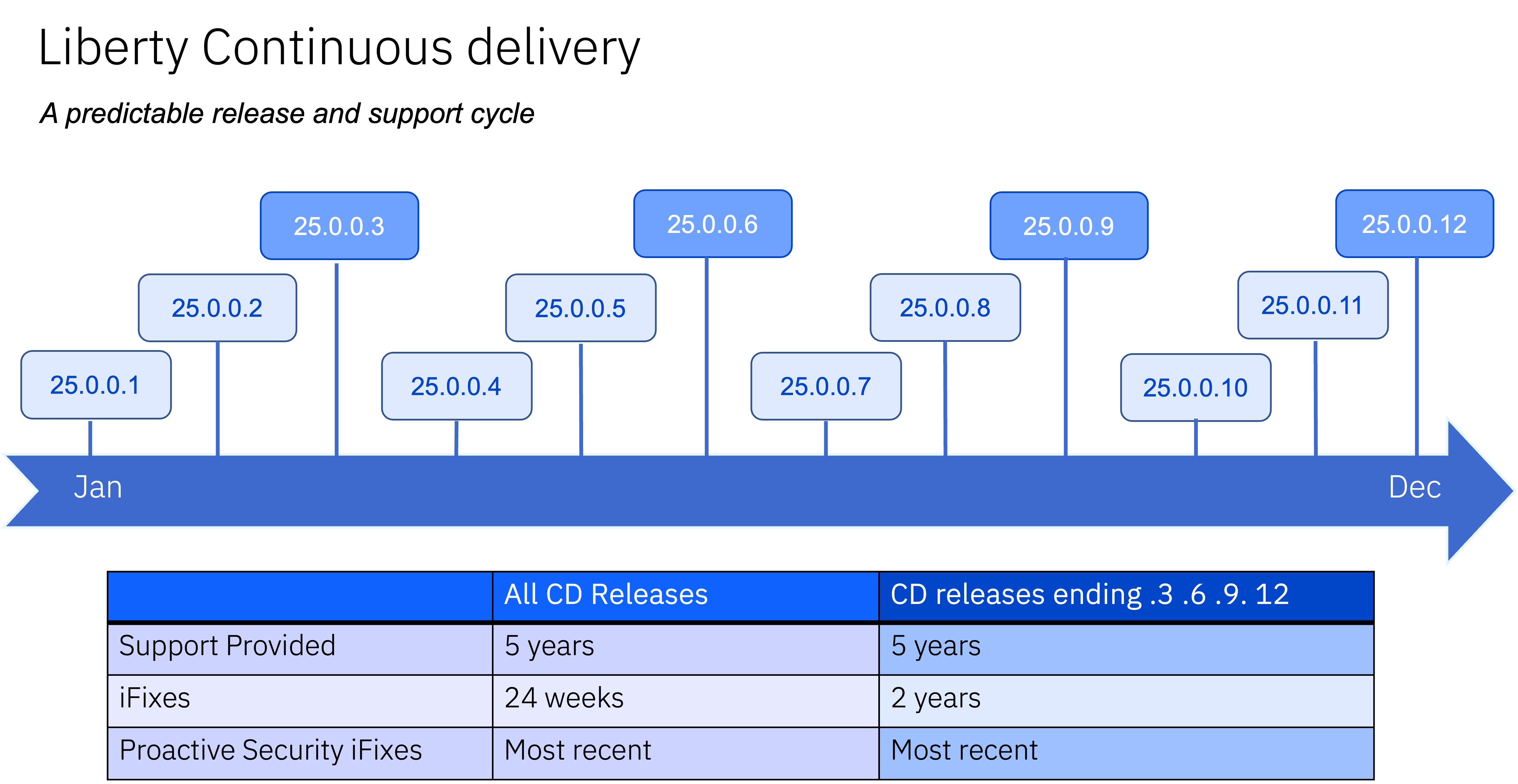
“iFixes” refer to fixes in a newer release of Liberty that a customer has requested be implemented in a previous release. If the request is granted, the fix is implemented but is limited to CD releases that are less than 2 years old.
Any “Proactive Security fix” is created and made available for the most recent CD release, as well as the 2 previous major quarterly releases (indicated in the dark blue boxes, 25.0.0.3 for example).
The following diagram depicts the typical strategies that can be used for adopting Liberty updates:
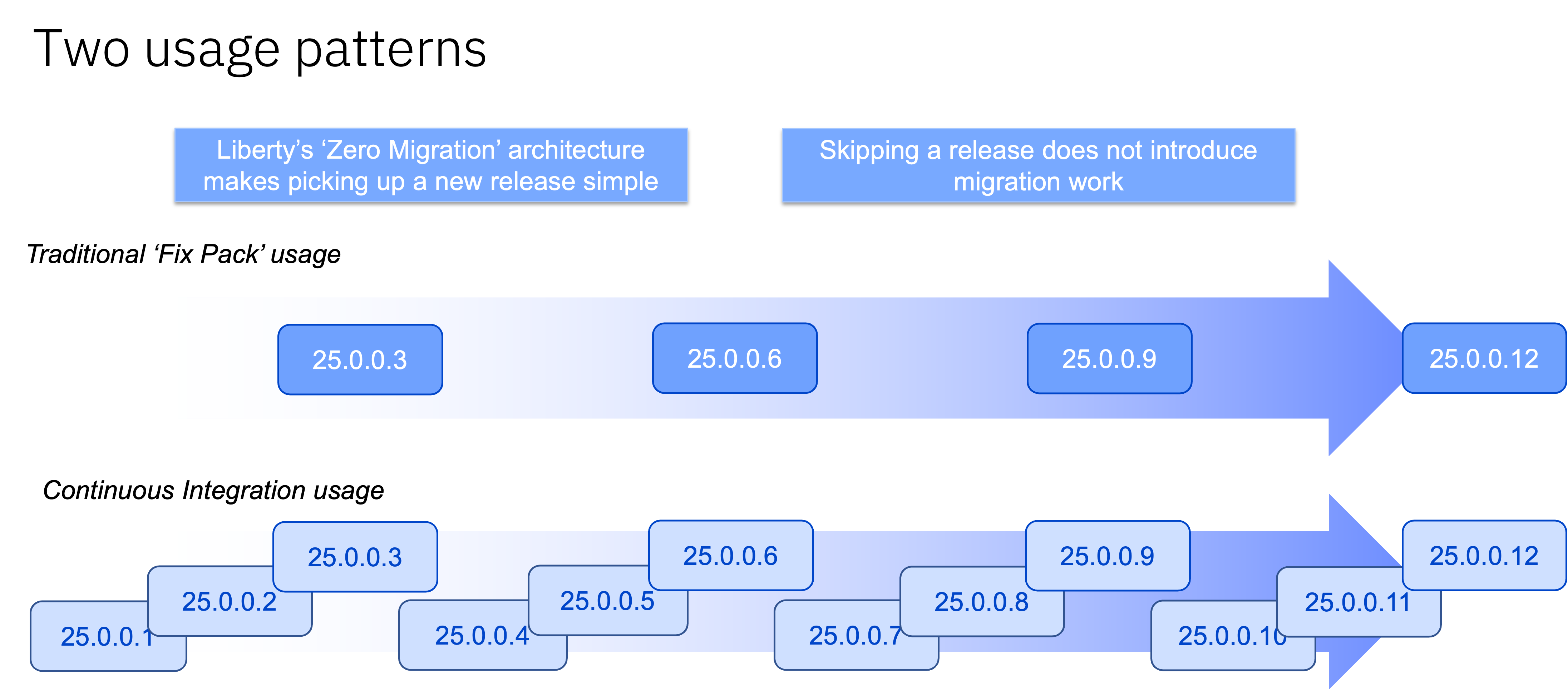
The first pattern is a more traditional approach, only upgrading on the “major” releases made every quarter.
The second pattern is a “continuous integration” (CI) approach, which ensures you are always current, with all of the latest security fixes. Staying current eliminates the need to request an “iFix” to patch up older releases.
Demonstrating zero migration in action
To show how this works in real life, let's start with a sample Java application. For this demo, we will be using an old enterprise application called "Plants by WebSphere".
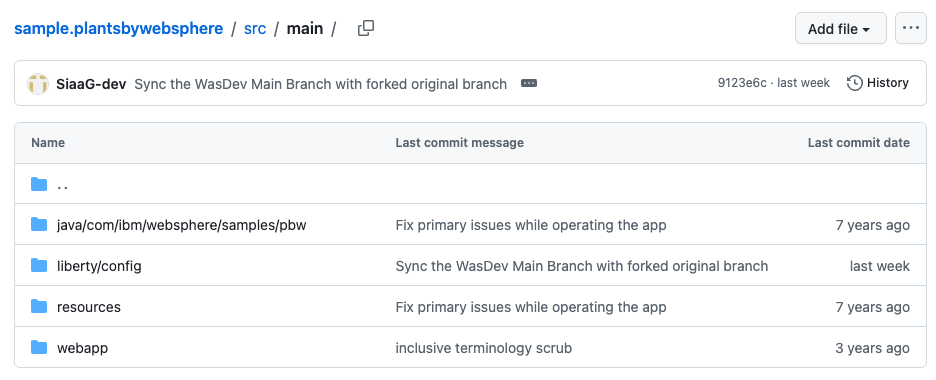
Looking at the GitHub repo, you will see that no code changes have been made in over 7 years.
Here are the steps that we used to conduct the test:
- Clone and download the application from GitHub.
- Install Java 8 and configure
JAVA_HOME. - Build the application with Java 8.
- Start the server and run the application on Open Liberty version 18.0.0.2 (dated June 2018).
- Upgrade to Open Liberty version 25.0.0.12 (dated December 2025).
- Run the application on Open Liberty 25.0.0.12.
We will use Maven to build and run the application.
Step 1. Clone and download the application from GitHub
Ensure that Git is installed so that you can access the repository remotely. Clone the branch openliberty-java8 from the GitHub repository. Navigate to sample.plantsbywebsphere directory.
git clone https://github.com/WASdev/sample.plantsbywebsphere -b openliberty-java8
cd sample.plantsbywebsphere
Step 2. Install Java 8 and configure JAVA_HOME
The application requires Java 8 to compile. Download Java 8 SDK. Set your JAVA_HOME environment variable to point to the Java 8 SDK:
$ export JAVA_HOME=<your Java 8 home path>
$ echo $JAVA_HOME
/Library/Java/JavaVirtualMachines/ibm-semeru-open-8.jdk/Contents/Home
Step 3. Build the application with Java 8
Run the following command to build the application with Java 8:
mvn clean package
Step 4. Start the server and run the application on Open Liberty version 18.0.0.2 (dated June 2018)
Start Liberty:
mvn liberty:start
The Plants by Websphere application runs at http://localhost:9080/PlantsByWebSphere:
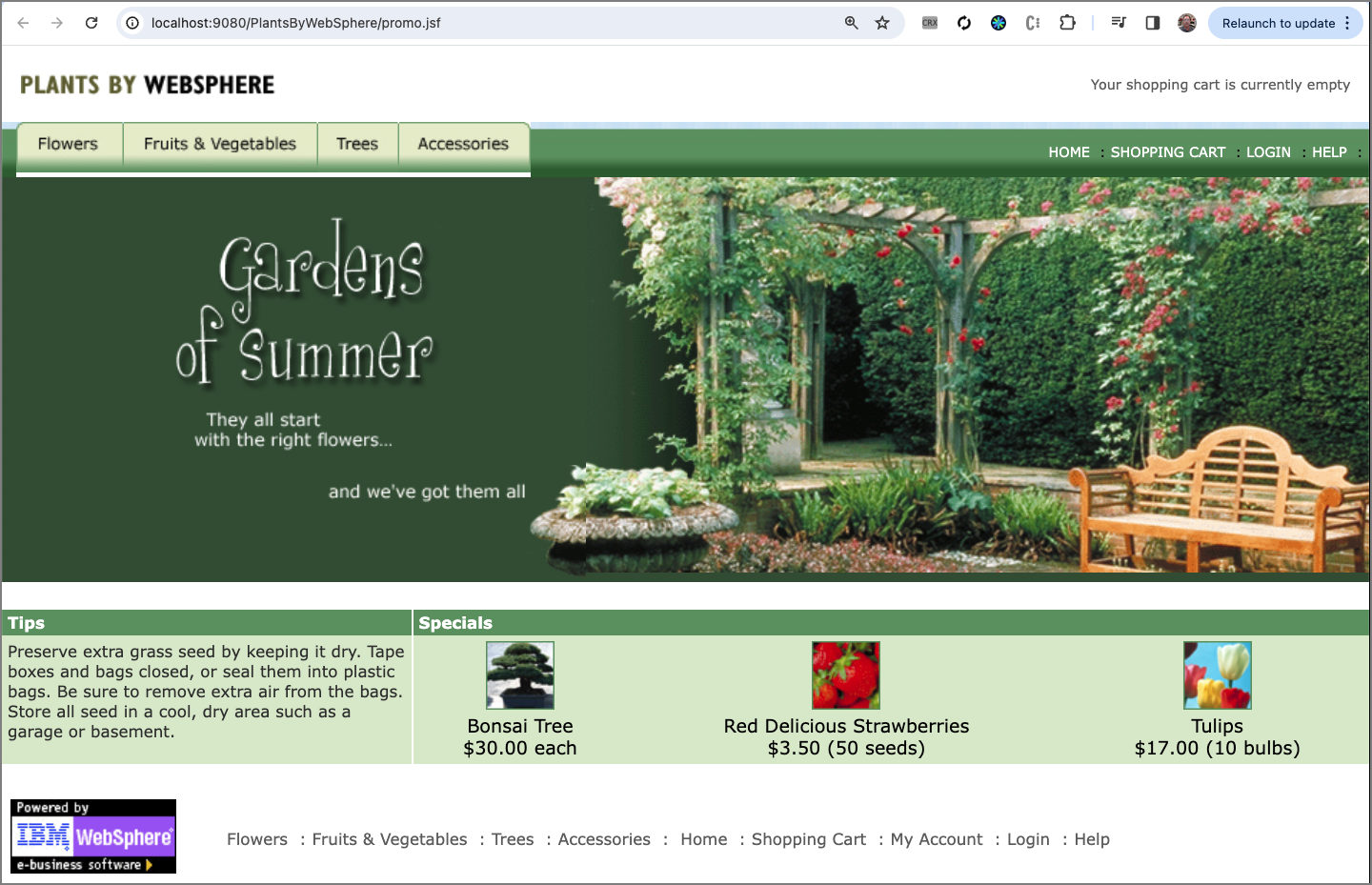
Verify that the application is running on Open Liberty 18.0.0.2:
./target/Liberty/wlp/bin/productInfo version
The following product version information is displayed in the terminal:
Product name: Open Liberty
Product version: 18.0.0.2
Product edition: Open
Stop the Liberty server:
mvn liberty:stop
Step 5. Upgrade to Open Liberty version 25.0.0.12 (dated December 2025)
Open the pom.xml file in an editor and under properties, update the version from 18.0.0.2 to 25.0.0.12:
<properties>
  ...
  <liberty.runtime.version>25.0.0.12</liberty.runtime.version>
  ...
</properties>
Notice that runtimeArtifact uses the liberty.runtime.version from above:
<plugin>
    <groupId>io.openliberty.tools</groupId>
    <artifactId>liberty-maven-plugin</artifactId>
    <version>${version.liberty-maven-plugin}</version>
    <configuration>
        <runtimeArtifact>
            <groupId>io.openliberty</groupId>
            <artifactId>openliberty-runtime</artifactId>
            <version>${liberty.runtime.version}</version>
            <type>zip</type>
        </runtimeArtifact>
    </configuration>
    ...
</plugin>
Step 6. Run the application on Open Liberty version 25.0.0.12
Re-build the application:
mvn clean package
Start the Liberty server:
mvn liberty:start
The Plants by Websphere application runs at http://localhost:9080/PlantsByWebSphere as before.
Verify that the application is now running on Open Liberty 25.0.0.12:
./target/Liberty/wlp/bin/productInfo version
The changed product version information is displayed in the terminal:
Product name: Open Liberty
Product version: 25.0.0.12
Product edition: Open
There have been more than 85 releases between versions 18.0.0.2 and 25.0.0.12!
Summary and next steps
Software upgrades have traditionally been a major source of stress to all those involved in DevOps, including developers, testers, architects, and business owners. They struggle in weighing the benefits of staying current with the latest security fixes and feature upgrades against the added pressure of finding time in the schedule to handle the required effort to test, fix, and verify. And, of course, the ultimate fear of finding a major breaking change!
Liberty’s zero migration architecture takes all the anxiety out of this decision by allowing you to effortlessly upgrade without any code or configuration changes. Liberty’s continuous delivery policy ensures a new release every 4 weeks, making the process easy to plan for, predictable, and routine. Together they make it easier to stay current, which is optimal for any deployment, and especially true when running in a CI/CD (continuous integration and delivery) environment.
To learn more about Open Liberty, check out the Getting started with Open Liberty guide, which you can run on your laptop or in a cloud-hosted environment to learn how to build real world Open Liberty applications.