Article
Optimize LLM performance with cache-augmented generation
Improve LLM efficiency, reduce inference latency, and accelerate knowledge retrieval by reusing precomputed KV caches with IBM Granite modelsLarge language models (LLMs) have transformed natural language processing with capabilities such as text generation, summarization, and question answering. While techniques such as retrieval-augmented generation (RAG) dynamically fetch external knowledge, they often introduce higher latency and system complexity.
Cache-augmented generation (CAG) offers an alternative by using expanded context windows and enhanced processing power in modern LLMs. By embedding and reusing precomputed knowledge within the model’s operational context, CAG enables faster and more efficient performance for static, knowledge-intensive tasks.
This article explores CAG and its integration with Granite language models, demonstrating how Granite’s extended context windows and processing power enhance efficiency by directly utilizing precomputed information.
How cache-augmented generation (CAG) works
Modern large language models (LLMs) feature expanded context windows, ranging from 4K and 8K tokens in earlier architectures up to 128K tokens in recent models such as Granite 3.1 and 3.2. This allows entire reference documents or domain datasets to fit directly within a model's operational context without requiring real-time chunking or dynamic retrieval. Typically, the attention layer computes key-value (KV) representations for all prompt tokens with each incoming query. Cache-augmented generation (CAG) optimizes this by precomputing KV representations for static reference context once and reusing them across subsequent queries, eliminating redundant computations and accelerating question-answering pipelines.
Preloading external knowledge
Relevant documents or datasets are preprocessed and loaded into the model’s extended context window.
- Goal: Consolidate knowledge for answering queries.
- Process:
- Curate a static dataset.
- Tokenize and format it for the model’s extended context.
- Inject the dataset into the model’s inference pipeline.
Precomputing the key-value (KV) cache
The model processes the preloaded knowledge to generate a KV cache, storing intermediate states used in attention mechanisms.
- Goal: Minimize redundant computations by storing reusable context.
- Process: Encode documents into a KV cache using the model’s encoder, capturing its understanding of the preloaded knowledge.
Storing the KV cache
The precomputed KV cache is saved in memory or on disk for later use.
- Goal: Enable multiple queries to access the cached knowledge without recomputation.
- Benefit: The cache is computed once, allowing for rapid reuse during inference.
Inference with cached context
During inference, the model loads the cached context alongside user queries to generate responses.
- Goal: Eliminate real-time retrieval and maintain contextual relevance.
- Process:
- Combine cached knowledge with the query.
- Generate responses using the preloaded KV cache for efficiency and accuracy.
Cache reset (optional)
To optimize memory usage, the KV cache can be reset when needed.
- Goal: Prevent overflow and manage memory efficiently.
- Process: Remove unnecessary tokens or truncate the cache. Reinitialize the cache for new inference sessions.
Implement CAG with Granite models
This section covers the practical implementation of cache-augmented generation (CAG) by using Granite models. You compare the performance of Granite models based on accuracy and response time by using the key-value cache for knowledge retrieval.
Importing dependencies: Start by importing the necessary libraries.
import os
import platform
from time import time
from tqdm import tqdm
import pandas as pd
import matplotlib.pyplot as plt
import torch
from sklearn.metrics.pairwise import cosine_similarity
from transformers import AutoTokenizer, AutoModelForCausalLM, DynamicCache
from sentence_transformers import SentenceTransformer
from helpers import get_env, generate_graphs
Environment setup: This function reads environment variables from a
.envfile and stores them in a dictionary. It loads the Hugging Face token (HF_TOKEN) required for authenticating API calls to Hugging Face’s model hub.def get_env() -> dict: env_dict = {} with open(file=".env", mode="r") as f: for line in f: key, value = line.strip().split("=") env_dict[key] = value.strip('"') return env_dictCAGModuleclass: This class manages the core logic of preprocessing knowledge, generating responses, and interacting with the model.__init__()methodInitializes the tokenizer and loads the model using the specified model name and Hugging Face token.
def __init__(self, model_name: str, hf_token: str): self.model_name = model_name self.hf_token = hf_token self.tokenizer = AutoTokenizer.from_pretrained(model_name, token=hf_token) self.model = AutoModelForCausalLM.from_pretrained( model_name, torch_dtype=torch.bfloat16 if torch.cuda.is_bf16_supported() else torch.float16, device_map="auto", token=hf_token )preprocess_knowledge()methodEncodes the input prompt and feeds it into the model. Returns
past_key_values, which store cached computations for efficient reuse in future queries.def preprocess_knowledge(self, prompt: str) -> DynamicCache: embed_device = self.model.device input_ids = self.tokenizer.encode(prompt, return_tensors="pt").to(embed_device) past_key_values = DynamicCache() with torch.no_grad(): outputs = self.model( input_ids=input_ids, past_key_values=past_key_values, use_cache=True, output_attentions=False, output_hidden_states=False ) return outputs.past_key_valueswrite_kv_cache()methodSaves the knowledge cache to a specified file path.
def write_kv_cache(self, kv: DynamicCache, path: str) -> None: torch.save(kv, path)clean_up()methodTruncates the key and value caches to their original length, freeing up memory. Compatible across both legacy tuple caches and
DynamicCachelayers.def clean_up(self, kv: DynamicCache, origin_len: int) -> None: if hasattr(kv, "key_cache") and hasattr(kv, "value_cache"): for i in range(len(kv.key_cache)): kv.key_cache[i] = kv.key_cache[i][:, :, :origin_len, :] kv.value_cache[i] = kv.value_cache[i][:, :, :origin_len, :] elif hasattr(kv, "crop"): kv.crop(origin_len)prepare_kvcache()methodFormats and preprocesses input documents using standard chat templates, generates a knowledge prefix prompt, and calls
preprocess_knowledge()to create a reusable key-value cache.def prepare_kvcache(self, documents: str | list, kvcache_path: str, answer_instruction: str = None): if answer_instruction is None: answer_instruction = "Answer the question in a concise and precise way." if isinstance(documents, list): documents = "\n\n\n\n\n".join(documents) elif not isinstance(documents, str): raise ValueError("The `documents` parameter must be either a string or a list of strings.") # Construct messages using standard chat templating messages = [ { "role": "system", "content": "You are an assistant for giving precise answers based on given context." }, { "role": "user", "content": f"Context information is below.\n------------------------------------------------\n{documents}\n------------------------------------------------\n{answer_instruction}\nQuestion:\n" } ] # Render prompt text using the model's chat template knowledges = self.tokenizer.apply_chat_template( messages, tokenize=False, add_generation_prompt=False ) t1 = time() kv = self.preprocess_knowledge(knowledges) self.write_kv_cache(kv, kvcache_path) t2 = time() return kv, t2 - t1generate()methodGenerates new tokens using
input_idsandpast_key_values. Uses a greedy search (argmax) to select the next token and appends it to the generated output.def generate(self, input_ids: torch.Tensor, past_key_values: DynamicCache, max_new_tokens: int = 300): embed_device = self.model.device origin_ids = input_ids input_ids = input_ids.to(embed_device) output_ids = input_ids.clone() next_token = input_ids with torch.no_grad(): for _ in range(max_new_tokens): outputs = self.model( input_ids=next_token, past_key_values=past_key_values, use_cache=True ) next_token_logits = outputs.logits[:, -1, :] next_token = next_token_logits.argmax(dim=-1).unsqueeze(-1).to(embed_device) past_key_values = outputs.past_key_values output_ids = torch.cat([output_ids, next_token], dim=1) if next_token.item() == self.model.config.eos_token_id: break return output_ids[:, origin_ids.shape[-1]:]run_qna()methodFormats an input question, feeds it with the cached knowledge prefix, and generates a response that is decoded into readable text.
def run_qna(self, question: str, knowledge_cache: DynamicCache): # Format query suffix and token generation prompt query_text = f"{question}\n" input_ids = self.tokenizer.encode(query_text, return_tensors="pt").to(self.model.device) output = self.generate(input_ids, knowledge_cache) generated_text = self.tokenizer.decode(output[0], skip_special_tokens=True) return generated_text.strip()run()functionThe main function that orchestrates the entire workflow, from setting up the model to running question-answering tasks with cached knowledge.
def run():
  HF_TOKEN = get_env()["HF_TOKEN"]
  datapath = "../datasets/rag_sample_qas_from_kis.csv"

  def get_kis_dataset(filepath):
      df = pd.read_csv(filepath)
      dataset = zip(df['sample_question'], df['sample_ground_truth'])
      text_list = df["ki_text"].to_list()
      return text_list, list(dataset)

  text_list, dataset = get_kis_dataset(datapath)

  model_names = [
      "ibm-granite/granite-3.0-2b-instruct",
      "ibm-granite/granite-3.1-2b-instruct",
      "ibm-granite/granite-3.2-2b-instruct"
  ]

  qa_details_per_model = {}
  model_summary_stats = {}

  bert_model = SentenceTransformer('all-MiniLM-L6-v2')

  for model_name in model_names:
      print(f"Processing model: {model_name}")
      model_id = model_name.replace("/", "_").replace(" ", "_")

      qa_details_per_model[model_id] = []
      model_summary_stats[model_id] = {}

      qna_module = CAGModule(model_name, HF_TOKEN)

      kv_cache_path = f"./data_cache/{model_id}_cache_knowledges.pt"
      knowledge_cache, prepare_time = qna_module.prepare_kvcache(text_list, kvcache_path=kv_cache_path)
      kv_len = knowledge_cache.key_cache[0].shape[-2]
      print("Length of the Key-Value (KV) Cache: ", kv_len)
      print(f"KV-Cache prepared in {prepare_time} seconds")

      total_similarity = 0
      total_inference_time = 0
      num_samples = len(dataset)

      for question, ground_truth in tqdm(dataset):
          torch.cuda.empty_cache()
          qna_module.clean_up(knowledge_cache, kv_len)

          generate_t1 = time()
          response = qna_module.run_qna(question=question, knowledge_cache=knowledge_cache)
          generate_t2 = time()

          response_time = generate_t2 - generate_t1
          total_inference_time += response_time

          ground_truth_emb = bert_model.encode(ground_truth, convert_to_tensor=True).cpu().numpy()
          response_emb = bert_model.encode(response, convert_to_tensor=True).cpu().numpy()
          similarity = cosine_similarity([ground_truth_emb], [response_emb])[0][0]
          total_similarity += similarity

          qa_details_per_model[model_id].append({
              "question": question,
              "ground_truth": ground_truth,
              "generated_text": response,
              "response_time": response_time,
              "similarity": similarity
          })

      avg_similarity = total_similarity / num_samples
      avg_inference_time = total_inference_time / num_samples

      model_summary_stats[model_id].append({
          "avg_similarity": avg_similarity,
          "avg_inference_time": avg_inference_time,
          "kv_len": kv_len,
          "prepare_time": prepare_time
      })

      del knowledge_cache
      del qna_module
      torch.cuda.empty_cache()

  print("Model Summary Stats:\n", model_summary_stats)
  return qa_details_per_model, model_summary_stats
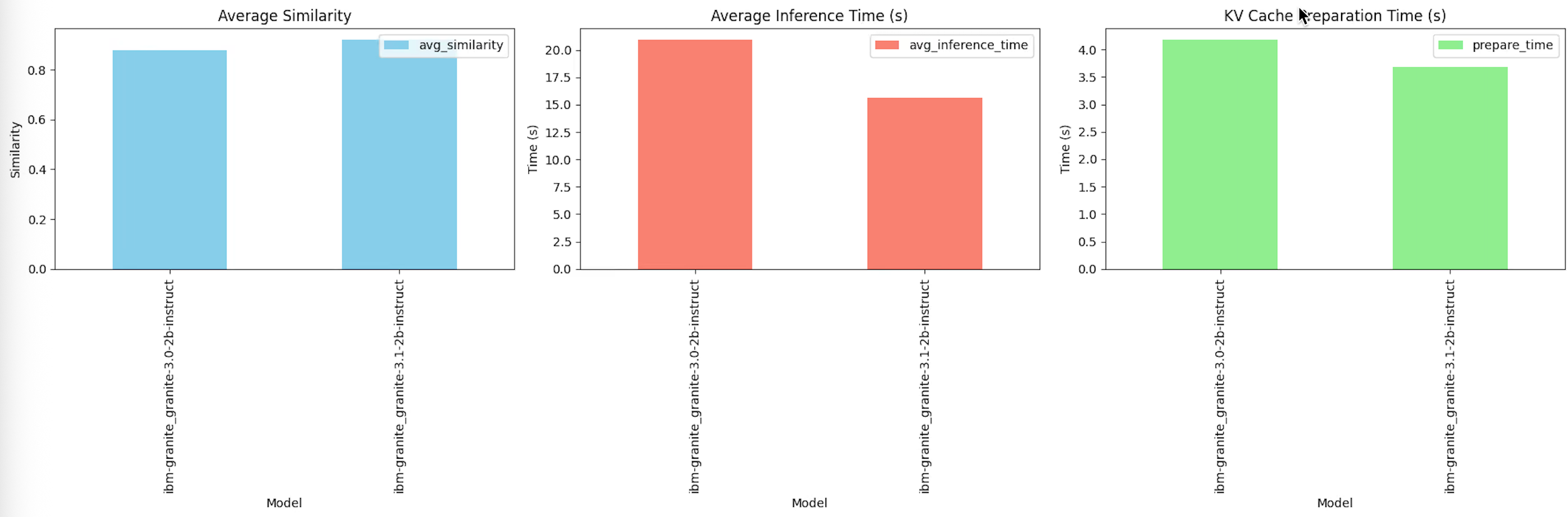
After running the script, the following results were obtained for the Granite-3.0-2B and Granite-3.1-2B models:
CAG compared to RAG: Key differences
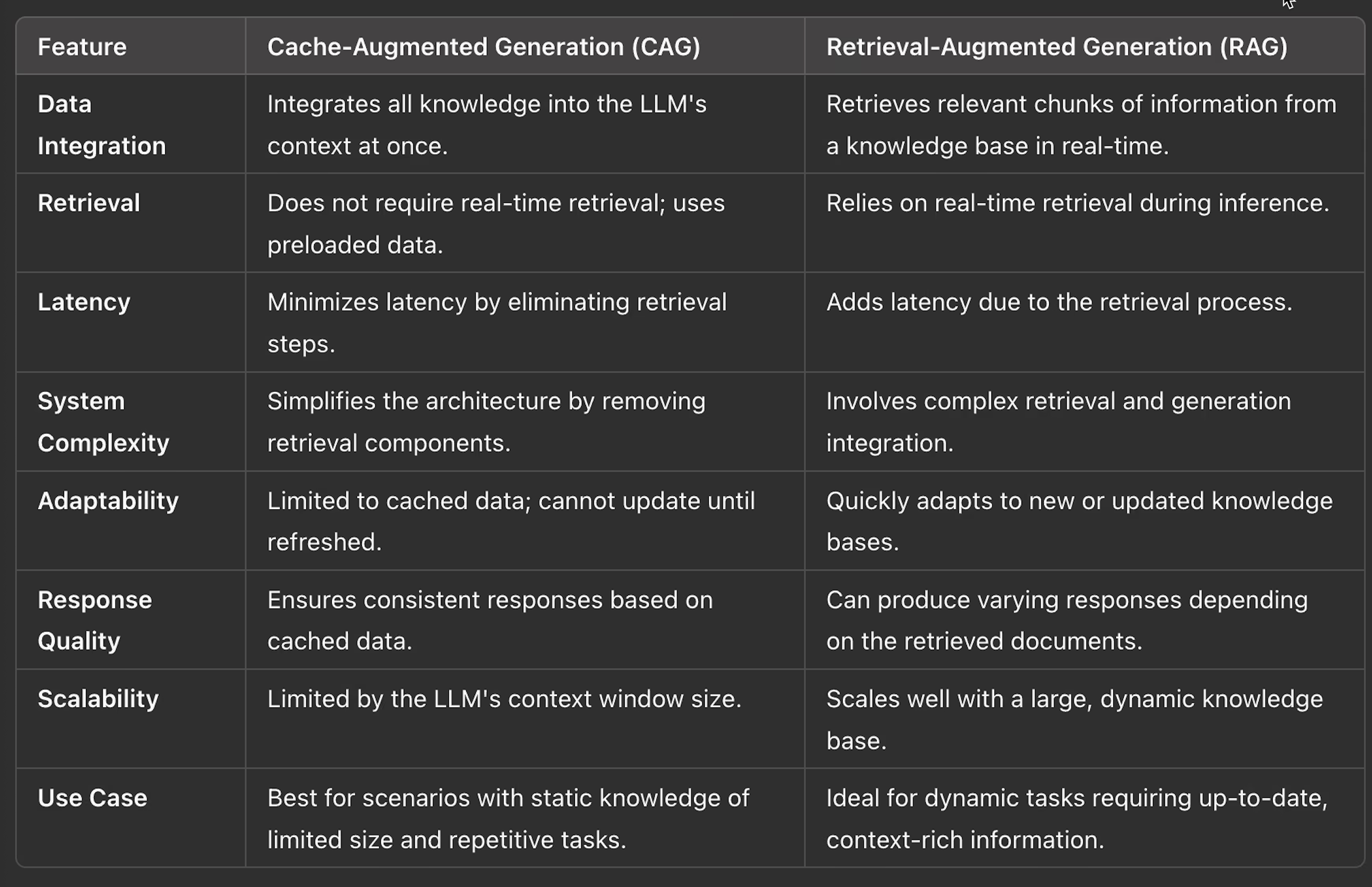
Retrieval-augmented generation (RAG) works like a web search engine, dynamically fetching information from external sources for each query. It offers flexibility but depends on retrieval speed and accuracy.
Cache-augmented generation (CAG) is more like a content delivery network (CDN), preloading and caching knowledge for faster and more reliable responses. However, its effectiveness is limited by the freshness and size of the preloaded data.
Benefits of CAG
- Faster responses – Eliminates real-time retrieval, reducing latency and speeding up query handling.
- Comprehensive insights – Preloaded knowledge ensures accuracy and coherence, making it ideal for summarization, FAQ management, and document analysis.
- Simplified system – Removes retrieval components, streamlining architecture and improving maintainability.
- Consistent output quality – Avoids errors from document selection or ranking, ensuring reliable and high-quality responses.
Challenges of CAG
- Scalability limits – Limited by the model’s fixed context window, making it unsuitable for large datasets.
- High memory usage – Preloading data into the KV cache increases resource demands.
- Limited adaptability – Cannot quickly update with new or real-time data without full reprocessing.
- Query matching issues – Less effective for complex or highly specific queries compared to dynamic retrieval methods such as RAG.
Summary
CAG optimizes LLM workflows by preloading knowledge and precomputing states, making it ideal for static dataset applications with fast response needs. Looking ahead, advancements such as extended context windows, improved context management, and hybrid RAG + CAG architectures offer efficient preloaded contexts with selective real-time retrieval for greater adaptability.