Article
Scale enterprise AI with IBM watsonx
The IBM watsonx portfolio of AI products is the foundation for the generative AI tech stackIBM watsonx is a portfolio of AI products designed for enterprise AI builders. Built with the open source hybrid cloud AI tools that form the foundation of IBM’s generative AI ecosystem, the watsonx portfolio includes the following products:
IBM watsonx.ai is a foundation model studio that you can use to build generative AI-powered applications. IBM watsonx.ai can also train classical machine learning (ML) models and provides the tools that you need to cleanse and prepare data before you build models.
IBM watsonx.data is IBM’s data lakehouse offering, which you can use to store data at scale and to query it efficiently when needed for AI training. The quality of an AI model’s outputs is only as strong as the quality of the data that is used to train or prompt it. IBM watsonx.data helps you store and retrieve that quality data at scale.
IBM watsonx.governance empowers enterprises with tools to minimize the impact of AI bias. Once an AI model is trained, enterprises require confidence that the model's outputs are not biased or harmful, and that they can test and validate future models in an organized, compliant, and trustworthy way. Additionally, watsonx.governance monitors deployed models in production to ensure that model outputs do not drift too far from desired responses.
The IBM watsonx AI assistants embed AI into the customer service experience across a variety of business processes and applications. While these AI assistants are part of the watsonx portfolio of products, they are part of the top layer of the generative AI tech stack. The watsonx products for AI assistants include watsonx Orchestrate and IBM Bob.
This article describes the features and use cases of the IBM watsonx products that make up the middle layer of IBM's generative AI tech stack. It shows how you can manage the full AI lifecycle when you integrate all parts of the watsonx portfolio.
The AI studio: IBM watsonx.ai
IBM watsonx.ai is a foundation model studio for next-generation AI builders. It contains most of the tools you might be familiar with from IBM Cloud Pak for Data. This includes all of the tools that you need to train classical ML models and to perform natural language processing (NLP), such as Watson Studio Notebooks and AutoAI, which builds ML pipelines with no code.
IBM watsonx.ai also natively supports a synthetic data generator and automated model workflow deployment. The AutoAI pipeline builder automatically selects relevant model features and performs feature engineering. AutoAI supports a variety of standard regression, classification, and time series forecasting models. The pipeline builder evaluates multiple models so that you can choose and deploy the best ones. It is a useful first step to see which models are likely to perform well when you build an ML pipeline.

The Data Refinery tool in watsonx.ai lets you clean and prepare data for analysis. It contains simple tools to create data visualizations, replace missing values, set column data types, and change strings and substrings. When building ML pipelines, data scientists and ML engineers often spend the most time cleaning and understanding their data before fitting models. Using the Data Refinery tool can significantly reduce the total time spent on data preparation. For developers who perform NLP tasks, the Data Refinery tool includes automated stop word removal and tokenization.

For those interested in generative AI, watsonx.ai comes with numerous options for foundation models. You have access to many models in the model library, including the popular Granite models from IBM, FLAN models from Google, and the Llama 2 model from Meta. When you click a model, the model card displays details about the model’s architecture, characteristics, and best-performing use cases.

IBM watsonx.ai also includes Prompt Lab, a user interface (UI) tool that you can use to quickly test different prompts and models before you fully tune a model or deploy a full app. The sample prompts section contains preconfigured prompts and inputs for a range of common use cases, including summarization, classification, entity extraction, question answering, and Python and C++ code generation.
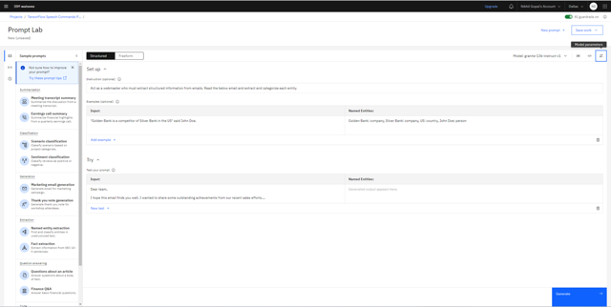
If you want full customization, you can save your prompts and edit them in a Jupyter notebook with Python. You can then integrate them into apps by using the Python software development kit (SDK).
Watsonx.ai will also support model fine-tuning. Unlike prompting, fine-tuning changes the weights of the foundation model by retraining the final layers of the model’s neural network on labeled data. Foundation models are engineered to perform multiple tasks, but fine-tuning increases the model’s performance on one specific task. Tuning requires you to upload a new training dataset with labeled examples of desired outputs, and watsonx.ai fine-tunes the model for you.

If you want to try IBM watsonx.ai for free, as a fully managed service on IBM Cloud, sign up for a free IBM watsonx.ai trial.
The data lakehouse: IBM watsonx.data
Training enterprise-grade AI requires access to enterprise-quality data, and the ability to access it quickly and at scale. The data lakehouse architecture of IBM watsonx.data combines the query speed of a data warehouse with the storage costs of a data lake. This architecture is particularly applicable to large enterprises that likely use multiple cloud providers and complex data storage solutions, making watsonx.data a hybrid cloud-native platform.
Data lakes and data warehouses, like databases, are types of data storage, and data can be retrieved or queried from them when needed. In addition to these, watsonx.data can also connect to cloud storage buckets, including the popular IBM Cloud Object Storage and Amazon S3 formats. Different storage formats are applicable depending on the type of data being stored (structured versus unstructured) and the frequency at which the data needs to be accessed.
A query engine is used to retrieve data from a data store. Watsonx.data supports the Spark and Presto query engines, and both use Structured Query Language (SQL) to query data. The following figure shows the IBM watsonx.data Infrastructure Manager, which visualizes the connections between different query engines, catalogs, databases, and cloud storage buckets. Multiple query engines can be connected to the same data source, and users can add more data sources as needed.

Query engines sit on top of a data table, which is the organized and queryable representation of unstructured and structured data in the data lakehouse. To make the data queryable, attributes about the data’s characteristics called metadata must be stored. Watsonx.data supports the open source Apache Iceberg table format and stores metadata in the Apache Hive metadata store. Using this metadata store and the Iceberg table format, watsonx.data users can roll back to earlier snapshots of a data table at a specified time.
One of the key features of watsonx.data is that multiple query engines can access the same data sources at once. Large enterprises often collect new data and continually update their data stores. Using multiple query engines enables you to view and query the data while it is being modified or updated. This is useful because it enables a consistent stream of real-time data to feed into data pipelines and AI models. Querying large amounts of data is compute-intensive, and you can scale your compute dynamically by adding or removing query engines as your needs evolve.
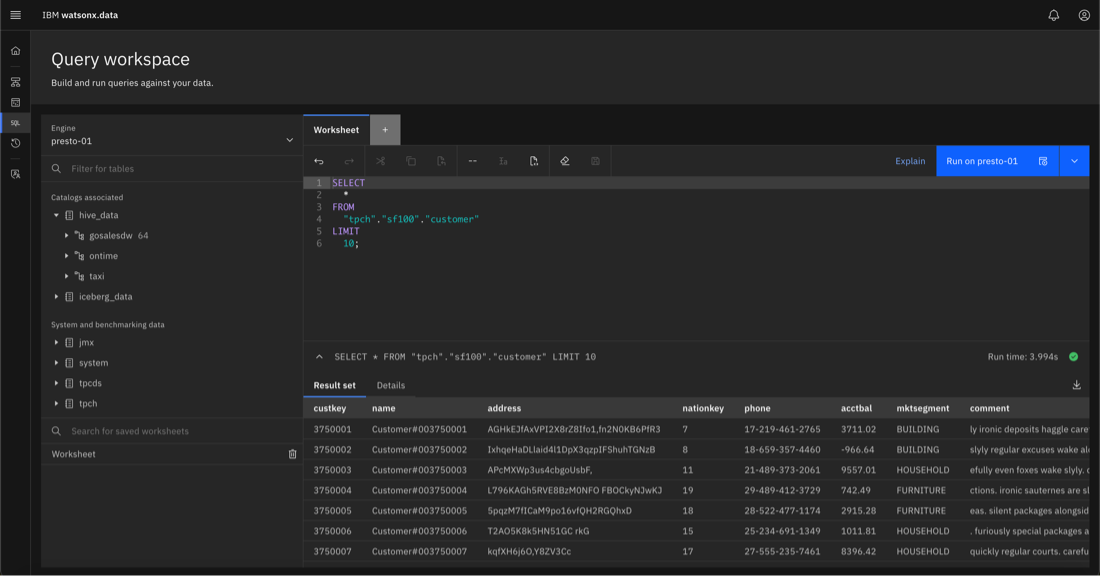
After query engines are connected to data sources in the Infrastructure Manager, you can use simple SQL to query all connected data sources in the watsonx.data Query Workspace. With SQL queries, you can modify, copy, or move data between data stores. Enterprise users find this functionality an attractive way to save on data storage costs. You can move data that needs to be accessed less frequently out of data warehouses into cheaper cloud object storage, cold storage, or other forms of storage.
If you want to try IBM watsonx.data for free, as a fully managed service on IBM Cloud or AWS, sign up for a free IBM watsonx.data trial.
AI model lifecycle monitoring and management: IBM watsonx.governance
After enterprises successfully extract their data and train AI, they need to ensure that it is trustworthy and free from unwanted bias, and to monitor its performance throughout its lifecycle. Biased models are ones that make predictions based on undesired variables. For example, an AI model that predicts someone’s eligibility for a loan would be biased if it used their race or religion as a factor to determine their creditworthiness. IBM watsonx.governance is IBM's AI governance solution designed to help businesses reduce risk and minimize the impact of AI bias. This takes the form of automatic model monitoring, explainability of model outputs, streamlining report generation, and application of controls through an integrated governance, risk, and compliance (GRC) platform.
To help enterprises organize the training and deployment of their models, watsonx.governance includes the model inventory feature from Watson OpenScale. All user models are stored in the model inventory, and you can define specific model use cases to track the lifecycle of model development. This helps data scientists and ML engineers track models in the different stages of model building and deployment. As shown in the following figure, you can evaluate these models and assign them to specific users for review before deployment into production:

By default, the inventory is separated into develop, test, validate, and operate stages, but you can customize the stages to implement your own governance framework. You set the rules that are needed to move models from one stage to another. Models in the inventory can include models developed on IBM platforms and on third-party platforms, such as Amazon SageMaker and Microsoft Azure ML.
Watson OpenScale automatically tracks all models in the inventory, including models developed in AutoAI, Jupyter Notebooks, and the watsonx.ai Prompt Lab. Applicable metadata is recorded in individual AI Model FactSheets to give users a snapshot of the model’s health and performance. For generative models like the ones displayed in the following figure, the FactSheet includes information about the prompts used and model hyperparameter information.

To measure how much a large language model (LLM) output differs from a predefined human output, you can configure ROUGE metric tracking and view it in the AI FactSheet. For predictive models, the metadata reported includes the features used to train the model, predictive accuracy on the test dataset, F1 score, log loss, precision, and recall. You can also define your own custom metrics to track for both generative and predictive models.

Watson OpenScale can help you automatically monitor model health by alerting you when key model health metric levels fall below specified thresholds. Many users are interested in monitoring model drift, which refers to the gradual decrease in model output quality over time. With predictive models, drift can be caused by a change in the underlying relationship between the model’s predictor variables and the outcome. Sometimes after a model is trained, a new, unaccounted-for variable can significantly affect predictions, resulting in drift.
Like predictive models, generative models are also trained on data snapshots at a specific time, and are not always updated with technological advancements or current news. Changes in human language patterns and slang can also affect a generative model’s ability to understand inputs. To mitigate the impact of drift, watsonx.governance monitors how far LLM and predictive model outputs drift from ideal ones, and alerts you if drift metrics fall below specified thresholds. You can then take appropriate action, such as retraining models or changing prompts, to mitigate the impact of the drift:

IBM watsonx.governance includes built-in model fairness tracking to ensure that model outputs are not unfairly biased. The platform is preconfigured to track the ability of the model to deliver different outputs for standard protected classes like gender, religion, and race. You can also set up your own custom fairness monitors and receive alerts for violations. When monitoring predictive models, the “feature importance” functionality in Watson OpenScale uses proprietary and open source algorithms to measure how much individual model variables impact predictions. This feature can be useful for demonstrating to regulators how model predictions are generated and that outputs are not significantly different because of membership in a protected class.

To facilitate easy reporting and tracking, watsonx.governance integrates with IBM OpenPages, which is a highly scalable, AI-powered GRC platform. Data is automatically shared between Watson OpenScale and IBM OpenPages. You can create custom dashboards that track metrics of interest or model fairness, training stage, and performance.

IBM OpenPages also contains custom control templates and risk assessments for common regulatory frameworks like the European Union AI Act. Model use cases that are deployed and tracked with Watson OpenScale can be integrated into risk assessments, and then have applicable controls and risk mitigation procedures applied to them.
Find out more about IBM watsonx.governance. You can also sign up for a free IBM watsonx.governance trial.
Summary and next steps
As you can see, the IBM watsonx portfolio of products, as the foundation for the generative AI tech stack, fully supports all parts of the AI lifecycle, and is a suitable platform for building AI at the scale of the enterprise.
With watsonx.data, you can store and retrieve enterprise data and take full advantage of its data lakehouse architecture. After the data is extracted, you can build generative AI and ML-powered apps with watsonx.ai. This includes a full suite of tools to cleanse and transform the data before you train AI models. After models are deployed, you also have a full range of model governance and monitoring capabilities with watsonx.governance to minimize AI bias and ensure that your AI is trustworthy.
IBM watsonx uses several key AI open source tools and technologies and combines them with IBM research innovations. Learn more about the foundation of IBM's generative AI tech stack, the hybrid cloud AI tools, in the article, "The open source ecosystem of watsonx." Learn more about the top layer of IBM's generative AI tech stack in the article, "Enterprise generative AI virtual assistants."
Explore more articles and tutorials about watsonx on IBM Developer.