Article
Multicloud, multicluster app framework with Red Hat OpenShift
Explore an approach that does not require installation, configuration, and maintenance of complex software for your distributed stateful applicationArchive date: 2023-10-27
This content is no longer being updated or maintained. The content is provided “as is.” Given the rapid evolution of technology, some content, steps, or illustrations may have changed.Today, organizations are becoming more dependent on cloud technology to have the ability to drive innovation, business value, and competitive differentiation. The enterprise IT environments are converging into hybrid and multicloud environments. New applications are being developed with a cloud-native architecture involving lightweight containers and managed with Kubernetes-based platforms. As the cloud adoption grows, so does the cloud concentration risk. Regulations in many countries require certain industries to not depend on a single cloud provider for their critial business applications. This article focuses on distributed applications that are deployed and managed using Kubernetes-based platforms and are distributed across various clouds.

As shown in the previous image, the application consists of six pods, with three pods in each cloud in their own Red Hat OpenShift cluster. The application’s pods, which are of the same type, must be able to communicate with each other directly. Examples of these types of applications are CockroachDB, Cassandra, and Redis. These applications use the Gossip protocol and are deployed in Kubernetes as stateful pods. These pods communicate with each other directly using their IP addresses, without going through the service. This all works fine when all of the pods are in the same Kubernetes cluster. However, problems can arise when the pods are deployed in two (or more) different Kubernetes clusters that might be in different clouds or regions. Because the pod network that is provided by Kubernetes is generally a private network, it is not possible for pods in one cluster to communicate directly with the pods in the other cluster.
Solutions such as Submariner, Cilium mesh, or cloud-specific CNI implementations can address this problem, but this article presents a different approach that does not require installation, configuration, and maintenance of complex software. The solution lies in programmatically creating a new overlay network specific to the application. The overlay network works on top of the existing networks and allows application pods to communicate with each other, regardless of where they are deployed and running, as shown in the following figure.
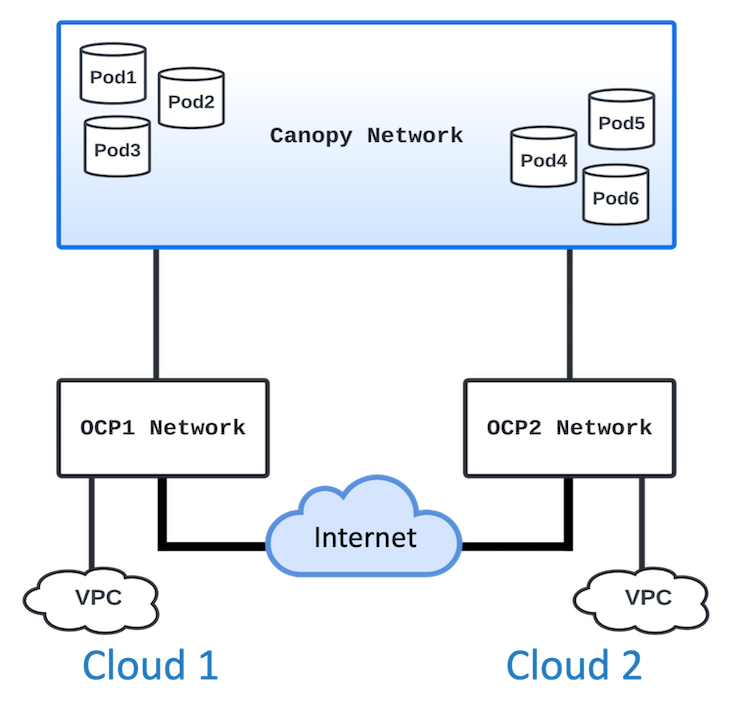
The new network, named Canopy, has its own IP address range. Each of the application pods receives an IP address that is based on certain rules, in addition to the PodIP provided by the platform. Your application communicates using this IP address, let's call it AppIP. Unlike PodIP, the AppIP address is fixed for that pod, and it always gets the same AppIP address, even after restarts.
The following steps show the process.
- Select an IP address range for the new network.
- Generate an
AppIPaddress for pods at their initialization. - Set up routing rules to forward to the appropriate proxy servers when the destination addresses are
AppIPaddresses. - Set up proxy servers as sidecar containers to the application containers.
- Configure the application to listen on the
AppIPaddress.
The following figure shows how a packet traverses from the origin pod to the destination pod. A packet originating from Pod 1 destined for Pod 4 using the AppIP first goes to Pod 1’s Egress Remote proxy. From there, it is forwarded to the public IP address of Cloud 2’s network load balancer. The load balancer is backed by a remote listener service that represents the Ingress Remote proxy of the pods. Suppose the packet lands on Pod 3 of Cloud 2. Here, the Ingress Remote proxy uses the technique of resolving the PodIP of the destination pod. It uses the underlying network to forward the packet to the destination pod (Pod 4) to its Ingress Local proxy, which in turn forwards it to the application container’s port 5000 in the same pod.

Implementation approach
The following steps show how this is implemented.
First, select an IP address range for the new network, for example, 10.0.0.0/12. Now divide this into two parts such that one cloud (Cloud 1) gets, for example, 10.1.0.x, and Cloud 2 gets 10.2.0.x. This way, by using the
AppIPaddress from within the cluster you can determine whether the traffic is intended for the local cloud or if it is for the remote cloud.The application must be deployed using a
StatefulSet. AStatefulSetprovides guarantees about the ordering and uniqueness of the pods and maintains a sticky identity for each of its pods. You use this concept to generate theAppIPaddress of the pod. Because you already have the first three octets of the IP address, you just use the pod ordinal as the fourth octet, and that gives you theAppIPaddress of the pod. Additionally, given theAppIP, you can infer its hostname, which is going to be aStatefulSetname, a dash, and last octet of theAppIPaddress.The routing rules are set at the pod initialization. This is done through an
initcontainer. The rules are as follows:- Check the destination
AppIPaddress. The second octet tells whether it is destined for Cloud 1 or Cloud 2. - If it is for the local cloud, the packet is forwarded to the Egress Local server port in the same pod’s proxy container.
- If it is for the remote cloud, the packet is forwarded to the Egress Remote server port in the same pod’s proxy container.
- Check the destination
There are four proxy servers that must be defined and configured.
Egress Local: This proxy handles the packets that are destined to another pod within the local cloud. The job of this proxy is to first get the fully qualified hostname of the destination pod and use the Kubernetes DNS to resolve the pod IP of the destination. It then forwards it to the destination pod’s Ingress Local server port using the underlying network.
Egress Remote: This proxy handles the packets that are destined to another pod in the remote cloud. Its job is to forward the packets to the remote listener service of the remote cloud.
Ingress Remote: This proxy handles traffic coming from the remote cloud in this cloud. It uses the same approach as the Egress Local proxy to route the traffic to the destination pod by converting the destination
AppIPto the pod hostname, and then uses the Kubernetes DNS and underlying network to route the traffic to the destination pod’s Ingress Local proxy.Ingress Local: This is the final destination proxy server, which simply forwards the packets to the listening port of the application container.
When your distributed application starts, it should be configured to listen on the
AppIPaddress instead of thePodIPaddress because that’s how it is able to communicate on the overlay network that you created for it.
One important thing to note is that while the application components (the pods deployed using two stateful sets in two clouds) can communicate with each other over the new overlay network that you created for it, the application is generally exposed using a service in Red Hat OpenShift. This service is on the network that is provided by Red Hat OpenShift. Any client pods accessing the distributed application should use the service available for the application and do not need to be on the new network. The new network can be used for internal communication of the application itself. For example, if a Cassandra NoSQL database is deployed in two clouds using this approach, all internal communication (Gossip) between the Cassandra pods in the two clouds occurs on the AppIP-based addresses, while any other pods accessing Cassandra connect to it using the service name associated with the Cassandra pods that directly use the underlying network.
This way, pod-to-pod communication can be achieved between two or more Red Hat OpenShift clusters in the same cloud or in different clouds. The same approach can be used for a multiregion setup as well.
Conclusion
This article described a new overlay network solution that does not require installation, configuration, and maintenance of complex software. The solution lies in programmatically creating a new network specific to an application, which works on top of the existing networks and allows application pods to communicate with each other, regardless of where they are deployed and running. This solution is particularly useful in creating distributed databases across Red Hat OpenShift clusters like Cassandra and CockroachDB.