Article
Easily modernize Java applications in your IDE with AMA Dev Tools
Discover how AMA Dev Tools help developers modernize legacy Java apps faster with automation, migration tools, and IDE integrationMany enterprise Java applications still rely on outdated frameworks and libraries. This results in potential security risks, high maintenance costs, limited enterprise support, and lack of visibility into dependencies and frameworks.
These mission-critical applications remain essential but need modernization to stay secure and efficient. Modernizing helps organizations:
- Improve security and protect sensitive data
- Deliver new features and services faster
- Optimize IT resources, lower costs, and gain a competitive advantage
However, modernization can be complex and time-consuming, often requiring significant developer effort. What if it did not have to be? Imagine using tools designed for enterprise Java applications that can scan your environment, guide you through the modernization steps, and automate many tasks to save time and effort.
This article introduces the IBM Application Modernization Accelerator Developer Tools (AMA Dev Tools) and explains how the tools simplify and accelerate enterprise Java application modernization from within your preferred IDE. AMA Dev Tools are part of the JSphere Suite for Java portfolio and require a valid access key.
What are AMA and AMA Dev Tools?
AMA Dev Tools help developers easily modernize enterprise Java applications to use modern Java runtimes, the latest enterprise Java APIs, and current Java SE and Java EE/Jakarta EE versions, all within their IDE. These IDE plug-ins or extensions work with the IBM Application Modernization Accelerator (AMA) tool to simplify and speed up the modernization process.
If you are new to AMA, it is a tool that analyzes your existing application landscape, visualize connected databases, queues, and dependencies, and assess the complexity, cost, and changes needed to move to your target runtime (for example, WebSphere Liberty, IBM MoRE, or tWAS in Containers). Based on the analysis, you can plan and prioritize key applications, identify dependencies and shared code that need updates, and group applications by target environments. AMA also provides effort estimates, modernization assessments, Role-Based Access Control (RBAC) functionality, and a migration plan that includes runtime configuration to help you set up and run your modernized applications efficiently on a modern runtime such as Liberty. You can find out more information on AMA in our Overview of IBM Application Modernization Accelerator article.
AMA Dev Tools help execute the migration plan that is generated by AMA. Using AMA Dev Tools with AMA removes the need for developers to switch contexts by providing insights and automated fixes directly within their preferred IDE. For instructions, see Using a migration plan to modernize your application.
Key capabilities of AMA Dev Tools
AMA Dev Tools provide features that help developers modernize enterprise Java applications quickly and confidently, all within their IDE.
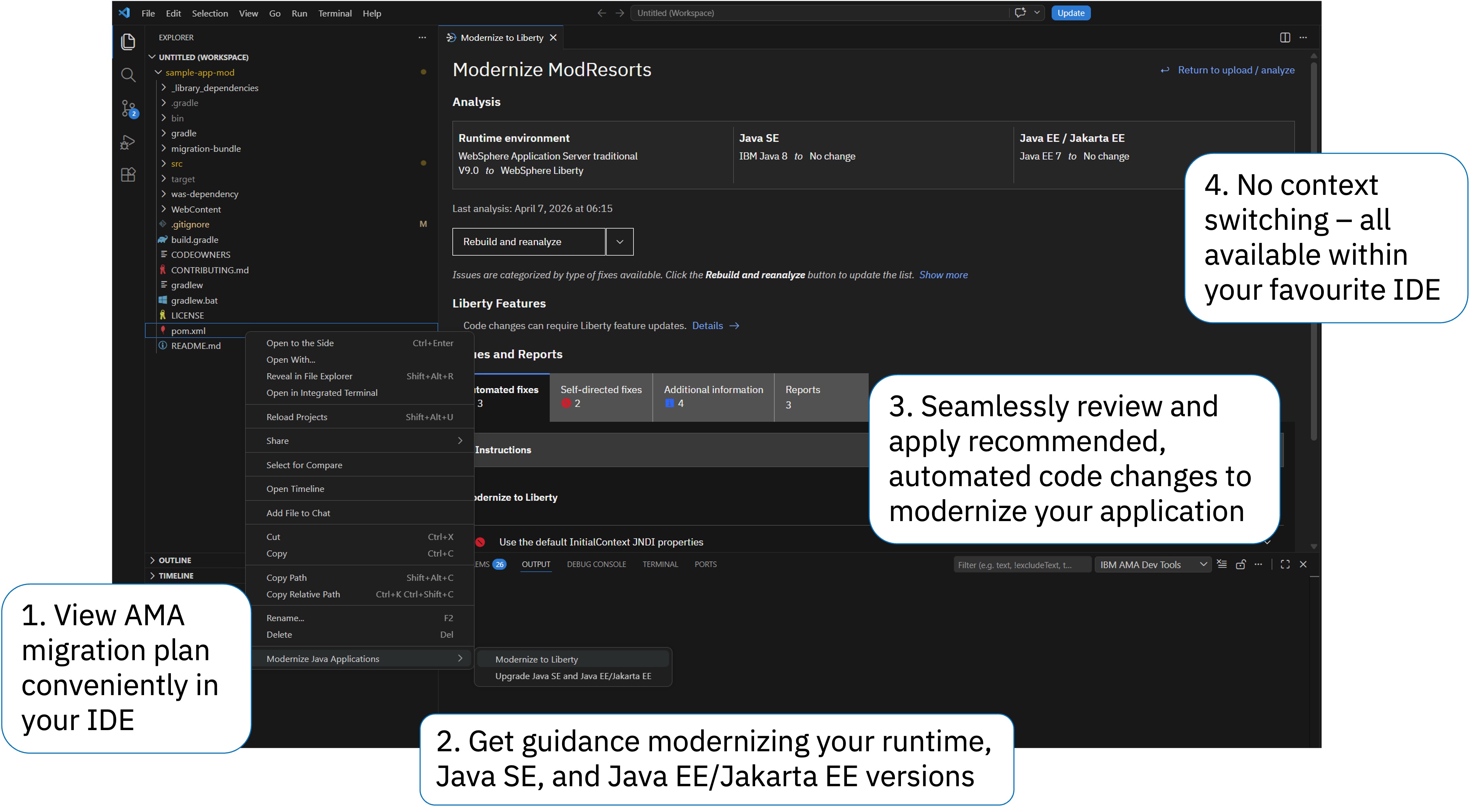
The main capabilities include:
- Analyze legacy applications and explore the modernization plan without switching between tools
- Apply recommendations and automations directly in your IDE
- Migrate JAX-RPC services to JAX-WS services with guided assistance
These capabilities simplify the modernization process, reduce manual effort, and ensure high-quality, secure code throughout the journey.
Analyze your legacy enterprise Java application and explore the migration plan
Without the use of IDE plugins like AMA Dev Tools, developers that want to view and explore the migration plan for their applications are often required to switch between their IDE and other GUIs (in this case, the AMA user interface in a browser to view the modernization plan). This constant context switching adds cognitive load to a developer's already full plate and slows down the app modernization process. But with the help of the IDE plugins, this becomes a lot easier.
Teams have two options for analyzing their applications and exploring the results:
An architect can generate the migration plan using the AMA tool, and then developers can import the plan into their IDE through the AMA Dev Tools plugin and view the results of this plan (including recommended actions) directly within their IDE. This is the recommended option, because architects can customize the migration plan more in the AMA tool. Click the Upload migration plan button in the Migration Plan (recommended) section.
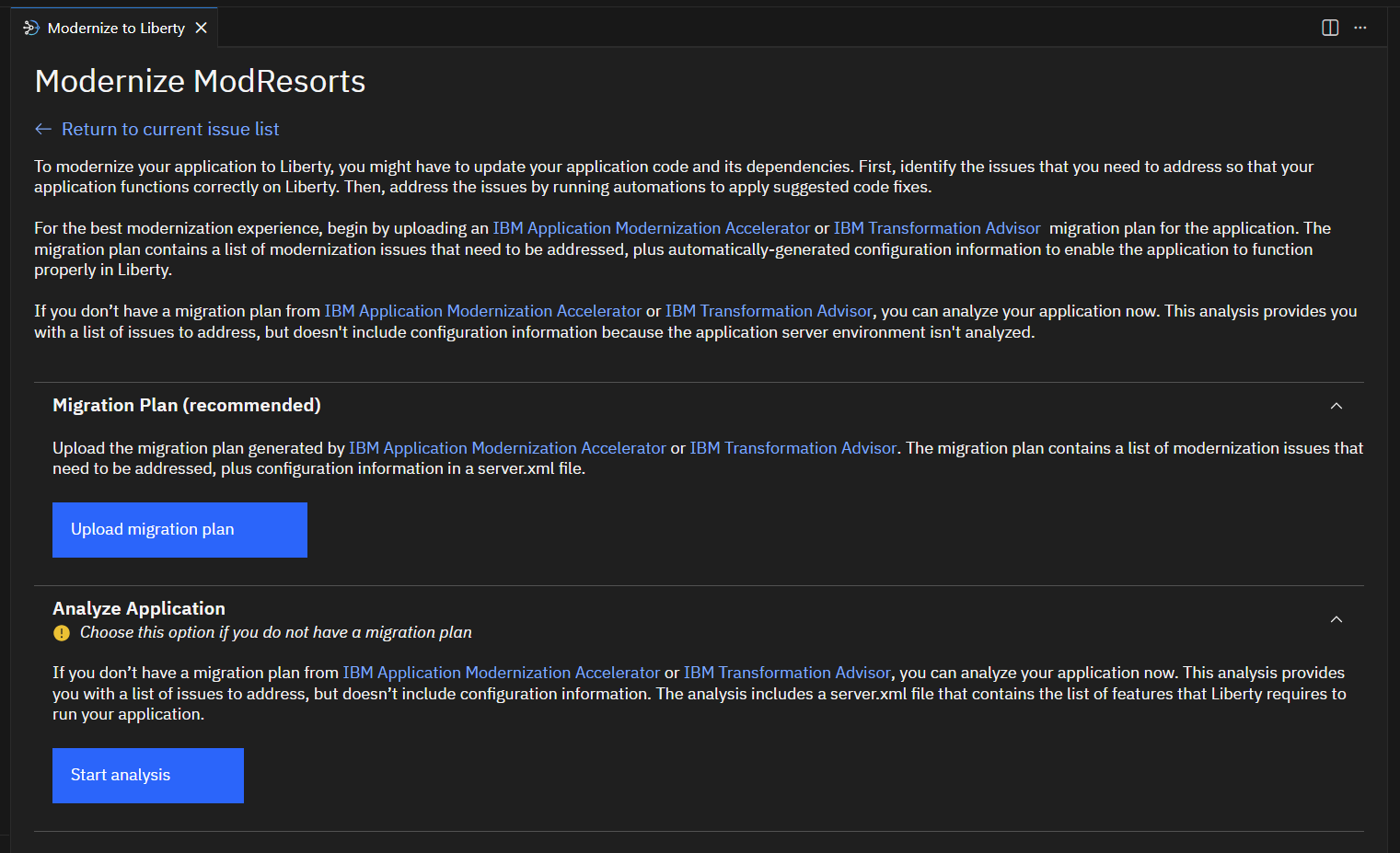
Developers can analyze their source application projects directly through the AMA Dev Tools plugin, right in their IDE. Click the Start Analysis button in the Analyze Application section (which is directly below the Upload migration plan button). Your source application project will be analyzed using AMA technologies for migration recommendations, and you can still select the source and destination runtimes you want to modernize from and to and also the source and target Java SE and Java EE/Jakarta EE levels that you need.
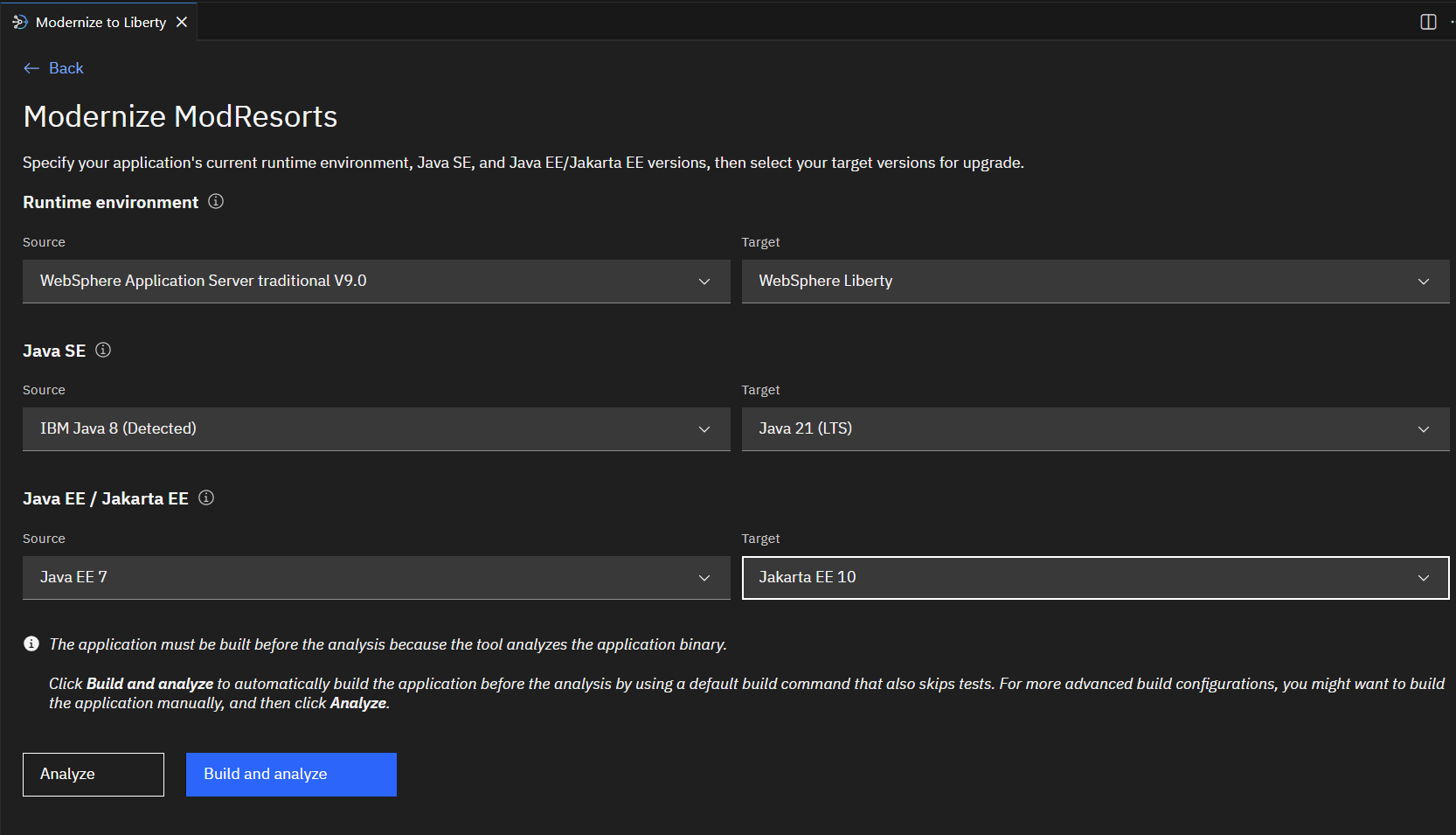
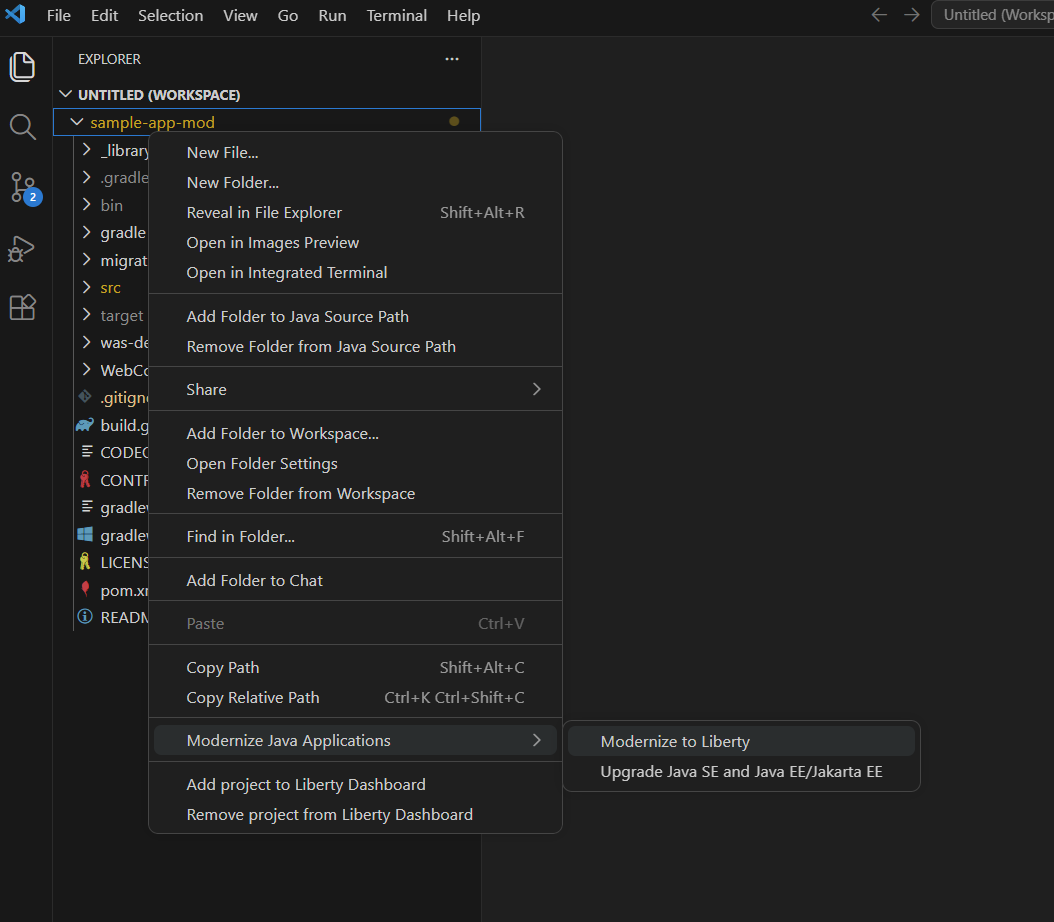
Whether it's working with a migration plan generated by AMA or through an analysis of the source application project by AMA Dev Tools, developers will be provided with insights for the following tasks (depending on the migration type that you choose):
- Modernize to Liberty (for example, moving from traditional WebSphere Application Server to Liberty)
- Upgrade Java SE and Java EE/Jakarta EE (for example, from Java 8 to Java 17 or 21 and from Java EE 7 to Jakarta EE 10)
Apply recommendations and automations
One of the key advantages of AMA Dev Tools is the built-in automated fixes that are available directly in your IDE. You can import your AMA migration plan, which includes recommended recipes and rules, and apply them instantly to update code and configurations that are needed for modernization, saving significant time on your modernization journey.
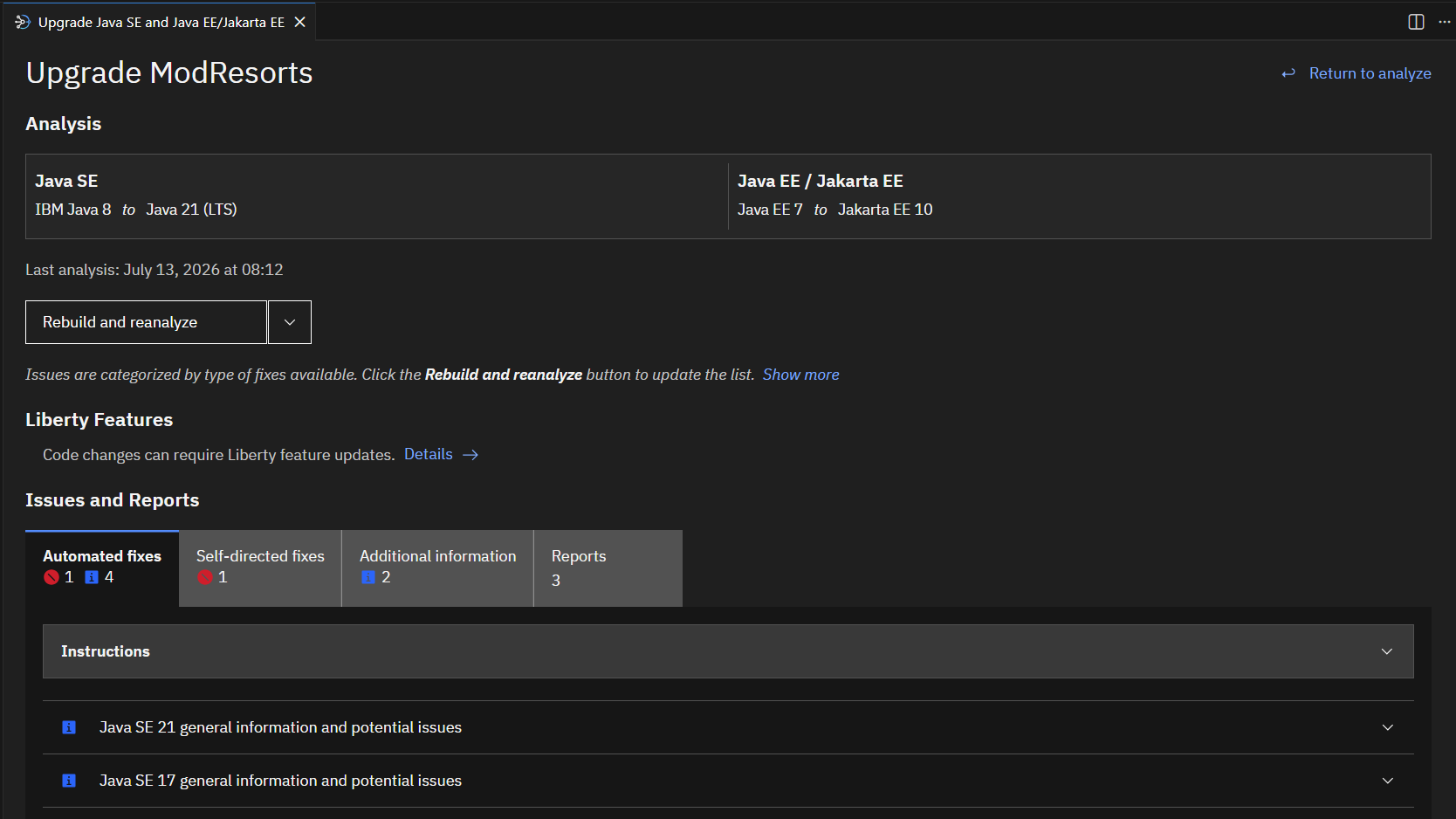
The automated fixes eliminate the need to manually identify migration steps or search for OpenRewrite recipes. The tool automatically detects and applies the required fixes, saving significant time and effort so your team can focus on complex modernization tasks that need manual attention. For instructions, see Fixing issues and reviewing additional information for your application.
Migrate JAX-RPC services to JAX-WS services
The AMA Dev Tools (version 1.1, or later) now also has a JAX-RPC to JAX-WS migration helper that guides developers through upgrading legacy JAX-RPC services. This feature uses automation to simplify and speed up the migration process, helping you modernize legacy JAX-RPC application code more efficiently.
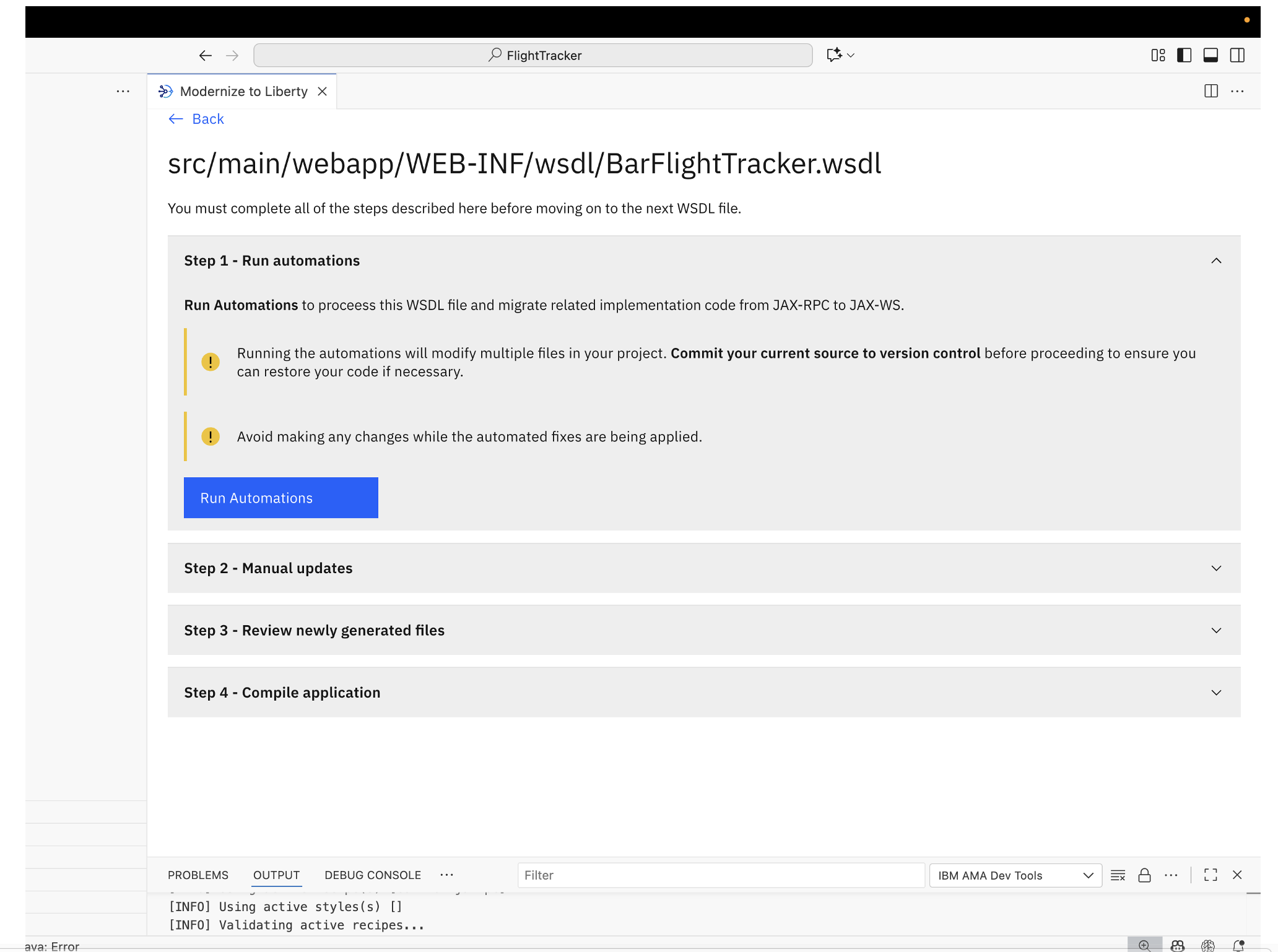
The migration helper is available in Visual Studio Code and Eclipse IDE and can be integrated into your existing development workflow. For migration helper instructions, read this article, "Migrate JAX-RPC to JAX-WS for Liberty: Automated conversion guide", or see the AMA Dev Tools docs.
What do these features mean for your team?
Using AMA and AMA Dev Tools together can save significant time and effort during modernization. Organizations have reported savings of up to 200 hours (70%) of engineering effort, allowing teams to modernize applications faster and focus on innovation.
To learn more about these results and real-world success stories, explore the following case studies:
- Application Modernization at scale, IBM CIO's Transformation story
- Accelerate your application development with automation and AI assistance
- IBM CIO Organization’s Application Modernization Journey
Get started with AMA Dev Tools
AMA Dev Tools are part of the JSphere Suite for Java portfolio and require a valid access key. Customers using IBM Enterprise Application Runtimes (EAR) or IBM Modernized Runtime Extension for Java (MoRE) can obtain a key to start using the AMA Dev Tools.
You can download the tools as plug-ins directly from your IDE marketplace and start using them right away:
Explore more tools
If you are developing enterprise Java applications with Liberty or MoRE, you can enhance your workflow by using the following complementary IDE extensions:
- Liberty Tools are available for Eclipse IDE, Visual Studio Code, IntelliJ IDEA, and the Open VSX Registry. They support fast, iterative development using Liberty dev mode and help you build, test, deploy, and manage Open Liberty or WebSphere Liberty applications directly from your IDE.