Article
Reduce service latencies of idle applications using Knative
Learn several ways to reduce the scaling latency in your applications running on Knative or a managed service like IBM Cloud Code EngineArchive date: 2024-09-16
This content is no longer being updated or maintained. The content is provided “as is.” Given the rapid evolution of technology, some content, steps, or illustrations may have changed.One appealing feature of Knative is the ability to scale down Kubernetes services to use zero running pods when the service is idle; however, you can also encounter long service latencies while you wait for Kubernetes to roll out new pods for idle services. This article explores the reason for these latencies and gives you ways to control and limit them. Such control can help Knative users of offerings like Red Hat OpenShift Serverless or IBM Cloud Code Engine.
Knative offers additional value to users deploying services on Kubernetes through automation, simplification, autoscaling, revision control, and an elaborated event system (see Resources). Knative's autoscaling support adjusts the number of pods your applications uses, based on the rate of requests the application needs to process. When your application receives no requests, Knative can set the application deployment to use zero pod replicas. As a result, when your application becomes idle, it uses no pods and therefore consumes no Kubernetes compute or memory resources.
When the first new request arrives to be served by an idle application, Knative increases the application deployment replicas to one and queues the incoming request until an application pod is ready. The time it takes Kubernetes to deploy the first application pod depends on multiple factors, as described in the next section. Knative users can control if and when the application is scaled to zero and can reduce service latencies when the application is scaled from zero to one.
Breakdown of a pod's cold start
Adding a Kubernetes pod is a multistep asynchronous process. This potentially lengthy process occurs naturally whenever a new service is deployed or the number of service replicas is increased. In many cases, the time it takes for a new pod to start has little effect on the service users. For example, for a service with 3 pods, if the rate of requests increases, Knative can start a 4th pod. Thanks to Knative's queueing mechanisms, while waiting for this 4th pod to start, the service continues to operate normally with a small increase in service latencies.
However, when Knative needs to scale the number of service pods from zero to one, no requests can be processed until Kubernetes can ready the pod. When a new request arrives to an idle service, Knative sets the desired number of service pods to one. If Kubernetes detects that the actual number of pods is smaller than the desired state, it begins a process to start a new service pod. The process Kubernetes uses to ready a pod can be divided into the following steps.
Table 1. Kubernetes process to ready a pod
| Steps | Description | Remarks |
|---|---|---|
| Kube init | Kubernetes asynchronously decides the pod placement in one of the nodes. | |
| Image pull | The node pulls the needed container images from a remote repository to a local cache. | (If needed.) |
| Image mount | The node prepares the container images and mounts them. | |
| Container start | The node configures and starts the pod's containers. | |
| Application load | Each container loads application code and libraries and initializes application memory. | |
| Application initialization | Each container performs application-specific initializations. | |
| Pod ready | The pod responds to the asynchronous readiness probe and signals that it is now ready. | Knative starts using the pod. |
Scale-from-zero options
Not all of these steps are required every time Knative scales the service from zero, so we distinguish between different types of "scale-from-zero" options and identify which steps they include, presented in order here from largest latency to smallest.
Cold start: When you are creating a pod from a new image for the first time or after a long time has passed since your last use of this pod in the Kubernetes node. During a cold start, the container image(s) are not cached on the node. The image(s) therefore need to be pulled from an external image repository. Once obtained, the container must be started from scratch. Under normal circumstances, a cold start can take up to 10-15 seconds (and in some cases, a minute or more).
Warm disk start: When the image(s) have already been pulled and cached on the node, while the container must be started from scratch. This can take up to several seconds, depending on image sizes, application loading, and initialization times.
Warm memory start: When the container has been paused and needs to be resumed. This case removes the need to wait for pulling and mounting images, starting containers, and application loading and initialization. These cases are typically done within 100ms.
Warm CPU start: When the container is already running and the only latency is how long it takes the app to respond to the request. This is a case where the application was not scaled to zero.

When a cold start or a warm disk start is used during a scale-from-zero, there is a noticeable delay between when a user makes a request and when the application responds to it, resulting in a poor user experience and possibly other consequences, such as missed service level objectives (SLOs). In a worst-case scenario, when a cold start is used during a scale-from-zero, it is even possible to encounter client timeouts if the application doesn't respond in time. Luckily, there are a number of ways that you can control scale-from-zero latencies.
Tweak Knative scaling performance to reduce the need to scale-from-zero
The easiest way to blunt the impact of scale-from-zero scenarios is to avoid them completely! If you always keep a copy of your application running, then you'll always be dealing with a warm CPU scenario with minimal latency. You can do this by setting a minimum scale for your app (using the min-scale annotation) to 1 or more. This ensures that you always have at least one warm container ready to handle any requests sent to your application.
However, this leaves at least one application pod running all the time, which might not be what you want. If you still want to scale to zero, there are 2 other levers you can pull to reduce the frequency of your application scaling down:
scale-down-delay: Increases the time window before a downscaling decision is made. This is especially helpful if you expect regular traffic patterns at specific intervals (for example, every few minutes) to prevent your application from scaling down and scaling back up repeatedly.scale-to-zero-pod-retention-period: Provides a minimum amount of time for the last pod to remain after a scale-to-zero decision has been made. You can use this to set a longer scale-down window on a single pod (rather than all of them) to help with irregular traffic patterns.
Finding the right values takes a little bit of trial and error while you seek to better match scaling decisions to the traffic patterns experienced by your application.
Tweak your application to reduce scale-from-zero times
There's also a few things to consider when writing your application.
The first is the programming language you use: some languages take longer to start processing requests than others. These differences are caused by aspects such as compilation and optimization, which are handled differently in different coding languages. For example, Java performs poorly because of the time required to spin up the JVM, whereas interpreted languages like Python or Node.js with smaller startup costs typically perform much better.
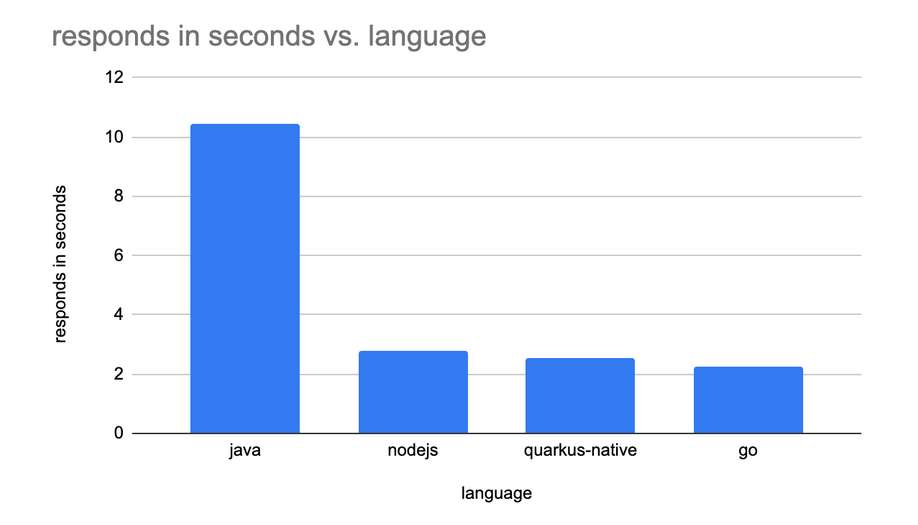
You should also look into optimizing your application. For example, if you still need to use Java, you could apply GraalVM to accelerate the performance of your application. In addition, you can try to reduce the dependencies in your application to help improve your startup time.
Speed up image pulls
This might be the area where you can get the biggest bang for your buck, as pulling the image tends to be where the most time is spent when starting a new pod. Some tweaks you can make include:
- Using a small base image, such as a distroless base image or alpine base image.
- Keep what you add to the base image to a minimum by using strategies like multistage builds and copying only what you must to the resulting image.
- Use eStargz to lazy pull your images.
- Avoid using an
imagePullPolicyofAlways. - Define a specific image digest rather than using the
latesttag. - Use Dragonfly to cache your image on all nodes.
Conclusion
This article outlines a number of steps you can take to reduce the service latencies of idle applications and to better control if and when your application is scaled to use zero pods using Knative. Just taking control over the size of your image can improve the worst case latency greatly. Choosing the right coding language and adjusting your service configuration can also help reduce and avoid latencies. You can always decide to avoid the problem all together by instructing Knative to keep at least one running pod of your service running.
These measures together can help you control the service costs in parallel to keeping your service-level agreement.
Thanks to Dr. Max for feedback and suggestions.