Article
Single sign-on and MFA integration with Maximo Application Suite
Take a look at a successful SSO implementation with Maximo Application SuiteAccording to 2022 industry reports, stolen or compromised credentials was one of the most common causes of a data breach. To make matters worse, many organizations cannot detect compromised credentials swiftly. Typical portfolios of asset-intensive organizations consist of many applications from heterogeneous vendors, requiring users to remember or keep a record of credentials for each application or vendor. Additionally, there is a growing need for Business Partners, vendors, and suppliers participating as an extended enterprise to collaborate with the asset-intensive organization, and requiring a system of trust for user authentication, also known as identity federation. To solve the challenges of multiple credentials management (per vendor or per application), potential stolen credential threats, and identity federation, organizations can start implementing a single sign-on (SSO) solution supporting multifactor authentication (MFA) with IBM Maximo Application suite.
This article provides an overview for a successful SSO implementation with Maximo Application Suite, starting with the exploration of implementation choices and personas to be involved, followed by detailed implementation information that covers the interaction flow.
Implementation choices
Now, let's review some design choices to make before you can successfully implement an SSO solution with Maximo Application Suite.
Choosing single sign-on protocol
A single sign-on solution relies on a vendor-neutral, single sign-on protocol that provides seamless authentication among multiple applications in a heterogeneous environment. Currently, SAML 2.0 (Security Assertion Markup Language) and OpenID Connect are the protocols that are most widely used by enterprises. SAML 2.0 is an XML-based standard that provides a framework that is governed by OASIS for transferring identity data between two parties: an identity provider (IdP) and a service provider (SP). Because Maximo Application Suite supports only SAML 2.0 for single sign-on, that's what is shown in this article.
Choosing the identity provider and authentication flow
Although there are many factors that go into selecting the right identity provider for an enterprise, in the context of SSO with Maximo Application Suite, you must look for the SAML 2.0 feature while selecting the identity provider. There are many identity providers available in the market that support SAML 2.0, including but not limited to IBM Security Verify, Keycloak, Okta, and Azure AD.
SAML 2.0 has two types of authentication flows:
- Identity provider-initiated
- Service provider-initiated
The choice of authentication flow depends on the broader IT strategy or corporate guidance on how users get access to an SSO-enabled application such as Maximo Application Suite. In greenfield implementation projects, an SP-initiated authentication flow is recommended over an IdP-initiated flow for increased security.
Choosing name ID format
A SAML 2.0 name identifier format controls how users at the identity provider are mapped to users at the service provider during the single sign-on process.
Some popular values of the name ID formats and their use cases are:
- Email address: Use the email address name identifier format if you want a user to log in at the service provider as the same user that they use to log in at the identity provider.
- Persistent alias: Use the persistent name identifier format if you want a user to log in at the identity provider as one user, but log in at the service provider as a different user.
- Windows domain qualified name.
Look at the OASIS SAML 2.0 Technical Overview for an explanation of the remaining values of name ID formats.
Choosing MFA
Multifactor authentication adds an additional layer of security to the log-in sequence. Choose the appropriate additional factor depending on the environment (internet or intranet) where Maximo Application Suite is operated, capabilities of the identity provider, and user readiness.
Personas
SSO implementation with Maximo Application Suite requires close collaboration among multiple stakeholders such as the Maximo Application Suite administrator, the chief information security officer (CISO), the identity provider administrator, IT Operations, and users. This allows for necessary configurations, user enrollments, troubleshooting, verification, pilot and production roll-out, and training.
SAML 2.0 Single sign-on implementation
The end-to-end process of implementing SAML 2.0 single sign-on with Maximo Application Suite can be divided into four key stages.
- Configuration
- User enrollment in the identity provider
- User enrollment in Maximo Application Suite
- Verification
- SP-initiated flow
- IdP-initiated flow
Stage 1. Configuration
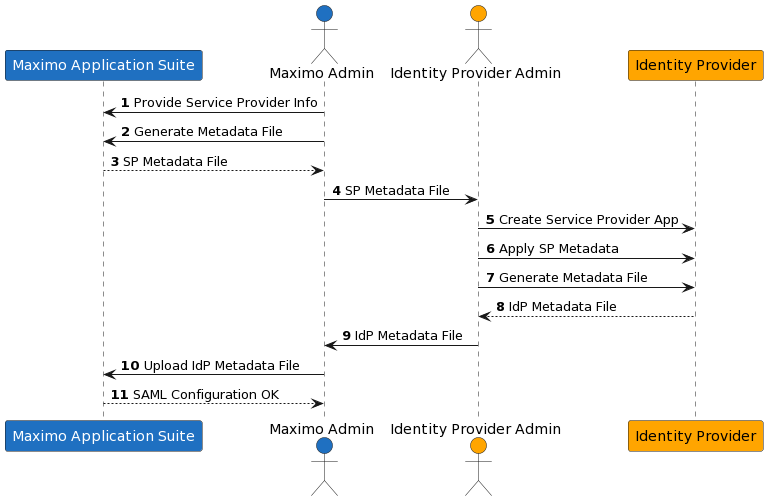
In this stage, the Maximo Administrator and the identity provider Administrator exchange service provider metadata (SP metadata) and IdP metadata as shown in the following image.
As shown in Steps 1-4, the Maximo Administrator generates the SP metadata file from Maximo Application Suite and provides it to the identity provider Administrator.
As shown in Steps 5 and 6, the identity provider Administrator creates the service provider Application, extracts the encryption/assertion certificate from the service provider metadata file, imports the certificate into the identity provider, and completes the service provider Application configuration. In Steps 8 and 9, the identity provider Administrator generates the IdP metadata file and provides it to the Maximo Administrator.
In Steps 10 and 11, the Maximo administrator uploads the IdP metadata file into Maximo Application Suite and ensures that the SAML configuration is complete.
Stage 2. User enrollment in identity provider
In this stage, the ddentity provider admin creates users while keeping in mind the SAML 2.0 name ID format chosen previously. Also, the appropriate MFA policy is applied to the created users.
Stage 3. User enrollment in Maximo Application Suite
If the chosen identity provider supports the Lightweight Directory Access Protocol (LDAP), then you can refer to IBM Documentation on how to implement LDAP user registry synchronization to synchronize the LDAP user registry with Maximo Application Suite.
Alternatively, the Maximo Administrator can leverage the csv import feature to bulk import users into Maximo Application Suite. Do not forget to set the value of the issuer field to SAML if you intend to use SAML authentication.
Stage 4. Verification
In this stage, you verify the Maximo user's login flow.
4a. SP-initiated flow
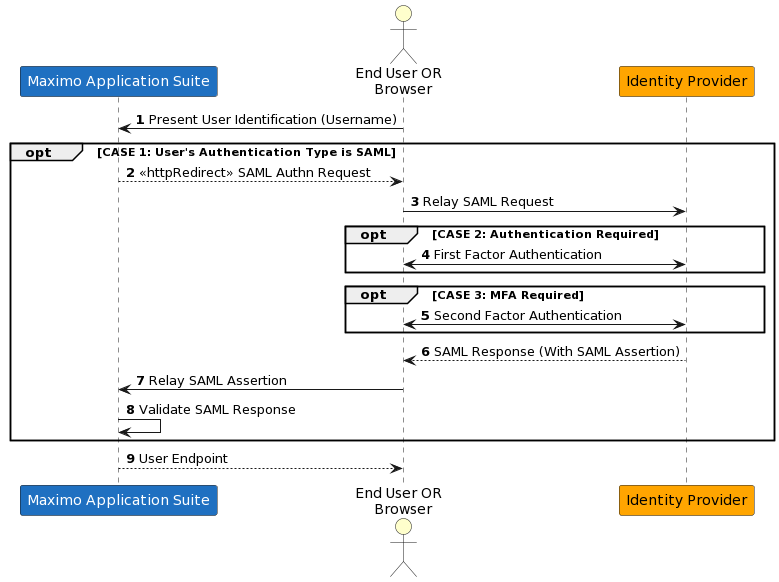
After the Maximo user enters their username in the Maximo Application Suite login page, Maximo Application Suite initiates a SAML 2.0 SP-initiated authentication flow (Step 2 in the following image) if the user’s authentication type is SAML.
Step 4 and Step 5 are optional steps, depending on the presence of an active authentication session or the configured MFA policy.
In the end, Step 9 shows Maximo Application Suite redirecting to the user endpoint.
4b. IdP-initiated flow
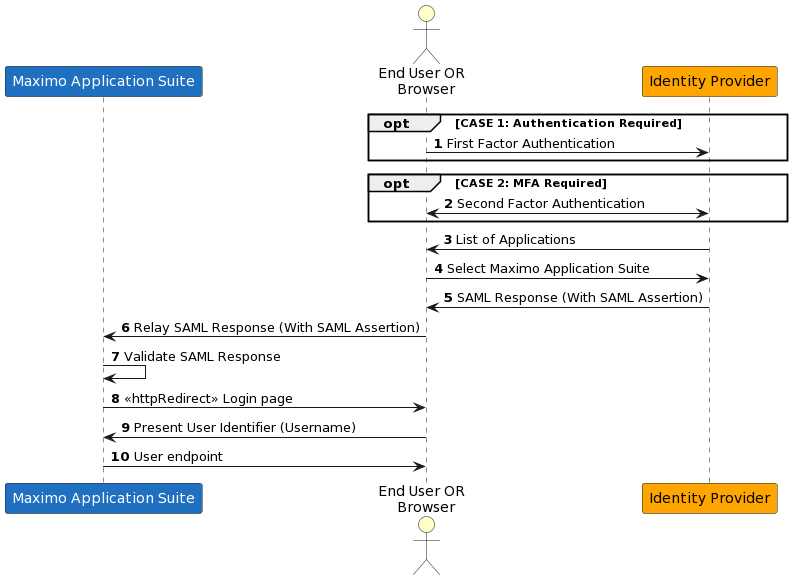
In an IdP-initiated flow, the user begins the authentication sequence with the identity provider.
Step 1 and Step 2 are optional steps, depending on the presence of the user’s active authentication session with the identity provider or the configured MFA policy.
Summary
Because stolen or compromised credentials are some of the most common causes of data breaches, you can implement single sign-on solutions by providing multifactor authentication with IBM Maximo Application suite. This article provided an overview for a successful SSO implementation with Maximo Application Suite, starting with the exploration of implementation choices and personas to be involved, followed by detailed implementation guidance covering the interaction flow.
Next Steps
Refer to IBM Support for visual walk-throughs of example setups of SAML configurations of selected identity providers with Maximo Application Suite. You can also learn how to configure single sign-on between Azure Active Directory and Maximo Application Suite.
Acknowledgment
The author would like to thank Alex Donateli, Andrew Foster, and Joao Paulo Karol Santos Nunes for reviewing the content for technical accuracy.