Blog post
Get started with IBM Wazi as a Service
Bringing IBM z/OS to the IBM Cloud with on-demand access to virtual server instances for development and testIBM recently announced IBM Wazi as a Service as a new service that brings IBM z/OS to the IBM Cloud with on-demand access to virtual server instances for development and test. After a successful closed experimental delivery stage in which a select group of sponsor customers kicked the tires and provided feedback, Wazi as a Service is finally here for everyone to dive in, explore, and use.
What is IBM Wazi as a Service?
In a nutshell, Wazi as a Service gives you the ability to spin up many z/OS development systems in the IBM Cloud that are protected by a Virtual Private Cloud (VPC) and access them securely with the Wazi family of editors and DevOps tools. These Virtual Server Instances (VSIs) can be created with IBM’s Wazi as a Service Development and Test z/OS image, which comes fully loaded with a wide range of current and next-generation tools and technologies for developers. It includes the latest compilers, Remote Systems Explorer, Z Debug, Dependency-Based Build, Python to run Ansible playbooks using IBM’s collections for z/OS, and much more.
How do I get started with it?
To help new users get started quickly, we created a set of tutorials and samples that allow you to spin up a development environment in a few minutes and dive right in. These tutorials also allow you to explore new ways of working that align closely with today’s cloud-native development best practices. This means you can work entirely in a web browser with a range of tools including editors (powered by Red Hat CodeReady Workspaces) that run in the cloud and are centrally managed, which frees you up from configuring and provisioning physical development machines in your organization.
The diagram below shows typical workflows that you can explore with our tutorials and samples. You can start these as a single user, but the diagram also illustrates the roles involved once you start scaling this up and provisioning VSIs for larger teams in your development organization.
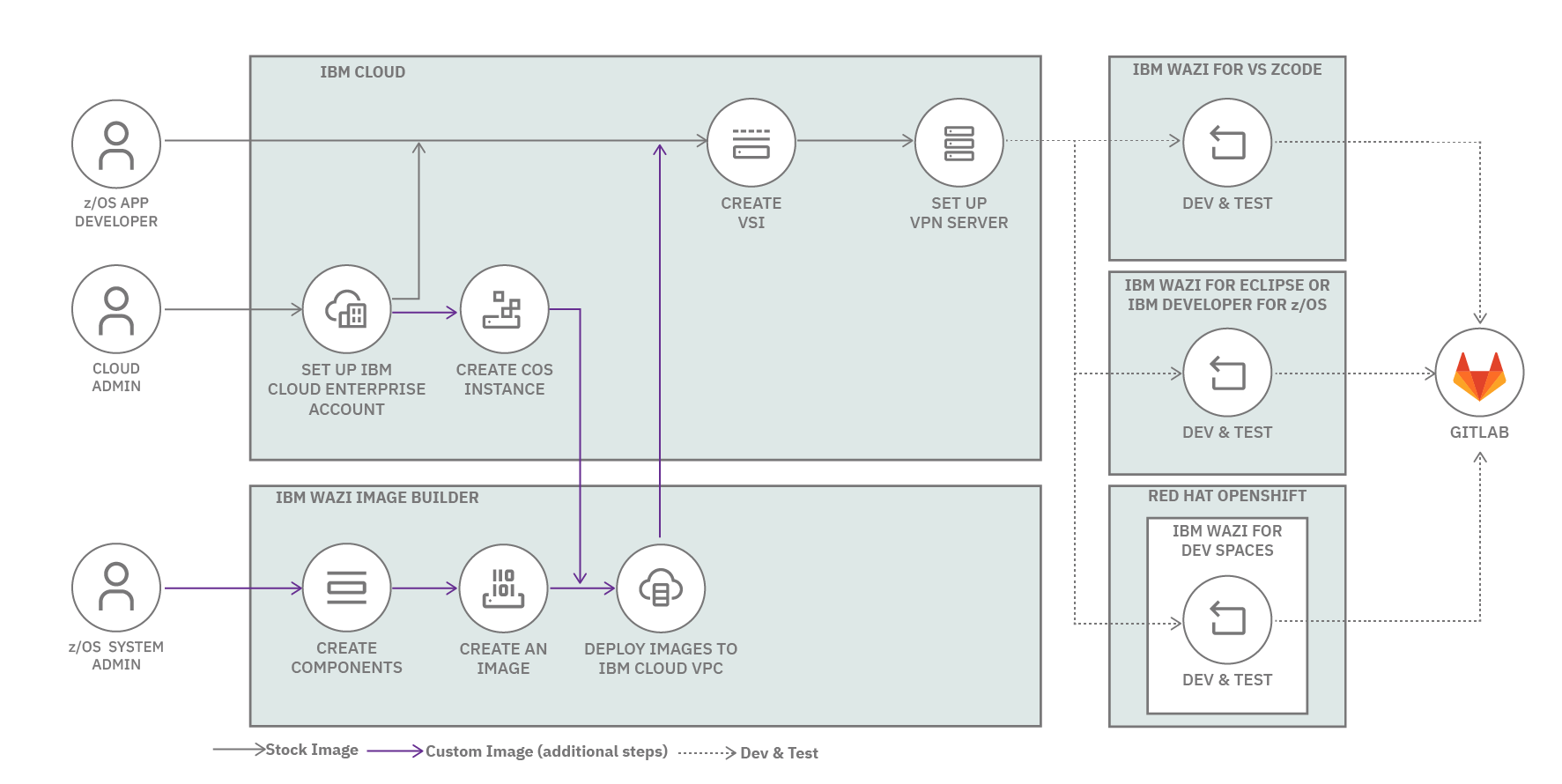
The upper workflow represents the initial exploration phase of using the Wazi image to deploy VSIs after creating accounts and configuring access to a VPC. You then have the choice of editor based on your preferred style of working, including using Microsoft Visual Studio Code (VS Code) with Z Open Editor, Eclipse with Wazi for Eclipse, or IBM Developer for z/OS. You can also stay entirely in the cloud and a browser with Wazi for DevSpaces, a special variant of Red Hat CodeReady Workspaces that’s customized for z/OS Enterprise Application development.
Create a development workflow and a custom Wazi image
Our tutorials then cover an entire development workflow that starts with preparing the z/OS VSI for your development project by configuring your editor and z/OS tools in a semi-automated way using Ansible playbooks. These playbooks generate connections to z/OS using Zowe, copy your sources over and perform full builds, as well as copy test data to run the application. They also generate debug launches and set up user builds for you with IBM Dependency Based Build. You are then ready to edit your source code, re-build it, debug it, and run it with simple commands and editor gestures.
After you’ve worked with our Wazi image, the workflow in the bottom part of the diagram shows how you can then produce your own custom z/OS images that address your development organization’s special needs using Wazi Image Builder. This toolkit allows you to build an image locally and then upload it securely to your VPC and cloud object storage.
Want to learn more?
If you prefer a more hands-off approach for seeing what these workflows look like, then we have recorded an entire series of small video clips that cover everything outlined above.
Another resource that covers Wazi as a Service and our solutions for developing on z/OS in the cloud is my presentation at this year’s APAC IBM zSystems Forum in May 2022, which provided a one-hour deep dive and demo, as well as my 30-minute conference presentation at this year’s Eclipse Cloud IDE Day, Mainframe Development in the Cloud.
Visit our Technical documentation to dive right in.
IBM Wazi as a Service opens up many new opportunities for z/OS to be a critical part of your hybrid cloud. Use the links below to empower yourself, build your skills, and accelerate cloud innovation by removing barriers to productivity.
Resources
- Statement of Direction for IBM Wazi as a Service
- IBM Cloud extends the IBM Z portfolio to z/OS Dev & Test and Linux on Z
- Virtual private cloud architecture
- IBM Wazi as a Service documentation overview
Videos: