Tutorial
Modernize monolithic applications with AI-assisted workflows using IBM Bob and reusable AI skills
Use context engineering and AI coding assistants to discover apps, identify microservices, and generate production-ready codeIn this tutorial, you build an AI-assisted brownfield modernization workflow that combines a context engineering platform, reusable AI skills, and IBM Bob.
You learn how to ingest application artifacts into a governed knowledge platform, construct a knowledge graph that captures relationships between business capabilities, requirements, code, APIs, database objects, integrations, and deployment assets, and use this context to guide AI-assisted modernization activities.
The workflow demonstrates how AI skills can analyze an existing application, identify candidate microservices using Domain-Driven Design (DDD) principles, generate specification-driven design artifacts, and implement production-ready microservices while adhering to organizational architecture, security, and coding standards.
The examples throughout this tutorial use Shopizer, an open source Java and Spring Boot e-commerce application, to demonstrate the workflow. Shopizer is used solely as an example application to illustrate how application knowledge can be discovered, organized into a knowledge graph, and consumed by reusable AI skills. The workflow itself is independent of any specific programming language, framework, or target architecture. The same workflow can modernize applications written in different languages and generate microservice implementations using different target technology stacks through the appropriate Developer Skill and organizational coding standards.
By the end of this tutorial, you will have a repeatable framework for building a governed context engineering platform and AI-assisted workflow for brownfield microservice modernization.
Architecture
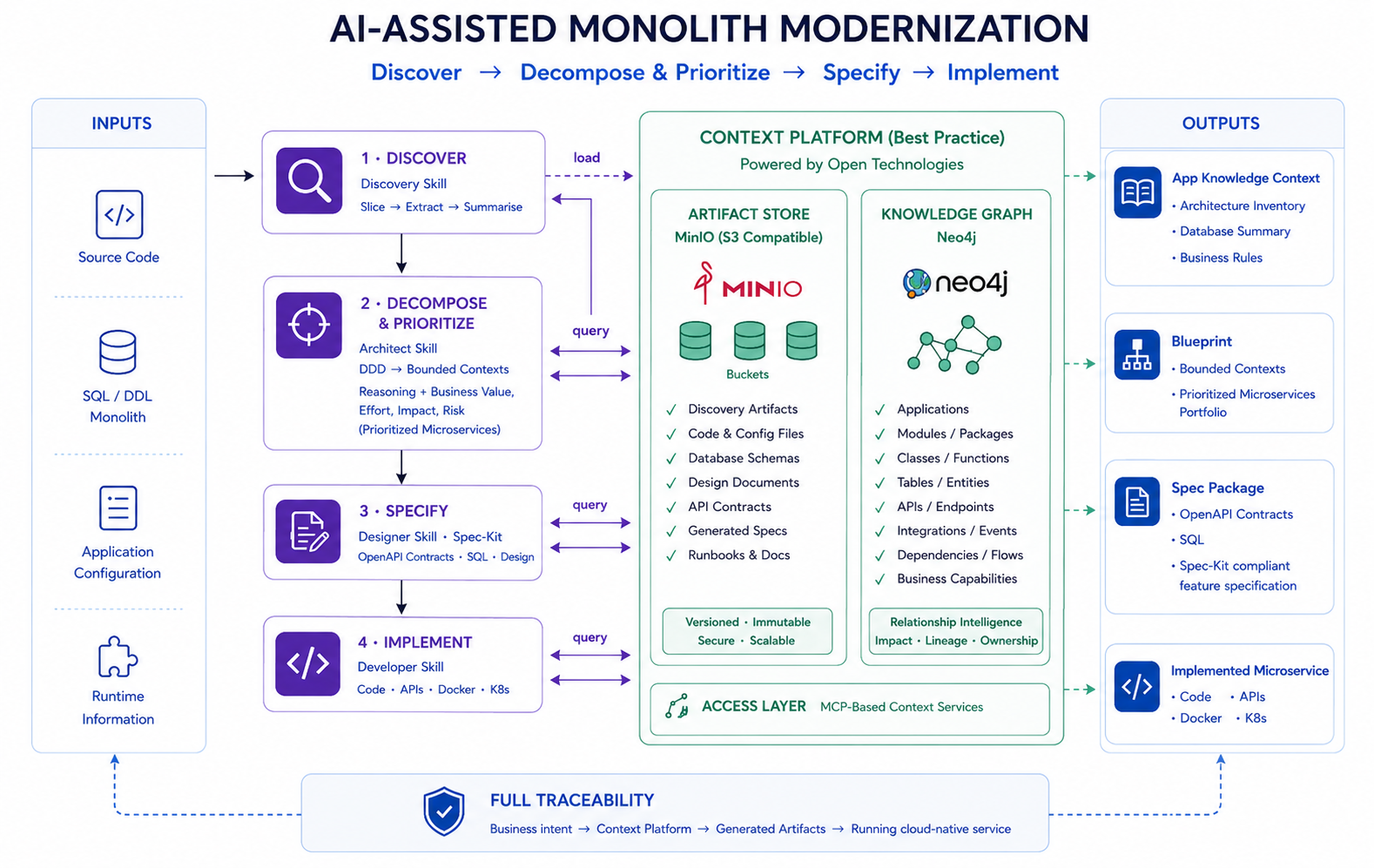
This solution combines a context engineering platform, a Neo4j knowledge graph, reusable AI skills, and IBM Bob to support a governed, AI-assisted brownfield modernization workflow.
Application artifacts—including source code, API specifications, database schemas, configuration files, business rules, documentation, integration definitions, and organizational standards—are analyzed and stored in MinIO and transformed into a Neo4j knowledge graph. The graph captures relationships between business capabilities, requirements, code components, APIs, database objects, integrations, deployments, documentation, and organizational standards, providing a structured representation of the application.
The knowledge graph and supporting artifacts are exposed through Model Context Protocol (MCP) servers, enabling IBM Bob to retrieve application context and organizational guidance throughout the modernization lifecycle. MCP provides a standardized mechanism for AI assistants to access external knowledge, tools, and services.
Reusable AI skills guide each stage of the workflow. The Application Discovery skill analyzes the existing application and constructs the knowledge graph. The Microservices Architect skill uses graph-based evidence together with Domain-Driven Design principles to identify bounded contexts and candidate microservices. The Microservices Designer skill generates design artifacts, including OpenAPI specifications and database ownership models. Finally, the Microservices Developer skill implements production-ready microservices that conform to the organization's architectural principles, security requirements, and coding standards, collectively referred to as the organization's constitution.
The workflow follows a specification-driven development approach. Functional specifications, implementation plans, and task definitions are generated and reviewed before implementation begins. Human-in-the-Loop (HITL) checkpoints enable architects and domain experts to validate key architectural decisions and generated artifacts before AI-assisted implementation proceeds.
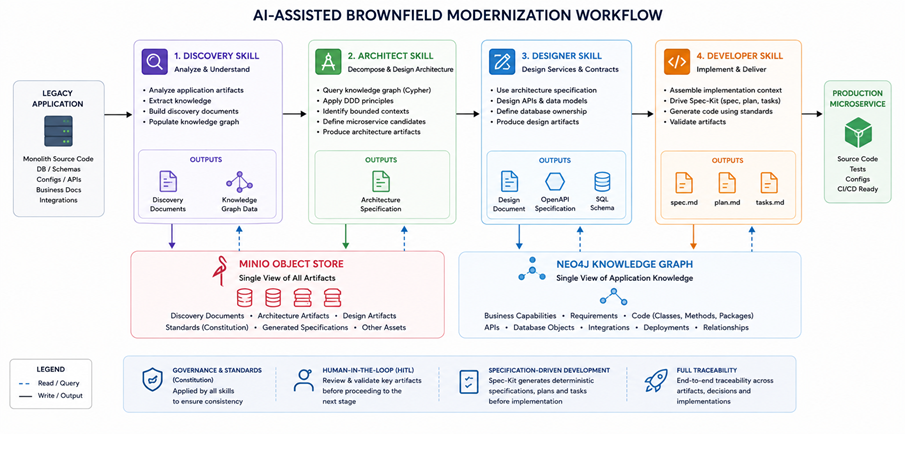
How the components interact during modernization
The following diagram shows how the four AI skills, MinIO object store, and Neo4j knowledge graph interact across the full modernization workflow — from ingesting the legacy application through to delivering a production-ready microservice.
Prerequisites
Install the following software:
| Component | Version | How used |
|---|---|---|
| IBM Bob | 2.0 | AI coding assistant that executes the reusable AI skills and orchestrates the AI-assisted modernization workflow throughout this tutorial. |
| Neo4j Community Edition | 5.26 LTS or later | Knowledge graph repository for storing application discovery facts (classes, methods, tables, bounded contexts, and relationships). Note the DB URL and credentials for use when configuring the MCP server. |
| MinIO Community Edition | Latest available version | Object store for modernization artifacts, discovery documents, and the organization's coding-standards constitution |
| Spec-Kit CLI | 0.9.4 | Specification-driven development tool that generates and manages implementation specifications (spec.md), implementation plans (plan.md), and task definitions (tasks.md). IBM Bob uses these artifacts to drive deterministic, specification-based implementation.Install with the command-line interface (CLI): pip install specify==0.9.4 |
| Node.js | 22 LTS or later | Runtime used only to execute the Neo4j and MinIO MCP servers that expose contextual knowledge to IBM Bob. |
Steps
Step 1. Set up your IBM Bob workspace
Prepare the development workspace by downloading the sample application, installing the reusable AI skills, and initializing the Spec-Kit project used throughout the tutorial.
Clone the Shopizer repo locally.
This legacy application contains the following artifacts:
- Application source code
- Configuration files
- Database schema and data definition language (DDL) scripts
Download the following skill files from the tutorial's GitHub repo, and copy them into the legacy application workspace in the
.bob/skillsdirectory.skills-app-discovery-enhanced/SKILL.md— Analyzes the monolithic application's source code, database schema, and integrations to produce structured discovery documents and populate a Neo4j knowledge graph.skills-microservices-architect/SKILL.md— Queries the knowledge graph using graph-first evidence to identify bounded contexts, propose candidate microservices, and generate technology-agnostic architecture specifications and governance artifacts.skills-microservices-designer/SKILL.md— Translates approved architecture specifications into technology-independent design artifacts — OpenAPI contracts, SQL schemas, design documents, and design review guidelines — enriched with Neo4j graph evidence.skills-microservices-developer/SKILL.md— Orchestrates GitHub Spec Kit to generate and validate functional specifications, implementation plans, and production-ready microservice code from approved architecture and design artifacts, enforcing the organization's coding standards throughout.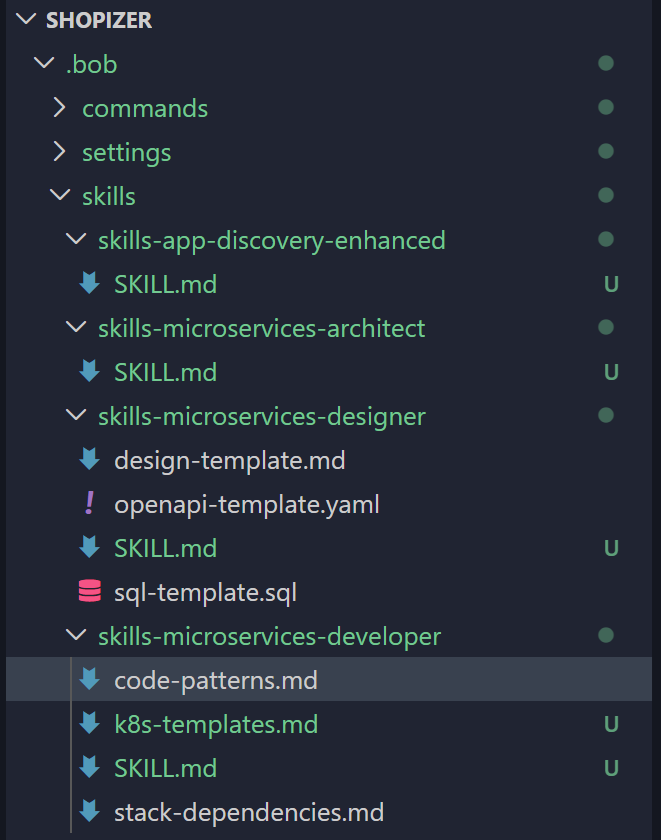
Initialize the Spec-Kit CLI in your legacy project root:
 cd <your-project-root>
 specify init  --integration bob --script bash --branch-numbering sequential --here
On Windows, replace
--script bashwith--script ps.A
.specify/folder (spec-kit state and templates) and a.bob/commands/folder is created that contains 10 slash commands. To verify, type/speckitin the Bob chat window, and all 10 commands should appear in the autocomplete list.
Step 2. Set up the context engineering platform
Set up the foundational components required for the modernization workflow.
Download the context engineering platform code from the tutorial's repo:
 git clone --branch master https://github.com/IBM/ai-assisted-modernization.git
 cd <Git Repo downloaded folder>
In IBM Bob IDE, open Settings > MCP. Click the plus sign to add an MCP server, and then click the Open Configuration File button. The
mcp-config.jsonfile opens.
In a terminal, install Node.js dependencies for the Neo4j MCP server by running
npm installin the/mcp-server/neo4j-mcp-serverdirectory. Then, configure the Neo4j MCP server by adding the following snippet in themcp-config.jsonfile, updating the credentials to match your Neo4j instance:{ "mcpServers": { "neo4j-mcp": { "type": "stdio", "command": "node", "args": [ "C:/ai-assisted-modernization/mcp-server/neo4j-mcp-server/index.js" ], "env": { "NEO4J_URI": "neo4j://localhost:7687", "NEO4J_USERNAME": "<your-neo4j-username>", "NEO4J_PASSWORD": "<your-neo4j-password>", "NEO4J_DATABASE": "neo4j" }, "alwaysAllow": [ "write-cypher", "read-cypher", "get-schema" ] } } }Verify that the server is running. In the IBM Bob chat, invoke the
get-schematool. A successful response returns the list of node labels, relationship types, and property keys from your Neo4j database. If the call fails, confirm that Neo4j is running on port7687and that the credentials in the snippet are correct.In a terminal, install Node.js dependencies for the MinIO MCP server by running
npm installin the/mcp-server/minio-mcpdirectory. Then, compile the TypeScript source by runningnpm run build. Finally, configure the MinIO MCP server by adding the following snippet in themcp-config.jsonfile, updating the credentials to match your MinIO instance:{ "mcpServers": { "minio": { "type": "stdio", "command": "node", "args": [ "C:/ai-assisted-modernization/mcp-server/minio-mcp/build/index.js" ], "env": { "MINIO_ENDPOINT": "localhost", "MINIO_PORT": "9000", "MINIO_ACCESS_KEY": "<your-minio-access-key>", "MINIO_SECRET_KEY": "<your-minio-secret-key>", "MINIO_USE_SSL": "false" }, "disabled": false, "alwaysAllow": [], "disabledTools": [] } } }Verify that the server is running.

In the IBM Bob chat, invoke the
list_bucketstool. A successful response returns an empty list or your existing buckets. If the call fails, confirm that MinIO is running on port9000and that the access key and secret key in the snippet are correct. The MinIO web console is available athttp://localhost:9001to confirm the service is live.In IBM Bob, switch to Agent Mode and try a few test prompts to validate that each MCP server is responding correctly. For example, try these prompts in the Bob chat:
- Neo4j MCP — "Get the schema of the knowledge graph" or "List all bounded contexts in the graph"
- MinIO MCP — "List all buckets" or "List objects in the shopizer bucket"
In MinIO, create a bucket named
coding-standards, and then upload all your coding standard documents into the bucket.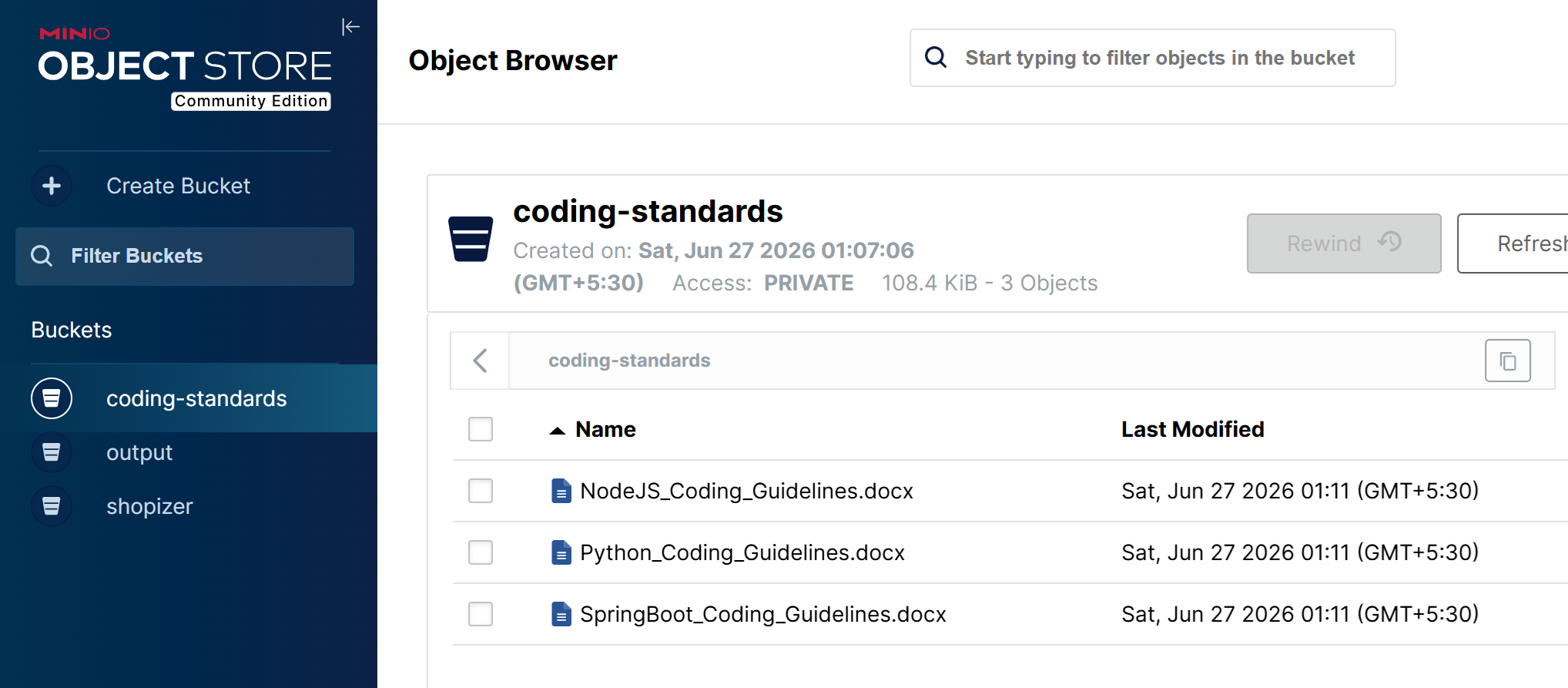
Your modernization environment is fully configured and ready for you to run the persona-specific skills.
Step 3. Analyze the monolithic legacy application
The Discovery (skills-app-discovery-enhanced) skill analyzes the monolithic application using source code, configuration files, and database scripts and produces structured knowledge in two forms:
- Discovery documents in Markdown format, which cover the application inventory, business rules, database schema, external integrations, and dependency map.
- Knowledge graph, which is the Neo4j graph that is populated with typed nodes (
Class,Method,Table,BoundedContext,Technology,DesignPattern) and relationships (OWNS_DATA,WRITES_TO,FOREIGN_KEY,DEPENDS_ON,INVOKES,INTEGRATES_WITH). The knowledge graph serves as the authoritative source of architectural facts.
In the Bob chat, run the Discovery skill against the Shopizer legacy application.
Use the skills-app-discovery-enhanced skill to analyze the shopizer codebase and generate discovery artifacts
These artifacts are uploaded to MinIO for use by the architect and the designer skills.
For the Shopizer example, the Discovery Agent produces a knowledge graph that contains 8 bounded contexts, 23 database tables, 18 Java classes, 26 methods, and 12 external technologies. The syntax tree from Neo4j serves as input to the architect and design skills.

Step 4. Decompose the legacy application
The Microservices Architect (skills-microservices-architect) skill runs a graph-first reasoning pipeline where the Neo4j knowledge graph serves as the primary evidence source.
Rather than asking the LLM to infer relationships from source code and documents, the Architect skill first executes targeted Cypher queries against Neo4j to retrieve objective architectural evidence. These graph-derived facts are then combined with the discovery documents and Domain-Driven Design (DDD) principles to identify candidate microservices and bounded contexts.
The workflow performs the following activities:
In IBM Bob chat, run the Microservices Architect skill against the populated knowledge graph and discovery documents.
Use the skills-microservices-architect skill to decompose shopizer into microservices.
The Microservices Architect skill produces these key artifacts:
Graph evidence summary (
graph-evidence-summary.md), which documents the results of all Neo4j Cypher queries used as the evidence base for every architectural decision, including aggregate root candidates, shared table risks, cross-context coupling scores, and shared service extraction criteria.
Microservices portfolio (
microservices-catalog.csv), which is a catalog mapping each service to its bounded context, owned tables, aggregate roots, business rules, external integrations, and upstream/downstream dependencies.
The microservices portfolio includes graph-derived evidence for each service:
- Owned tables (from Neo4j OWNS_DATA relationships)
- Dependency scores (coupling metrics from graph)
- Transaction boundaries (from graph analysis)
- Aggregate roots (from foreign key analysis)
- Upstream/downstream services (from cross-context dependencies)
- Duplication metrics (for shared services)
Bounded context map (
bounded-context-map.md), which is a C4 context diagram showing the relationships between bounded contexts, including upstream/downstream dependencies, DDD integration patterns (Anti-Corruption Layer, Customer/Supplier, Published Language, Conformist), and coupling scores.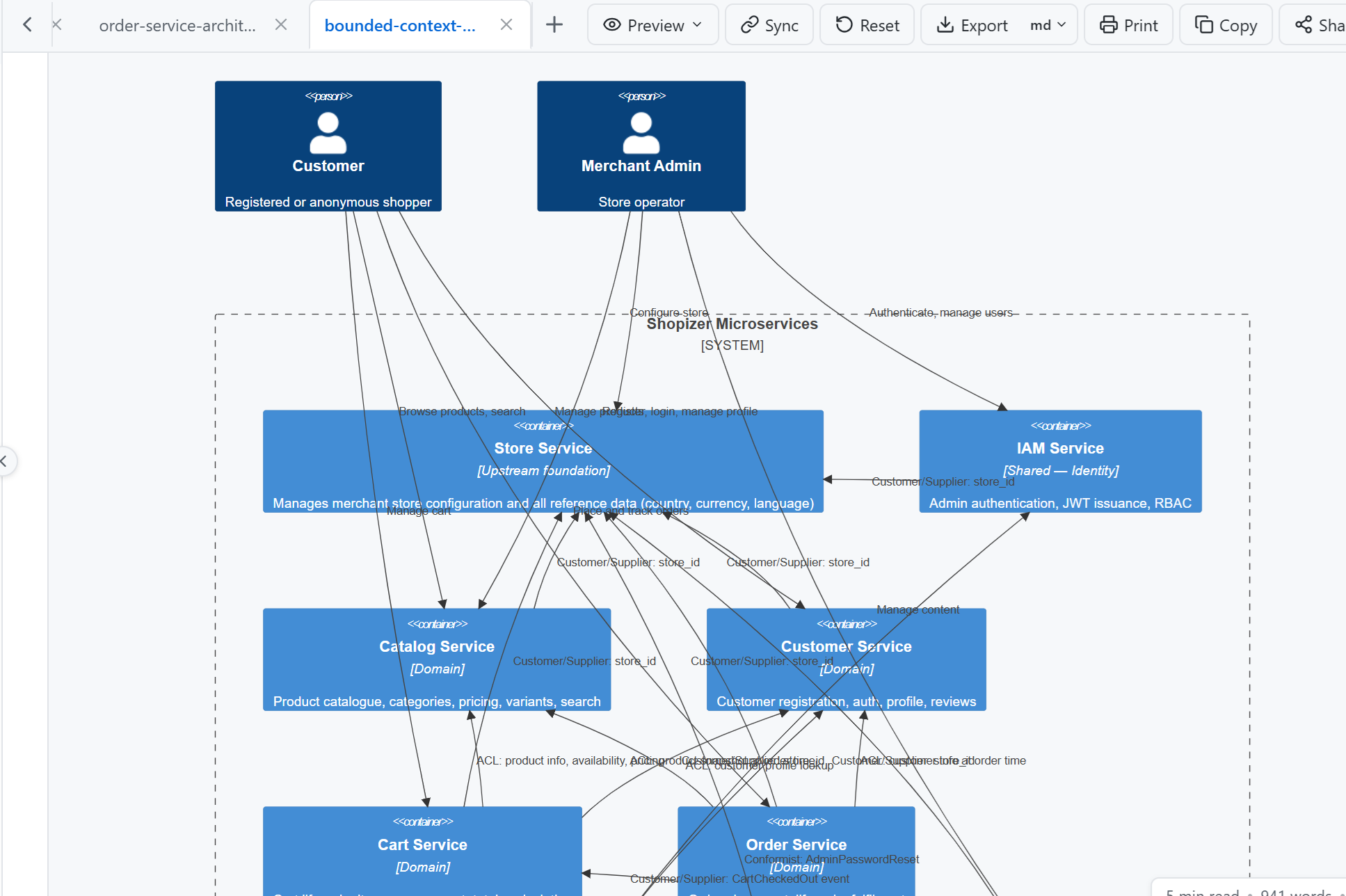
Architecture specifications (
output/architecture/{service}-architecture.md), which is a technology-agnostic architectural contract for each service. Each specification defines the service's bounded context, aggregate roots, owned database tables, business rules, event contracts, API responsibilities, data ownership rules, transaction boundaries, NFRs, architectural constraints, and the graph evidence rationale behind the design. This is the primary input to the Designer skill.
Architecture governance guidelines (
output/governance/{service}-spec-review-guidelines.md), which define the architectural acceptance criteria for each service across eight rule categories: Business Alignment, Domain Model, Data Ownership, Service Relationships, Events, APIs, NFRs, and Architectural Constraints. These guidelines are used to validate that any implementation specification preserves the approved architecture before development proceeds.Data ownership matrix (
data-ownership-matrix.md), which maps every database table to exactly one owning service, flags shared-table risks and cross-context access patterns requiring resolution, and documents the foreign key relationships across service boundaries.Migration roadmap (
migration-roadmap.md), which defines the Strangler Fig extraction sequence ordered by dependency score (lowest coupling first), covering per-service extraction steps, data migration strategy, and rollback procedures.
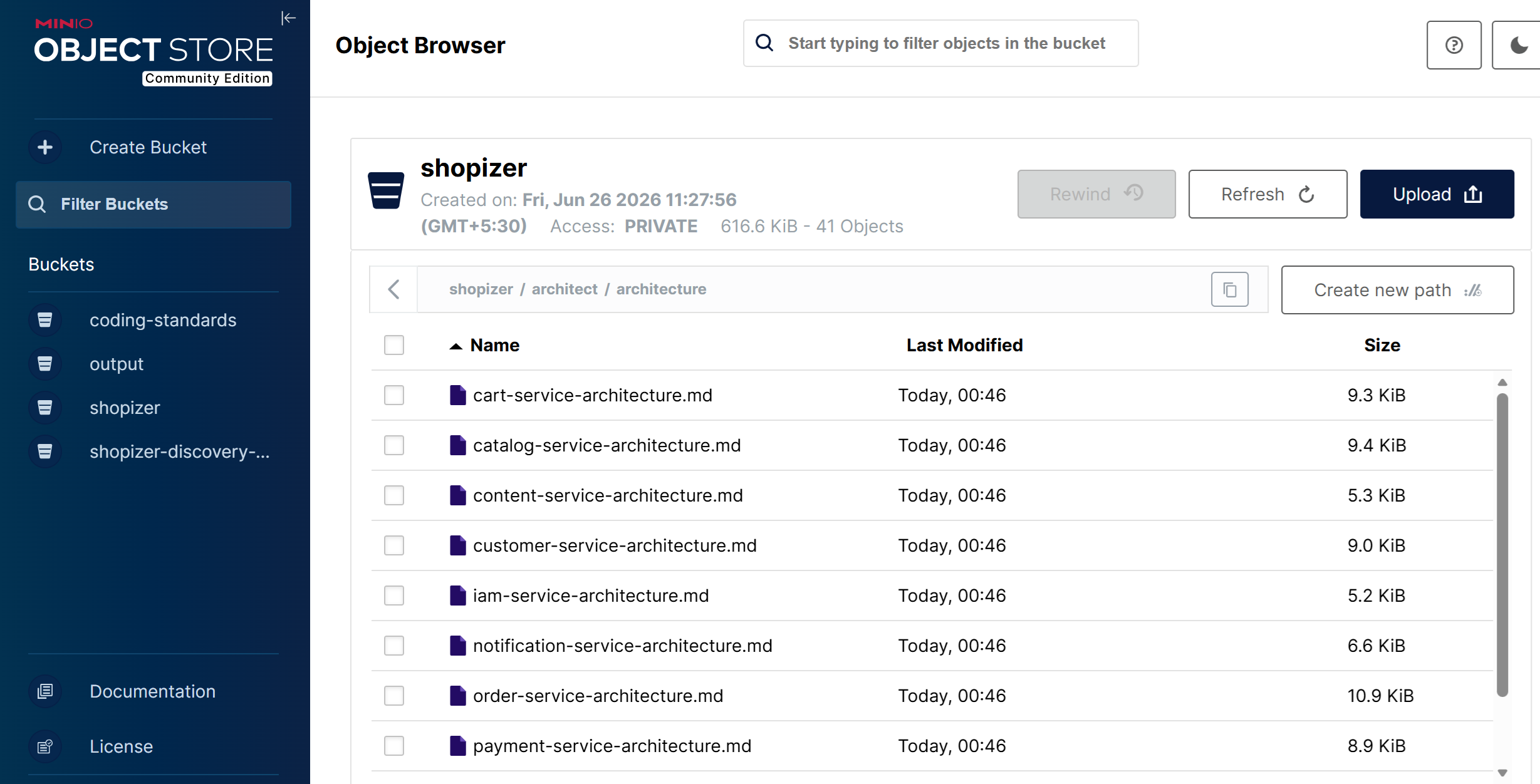
All output files are uploaded to the MinIO shopizer bucket under the architect/ prefix for use by subsequent agents.

For the Shopizer example, the Architect Agent identifies 10 microservices covering catalog management, order processing, payment, shopping cart, customer identity, store configuration, content management, tax and shipping, access management, and notifications. The migration roadmap sequences extraction across four waves, starting with the lowest-coupling foundation services (store-service, iam-service, content-service) before tackling the most widely-referenced domain service (catalog-service) in Wave 2.
Important: Before running the Designer skill, review and approve the Architecture Specification ({service}-architecture.md) for each service. This is the single Human-in-the-Loop (HITL) checkpoint in the modernization workflow and the only point where you can shape what gets built before design and code generation begin. Use the Spec Review Guidelines ({service}-spec-review-guidelines.md) as your validation checklist. Since all OpenAPI contracts, SQL schemas, and implementation artifacts in the following steps are derived directly from these architecture specifications, errors caught at this point are significantly cheaper to fix than those discovered after design has been generated. The Spec Review Guidelines are also used in Step 6, where the Developer skill validates the generated implementation specification against them before code generation begins.
The architecture specification is the source of truth for everything that follows. Errors or omissions propagate forward into design and code automatically.
For each service, verify:
- The service has a single, well-scoped capability (no cross-context scope creep)
- All applicable business rules from
BUSINESS_RULES.mdare explicitly stated - Upstream/downstream relationships and event contracts are correct
- Data ownership is exclusive — no tables claimed by more than one service
- NFRs such as JWT authentication, correlation ID propagation, retry policies, and timeout values are explicitly stated, not assumed.
Step 5. Generate microservice design artifacts
The Microservices Designer (skills-microservices-designer) skill runs a graph-enriched design pipeline:
- Retrieves the architecture specifications and other artifacts from MinIO (generated by the Architect skill).
- Queries Neo4j to enrich each service design with bounded context business rules, method signatures, recommendation scores, and cross-context dependencies.
- Generates technology-independent design artifacts from the approved architecture specifications.
In IBM Bob chat, run the Microservices Designer skill for each microservice.
Use the skills-microservices-designer skill to design the catalog-service microservice.
For each service, the Microservices Designer skill produces these design artifacts:
OpenAPI specification (
output/swagger/{service}-openapi.yaml), which is the complete, technology-independent API contract derived from the architecture specification and enriched with graph evidence. Includes JWT Bearer security,X-Correlation-IDheader, timeout and retry policies, health endpoints, error scenarios derived from business rules, and evidence traceability annotations on every endpoint.
SQL schema (
output/sql/{service}-schema.sql), which defines the service's owned database tables, derived from the architecture specification's data ownership rules and enriched with graph evidence. Includes ownership boundaries, audit columns,{schema}_audit_logtable,{schema}_outboxtable for event-driven consistency, and business rule constraints. No cross-service foreign keys are permitted.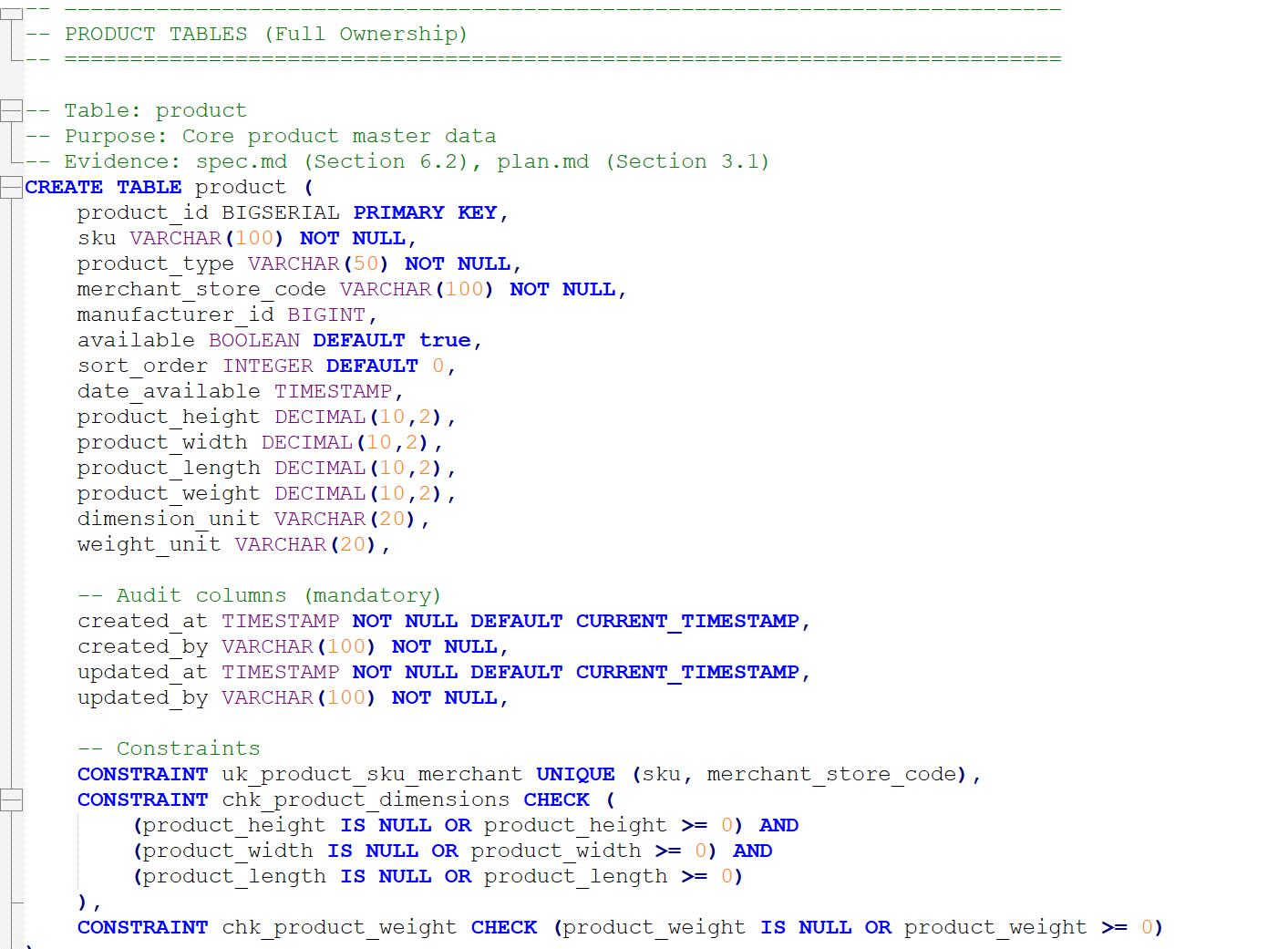
Design document (
output/design/{service}-design.md), which is a 14-section technology-independent design document covering service overview, business context, architecture, API design, data design, integration design, event-driven architecture, NFRs, deployment strategy, testing strategy, migration strategy, open questions, risks, and evidence traceability.
Design review guidelines (
output/governance/{service}-design-review-guidelines.md), which define the design acceptance criteria across seven rule categories: API Design, Data Design, Integration Design, NFRs, and Design Constraints. These guidelines are used in Step 6, where the Developer skill validates the generated implementation plan against them before code generation begins.
All output files are uploaded to the MinIO shopizer bucket under the designer/ prefix for use by the Developer skill.

For the Shopizer legacy application, graph evidence enriches the catalog-service and payment-service design artifacts:
- Business rules from the graph (for example, "Transactions are immutable") are enforced as SQL
CHECKconstraint comments and OpenAPI 400/422 error scenarios. - Method signatures from graph queries are used to derive OpenAPI
operationIdvalues and request/response body shapes. - Bounded context recommendation scores influence migration phase ordering in the design document.
- Cross-context dependencies guide upstream/downstream integration design and Saga pattern recommendations.
Step 6. Implement microservices from approved specifications
The Microservices Developer (skills-microservices-developer) skill is an orchestration skill that prepares an enterprise implementation context, drives GitHub Spec Kit through a specification-first generation pipeline, and validates every generated artifact against the approved architecture and design. GitHub Spec Kit is the sole owner of all source code, project structure, test, and deployment manifest generation.
In IBM Bob chat, run the Microservices Developer skill for each microservice, specifying the target technology profile.
Use the skills-microservices-developer skill to implement the catalog-service using Java SpringBoot.
The implementation technology is determined by the Technology Profile you specify. The workflow itself remains unchanged regardless of the target technology.
Phase 1 — Load standards and retrieve approved artifacts
Before any generation begins, the Developer skill loads the organization's coding standards constitution from the coding-standards bucket in MinIO. MinIO is the authoritative source and standards are loaded dynamically at runtime, ensuring generated code always reflects the latest organizational guidelines rather than hardcoded defaults.
It then retrieves all approved artifacts from MinIO, in precedence order:
| Artifact | MinIO path | Role in implementation |
|---|---|---|
| Architecture Specification | architect/architecture/{service}-architecture.md |
Authoritative for what to build |
| Architecture Governance Guidelines | architect/governance/{service}-spec-review-guidelines.md |
Validates spec.md in Phase 2 |
| Design Document | designer/design/{service}-design.md |
Authoritative for how to design |
| OpenAPI Specification | designer/swagger/{service}-openapi.yaml |
API contract |
| SQL Schema | designer/sql/{service}-schema.sql |
Data contract |
| Design Review Guidelines | designer/governance/{service}-design-review-guidelines.md |
Validates plan.md in Phase 2 |

If any artifact is missing or unresolvable, execution stops and every gap is reported before proceeding.
Phase 2 — Generate and validate Spec Kit artifacts
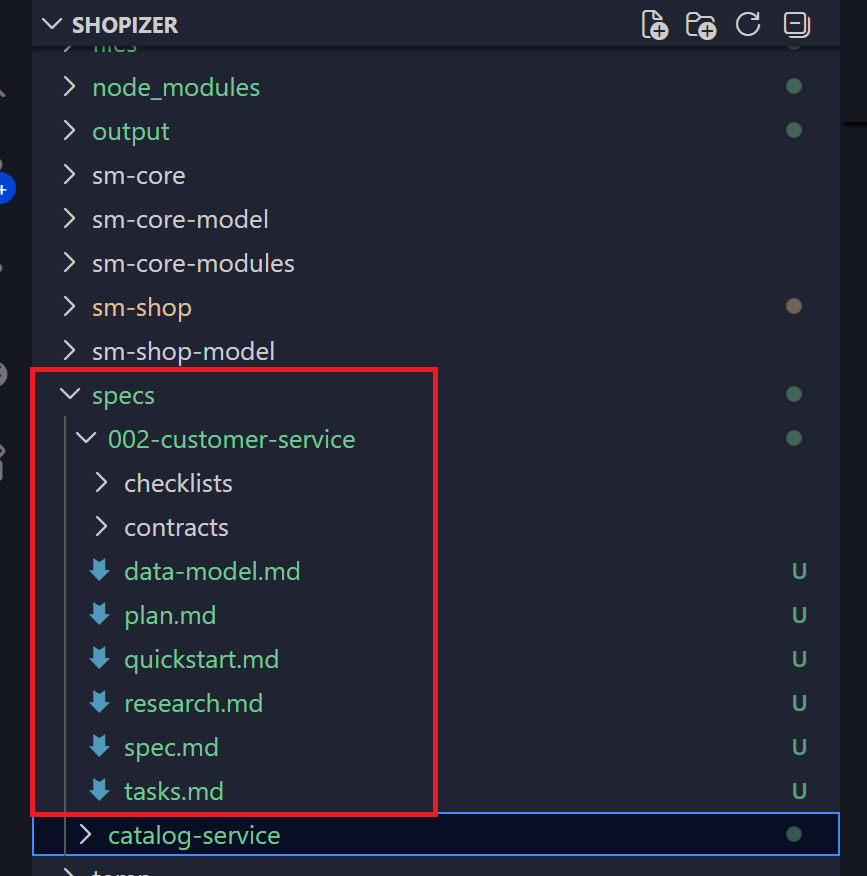
GitHub Spec Kit is introduced at this phase. The Developer skill assembles an Implementation Context from all retrieved artifacts and enterprise standards, then drives Spec Kit through three sequential commands. Each command's output is validated against the governance artifacts from Steps 4 and 5 before the next command runs.
| Spec Kit command | Output | Validated against | Validation fails |
|---|---|---|---|
/speckit-specify |
spec.md — functional specification |
Architecture Governance Guidelines (Step 4): business capability, bounded context, aggregate roots, business rules, event contracts, APIs, data ownership, NFRs | Improve Implementation Context, re-invoke /speckit-specify |
/speckit-plan |
plan.md — implementation plan |
Design Review Guidelines (Step 5): API representation, SQL model, integration design, NFRs, security, observability, deployment, Technology Profile | Improve Im**plementation Context, re-invoke /speckit-plan |
/speckit-tasks |
**tasks.md — sequenced task breakdown |
Completeness: every functional requirement, business rule, API, integration, NFR, security, observability, testing, and deployment task present; tasks in logical dependency order | Improve Implementation Context, re-invoke /speckit-tasks |
No Spec Kit artifact is ever edited directly. Generation iterates until all three artifacts pass validation.
Phase 3 — Generate implementation with /speckit-implement
Once all three Spec Kit artifacts pass validation, the Developer skill invokes /speckit-implement with the selected Technology Profile. GitHub Spec Kit generates the complete microservice implementation in the task order defined by tasks.md:
- Source code — domain, application, persistence, and API layers following the organization's layering conventions
- API implementation — all endpoints from the OpenAPI specification, with JWT security,
X-Correlation-IDpropagation, structured logging, and retry and timeout policies applied - Unit and integration tests — unit test coverage ≥ 80%; integration tests covering all API endpoints, as required by the testing standards in the
coding-standardsbucket - Dockerfile — container build configuration
- Kubernetes or OpenShift manifests — deployment manifests, resource limits, scaling policies, and secret management as specified in the deployment standards and the Technology Profile
- README documentation — service overview, setup, API summary, configuration reference, and deployment guide
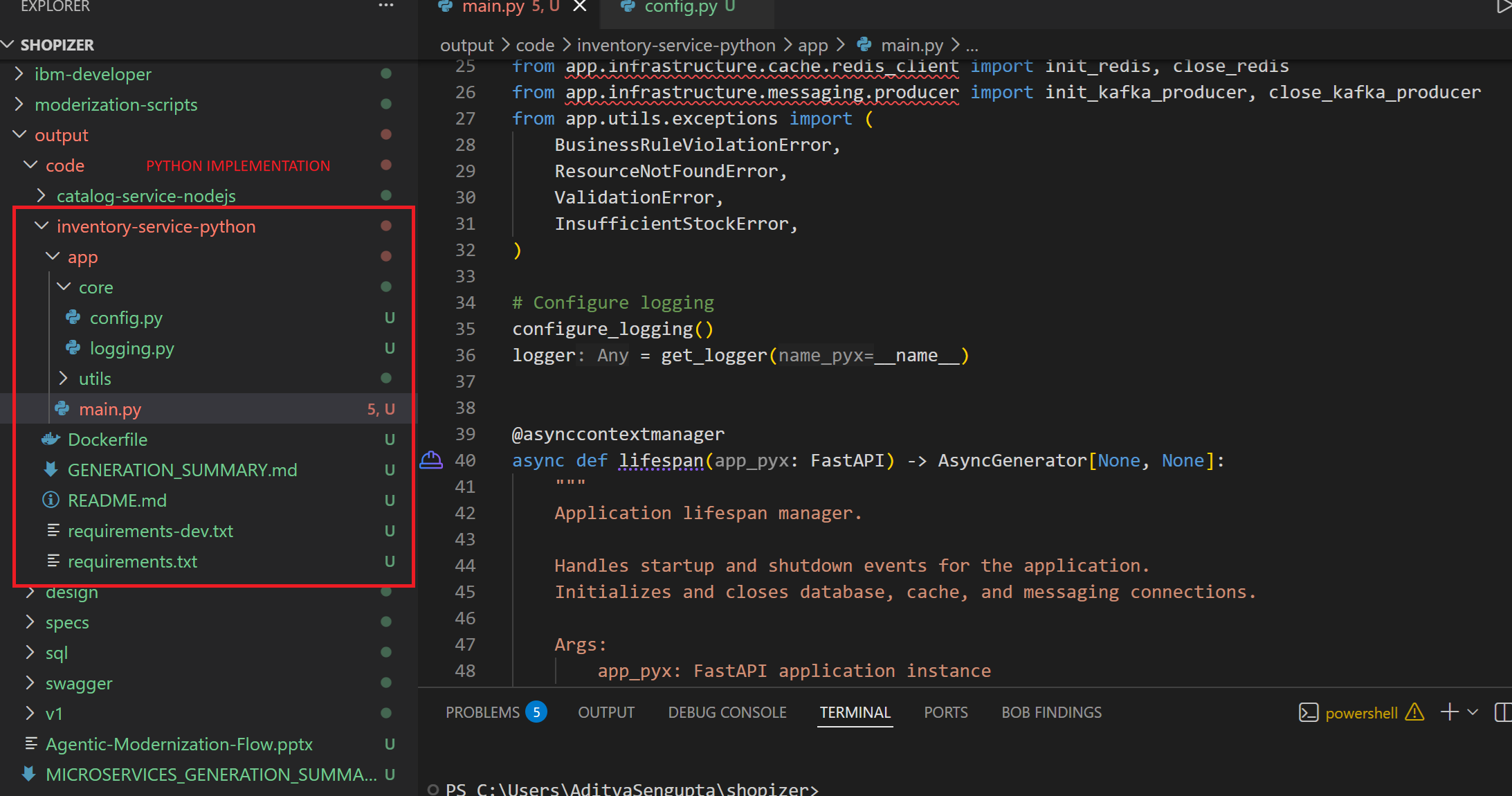
The same workflow generates production-ready implementations across any supported stack — Java Spring Boot, Java Quarkus, C#, ASP.NET Core, Python FastAPI, Go, and Node.js.
Here is the Developer agent output for Python:
Phase 4 — Validate implementation against standards
After /speckit-implement completes, the Developer skill runs a final compliance check before publishing:
| Category | Checks |
|---|---|
| Spec Kit coverage | All tasks.md tasks implemented; all spec.md requirements enforced · architecture conforms to plan.md; all business rules present in code |
| Enterprise standards | Naming, layering, and dependency rules; structured JSON logging with correlation IDs; JWT on all non-health endpoints; no hardcoded credentials; observability (metrics, tracing, health checks); unit coverage ≥ 80% |
| Traceability | Every class and method traceable to a task ID, requirement ID, and specification section; all artifacts traceable to Architecture Specification, Design Document, OpenAPI, SQL Schema, and Coding Standards |
If any check fails, the Implementation Context is improved, /speckit-implement is re-invoked, and validation repeats until compliant.
Before promoting the generated implementation into your development or deployment pipeline, review and validate that it satisfies the approved specifications, organizational coding standards, security requirements, and testing criteria. This engineering validation ensures that AI-generated implementations remain aligned with enterprise quality standards before being committed to source control or deployed.
Summary
In this tutorial, you learned how to build an AI-assisted application modernization workflow using IBM Bob, a context engineering platform, MCP servers, and persona-specific skills. You ingested application artifacts into a shared knowledge repository built on MinIO and Neo4j.
A central lesson of this tutorial is the role of the knowledge graph as the primary evidence source. By querying Neo4j before making architectural decisions, the Architect and Designer Agents produce specifications and designs backed by objective, code-derived facts and not by document inference. Graph-confirmed business rules flow directly into SQL constraints and OpenAPI error definitions, ensuring that the generated artifacts accurately reflect how the application actually behaves.
Using this contextual knowledge, you created a governed modernization process that enables AI agents to discover application domains, identify candidate microservices, generate specifications, and accelerate implementation. By combining organizational standards (the constitution), spec-driven development, and Human-in-the-Loop (HITL) reviews and approvals, you ensured that modernization decisions remain aligned with enterprise architecture and engineering practices.
The resulting framework provides a repeatable approach for modernizing monolithic applications while allowing architects and developers to remain in control of critical design and implementation decisions.
Next steps
The context platform should evolve alongside the applications it supports. As new microservices are generated, consider ingesting AI-generated specifications, architecture documents, API contracts, implementation artifacts, and operational documentation back into the context repository. This continuous feedback loop helps maintain context freshness and improves the quality of future modernization activities.
You can further enhance the solution by:
- Ensuring the Neo4j knowledge graph is fully populated with method-level relationships, which enables the complete set of graph evidence queries and produces more precise architectural decisions in future modernization runs.
- Creating additional persona-specific skills for testers and platform engineers.
- Enriching the Neo4j graph with runtime call data, test coverage metrics, and performance profiles so that future architectural decisions are informed by production behavior as well as static code analysis.
- Extending the constitution to enforce additional organizational standards such as observability frameworks, secrets management patterns, or data residency requirements.
By continuously enriching the context platform and expanding the skill catalog, organizations can establish a self-improving modernization ecosystem where every modernization wave contributes knowledge that accelerates future transformations.
Acknowledgements
The author would like to thank Tanmay Ambre for his contributions, guidance, and feedback in shaping the context engineering, modernization, and spec-driven development approach described in this tutorial.