Tutorial
Custom entity extraction using fine-tuned models
Get an introduction to IBM Watson NLP, and learn the process of fine-tuning models for entity extractionEntity extraction is a crucial component in making sense of unstructured data because it enables the identification of key pieces of information such as names of individuals and organizations, dates, prices, and facilities. With IBM Watson NLP, businesses can now easily extract entities using pretrained models, and even fine-tune the model to extract custom entities specific to their needs.
IBM Watson NLP is a versatile AI library that seamlessly integrates various components of IBM natural language processing (NLP) capabilities. It offers a standardized natural language processing layer, as well as a unified roadmap, architecture, and code stack that easily can be adopted across IBM products. By leveraging the capabilities of IBM Watson NLP, businesses can gain deeper insights into their data, enabling them to make more informed decisions and stay ahead of the competition.
The watson_nlp library is available on IBM Watson Studio as a runtime library so that you can directly use it for model training, evaluation, and prediction. The following figure shows the Watson NLP architecture.
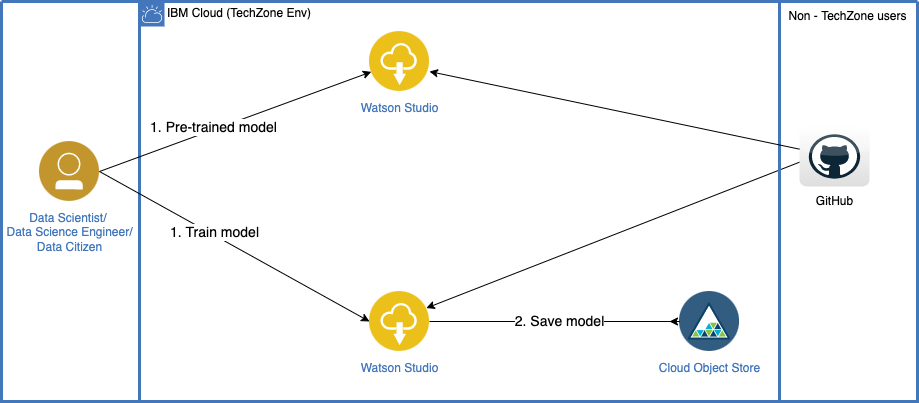
This tutorial provides an introduction to IBM Watson NLP, and guides you through the process of fine-tuning models for entity extraction.
Prerequisites
To follow the steps in this tutorial, you need:
- An IBMid
- A Watson Studio project
- A Python fine-tuned models notebook
- Your environment set up
Steps
The tutorial demonstrates the extraction of entities using generated training data for custom entities and how to fine-tune the models. This section focuses on entity extraction models for the following entities.
| Fine-tuned models |
|---|
| Language |
| Nationality |
| periodical_set |
| Festival |
| Colors |
Generate the data for custom entities
Step 1. Generate the sample data set
Generate the custom entities using a Faker library. The generated custom entities can be used to create a sentence that includes all of the relevant information. Then, you can use this sentence to fine-tune the model. The following code shows the data generation process for custom entities.
#Generate the dataset using faker
fake = Faker(locale='en_US')

def format_data():

    language = fake.language_name()
    nationality = fake.random_element(elements=('American', 'British', 'Canadian', 'Chinese', 'French', 'German', 'Italian', 'Japanese', 'Korean', 'Mexican', 'Russian', 'Spanish'))
    periodical_set = fake.random_element(['daily', 'biannually', 'hebdomadally', 'fortnightly', 'monthly', 'Weekly','quarterly', 'semiannually', 'yearly','every week', 'each afternoon', 'on Fridays', 'at night', 'on Wednesdays', 'on weekends'])
    festival = random.choice(["New Year","Super Bowl Sunday","Valentine day","Presidents day","St. Patrick","Easter","Memorial Day","Independence Day","Labor Day","Columbus Day","Halloween","Veterans Day","Thanksgiving","Christmas"])
    color = fake.color_name()

    text1= "Their %s friend recently started learning %s, they can prepare it %s, tomorrow they have holiday due to %s, we can go for drive in my %s car."%(nationality,language,periodical_set,festival,color)
    text2="my %s neighbour can speak %s, they can practice %s. We can meet them on %s with %s book."%(nationality,language,periodical_set,festival, color)

    text = random.choice([text1, text2])
Now that you have the sentence that you can use for fine-tuning the model, you must label the entities within the sentence. This labeling process enables the model to recognize the entities and assign the appropriate labels to them. To achieve this, you can pass the exact index locations of all the entities, along with their corresponding labels, as shown in the following example.
    color_begin = text.find(color)
    color_end = color_begin + len(color)

    nationality_begin = text.find(nationality)
    nationality_end = nationality_begin + len(nationality)

    language_begin = text.find(language)
    language_end = language_begin + len(language)

    festival_begin = text.find(festival)
    festival_end = festival_begin + len(festival)

    periodical_set_begin = text.find(periodical_set)
    periodical_set_end = periodical_set_begin + len(periodical_set)

    data = {
                "text": text,
                "mentions": [
                    {
                        "location": {
                            "begin": color_begin,
                            "end": color_end
                        },
                        "text": color,
                        "type": "color"
                    },
                    {
                        "location": {
                            "begin": nationality_begin,
                            "end": nationality_end
                        },
                        "text": nationality,
                        "type": "nationality"
                    },
                    {
                        "location": {
                            "begin": language_begin,
                            "end": language_end
                        },
                        "text": language,
                        "type": "language"
                    },
                    {
                        "location": {
                            "begin": festival_begin,
                            "end": festival_end
                        },
                        "text": festival,
                        "type": "festival"
                    },
                    {
                        "location": {
                            "begin": periodical_set_begin,
                            "end": periodical_set_end
                        },
                        "text": periodical_set,
                        "type": "periodical_set"
                    }
                ]
            }

    return data
You can run this function 30,000 times to generate 30,000 labeled training sentences with entities and 1000 labeled testing sentences, and store the resulting data in a JSON format. This lets you use the training data whenever it's required.
#Prepared and store Training dataset for Custom Entities
train_list_faker = []
for i in range(0, 30000):
    train_list_faker.append(format_data())

with open('custom_entity_train_data.json', 'w') as f:
    json.dump(train_list_faker, f)

#Prepared and store Training dataset for Custom Entities
test_list_faker = []
for i in range(0, 1000):
    test_list_faker.append(format_data())

with open('custom_entity_test_data.json', 'w') as f:
    json.dump(test_list_faker, f)
The text inputs are converted into a streaming array where the text is broken down by the syntax model.
train_data = dm.DataStream.from_json_array("custom_entity_train_data.json")
train_iob_stream = prepare_train_from_json(train_data, syntax_model)
dev_data = dm.DataStream.from_json_array("custom_entity_test_data.json")
dev_iob_stream = prepare_train_from_json(dev_data, syntax_model)
Step 2. Fine-tune BilSTM model for entity extraction
The Watson NLP platform provides a fine-tune feature that allows for custom training. This enables the identification of an entity from text using two distinct models: the BiLSTM model and the SIRE model.
The BiLSTM network takes the preprocessed text as input and learns to identify patterns and relationships between words that are indicative of entity data. The BiLSTM network then outputs a probability score for each word in the text, indicating the likelihood that the word is part of an entity. The BiLSTM network might also be trained to recognize specific entities such as names, location, and duration.
2.1. Entity extraction function
The models are trained from labeled data, which requires that the syntax block be run first to generate the expected input for the entity-mentions block. BiLSTM models require GloVe embedding for fine-tuning. GloVe is a popular method for generating vector representations of words in natural language processing. It allows for words to be represented as dense vectors in a high-dimensional space, where the distance between vectors reflects the semantic similarity between the corresponding words. You can use GloVe embedding to generate vector representations of the words in your data, which can then be used for further analysis or modeling.
# Load a syntax model to split the text into sentences and tokens
syntax_model = watson_nlp.load(watson_nlp.download('syntax_izumo_en_stock'))
# Download the algorithm template
mentions_train_template = watson_nlp.load(watson_nlp.download('file_path_entity-mentions_sire_multi_template-crf'))
# Download the feature extractor
default_feature_extractor = watson_nlp.load(watson_nlp.download('feature-extractor_rbr_entity-mentions_sire_en_stock'))
# Download the GloVe model to be used as embeddings in the BiLSTM
glove_model = watson_nlp.load(watson_nlp.download('embedding_glove_en_stock'))
2.2. Fine-tuning the models
Fine-tuning a BiLSTM model for entity extraction involves training the model on a labeled training data set that includes examples of the entities.
# Train BILSTM Model for Educational details entity
bilstm_custom = watson_nlp.blocks.entity_mentions.BiLSTM.train(train_iob_stream,
                                                              dev_iob_stream,
                                                              glove_model.embedding,
                                                              num_train_epochs=5)
In the previous fine-tuning example, train_iob_stream is the training data that was generated previously that includes 30,000 sentences, dev_iob_stream is the testing data of 1000 sentences, and glove_model.embedding is GloVe embedding, which was described previously.
Save the model with a Syntax model as a workflow model so that you can directly test on the input text.
#Save the Trained block model as a workflow model
from watson_nlp.workflows.entity_mentions.bilstm import BiLSTM

mentions_workflow = BiLSTM(syntax_model, bilstm_custom)

# Save the model
project.save_data('Entity_workflow_bilstm_custom', data=mentions_workflow.as_file_like_object(), overwrite=True)
2.3. Test the fine-tuned model
Now, run the trained models with testing data. Here, the testing data is a sentence from the test data that was generated previously. You can fetch single sentences by using text = pd.read_json('custom_entity_test_data.json')['text'][0].
# Run the BILSTM workflow model
#syntax_result = syntax_model.run(text)
bilstm_result = mentions_workflow.run(text)

print(bilstm_result)

{
  "mentions": [
    {
      "span": {
        "begin": 3,
        "end": 10,
        "text": "Chinese"
      },
      "type": "nationality",
      "producer_id": {
        "name": "BiLSTM Entity Mentions",
        "version": "1.0.0"
      },
      "confidence": 0.9999990463256836,
      "mention_type": "MENTT_UNSET",
      "mention_class": "MENTC_UNSET",
      "role": ""
    },
    {
      "span": {
        "begin": 31,
        "end": 37,
        "text": "Arabic"
      },
      "type": "language",
      "producer_id": {
        "name": "BiLSTM Entity Mentions",
        "version": "1.0.0"
      },
      "confidence": 0.999930739402771,
      "mention_type": "MENTT_UNSET",
      "mention_class": "MENTC_UNSET",
      "role": ""
    },
    {
      "span": {
        "begin": 57,
        "end": 68,
        "text": "fortnightly"
      },
      "type": "periodical_set",
      "producer_id": {
        "name": "BiLSTM Entity Mentions",
        "version": "1.0.0"
      },
      "confidence": 1.0,
      "mention_type": "MENTT_UNSET",
      "mention_class": "MENTC_UNSET",
      "role": ""
    },
    {
      "span": {
        "begin": 90,
        "end": 102,
        "text": "Columbus Day"
      },
      "type": "festival",
      "producer_id": {
        "name": "BiLSTM Entity Mentions",
        "version": "1.0.0"
      },
      "confidence": 1.0,
      "mention_type": "MENTT_UNSET",
      "mention_class": "MENTC_UNSET",
      "role": ""
    },
    {
      "span": {
        "begin": 108,
        "end": 114,
        "text": "Silver"
      },
      "type": "color",
      "producer_id": {
        "name": "BiLSTM Entity Mentions",
        "version": "1.0.0"
      },
      "confidence": 1.0,
      "mention_type": "MENTT_UNSET",
      "mention_class": "MENTC_UNSET",
      "role": ""
    }
  ],
  "producer_id": {
    "name": "BiLSTM Entity Mentions Workflow",
    "version": "1.0.0"
  }
}
As per the previous result, the fine-tuned BiLSTM model can identify all trained custom entities as nationality, language, festival, periodical_set, and Colors.
Step 3. Fine-tune SIRE model for entity extraction
Statistical Information and Relation Extraction (SIRE) is a technique that is used in natural language processing to extract specific information and relationships from text. It uses machine learning algorithms to identify and extract structured data such as entities, attributes, and relations from unstructured text. SIRE is used in various applications, including information extraction, knowledge graph construction, and question answering. Typically, SIRE uses a supervised learning approach, where a model is trained by using annotated examples of text and the corresponding structured data. Then, the model can be used to extract the same information from new, unseen text.
3.1. Fine-tuning the model
Fine-tuning a SIRE model for entity extraction involves training the model on a labeled training data set that includes examples of entities.
# Train the model
sire_custom = watson_nlp.workflows.entity_mentions.SIRE.train(syntax_model=syntax_model,
                                                              labeled_entity_mentions='/home/wsuser/work/',
                                                              model_language='en',
                                                              template_resource=mentions_train_template,
                                                              feature_extractors=[default_feature_extractor],
                                                              l1=0.1,
                                                              l2=0.005,
                                                              num_epochs=50,
                                                              num_workers=5)
In the previous fine-tuning example, labeled_entity_mentions is the path to a collection of labeled data (.json) or loaded DataStream of JSONs, which is prepared previously when preparing the sample data set. /home/wsuser/work/ is the home directory that includes train_iob_stream, the training data generated previously that includes 30,000 sentences. en is the language code for English, and mentions_train_template is the SIRE model entity-mentions template that you load in the beginning. It's the base training template for the entity-mentions SIRE block using the CRF algorithm.
Save the model with a Syntax model as a workflow model so that you can directly test on the input text.
#Save the Trained block model as a workflow model
from watson_nlp.workflows.entity_mentions.sire import SIRE

sire_workflow = SIRE("en",syntax_model,sire_custom)

project.save_data('sire_Entity_workflow_custom', data=sire_workflow.as_file_like_object(), overwrite=True)
3.2. Test the fine-tuned model
Now, run the trained models with the testing data. Here, the testing data is a sentence from the test data that you generated previously.
# Run the model
sire_result = sire_custom.run(text)
print(sire_result)

{
  "mentions": [
    {
      "span": {
        "begin": 3,
        "end": 10,
        "text": "Chinese"
      },
      "type": "nationality",
      "producer_id": null,
      "confidence": 0.9972540536035641,
      "mention_type": "MENTT_UNSET",
      "mention_class": "MENTC_UNSET",
      "role": ""
    },
    {
      "span": {
        "begin": 31,
        "end": 37,
        "text": "Arabic"
      },
      "type": "language",
      "producer_id": null,
      "confidence": 0.9999835617867643,
      "mention_type": "MENTT_UNSET",
      "mention_class": "MENTC_UNSET",
      "role": ""
    },
    {
      "span": {
        "begin": 57,
        "end": 68,
        "text": "fortnightly"
      },
      "type": "periodical_set",
      "producer_id": null,
      "confidence": 0.9999952747452828,
      "mention_type": "MENTT_UNSET",
      "mention_class": "MENTC_UNSET",
      "role": ""
    },
    {
      "span": {
        "begin": 90,
        "end": 102,
        "text": "Columbus Day"
      },
      "type": "festival",
      "producer_id": null,
      "confidence": 0.9999672551278073,
      "mention_type": "MENTT_UNSET",
      "mention_class": "MENTC_UNSET",
      "role": ""
    },
    {
      "span": {
        "begin": 108,
        "end": 114,
        "text": "Silver"
      },
      "type": "color",
      "producer_id": null,
      "confidence": 0.7077578736747369,
      "mention_type": "MENTT_UNSET",
      "mention_class": "MENTC_UNSET",
      "role": ""
    }
  ],
  "producer_id": {
    "name": "Entity-Mentions SIRE Workflow",
    "version": "0.0.1"
  }
}
As per the previous result, the fine-tuned SIRE model can identify all trained custom entities as nationality, language, festival, periodical_set, and Colors.
Conclusion
This tutorial demonstrated the practical process of fine-tuning a Watson NLP model by using custom entities, with a focus on achieving high accuracy. Use this notebook to follow the step-by-step process of fine-tuning in detail, with testing results showing how you can fine-tune your required custom entities with high accuracy.