Tutorial
Integrating Cognee MCP with IBM Bob
Give IBM Bob a persistent knowledge graph memory system using Cognee MCP and local Ollama modelsLarge language models (LLMs) are stateless by design. Every new session starts from a blank slate with no awareness of prior decisions, no memory of earlier conversations, and no accumulated understanding of the domain you work in day after day. Supplying that context on every call is the standard workaround, but it does not scale. As an agent accumulates knowledge across sessions, the amount of material it must carry forward grows, and the quality of its answers depends entirely on what fits in the context window at the moment of the query.
Vector RAG is a meaningful improvement. Instead of reloading everything, a vector database retrieves only semantically similar chunks. But a vector store holds isolated embeddings; it can surface relevant text, but it does not know that two entities are related, that one event caused another, or that a decision made three sessions ago constrains the options available today. The LLM still has to infer those connections from raw text, every time.
Cognee approaches agent memory differently. Rather than storing text chunks or flat summaries, it builds a knowledge graph. A knowledge graph is the set of entities, facts, and relationships that are extracted at ingest time and stored as first-class nodes and edges. By the time a query arrives, the relationships are already resolved. The agent receives a pre-connected subgraph and synthesizes an answer from structured context and not from a pile of loosely related text.
In this tutorial, you learn how to run the Cognee MCP server locally using Podman and Ollama (no cloud API keys required), register it with IBM Bob, and use it to give Bob a persistent, structured memory system that produces relationship-aware answers across sessions.
Cognee MCP tools
The Cognee MCP server exposes a focused memory application programming interface (API). For Bob, 3 Cognee MCP tools are relevant.
| Tool | What it does | Key parameters |
|---|---|---|
remember |
Stores data in Cognee memory. When session_id is not provided, runs the full cognify pipeline: entity extraction, relationship resolution, graph write. Data persists permanently across sessions. When session_id is provided, writes to a fast session cache only. No entity extraction, no graph write. |
data (required), dataset_name (optional), session_id (optional) |
recall |
Queries memory with auto-routing. When session_id is provided, searches the session cache first and falls through to the permanent knowledge graph if nothing matches. Auto-routing picks the best strategy, either vector similarity, graph traversal, hybrid, or graph-completion, based on the query. |
query (required), session_id (optional), top_k (default 15) |
forget |
Deletes memory from the relational database, graph database, and vector database simultaneously. Pass dataset to remove a single dataset, or pass everything=true to wipe all memory owned by the current user. |
dataset (optional), everything (default false) |
Prerequisites
Before you begin, ensure the following are in place.
- Install Podman and initialize the machine.
- Run Ollama locally. Install from ollama.com, then pull the 2 models using these commands:
ollama pull gpt-oss:20bandollama pull nomic-embed-text:latest. - Install IBM Bob. Sign up for a free trial of IBM Bob. Download and install the Bob IDE. Enable MCP server support. Confirm with
cat ~/.bob/settings/mcp.json. - Install
jq, a lightweight command-line JSON processor, which is used to add the Cognee entry to Bob's MCP configuration file safely without manually editing JSON. Usebrew install jqto install it, and usejq --versionto check that it is installed.
Steps
Step 1. Set up the Cognee MCP server
These steps configure the environment, build and run the Cognee MCP server container, and register it with IBM Bob.
Pull the Cognee source from GitHub and change into the project root directory. All subsequent commands in this tutorial run from this directory.
 git clone https://github.com/topoteretes/cognee.git
 cd cognee
Cognee reads all LLM and embedding configuration from a
.envfile at the project root. Create a file named.envin thecognee/directory with the following contents:# LLM - Ollama LLM_PROVIDER=ollama LLM_MODEL=gpt-oss:20b LLM_ENDPOINT=http://host.docker.internal:11434/v1 LLM_API_KEY=ollama # Embeddings - Ollama EMBEDDING_PROVIDER=ollama EMBEDDING_MODEL=nomic-embed-text:latest EMBEDDING_ENDPOINT=http://host.docker.internal:11434/api/embed EMBEDDING_DIMENSIONS=768Note: Do not use
localhostin container endpoints. Since the MCP server runs inside a container, Ollama on your Mac cannot be reached atlocalhost, which resolves to the container itself. Usehost.docker.internalinstead when pointing a containerized service at something running on your host machine; Podman on macOS maps this to your Mac's IP.From the
cognee/root, build the MCP server image using Podman. The--no-cacheflag ensures a clean build. The Dockerfile is located in thecognee-mcp/subdirectory and the build context is the project root (the trailing.).podman build --no-cache \ -f cognee-mcp/Dockerfile \ -t cognee/cognee-mcp:main .This command installs all Python dependencies, builds the workspace user interface (UI) bundle (Node.js runs inside the image during the build), and packages everything into a single Open Container Initiative (OCI) image. Expect this to take a few minutes on first run.
Verify the image is created:
podman images | grep cogneeYou should see
localhost/cognee/cognee-mcpwith the tagmain.Start the container in HTTP transport mode. The server exposes a standard Streamable HTTP MCP endpoint at
/mcpon port 8000.podman run \ -e TRANSPORT_MODE=http \ --env-file ./.env \ -p 8000:8000 \ --rm -it \ localhost/cognee/cognee-mcp:mainWhen the server is ready, you see:
INFO: Uvicorn running on http://0.0.0.0:8000 (Press CTRL+C to quit)Important: Keep this terminal open. The MCP server process must stay running for Bob to communicate with it. Open a new terminal window for the remaining steps.
Add a
cognee-httpentry to Bob's MCP settings file. The command reads the existing JavaScript Object Notation (JSON), merges the new server entry, and writes the result back atomically via a temporary file. The timeout is set to 1 hour (3,600,000 ms) because theremembertool's cognify pipeline — which does entity extraction and graph writing — can take significant time on large documents.jq '.mcpServers["cognee-http"] = { "url": "http://localhost:8000/mcp", "timeout": 3600000 }' ~/.bob/settings/mcp.json \ > /tmp/mcp_tmp.json \ && mv /tmp/mcp_tmp.json ~/.bob/settings/mcp.jsonVerify the entry is written correctly:
cat ~/.bob/settings/mcp.json | jq '.mcpServers["cognee-http"]'Expected output:
 {
   "url": "http://localhost:8000/mcp",
   "timeout": 3600000
 }
Restart Bob (or reload the MCP server list from Bob's settings) after this step. Bob discovers available tools by querying the MCP server at startup.
With the server running and Bob restarted, confirm the
cognee-httpMCP server is active. You can also confirm directly from a terminal:curl -s http://localhost:8000/mcp | head -c 200A JSON response confirms the server is reachable. If Bob does not show the Cognee tools, restart Bob after confirming the server is up.
To do a quick end-to-end smoke test of all 3 tools:
 # Store something in permanent memory
 cognee remember: "Cognee gives AI agents persistent memory via a knowledge graph."

 # Query memory
 cognee recall: "What does Cognee do?"

 # Clean up
 cognee forget: dataset="main_dataset"
Even on a near-empty graph,
recallshould return the sentence you just stored.
Step 2. Ingest your document into the knowledge graph
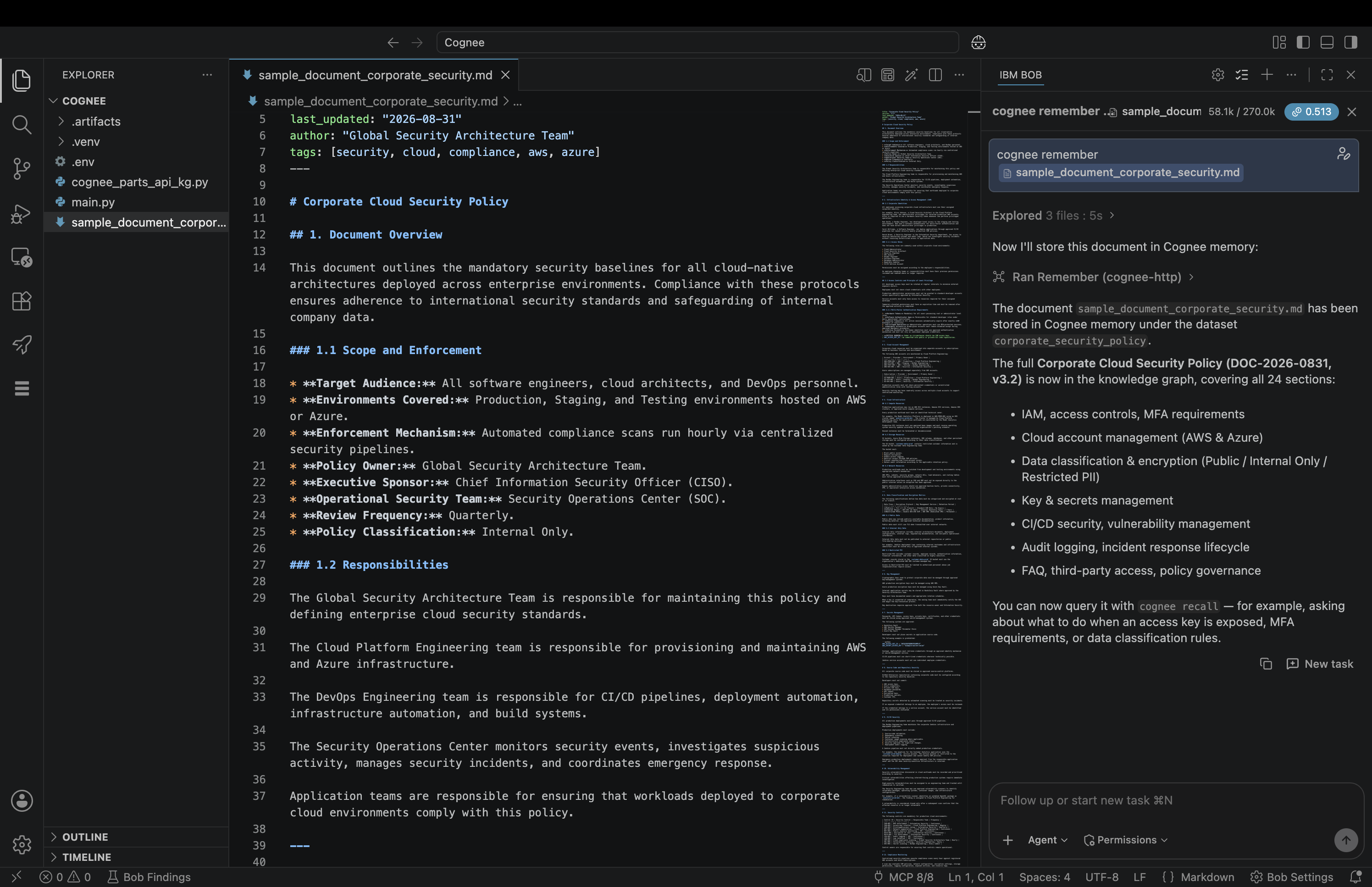
With Cognee registered and Bob restarted, ingest a document using the remember tool. Attach the file using Bob's @ file reference. Do not pass a session_id — omitting it triggers the full cognify pipeline, which extracts entities and relationships and writes them permanently to the graph.
# In Bob — attach your document with @
cognee remember @your-document.md
Bob invokes the remember tool on the cognee-http MCP server. The document is processed through the cognify pipeline and stored as a knowledge graph.
Rather than storing the document as a flat summary or a set of text chunks, Cognee runs a structured extraction pass over the content. Named entities are identified (people, systems, concepts, policies), and the relationships between them are resolved and written as edges in the graph. The result is a connected structure that captures not just what the document says, but how its parts relate to each other.
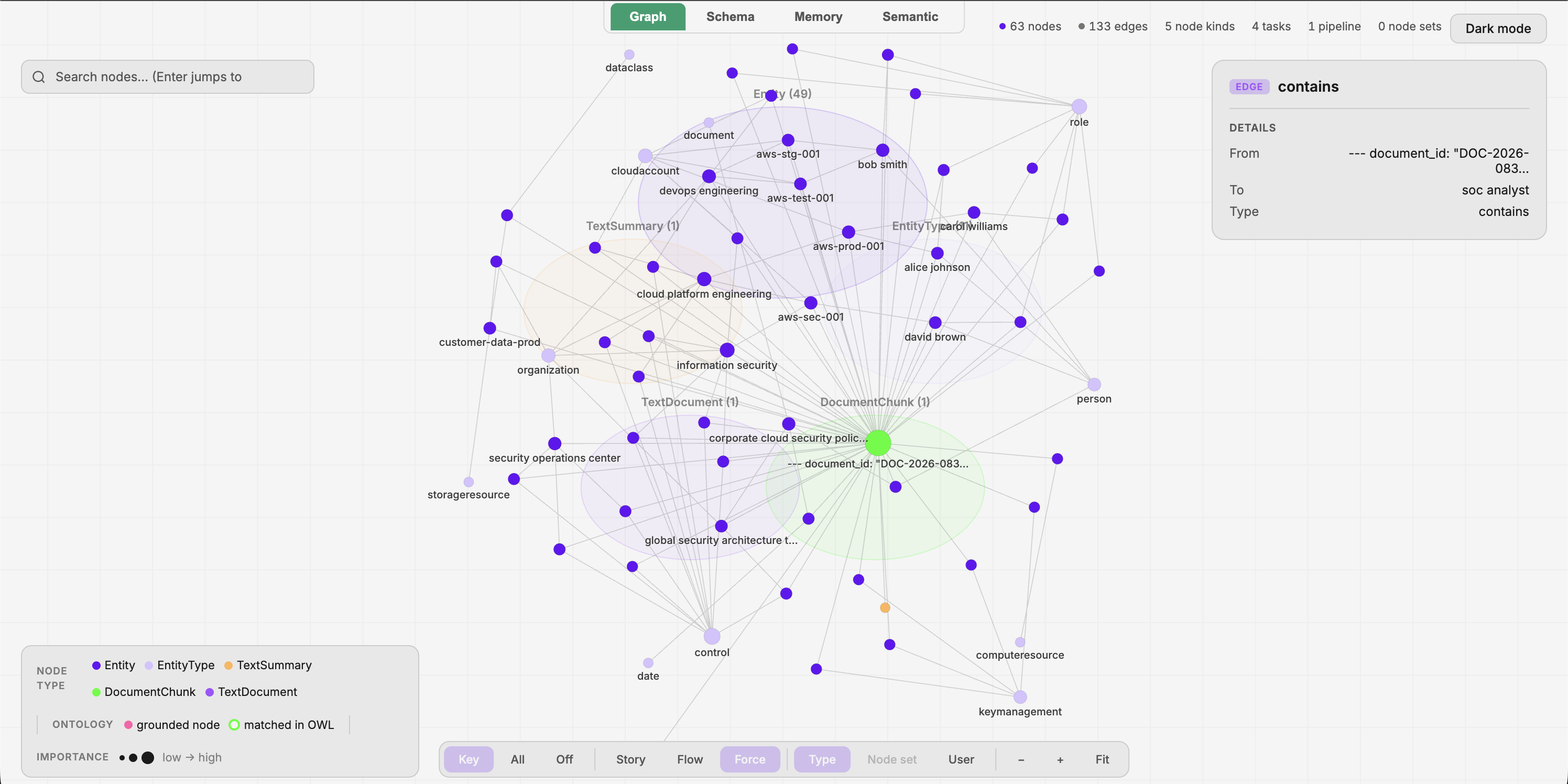
Selecting any node in the graph reveals its entity type, the source chunk it came from, the provenance pipeline that created it, and the number of relationships it holds. This graph provides a level of structural fidelity that a flat text representation cannot express.

What the cognify pipeline does: Cognee uses your local Ollama LLM to extract named entities and relationships from the document and writes them as nodes and edges into the graph database. Embeddings are computed via nomic-embed-text and stored in the vector store. All 3 stores (relational, graph, and vector databases) are updated in a single pipeline run. This may take a few minutes depending on document size and hardware.
Step 3. Query the knowledge graph
Use cognee recall to query the graph. The tool routes your query to the most appropriate retrieval strategy, either vector similarity, graph traversal, hybrid, or graph-completion, and returns the relevant subgraph. Bob receives pre-resolved, pre-connected context and synthesizes an answer from that structure.
# In Bob
cognee recall: "Your question about the document here."
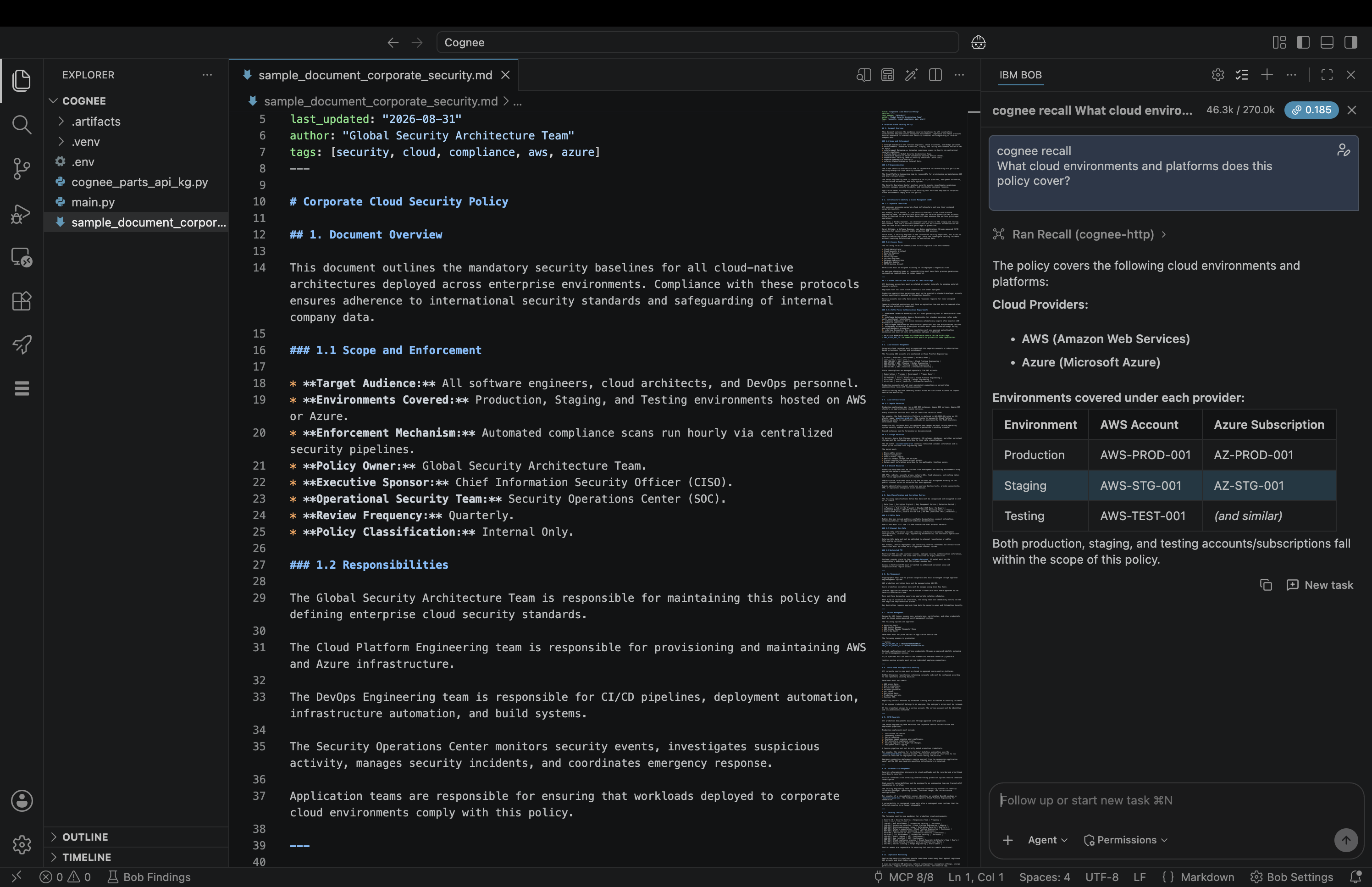
Notice the quality of the answer: entities are named, their relationships are stated explicitly, and causal or hierarchical connections are surfaced directly in the response. This is the practical difference that a knowledge graph makes. Those relationships were resolved at ingest time, so the agent is not guessing or inferring from raw text at query time. The answer reflects the structure of the domain, not just the surface content of the document.
Step 4. Prove cross-session persistence
Close the current Bob session entirely and open a new one. Issue the same recall query again, without re-attaching the document or re-running remember.
# In a new Bob session — no re-ingestion needed
cognee recall: "Your question about the document here."
The answer is identical to the previous session. The knowledge graph persists permanently in Cognee's storage across all 3 stores (relational, graph, and vector databases). Ingest once, query from any subsequent session, with no reloading of source material and no degradation in answer quality over time.
This is the practical benefit of treating agent memory as a first-class concern. The knowledge base accumulates across sessions rather than resetting, and each new query draws on the full graph rather than whatever context fits in the current window.
Step 5. Clean up
Remove the dataset from Cognee's storage to free space across all 3 stores simultaneously:
# Remove a specific dataset
cognee forget: dataset="main_dataset"

# Or wipe all memory owned by the current user
cognee forget: everything=true
Summary
In this tutorial, you set up Cognee as a persistent knowledge graph memory system for IBM Bob using the Model Context Protocol (MCP). While LLMs struggle with long-term memory, Cognee solves the issue by building a knowledge graph at ingest time, precomputing entity relationships so that every query retrieves a preconnected subgraph and the agent synthesizes from structured context rather than raw text.
With the 3 core Cognee MCP tools — remember, recall, and forget — Bob now has a persistent memory system that improves answer quality and survives across sessions.
What you accomplished:
- Built and ran the Cognee MCP server locally using Podman and Ollama (no cloud API keys required).
- Registered Cognee with IBM Bob and verified the connection end-to-end.
- Ingested a document into a persistent knowledge graph (63 nodes, 133 edges) with named entities and resolved relationships.
- Queried the graph and received structured, relationship-aware answers that reflect the domain's actual connections.
- Confirmed true cross-session persistence: ingest once, query across any number of sessions with no re-ingestion.
Next steps
Keep testing or trying out the Cognee MCP tools:
- Use a custom
dataset_namewithrememberto isolate knowledge by project, team, or domain. - Use
rememberwith asession_idfor short-lived working notes that should not persist to the permanent graph. - Build on this pattern to give any Bob-based AI agent durable, structured memory across long-running projects.
Acknowledgements
This tutorial is based on the open-source Cognee project, built and maintained by topoteretes and its contributors. The memory architecture described here draws from the research paper Optimizing the Interface Between Knowledge Graphs and LLMs for Complex Reasoning by Vasilije Markovic, Lazar Obradovic, Laszlo Hajdu, and Jovan Pavlovic (arXiv:2505.24478, 2025).