Tutorial
Use COBOL to parse JSON
Learn how to quickly connect back-end and front-end applicationsThis simple COBOL application demonstrates how to parse JSON using IBM Enterprise COBOL. It is written to work in a standalone fashion so it can run without any input files. The JSON string is declared in memory, as are the results from the parse, and everything is printed out for clarity.
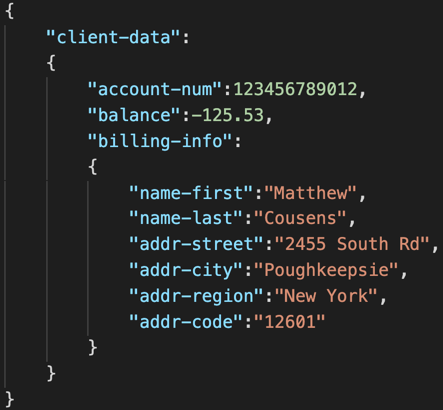
The first JSON text that you will need to parse contains information about the client and is defined in working storage as jtxt-1047-client-data.
It looks like this:
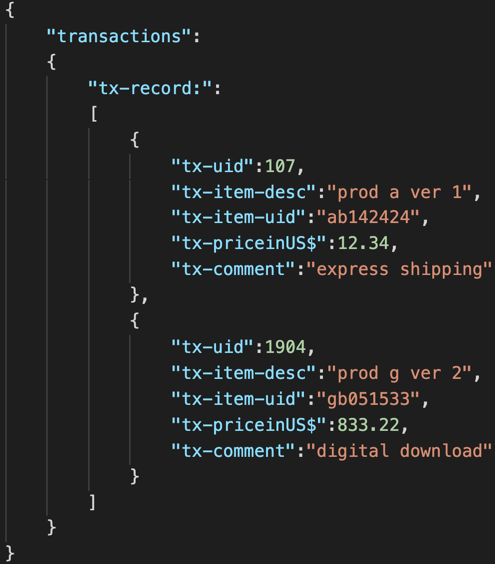
The second JSON text that you'll use contains transaction data stored in a JSON array. You'll define it in working storage as jtxt-1047-transactions.
It looks like this:
Prerequisites
- z/OS system access
- IBM Enterprise COBOL
Estimated time
It should take about 30 minutes to complete this tutorial.
Steps
1. Copy the supplied files to your z/OS system
Copy files in this GitHub repo to your z/OS system. There are several ways to transfer the files: You could do this directly to z/OS using a Git client running there, or you can use your PC as an intermediary between the Git repo and your z/OS system.
2. Edit the supplied JCL to meet your environment
Edit the supplied JCL to meet your environment. You'll need to update each JCL job for your environment.
You'll need to customize the following:
- Data set and volume names
- JOB card definition
- High-level qualifiers in data definitions
3. Compile your COBOL code
Submit compile.jcl to invoke the Enterprise COBOL compiler to create an object from your source. This should complete with MAXCC=0. Output from the COBOL compiler will go to the JES spool for your review in case you need to debug any programs with the JCL or the COBOL source.
4. Link-edit your object
Submit bind.jcl to invoke the Binder to create an executable from your object file. This should complete with MAXCC=0. Output from the Bind will go to the JES spool for your review in case you need to debug any programs with the JCL or the COBOL source.
5. Run the program
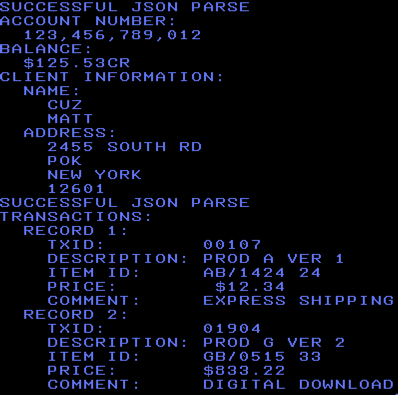
Submit execute.jcl to execute the program. This should complete with MAXCC=0. Output from the COBOL application will go to the JES spool.
A successful execution should look like this:
Troubleshooting
You may encounter a problem running this code based on the default character encoding (CCSID) in your environment. For example, you may encounter a IGZ0339W at run time on the second JSON parse because of the square brackets in the JSON. This is the purpose of the CBL CODEPAGE(DCBS) command at the top of our program. Your mileage may vary based on environmental configuration.
Summary
Parsing JSON in a COBOL application allows you to connect back-end applications with today’s front-end applications. The JSON PARSE statement is an easy way to programatically consume a payload in an efficient, easy-to-code manner.
After you have gotten your COBOL application working, feel free to modify the code to work with different types of JSON structures or even read the JSON input from a file. See the Related content section below or the Resources in the right nav for more technical information on COBOL.