Tutorial
Enable secure LLM inferencing over protected enterprise content with access-controlled LoRA adapters
Build a privacy-preserving AI workflow that uses access-controlled LoRA adapters, secure LLM inference, enterprise data governance, and role-based access controls to protect sensitive business content while delivering accurate AI responsesEnterprise AI deployments face a critical challenge while dealing with confidential data. How can teams serve secure inference over confidential data to multiple departments or user groups with different security clearances while using expensive and limited AI resources?
Traditional approaches either deploy separate models per group (expensive and operationally complex) or implement post-generation filtering (unreliable and leaky). A modern solution partitions the knowledge and enforces authorization boundaries at the gateway layer, before responses are generated.
In this tutorial, you deploy a complete access-controlled LLM inference stack on a local Minikube cluster — no GPU required — using LoRA adapters for knowledge partitioning and attribute-based access control (ABAC) enforced at the gateway provided by the secure-inference project. (Learn more about the secure-inference project in this blog, "Secure LLM inference: enforce access control on confidential data".)
Demo scenario: role-based access to domain knowledge
In this tutorial, you work through a demo scenario in which you build an AI assistant for a tech support team. Different support engineers or end users have access to a subset of knowledge. You create a system that routes large language model (LLM) inference queries to the appropriate knowledge domain while enforcing attribute-based access policies.
The demo is organized around two users, Alice and Charlie. While Alice is a systems engineer serving customers using IBM z17 and IBM Power systems, Charlie is a database and storage expert serving support queries from customers on IBM FlashSystem.
- Alice (systems_role): Can access base model, IBM z17 knowledge, and IBM Power knowledge
- Charlie (database_expert): Can access base model and IBM FlashSystem knowledge
For this demo, the knowledge needed for these systems is taken from the following IBM Redbooks:
- IBM z17 knowledge comes from IBM z17 Technical Introduction
- Automation knowledge for IBM Power systems comes from Using Ansible for Automation in IBM Power Environments
- IBM FlashSystem knowledge comes from Performance and Best Practices Guide for IBM Storage FlashSystem and IBM SAN Volume Controller
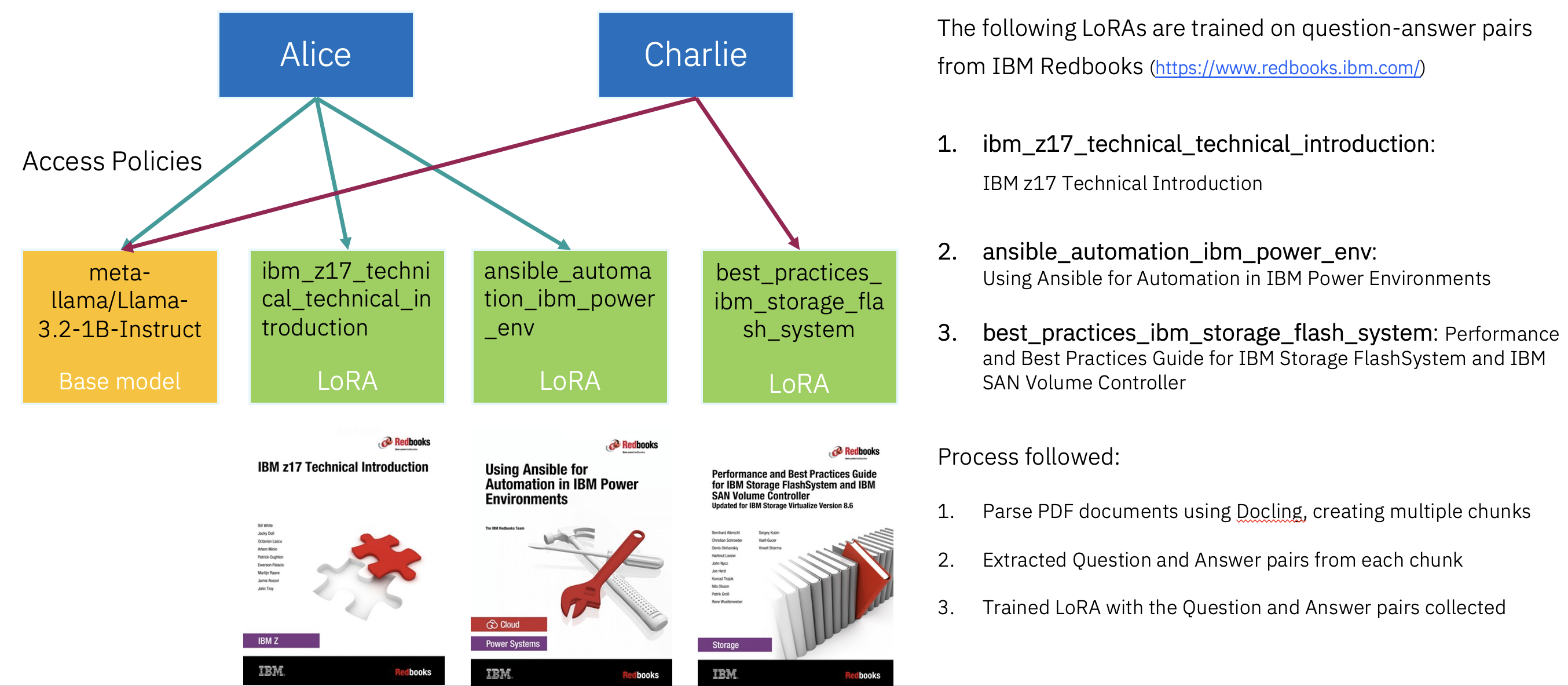
System architecture for access-controlled inference
To set up this access-controlled, multi-tenant AI system, you use llm-d's kustomize deployment:
- Gateway: Istio with Gateway API Inference Extension (HTTPS)
- Scheduler: llm-d InferencePool via OCI helm chart (load-aware routing)
- Model Server: vLLM CPU with LoRA adapters from HuggingFace
- Authentication: The ext-auth filter in secure-inference (JSON Web Token (JWT) with Open Policy Agent (OPA) - attribute-based access control (ABAC))
- LoRA Routing: Adapter selection sidecar (semantic similarity)
The key components of this system architecture are:
Training Phase (Offline): Fine-tuning of LoRA adapters is outside the scope of this tutorial. For the benefit of readers, the
Llama-3.2-1B-Instruct-specific LoRA adapters for each of the Redbooks are available on Hugging Face. When you set up the environment, the LoRA adapters are downloaded and deployed along with theLlama-3.2-1B-Instructmodel.- Docling: Extracts structured text from complex PDFs (handles tables, multi-column layouts). (IBM now provides a managed Docling-as-a-Service offering, Docling for IBM watsonx.)
- Llama-3.2-1B-Instruct: Generates synthetic question-answer pairs from extracted text.
- Hugging Face PEFT: Trains parameter-efficient LoRA adapters (approximately 10–50 MB each, compared to the 1 GB base model).
- Hugging Face Hub: Hosts trained LoRA adapters for dynamic loading by vLLM.
Inference Phase (Online - Kubernetes via Kustomize)
- Istio Gateway with Gateway API Inference Extension:
- HTTPS ingress endpoint (
/v1/completions,/v1/chat/completions,/v1/models) - Integrates with secure-inference as ext-auth filter
- Routes authorized requests to InferencePool
- HTTPS ingress endpoint (
- secure-inference ext-auth Filter (
:9000 gRPC):- JWT authentication (RSA signature verification)
- User attribute lookup from Kubernetes CRDs
- Adapter selection sidecar integration (
:8000 HTTP) - OPA policy engine for ABAC enforcement
- Returns ALLOW/DENY + adapter_id to gateway
- Audit logging for compliance
- Adapter Selection Sidecar (
:8000 HTTP):- Semantic similarity matching between query and adapter descriptions
- Uses sentence transformers for embedding-based selection
- Returns best-matching adapter ID to ext-auth filter
- llm-d InferencePool Scheduler (OCI Helm Chart):
- Load-aware routing to vLLM workers
- Health checks and automatic failover
- LoRA adapter injection into inference requests
- Pools workers by base model
- vLLM CPU Model Servers (Kubernetes Pods):
- Base model:
meta-llama/Llama-3.2-1B-Instruct - Dynamic LoRA adapter loading from Hugging Face Hub
--enable-lora+--lora-modulesconfiguration- CPU-optimized inference (no GPU required for tutorial)
- Base model:
- Istio Gateway with Gateway API Inference Extension:
Control Plane (Kubernetes CRDs)
- User CRD: Defines user identities with attributes (role, department, clearance level)
- alice: systems_role (access to z17 and Power adapters)
- charlie: database_expert (access to FlashSystem adapter)
- Model CRD: Defines available adapters with access policies and selection keywords
- Base model: meta-llama/Llama-3.2-1B-Instruct (unrestricted fallback)
- LoRA adapters: ibm-z17-technical, ibm-power-env, ibm-storage-flash (role-restricted)
- User CRD: Defines user identities with attributes (role, department, clearance level)
Deployment
- Mixed Helm + kustomize: The gateway and the vLLM model server are deployed with kustomize (
kubectl apply -k); the llm-d scheduler (InferencePool) and secure-inference are deployed with Helm. - Single namespace: llm-d components colocated for simplified networking.
- InferencePool via OCI (Open Container Initiative) registry: The scheduler is installed from an OCI Helm chart, and secure-inference from its in-repo Helm chart.
- Mixed Helm + kustomize: The gateway and the vLLM model server are deployed with kustomize (
Prerequisites
This demo requires certain system resources:
| Resource | Minimum | Recommended |
|---|---|---|
| RAM | 16 GB | 32 GB |
| CPU | 6 cores | 8+ cores |
| Disk | 20 GB | 30 GB |
| GPU | Not Required | Not Required |
This demo requires this software:
- minikube
- Docker Desktop (or Docker Engine on Linux)
- helm
- kubectl
- git
- go (for building secure-inference)
- A Hugging Face token with access to
meta-llama/Llama-3.2-1B-Instruct(a gated model)
Steps
Follow these steps to deploy the full secure-inference stack on a local Minikube cluster and then test its access-control behavior as two different users.
- Deploy secure-inference. Run a single script that provisions Minikube, the Istio gateway, the llm-d scheduler, the vLLM model server, and the
secure-inferencecomponents. - Prepare for inference requests. Connect to the gateway using port forwarding, choose a model, and generate a JWT for a sample user.
- Validate authenticated model access. Send authenticated inference requests, verify automatic LoRA adapter selection, and confirm which adapter handled each request.
The environment you build is the same for every user; what changes between users is the identity carried in their JWT and the access policy that identity maps to.
Step 1. Deploy secure-inference
In this step, you provision the entire inference stack with a single setup script. The script is intentionally one command so that you can reach the access-control behavior quickly. Everything it installs runs locally on Minikube, so no GPU and no cloud account are required.
Clone the repo:
 git clone https://github.com/llm-d-incubation/secure-inference.git
 cd secure-inference
Change into the guide directory that contains the setup script:
cd ./guides/minikube-llm-d-cpuExport your Hugging Face token. This token is required because the base model,
meta-llama/Llama-3.2-1B-Instruct, is a gated model that the vLLM server downloads from the Hugging Face Hub during startup. Make sure that the token you use has been granted access to that model on its model page. The LoRA adapters needed for this demo are also available on Hugging Face. The setup script, invoked in the next step, downloads and deploys them.export HF_TOKEN="hf_your_token_here"Run the setup script:
./setup.shThe script takes approximately 10–15 minutes to complete (longer on the first run, because the vLLM CPU image is large). This script performs the following actions:
- Pulls the pre-built vLLM CPU image.
- Clones the llm-d repository (the latest kustomize-based architecture).
- Installs the client tools it needs (
kustomize,istioctl, and others). - Starts a Minikube cluster (10 GB RAM, 6 CPUs).
- Installs Istio with Gateway API Inference Extension support.
- Generates a static TLS certificate using
llmd-admin tls-cert. - Deploys the HTTPS gateway via kustomize.
- Deploys the llm-d scheduler (InferencePool) via an OCI Helm chart.
- Deploys the model server with CPU vLLM and the LoRA adapters, which are downloaded from the Hugging Face Hub.
- Builds and deploys secure-inference (the policy engine, the CRD controllers, and the ext-auth gRPC server).
- Builds and deploys the adapter selection sidecar.
Applies the sample access policies.
When the script finishes, every component shown in the architecture is running in the
llm-d-cpunamespace. For a deeper explanation of what the script installs and how the manifests are organized, see the Minikube llm-d CPU guide README.
Step 2. Prepare for inference requests
In this step, you prepare everything you need to send a request: a local route to the gateway (endpoint), the model (MODEL) you want to call, and a signed identity token (JWT) for one of the sample users. These three values are the inputs that every request in Step 3 reuses.
Port-forward the gateway service so that you can reach it from your local machine. The cluster exposes the gateway on port
443; this command maps it to8443onlocalhostand runs in the background.kubectl port-forward svc/llm-d-cpu-inference-gateway-istio 8443:443 -n llm-d-cpu &Choose the model to call and store it in the
MODELenvironment variable. Start with the base model. The commented lines are the three LoRA adapters you can call directly by name; later, in Step 3, you let the system select an adapter automatically instead of naming one.export MODEL="meta-llama/Llama-3.2-1B-Instruct" # export MODEL="ibm_z17_technical_technical_introduction" # export MODEL="ansible_automation_ibm_power_env" # export MODEL="best_practices_ibm_storage_flash_system"Generate a JWT for a sample user with the
llmd-admintool. The token encodes the user's identity; at request time,secure-inferencelooks that identity up in the matching User CRD to determine which models and adapters the user is allowed to reach. Generate a token foraliceto start (the commented line shows how to generate one forcharlieinstead).# alice (has access to z17 and Power LoRAs) export JWT=$(cd ../../ && ./bin/llmd-admin create --name alice) # charlie (has access to FlashSystem LoRA) # export JWT=$(cd ../../ && ./bin/llmd-admin create --name charlie)The user identities and the policies that bind them to models live in the
sample_policies.yamlfile that the setup script applied. To see howaliceandcharliemap to roles and adapters, reviewsample_policies.yaml.
Step 3. Validate authenticated model access
In this step, you send inference requests through the gateway and watch the access-control logic decide what each user is allowed to reach. You start with a plain authenticated request, then enable automatic LoRA adapter selection, and finally confirm which adapter actually served each request. Each request reuses the JWT and MODEL values you set in Step 2.
Send an authenticated request. This request calls the base model directly. The
Authorization: Bearer $JWTheader is what makes it authenticated; without a valid token, the gateway rejects the request before it reaches the model. The--connect-toflag letscurlpresent thellm-d.comhostname (which the TLS certificate is issued for) while connecting to your local port-forward.curl -vik --connect-to llm-d.com:443:localhost:8443 https://llm-d.com:443/v1/completions \ --header "Authorization: Bearer $JWT" \ --header "Content-Type: application/json" \ --data '{ "model": "'"$MODEL"'", "prompt": "What is Kubernetes?", "max_tokens": 100 }'Important: CPU inference is slow. Expect 10–30 seconds for a response. The 1-billion-parameter model on a CPU produces approximately 1–5 tokens per second. This tutorial is for the access control and routing flow, not production performance. If CPU model loading takes 3–5 minutes, check the logs:
kubectl logs -n llm-d-cpu -l llm-d.ai/role=decode -fVerify automatic adapter selection. Instead of naming a LoRA adapter, you call the base model and add the
x-adapter-selection: trueheader. When this header is present, the system matches your prompt against the descriptions of the adapters you are allowed to use and routes to the best match automatically. Internally, End Point Picker (EPP), a component within llm-d Router, rewrites the request body'smodel:field to the selected LoRA before forwarding to vLLM and then rewrites the response body'smodel:field back to the base model name you originally requested. No response header carries the LoRA name, so the response alone does not reveal which adapter ran (but you confirm that in the next task).Run the request as
aliceasking about IBM z17. Becausealicehas thesystems_roleand the prompt matches the z17 adapter's description, the request should route to theibm_z17LoRA:# alice asking about z17 — should auto-route to ibm_z17 LoRA export JWT=$(cd ../../ && ./bin/llmd-admin create --name alice) curl -vik --connect-to llm-d.com:443:localhost:8443 https://llm-d.com:443/v1/completions \ --header "Authorization: Bearer $JWT" \ --header "Content-Type: application/json" \ --header "x-adapter-selection: true" \ --data '{ "model": "meta-llama/Llama-3.2-1B-Instruct", "prompt": "Explain the IBM z17 mainframe architecture", "max_tokens": 100 }'Now run the same kind of request as
charlieasking about IBM FlashSystem. Becausecharliehas thedatabase_expertrole, this request should route to theibm_storage_flashLoRA instead:# charlie asking about FlashSystem — should auto-route to ibm_storage_flash LoRA export JWT=$(cd ../../ && ./bin/llmd-admin create --name charlie) curl -vik --connect-to llm-d.com:443:localhost:8443 https://llm-d.com:443/v1/completions \ --header "Authorization: Bearer $JWT" \ --header "Content-Type: application/json" \ --header "x-adapter-selection: true" \ --data '{ "model": "meta-llama/Llama-3.2-1B-Instruct", "prompt": "What are best practices for IBM FlashSystem storage management?", "max_tokens": 100 }'To see access control in action, try asking
charliean IBM z17 question. Becausecharliedoes not have thesystems_role, the z17 adapter is not eligible for selection, and the request falls back to the base model instead of the specialized adapter.Verify which adapter served the request. As noted above, the response body always shows the base model name, so it cannot tell you which LoRA was used. Use one of the two methods below to confirm the routing decision.
Option A — EPP logs. EPP records the model the client sent and the model it actually routed to. When the two differ, an adapter was selected:
 kubectl logs -n llm-d-cpu deployment/minikube-llm-d-cpu-epp --tail=50 \
   | grep "EPP sent request body response"
Each line contains
modelName(what the client sent) andtargetModelName(what EPP routed to). When they differ, a LoRA was selected. Match a line to your specific request byx-request-id, which equals the response body'sidfield without thecmpl-prefix.Option B — vLLM
lora_requests_infometric. This is a per-LoRA gauge whose value is the Unix timestamp of the most recent request to use that LoRA. Snapshot it before and after a request and watch which timestamp advances:DECODE_POD=$(kubectl get pod -n llm-d-cpu -l llm-d.ai/role=decode -o jsonpath='{.items[0].metadata.name}') kubectl exec -n llm-d-cpu $DECODE_POD -c modelserver -- \ curl -s localhost:8000/metrics | grep '^vllm:lora_requests_info'The output lists one line per adapter slot, each ending in a timestamp. The line with an empty
running_lora_adapters=""is the base-model (no-adapter) slot; the others name a loaded LoRA:vllm:lora_requests_info{max_lora="3",running_lora_adapters="",waiting_lora_adapters=""} 1.782389025e+09 vllm:lora_requests_info{max_lora="3",running_lora_adapters="ibm_z17_technical_technical_introduction",waiting_lora_adapters="ibm_z17_technical_technical_introduction"} 1.782389010e+09 vllm:lora_requests_info{max_lora="3",running_lora_adapters="best_practices_ibm_storage_flash_system",waiting_lora_adapters="best_practices_ibm_storage_flash_system"} 1.782389019e+09If a LoRA's timestamp advances into the time window of your request, that LoRA ran. The other LoRAs' timestamps stay frozen.
Clean up the environment (optional)
To uninstall all components, delete the minikube cluster, and remove the cloned llm-d directory, run the cleanup script.
./cleanup.sh
Summary and next steps
In this tutorial, you deployed a complete access-controlled inference stack on a local Minikube cluster and saw it enforce authorization boundaries at the gateway, before any response was generated. Along the way, you:
- Provisioned the full llm-d-based stack with a single setup script, no GPU required.
- Minted per-user JWTs and saw how each user's identity maps, through Kubernetes User and Model CRDs, to the set of models and LoRA adapters they are allowed to reach.
- Triggered automatic, semantic LoRA adapter selection with the
x-adapter-selectionheader, and watched the same prompt route to different adapters, or fall back to the base model, depending on the requesting user's role. - Confirmed the routing decision using EPP logs and the vLLM
lora_requests_infometric.
The result is a pattern for secure, multi-tenant AI serving: a single shared base model, partitioned knowledge in lightweight LoRA adapters, and attribute-based access control enforced at inference time. This avoids both the cost of deploying separate models per group and the unreliability of post-generation filtering.
To continue building on what you learned:
- Train your own adapters. Fine-tuning the LoRA adapters is outside the scope of this tutorial, but you can follow Fine-tuning IBM Granite language models to train domain-specific adapters for your own knowledge sources, then register them as Model CRDs.
- Define your own users and policies. Adapt
sample_policies.yamlto model your own roles, users, and adapter access rules. - Explore the deployment internals. See the Minikube llm-d CPU guide README for a deeper look at how the components are deployed and configured.