Article
Build intelligent agents with skills and MCP servers
Learn to use agent skills and Model Context Protocol (MCP) serversImagine that you're building an AI agent that needs to diagnose production incidents and track them in JIRA. Traditionally, you'd face a dilemma: either write extensive prompts for every task or build complex API integrations for external services. Both approaches are time-consuming and hard to maintain.
This is where two complementary approaches come into play: agent skills and MCP servers. Think of skills as teaching your agent "how to think" through natural language instructions. MCP servers give your agent "opportunities to act" by connecting to external tools.
This guide walks you through both approaches, showing you when to use each and how they work together to create powerful AI agents.
Comparing and contrasting agent skills and MCP servers
In a nutshell, skills and MCP servers solve different problems.
- Skills answer the question: "How should I do this task?"
- MCP servers answer the question: "How do I access that external service?"
Seems simple enough, but read on to understand the key differences between skills and MCP servers.
Understanding agent skills
Let's start with a simple analogy. When you teach someone a new task, you don't write code; you write instructions. "First, do this. Then, check that. If you see X, do Y." Agent skills work the same way.
A skill is just a folder that contains a markdown file called SKILL.md. Inside, you write plain English instructions that tell your agent how to perform a specific task. No servers to run, no APIs to configure, just instructions in a file.
Here's what a typical skill folder looks like:

Skills capture knowledge in a reusable format. Write the instructions, save them in a folder, and your agent can follow them whenever they are needed.
When you give your agent a task, skills activate through a three-phase lifecycle:
- Discovery. When your agent starts, it scans all skill folders and reads just the name and description from each
SKILL.mdfile. This is lightweight—about 100 tokens per skill. Your agent now knows what skills are available without loading everything into memory. - Activation. When you make a request, your agent matches it against the skill descriptions. If there's a match, the agent loads the full instructions from that skill's
SKILL.mdfile. Irrelevant skills stay unloaded, keeping your context window clean. - Execution. Now the agent follows the loaded instructions step by step. It might read reference files, execute scripts, or call other tools—whatever the skill directs. The result is consistent, predictable behavior based on your documented process.
This progressive disclosure pattern is what makes skills so efficient. You're not loading everything upfront; you're loading exactly what you need, when you need it.
Understanding MCP servers
Now let's talk about the other side of the equation: MCP servers.
If skills teach your agent "how to think," MCP servers give your agent "opportunities to act." The Model Context Protocol (MCP) is a standardized way for AI agents to connect to external tools and services.
Without MCP, connecting an AI agent to external services is messy. You'd need custom integrations for every tool: one for JIRA, another for Slack, another for GitHub. Each integration requires different authentication, different APIs, different error handling. MCP standardizes this access. One MCP server can work with any MCP-compatible agent. Build it once, use it everywhere.
An MCP server exposes three types of capabilities:
Tools: Functions the AI can call when it decides they're needed.
- Examples:
create_jira_issue,send_slack_message,search_github
- Examples:
Resources: Data the application provides to the agent.
- Examples: Files, database schemas, configuration data
Prompts: Reusable templates users can trigger.
- Examples:
/summarize,/review,/analyze
- Examples:
MCP servers handle the hard parts of external integrations: authentication, persistent connections, predictable execution, and universal standardization.
MCP tools are more universally compatible because they use structured JSON schemas instead of natural language. The input and output formats are fixed and deterministic, which most models can handle reliably.
Skills vs. MCP servers
Let's break down the differences:
| Aspect | Skills | MCP servers |
|---|---|---|
| What it provides | Knowledge and workflow logic, decision making, local processing | External tool calls, authentication, real-time data |
| Setup complexity | Write markdown files | Write code, configure auth, deploy server |
| Where it runs | Locally (zero latency) | Over network (50–500ms typical) |
| Token cost | ~100 tokens per skill (idle) | 2K+ tokens (always loaded) |
| Best for | Processes and workflows | External tool integration |
| Works offline | Yes | No |
Think of it this way: If you're teaching an agent to analyze code, that's a skill. If you're giving an agent the ability to create JIRA tickets, that's an MCP server.
Comparing the approaches:
| Approach | Strengths | Limitations |
|---|---|---|
| Skills only | Fast, offline, consistent | Limited to log analysis |
| MCP only | External system access | No workflow structure, inconsistent |
| Skills + MCP | Structured workflow + external actions | Requires MCP setup |
When should you use skills? When should you use MCP servers? Here's a simple decision framework to guide your decision:
| Question | Answer | Use |
|---|---|---|
| Does the agent need to connect to an external tool? | Yes | MCP servers |
| Does the agent need to follow a specific process? | Yes | Skills |
| Is complex authentication involved (OAuth, SSO)? | Yes | MCP servers |
| Is the task self-contained with local scripts? | Yes | Skills |
| Do you need consistency across repeated runs? | Yes | Skills |
| Do you need both knowledge and external access? | Yes | Skills + MCP servers |
The hybrid approach: When skills meet MCP servers
The real power comes from combining both approaches. Skills tell your agent what to do, and MCP servers give it the tools to do it.
Real-world example: The Incident Response agent
To demonstrate this hybrid approach, I created an Incident Response agent which uses langchain's deep agent library.
The real-world scenario
Imagine it's 3 AM, your API error rate just spiked, and you're getting paged.
Here's the scenario that our Incident Response agent will handle:
- Developer pushes a bad deploy.
- Payment service throws 500 errors.
- On-call engineer pastes the log path.
- Engineer asks a question to the agent.
- Agent returns diagnosis.
- Agent provides a draft Slack post.
- Agent creates a ticket for tracking the issue.
The components of the Incident Response agent
This Incident Response agent combines skills for incident analysis with optional JIRA MCP Server for ticket tracking. The agent supports three model providers: IBM watsonx provided models, Open Router models, and Anthropic Claude models.
In my experiments, the Claude Sonnet and Claude Haiku model works best with deep agents and skills. From the watsonx provided models, the gpt-oss-120b model works well.
To specify which model you want to use, you must configure the API KEY in an .env file that you create under the main agent. Copy the .env.example file to .env and add your API key for the chosen LLM provider.
Two skills were created:
log-parserdiagnoses issuesincident-brief-summarizergenerates Slack communications
One MCP server can be integrated:
- Atlassian MCP Server creates the Jira ticket
The MCP integration is optional. The agent works perfectly fine with just skills. The MCP server integration adds the ability to automatically create JIRA tickets as part of the agent workflow.
How the Incident Response agent works
The on-call engineer chats with the Incident Response agent to provide the logs and asks it to help run the process.
First, you start the agent (python3 agent.py) and provide the log file path when prompted for it.
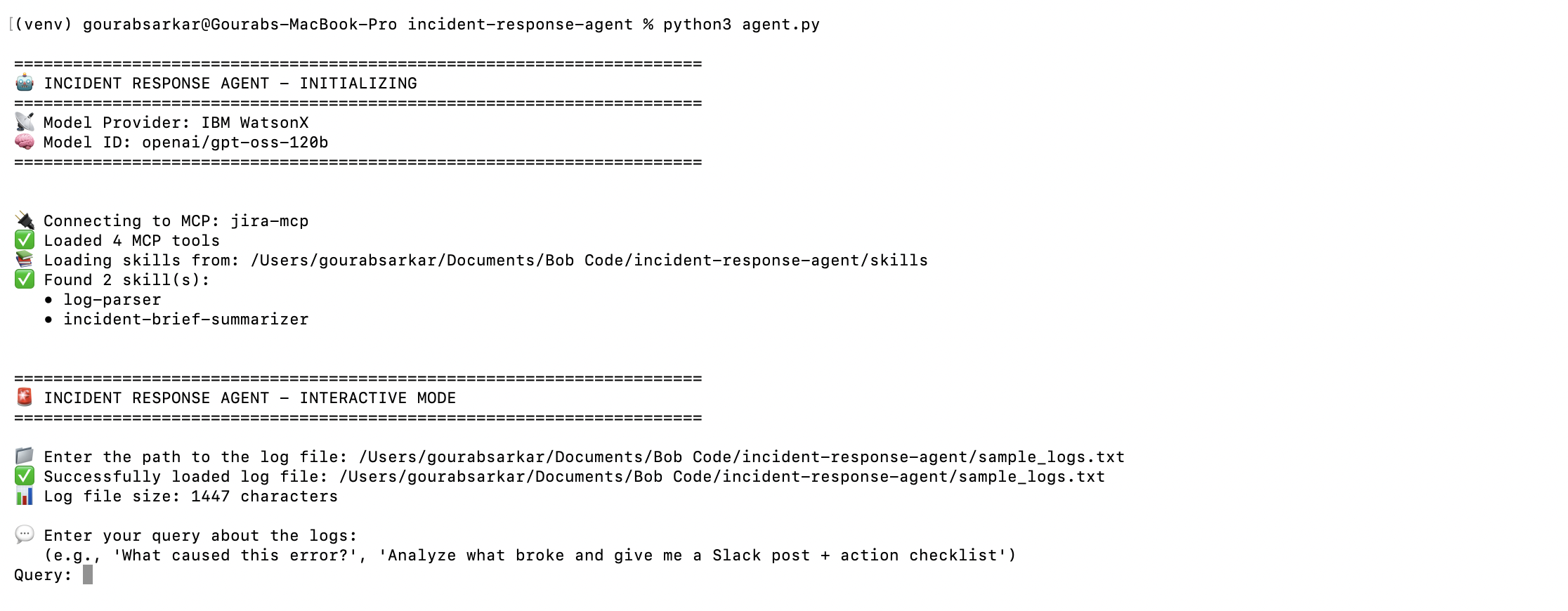
Then, the user can prompt the agent to analyze the log files.
We have an incident!
Analyze what broke and give me a draft Slack post + action checklist and provide me a JIRA ticket.
Step 1: log-parser skill activates
- Scans logs for
ERROR,FATAL,Exceptionpatterns. - Checks timing against deploy history.
- References
common-errors.mdfor error patterns. - Outputs structured diagnosis with confidence level.
Step 2: incident-brief-summarizer skill activates
- Uses
slack-post.mdtemplate for team update. - Uses
checklist.mdtemplate for action items. - Produces copy-paste ready documents.
Step 3: JIRA MCP called (if configured, optional)
- Creates JIRA ticket with incident details.
- Links to relevant logs and metrics.
- Assigns to appropriate team.
Step 4: Results returned
The agent returns an incident summary, a Slack post, and an action checklist.
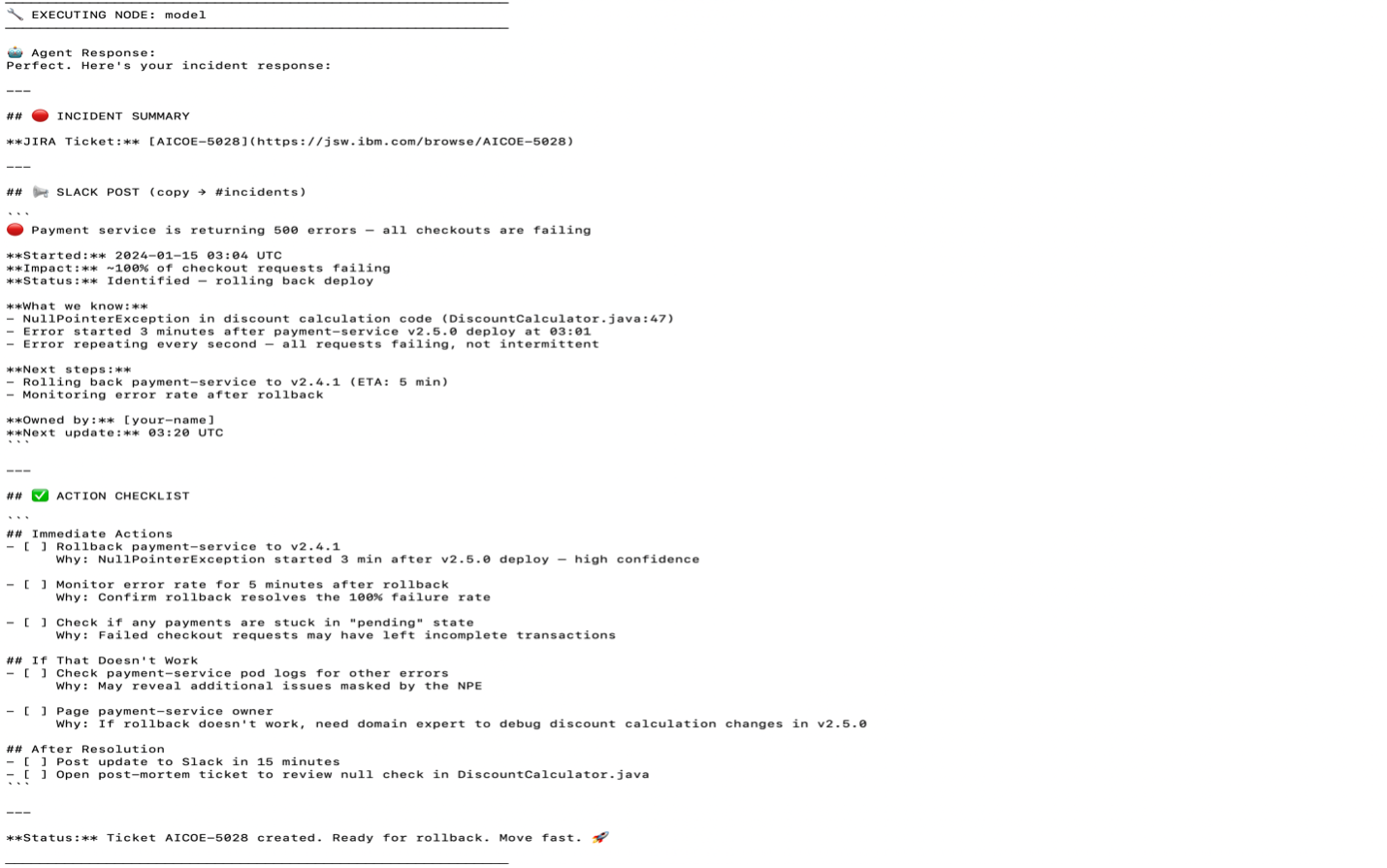
The total time from submitting the logs to an action plan is less than 90 seconds.
Summary
Building intelligent agents no longer requires choosing between simplicity and capability. By understanding when to use agent skills and when to leverage MCP servers, you can create powerful, maintainable AI systems that solve real-world problems.
The key principles to remember are:
- Start with skills for workflow logic and domain knowledge. They're fast, reliable, and require zero infrastructure.
- Add MCP servers when you need external tool integration, complex authentication, or persistent connections.
- Combine both for complete automation that's both intelligent and capable.
- Choose the right model based on your approach: Models often excel at skills, while MCP servers work across most models.
The Incident Response agent example demonstrates this philosophy in action: Skills provide the expertise and consistency, while optional MCP integration adds automation capabilities. This hybrid approach delivers production-ready solutions that are both powerful and maintainable.
As you build your own agents, remember that complexity should be added incrementally. Start simple with skills, validate your workflows, and then enhance the agent with MCP servers when the value is clear. This progressive approach ensures you're always building on a solid foundation.
To get hands-on with automating agent workflows using MCP tools, try the tutorial, "Build AI agents with IBM Bob and watsonx Orchestrate."