Article
Architect AI assistants with watsonx Orchestrate
Build scalable AI assistants using multi-agent architecture patterns, hybrid workflows, and stateful context managementEnterprises are moving beyond building simple chatbots to building sophisticated AI agents that are capable of managing complex, long-running business processes that involve state persistence, compliance, security, multi-step orchestration, and integration with existing systems. IBM watsonx Orchestrate provides a powerful platform for this shift.
This article explores key architectural patterns and watsonx Orchestrate capabilities that help developers and architects build reliable, production-grade agentic systems:
- Agent orchestration (multi-agent architecture)
- Hybrid agentic workflows (using agents and workflows)
- Statefulness and context management
- Parallel processing
Agent orchestration with a multi-agent architecture
A scalable enterprise AI assistant is rarely a single monolithic agent. Relying on a single monolithic agent introduces significant operational bottlenecks: as more tools, APIs, and instructions are added to a single prompt, the LLM suffers from prompt bloat and instruction overload, which severely degrades its intent-classification accuracy.
Furthermore, large, all-in-one prompts increase latency and context-window costs. From a maintenance perspective, a monolithic agent is highly fragile where changing a single tool or prompt rule can inadvertently break unrelated capabilities.
To ensure modularity, maintainability, and high performance, a supervisory multi-agent system model is preferred. Within watsonx Orchestrate, this architecture is configured using an intelligent routing layer and specialized collaborators. For more information, see the building multi-agent workflows documentation.
The router or orchestrator agent: A lightweight router agent interprets the user's natural language intent and translates it into specific actionable tasks. It then routes these tasks to the appropriate specialized agents. This agent keeps system prompts concise, reduces latency, and avoids instruction overload.
The specialized agents or collaborator agents: These agents focus on specific functions, such as authentication, order processing, employee record updates, or retrieval-augmented generation (RAG) for data retrieval.
In watsonx Orchestrate, you define the specialized agents directly in Agent Builder. This approach enables the orchestrator agent to route tasks dynamically or through structured workflows. For more information, see the creating and customizing agents documentation.
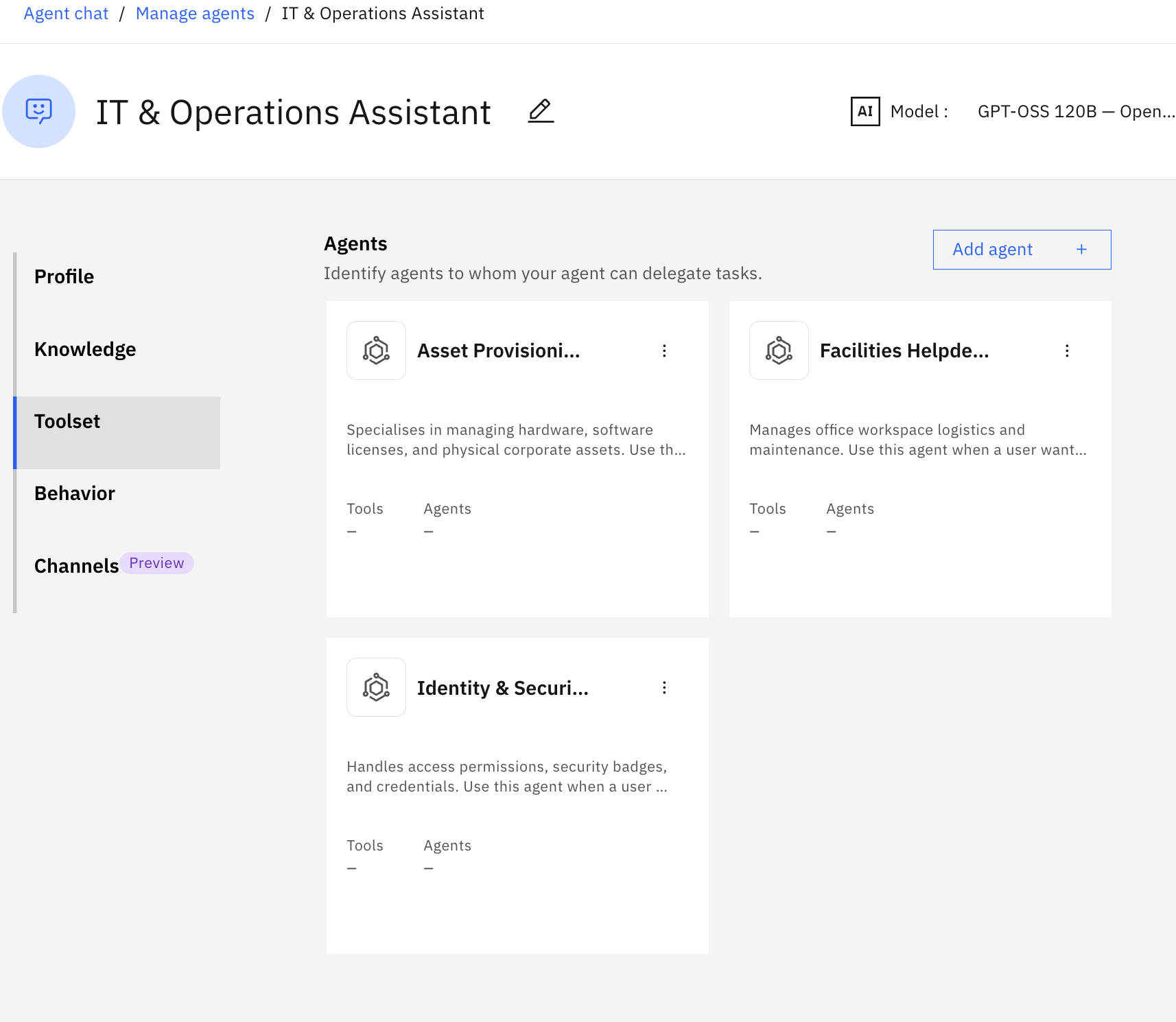
The following screen capture shows the multi-agent architecture in the watsonx Orchestrate Agent Builder, including a router agent, an IT and Operations Assistant, with specialized agents and their descriptions.
Hybrid agentic workflows
In watsonx Orchestrate, developers have 2 primary constructs: AI agents and agentic workflows.
A common architectural mistake is embedding business process logic directly into agent instructions and expecting the agent to follow a sequence of steps reliably, in order, every time. This introduces the Agent-as-Business-Process Fallacy, which is where the agent does not execute the process, it approximates it. Under normal conditions, this looks correct. Under edge cases, which is precisely when compliance and correctness matter most, the agent breaks.
Research confirms why. Two different benchmarks for LLMs (the IFEval benchmark and the FollowBench benchmark) show that accuracy degrades especially as constraints grow. A business process is not a single constraint. It is a graph of many constraints, including branch conditions, exception paths, approval requirements, and mandatory fields. Encoding that graph into agent instructions means accepting that some percentage of executions will take the wrong path.
To avoid these critical system failures, developers must understand and avoid common AI agent anti-patterns that compromise enterprise reliability. You can read more about these anti-patterns in this Medium article.
In watsonx Orchestrate, you can build both pure agents (LLM-driven agents with autonomous tool calling) and agentic workflows (deterministic workflows).
Agents are LLM-driven entities that leverage autonomous tool-calling to reason through tasks, making them ideal for flexible, unstructured interactions. Agents are best when input comes in natural language that requires interpretation or flexible routing, and when the task involves discovery, summarization, or reasoning over unstructured data.
For example, a user might submit a free-form request such as “Help me update my project access rights.” A router agent analyzes the query, maps it to available capabilities, hands off the request to the appropriate specialized agent, or routes the request to a RAG node for policy retrieval if no exact match exists.
Agentic workflows are deterministic sequences of steps, a structured "skeleton," that enforces specific business logic, data validation, and compliance gates. Workflows serve as powerful orchestration containers and are best when the process is highly structured, repeatable, and requires strict sequencing without relying on probabilistic LLM decisions.
For example, you can create agentic workflows for user identification, authentication, or approval gates. Use explicit nodes for prompts, validations, API calls, and structured outputs to ensure a deterministic process.
Two integration patterns make this hybrid model work in practice:
Pattern 1: An agent invokes a workflow as a tool. The agent handles the open-ended reasoning layer, interpreting intent, resolving ambiguity, and deciding which process applies. Once that decision is made, the agent hands off to a workflow for deterministic execution. The agent reasons to the decision; the workflow owns the execution from that point forward.
Pattern 2: An agent-in-the-loop within a workflow. The workflow owns the overall process but delegates specific reasoning steps to an embedded agent node, such as pausing a claims workflow to let a Risk Analysis agent evaluate supporting documents. If the agent fails or returns an inconclusive result, the workflow escalates to a human rather than allowing the process to continue on an uncertain basis. The workflow maintains control; the agent contributes reasoning at a bounded, specific point.
In both patterns, the principle remains the same. Let the agent think, let the workflow execute. Conflating the two produces systems that work in demos and fail in production.
Decision table for agents, workflows, or the hybrid approach
Decide which architecture is right for your agentic system:
| Scenario | Recommended approach | Why |
|---|---|---|
| Authentication or approval gates | Agentic workflow | Strict order, compliance, and no skipping |
| Natural language intent routing | Orchestrator agent | Flexible interpretation |
| Structured transactions or forms | Workflow with slot filling | Mandatory fields and validation |
| Risk or document narrative analysis | Hybrid: agent node inside a workflow | Needs LLM reasoning within bounds |
| Policy or knowledge retrieval | Hybrid: RAG agent node in a workflow | Unstructured document retrieval |
| Complex calculation | Hybrid: Python logic block in a workflow | Precision without hallucination |
Hybrid agentic workflows in real-world applications
These examples show the value of hybrid agent orchestration across industries:
| Industry | Main goal | Orchestrator Agent | Agentic workflow |
|---|---|---|---|
| Banking and finance | Processing a loan application | Risk assistant: Reads candidate background letters to highlight potential risk flags. | Approval flow: A strict step-by-step process that verifies identity and confirms credit scores. |
| Healthcare and pharma | Matching patients to clinical trials | Protocol Matching agent: Reads medical research papers to find matching patient profiles. | Consent workflow: A mandatory, audited sequence that collects patient signatures and data permissions. |
| Retail and supply chain | Handling vendor disputes or returns | Negotiation agent: Reviews vendor history to determine the best discount tier to offer. | Return workflow: A fixed process that checks product warranty status and issues a refund. |
| HR and operations | Onboarding a new employee | Resume Screener agent: Summarizes a candidate background against a specific job role. | Setup workflow: A strict checklist that creates a corporate email account and a building security badge. |
Statefulness and context management
The router agent maintains global session state across specialized agents and workflows.
Statefulness allows agents and workflows to maintain context across multi-turn interactions and handoffs, which are essential for long-running business processes. In watsonx Orchestrate, statefulness is supported with:
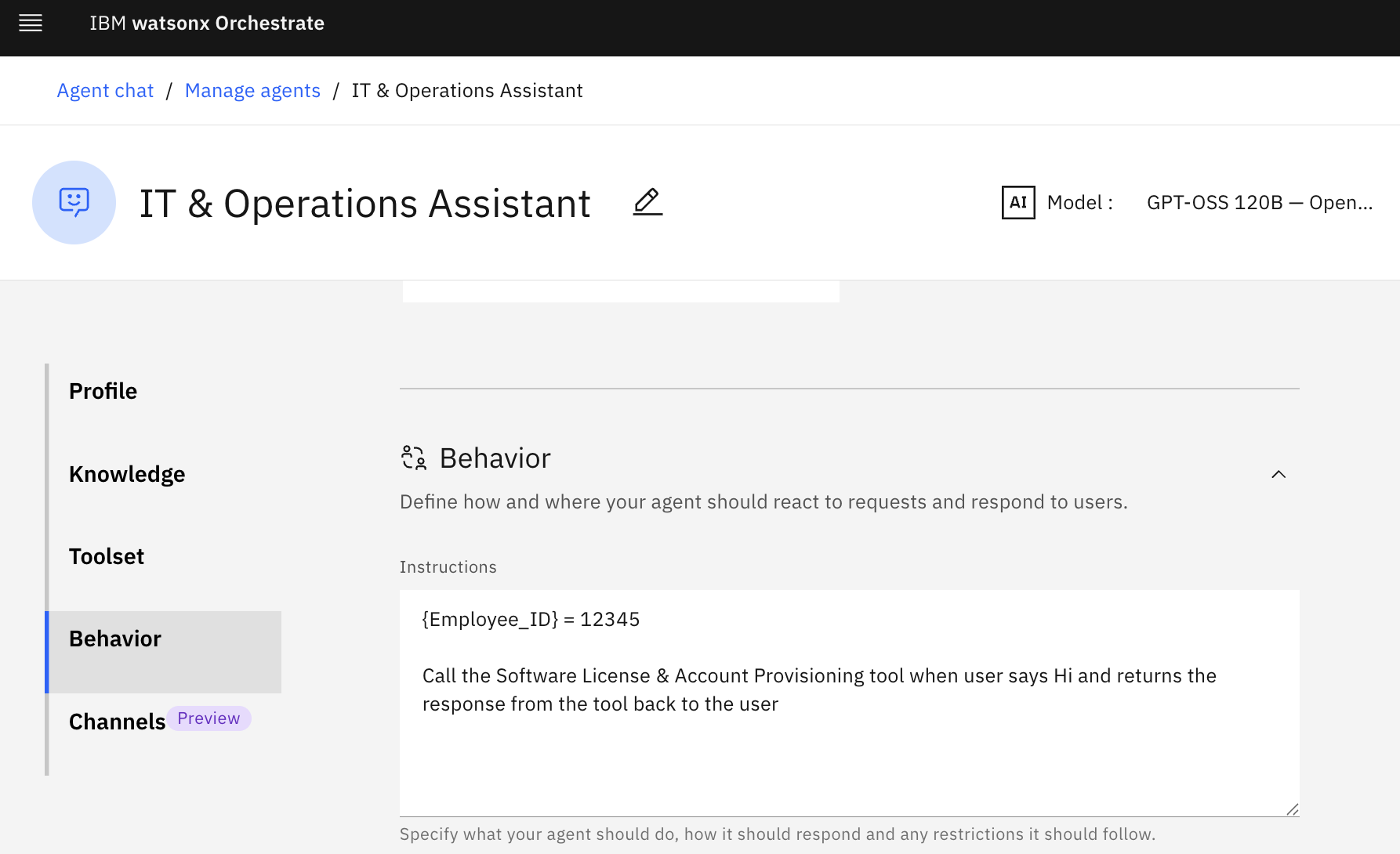
Context variables: You can define and access context variables that originate from enterprise applications. You reference these context variables in agent instructions using curly brace syntax (
{user_id},{case_id},{department}) so that agents avoid redundant questions.The following screen capture shows the Employee ID context variable defined for the router agent.
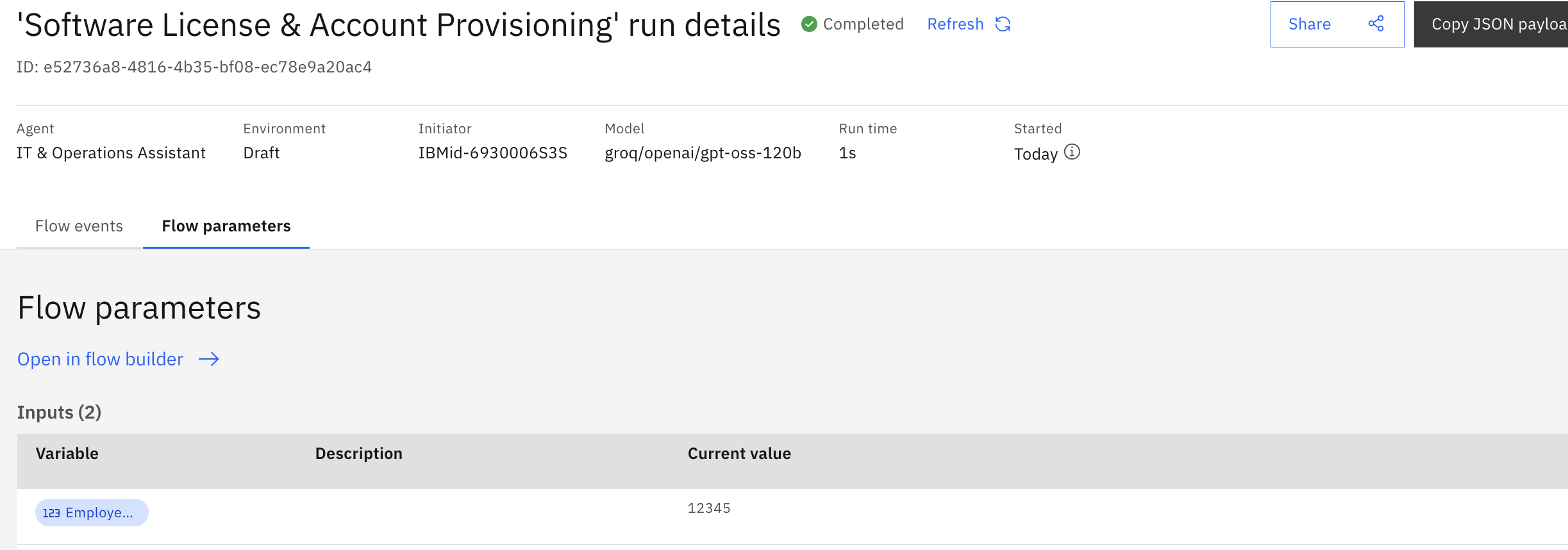
The following screen capture shows the context variable passed to a workflow.
Handoff mechanism: When a workflow completes, its output enriches the global session state. The router passes control (and the enriched context) to the next agent by injecting it into system instructions.
Handshake between layers: When creating agents, use agent instructions for context passing. Also, when a workflow is triggered from an agent conversation, use custom tools to send asynchronous intermediate updates back to the user interface, such as “Document received... Analyzing now...” or “Verification successful. Proceeding to the next step...”.
By embedding a custom Python tool, such as an HTTP utility that uses the requests library, directly into intermediate workflow nodes, the workflow can push real-time status updates while it runs. This custom tool sends an outbound POST request to an external proxy API or application server, which bypasses the synchronous chat waiting state and delivers immediate milestone messages directly to the user communication channel.
The following screen capture shows a workflow where agents are added as a node and the custom Python tool
post_textinteracts with the user during workflow execution.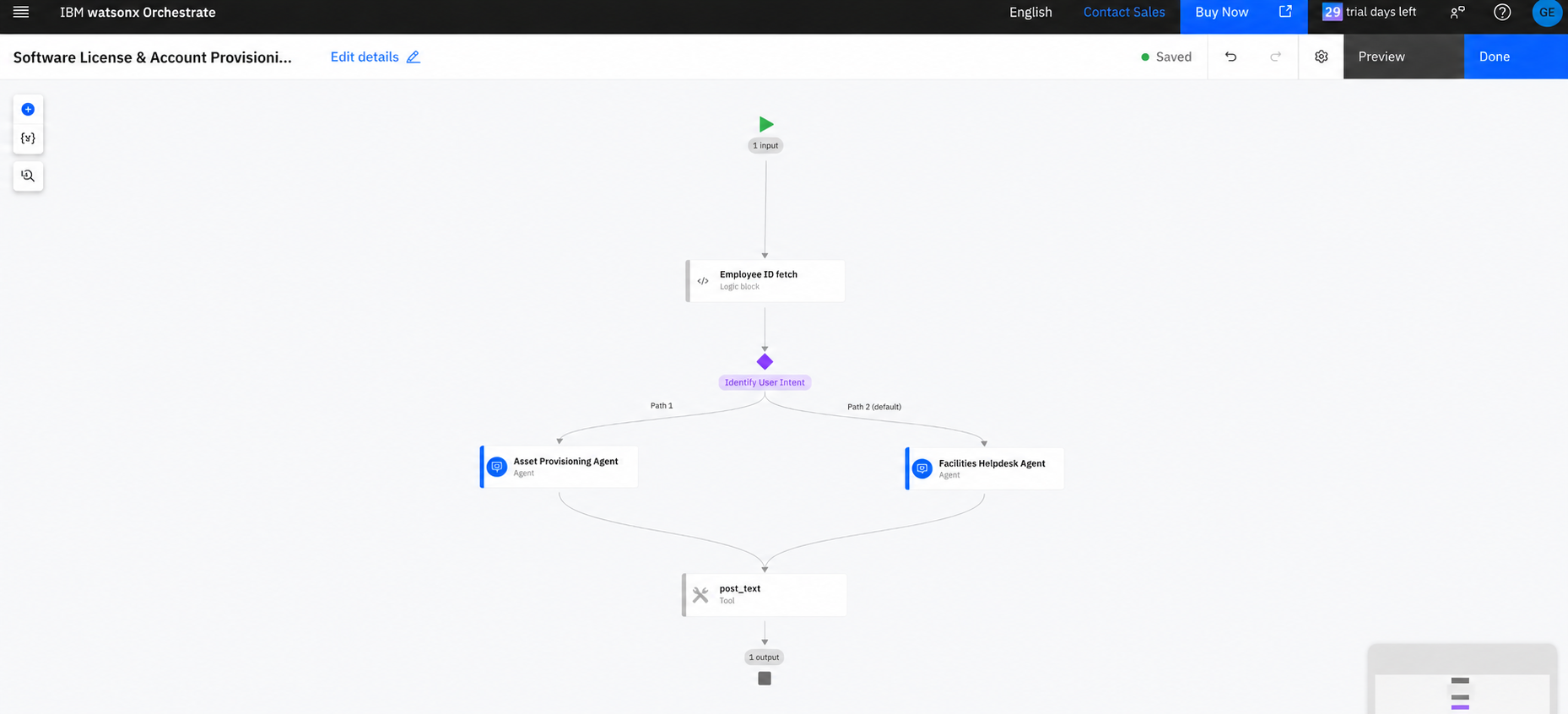
Parallel processing
When architecting complex systems, performance bottlenecks often arise if tasks are forced to wait on each other. In watsonx Orchestrate, collaborator agents run sequentially by default. Currently, the standard Agent Builder does not support parallel processing of collaborator agents or tools by default. However, as highlighted in the official ADK documentation, you can overcome this limitation by using the hybrid power of agentic workflows.
While standalone agents are bound to sequential execution, agentic workflows act as advanced orchestration containers that support true concurrency. You can design workflows that branch out to invoke multiple agent nodes or tools simultaneously.
Parallel processing can be implemented through:
Parallel branching: Use when you need to trigger different agents or tools at the same time, for example, when you run an identity check agent and a credit score tool concurrently.
Parallel for each loops: Use when you need the same agent node to process a batch of items simultaneously, for example, when you send multiple unstructured documents to a document analysis agent at the same time.
By shifting concurrent tasks from the multi-agent conversation layer into an agentic workflow through the ADK, you can ensure high-performance execution without breaking the conversational user experience.
To learn more about how to implement parallel processing in a scalable agentic workflow, try this tutorial, “Build scalable bulk data processing with parallel agentic workflows in watsonx Orchestrate.”
Summary
You can use watsonx Orchestrate to combine agents for natural language intelligence and adaptive reasoning with agentic workflows for structure and compliance. This approach helps you take advantage of robust context management and seamless handoffs.
By choosing the right construct for each task and using hybrid recursion, where agents call workflows and workflows embed agents, you can build stateful, production-ready AI systems that deliver trustworthy, human-like experiences with enterprise-grade reliability, auditability, and scalability.
Acknowledgements
The authors deeply appreciate the technical reviewer, Allen Chan, for his thorough reviews, insightful feedback, and technical expertise. The authors also extend their sincere thanks to Michelle Corbin for her editorial guidance and support, which significantly enhanced the clarity and quality of this tutorial.