Data Prep Kit is a toolkit that helps developers streamline data preparation when building LLM-enabled applications using fine-tuning, RAG, instruction-tuning, or agentic techniques. You can use the Data Prep Kit modules to easily build data pipelines that best supports your case. DPK modules, also referred to as transforms, help the developer get started and build end-to-end data pipelines, from ingestion to tokenization, that fit their use cases. These modules have been used to produce pre-training data sets for the Granite open models on HuggingFace.
An AI developer goes through a development lifecycle as shown in the following figure, when adding their own domain data.
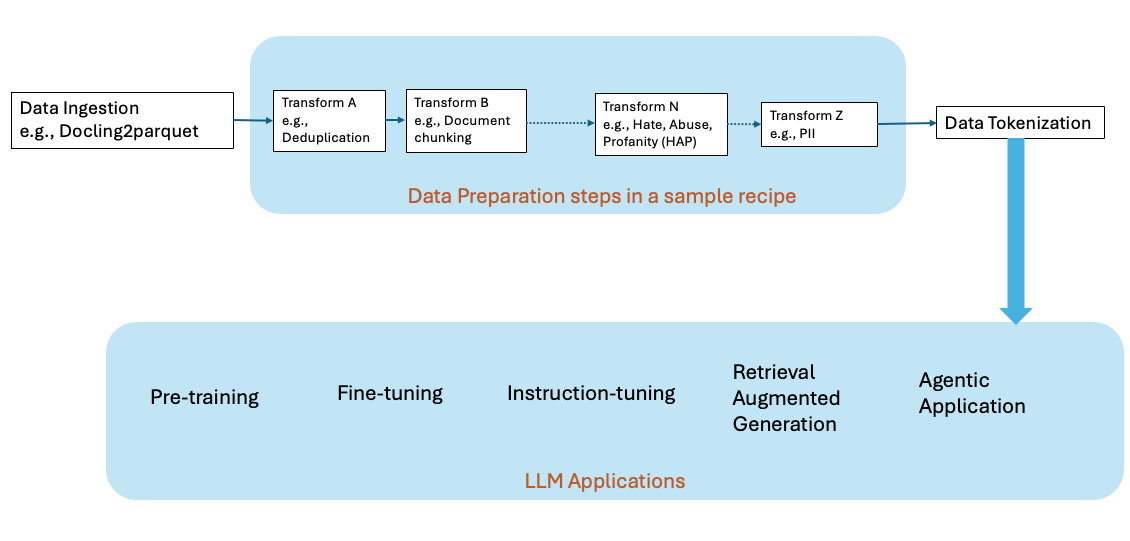
Data preparation is a time-consuming but critical part of building AI workloads. The volume of the data and the complexity of that data are some of the most challenging aspects of building AI workloads. Every use case has its own unique needs and manual verification of the data quality is not possible due to the huge data volumes. To overcome these challenges, we introduced the open-source Data Prep Kit (DPK) with a friendly Apache 2.0 license. DPK currently consists of 25+ modules for pre-processing data for code and language. As such, they provide a comprehensive set of capabilities for ingestion, document annotation, filtering, and redaction of private information.
Watch Maroun Touma introduce the Data Prep Kit.
IBM’s newest launch, watsonx.data integration, leverages the power of Data Prep Kit (DPK) to simplify unstructured data ingestion, transformation, and processing, but brings a scalable, repeatable, and easily maintainable data pipeline approach. Paired with our hybrid lakehouse, watsonx.data, users can work across both structured and unstructured sources to build powerful, more accurate retrieval applications!
Ready to get started?
The rest of this learning path will introduce you to the concepts, components, and key use cases for getting started with DPK. Click Next below to continue learning.
Check out our Getting Started Guide. We suggest trying DPK for the first time by using this Google Colab notebook example that requires zero setup on your local machine.