Tutorial
Stemming text using the Porter stemming algorithm in Python
Use watsonx, NLTK, and spaCy to prepare raw text data for use in ML models and NLP tasksStemming is a text preprocessing technique in natural language processing (NLP). More specifically, stemming algorithms reduce inflectional forms to their stem or root form. This root word is also known as a “lemma” in computational linguistics. Stemming is one of two primary methods (the other being lemmatization) for reducing inflectional variants within a text data set to one, shared morphological lexeme by removing affixes.
In this tutorial, we’ll use the Python natural language toolkit (NLTK) to walk through stemming .txt files with the most widely used stemming algorithm, Porter stemmer. We’ll focus on stemming as a means to prepare raw text data for use in machine learning models and NLP tasks.
Note that there are other libraries and packages for stemming text, such as scikitlearn. Also, while this tutorial focuses on stemming in Python programming, R’s tm package (text mining package) contains functions for stemming.
More about stemming
Stemming is one stage in text mining pipelines that converts raw text data into a structured format for machine processing. It is often used in search engines and other information retrieval systems. Stemming is also used in preparing text data for deep learning tools, such as large language models, and various NLP tasks, such as sentiment analysis and text classification.
Stemmers are the algorithms used to reduce different forms of a word to a base form. Essentially, they do this by removing specific character strings from the end of word tokens. Stemmers thus do not account for prefixes. Most stemmers contain a list of common language-specific suffixes against which the algorithm matches input word tokens. If the algorithm matches a word to one of the suffixes, and stripping the suffix does not violate pre-specified rules in the algorithm (e.g. character length restrictions), then the algorithm removes the suffix from the word.
Stemming algorithms differ in a number of ways. One primary difference is in the conditions or rules that determine whether to strip a given suffix from a token. Additionally, some stemmers have processes to correct for malformed stem words, and so they limit under-stemming and over-stemming.
Though closely related, stemming differs from lemmatization in that stemming is a more heuristic process of removing suffixes to produce a base form. Lemmatization conducts a more detailed morphological analysis, often involving part of speech (POS) tagging and mapping output to real word roots contained in dictionaries.
Prerequisites
You'll need an IBM Cloud account to create a watsonx.ai project.
Steps
- Set up your environment
- Install and import relevant libraries
- Load the data
- Preprocess the data
- Tokenize the text
- Remove stop words
- Running the Porter stemmer
Step 1. Set up your environment
While there are a number of tools to choose from, we’ll walk you through how to set up a watsonx project to use a Jupyter notebook. Jupyter notebooks are widely used tools in data science to combine code, text, and visualizations to formulate well-formed analyses.
Log in to watsonx.ai using your IBM Cloud account.
Create a watsonx.ai project.
- Click the navigation menu at the top left of the screen, and then select Projects > View all projects.
- Click the New project button.
- Select Create an empty project.
- Enter a project name in the Name field.
- Select Create.
Create a Jupyter notebook.
- In your project environment, select the Assets tab.
- Click the blue New asset button.
- Scroll down in the pop-up window, and then select Jupyter notebook editor.
- Enter a name for your notebook in the Name field.
- Click the blue Create button.
A notebook environment opens for you to load your data set and copy code from this tutorial to tackle a simple single-file text stemming task. To view how each block of code affects the text file, each step’s code block is best inserted as a separate cell of code in your watsonx.ai project notebook.
Step 2. Install and import relevant libraries
You'll need a few libraries for this tutorial. Make sure to import the ones below, and if they're not installed, you can resolve this with a quick pip install, included at the top of the code.
!pip install nltk -U
!pip install spacy -U

import nltk
import re
import string
import spacy

from nltk.tokenize import word_tokenize
from nltk.corpus import stopwords
from nltk.stem import PorterStemmer

nltk.download("punkt")
nltk.download('wordnet')
nltk.download('stopwords')

!python -m spacy download en_core_web_sm
sp=spacy.load('en_core_web_sm')
Step 3. Load the data
For this tutorial, we use the Asian religious text data set from the UCI Machine Learning Repository. We will focus on stemming one text file in this tutorial for the purpose of explaining in detail the steps that are involved in producing high-quality stemmed text data. Many of the later preprocessing and stemming steps can be combined together under one Python function to iterate through a corpus of text files.
- Download the Asian religious text data from the UCI Machine Learning Repository.
- Unzip the file and open the resulting folder.
- Select the
Complete_data.txtfile to upload from your local system to your notebook in watsonx.ai. - Read the data into the project by selecting the </> icon in the upper right menu, and then selecting Read data.
- Select Upload a data file.
- Drag your data set over the prompt, Drop data files here or browse for files to upload.
- Return to the </> menu and select Read data again. Click Select data from project.
- In the pop-up menu, click Data asset on the left-side menu. Select your data file (for example,
Complete_data.txt), and then click the lower right-side blue button Select. - Select Insert code to cell, or the copy to clipboard icon to manually inject the data into your notebook.
Because watsonx.ai imports the file as a streamingBody, we need to convert it into a text string. The following code does this conversion:
# convert loaded streamingbody file into text string for preprocessing
# note "streaming_body_1" in the following line may need to be changed to whatever your file imports as

raw_bytes = streaming_body_1.read()
working_txt = raw_bytes.decode("utf-8", errors="ignore")

# print to confirm text converted successfully
print(working_txt)
Step 4. Preprocess data
Even though stemming is itself considered a preprocessing technique, there are several preliminary steps that can improve the quality of our stemmed text file. This step strips line breaks and sequential white space from the text.
This step is not necessary for stemming text, but it improves the quality of the final output from the tokenizer, and by extension, the stemmer.
# clean text by removing successive whitespace and newlines then print regularized text
clean_txt = re.sub(r"\n", " ", working_txt)
clean_txt = re.sub(r"\s+", " ", clean_txt)
clean_txt = clean_txt.strip()
print(clean_txt)
Step 5. Tokenize text
Tokenization breaks down unstructured text data into smaller units called tokens. A token can range from a single character or individual word to much larger textual units. Although electronic text is, essentially, only a sequence of characters, NLP techniques process text in discrete linguistic units (for example, words and sentences). To stem a text string, the machine must be able to identify individual words. Tokenization allows the machine to do this.
Fortunately, the NLTK library comes with a function to tokenize text at the word level. We can pass our cleaned text string through this word_tokenize function, with a subsequent parameter to only return alphabetic characters.
While this latter step is not necessary to stem text data, it will help clean our final output by removing punctuation, numbers, and other such characters that are unaffected by the stemmer. This cleaned up text can be especially useful if you are stemming text for NLP tasks such as word embeddings or topic models.
# tokenize cleaned text
tokens = word_tokenize(clean_txt)

# remove non-alphabetic tokens and print
filtered_tokens_alpha = [word for word in tokens if word.isalpha()]
print(filtered_tokens_alpha)
Step 6. Remove stop words
Stop words (or stop lists) denote a non-universal list of words that are removed from a data set during preprocessing. Often, stop words are the most commonly used words in a language, and are believed to add little value in NLP tasks. Some stemmers come with predefined stop lists. One notable example is the Snowball stemmer, whose predefined stop list contains words without a direct conceptual definition and that serve more of a grammatical than conceptual purpose (for example, the words "a," "the," and "being.")
Rather than create an original collection of stop words, we can load the NLTK English language stop list. We then remove the stop words in the NLTK list from the tokenized text.
# load stop list from NLTK
stop_words = set(stopwords.words('english'))

# remove stop words from tokenized text and print
filtered_tokens_final = [w for w in filtered_tokens_alpha if not w in stop_words]
print(filtered_tokens_final)
Step 7. Running the Porter stemmer
The Porter stemming algorithm classifies every character in a given token as either a consonant ("c") or vowel ("v"), grouping subsequent consonants as "C" and subsequent vowels as "V." The algorithm thereby represents every word token as a specific combination of consonant and vowel groups. For example, the word therefore is represented as CVCVCVCV, or C(VC)3V, with the exponent representing repetitions of consonant-vowel groups.
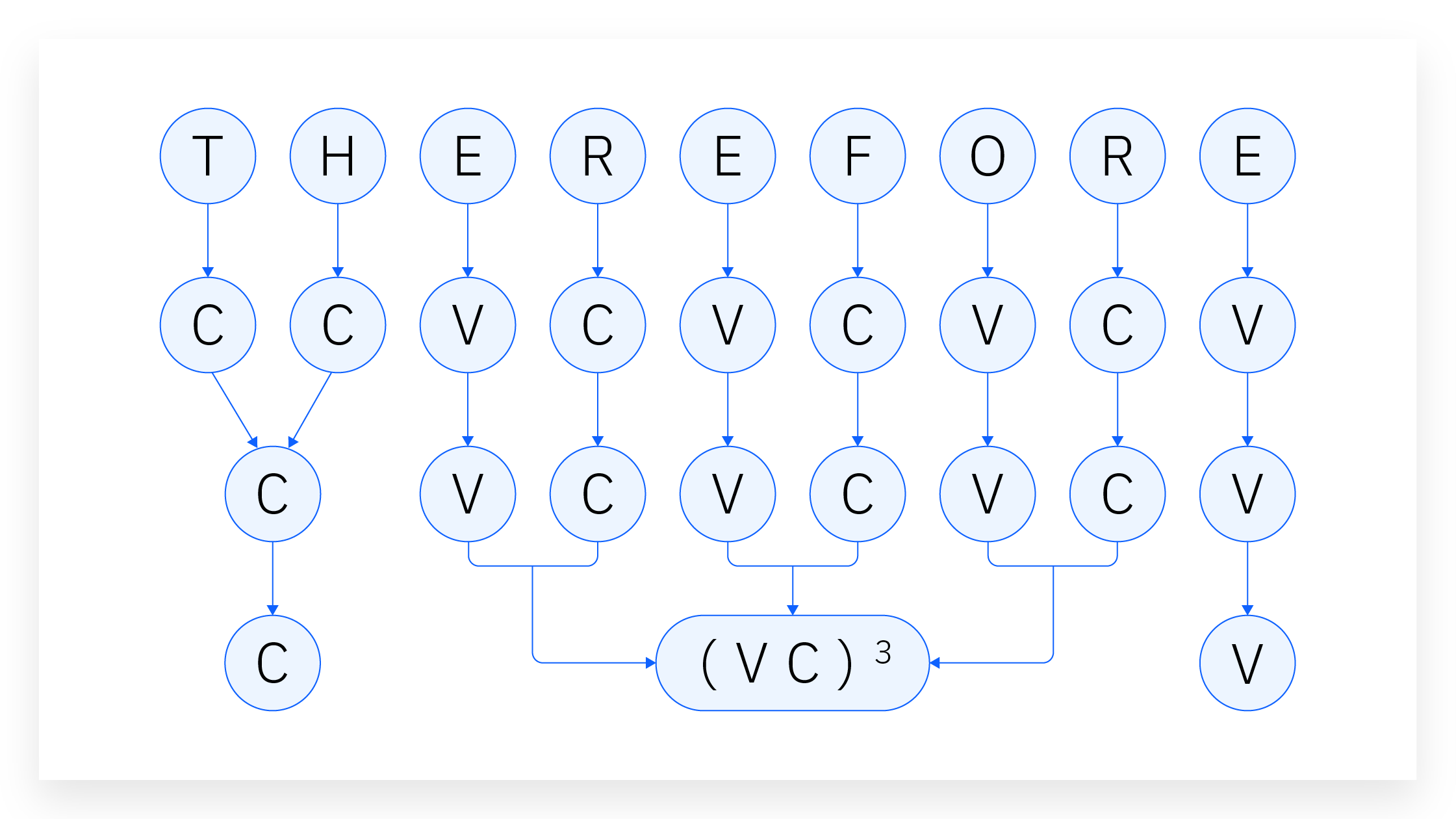
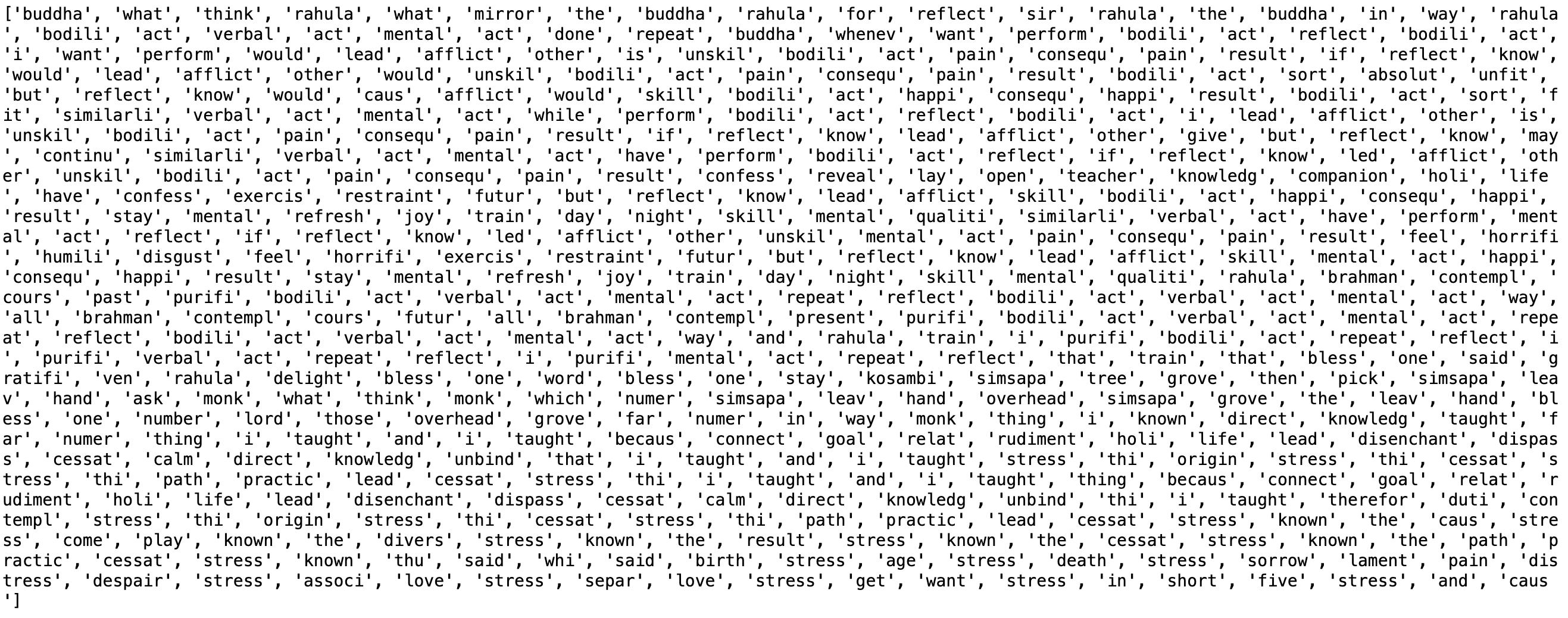
Once enumerated this way, the stemmer runs each word token against a list of rules that specify the ending characters to remove according to the number of vowel-consonant groups in that token. The following code runs each word token through the Porter stemmer and prints the first 500 stemmed tokens.
# define Porter Stemmer from NLTK
p_stemmer = PorterStemmer()

# stem tokenized text and print first 500 tokens
stemmed_tokens = [p_stemmer.stem(word) for word in filtered_tokens_final]
print(stemmed_tokens[:500])
Other stemming algorithms
Because the English language itself follows general but not absolute lexical rules, the Porter stemmer algorithm’s systematic criterion for determining suffix removal can return errors. This is where other stemming algorithms can be useful. Although Porter stemmer is the most common stemming algorithm, there are a number of other stemmers with their own respective advantages and disadvantages:
Lovins stemmer, the first published stemming algorithm, is essentially a heavily parametrized find-and-replace function. It compares each input token against a list of common English suffixes, each suffix being conditioned by one of twenty-nine rules. If the stemmer finds a predefined suffix in a token and removing the suffix does not violate any conditions attached to that suffix (such as character length restrictions), the algorithm removes that suffix. The stemmer then runs the resulting stemmed token through another set of rules that correct for common malformations, such as double letters (such as hopping becomes hopp becomes hop).
Snowball stemmer is an updated version of the Porter stemmer. It differs from Porter in two main ways. First, while Lovins and Porter only stem English words, Snowball can stem text data in other Roman script languages, such as Dutch, German, French, or Spanish. It also has capabilities for non-Roman script languages, most notably Russian. Second, Snowball has an option to ignore stop words.
Lancaster stemmer (also called Paice stemmer) is considered the most aggressive English stemming algorithm. It contains a list of over 100 rules that dictate which ending strings to replace. The stemmer iterates each word token against each rule. If a token’s ending characters match the string defined in a given rule, the algorithm modifies the token per that rule’s operation, then runs the transformed token through every rule again. The stemmer iterates each token through each rule until that token passes all the rules without being transformed.
Summary and next steps
In this tutorial, you used the Porter stemmer from Python NLTK to complete a popular text normalization technique. Although this tutorial describes how to stem a single text, the same commands and techniques can be deployed on a corpus of .txt files by combining the tokenization, formatting, and stemming commands under one Python function and iterating files through that function.
Try watsonx for free
Build an AI strategy for your business on one collaborative AI and data platform called IBM watsonx, which brings together new generative AI capabilities, powered by foundation models, and traditional machine learning into a powerful platform spanning the AI lifecycle. With watsonx.ai, you can train, validate, tune, and deploy models with ease and build AI applications in a fraction of the time with a fraction of the data.
Try watsonx.ai, the next-generation studio for AI builders.
Next steps
Explore more articles and tutorials about watsonx on IBM Developer.
To continue learning, we recommend exploring this content: