Tutorial
Building microservices for reactive messaging between IBM MQ apps and Open Liberty apps
Use MicroProfile Reactive Messaging 3.0 with SmallRye connectors and AMQP to enable reactive messaging between MQ and Liberty appsReactive messaging enables event-driven communication between systems, allowing decoupled services to communicate by triggering events. In modern applications, this type of architecture is often defined using microservices. An event can be defined as a change in state, such as a message being placed in a queue. The event-driven architecture comprises three key components: event producers, event brokers (like IBM MQ), and event consumers. The producer publishes an event to the broker, which filters and pushes the events to consumers. This method of exchange messaging replaces message-driven communication, where applications need to repeatedly ask to receive the next available message.
This tutorial shows you how to configure IBM MQ and Open Liberty microservices for reactive messaging over AMQP using MicroProfile Reactive Messaging 3.0 and SmallRye connectors — so your services communicate through events rather than polling.
This tutorial demonstrates how Open Liberty applications can use MicroProfile Reactive Messaging (with SmallRye connectors) to enable reactive messaging patterns for IBM MQ using AMQP.
Reactive messaging is achieved by configuring incoming and outgoing messaging channels managed by the SmallRye AMQP connector, which maps messages into Reactive Messaging objects and transports them to the configured consumer or producer application channels. The suite of technologies enables event streaming messaging between Open Liberty applications and IBM MQ with AMQP, creating a similar active messaging exchange configuration that would be obtained by using Kafka as the AMQP broker.

SmallRye provides many MicroProfile specifications. One of the key components of SmallRye is the SmallRye Reactive Messaging module, which facilitates communication between microservices using Reactive Streams.
SmallRye is a collection of open-source Java libraries designed for developing microservices. It offers a lightweight and modular approach to building microservices by leveraging popular technologies such as MicroProfile (which is used in this tutorial), Reactive Streams, and Kubernetes.
This tutorial focuses on building microservices for reactive messaging using MicroProfile Reactive Messaging 3.0. Messages are exchanged with AMQP using SmallRye Reactive Messaging AMQP 4.3 as the AMQP connector. The SmallRye connector is responsible for receiving messaging from an AMQP Broker or Router and sending messages to an AMQP address. It is based on the Vert.X AMQP Client 4.3.4.
The microservices created in this tutorial are intended to be a proof of concept and are not suitable for use in production.
IBM MQ Liberty reactive messaging sample
This section describes the code in the reactive messaging sample.
This tutorial uses a sample from the mq-dev-patterns repository. The code for this tutorial is in the "Liberty-MQ-reactive-messaging" folder and consists of two subfolders: "app-producer" and "app-consumer".

Producer and consumer app code
The code behind these two Open Liberty applications enables the producer to send a message to a queue and the consumer to respond to this message by providing a reply using reactive messaging.
The structure of the producer and consumer are similar. In Open Liberty, like other Java runtime platforms, the application bean classes are indicated by the @ApplicationPath annotation. This annotation enables the Open Liberty server (server.xml) to find the application's entry point and triggers it.
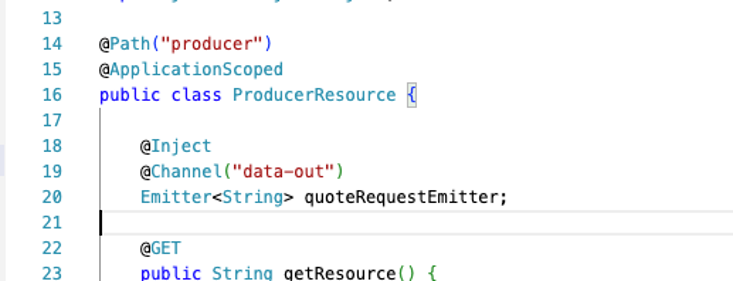
A single application scope can have multiple resources defined by the @Path annotation. The only HTTP endpoint within the producer resource (ProducerResource.java) that this tutorial uses is http://localhost:9080/system/producers/produce. This endpoint enables you to put a message into a queue using reactive messaging, which is then redirected to the consumer.
The default Open Liberty port is 9080, but you can change it in the server configuration file (server.xml).
These two Open Liberty applications are equipped with incoming and outgoing reactive messaging channels managed by the SmallRye AMQP connector. To facilitate message exchange between Open Liberty applications and the AMQP broker, SmallRye uses the MicroProfile Reactive Messaging @Channel annotation. The channels defined by the application are the logical communication links between the Open Liberty applications and the AMQP broker (in this case, IBM MQ), and their only purpose is to enable these entities to exchange messages in an event-driven way. These channels are different from the MQ queue manager channels.
The SmallRye connector receives messages from the outgoing application channel and delivers them to the AMQP broker destination, receives messages from the broker, and then delivers them to a specified incoming channel of the application consumer.
The configuration file for these channels and the credentials for the connection with the AMQP broker (MQ) are located in the microprofile-config.properties file.

Producing a message
When the producer endpoint is triggered (http://localhost:9080/system/producers/produce), a message is published into an outgoing producer channel using a Reactive Message Emitter object. The destination channel for this outgoing message is specified using the @Channel annotation. The @Channel lets you indicate to which channel you are going to send your payloads or messages. The Emitter is the object to use to send these payloads or messages. When the @Channel qualifier is used on an Emitter object this indicates which outgoing channel the message payload will be emitted to. Both these elements are part of the org.eclipse.microprofile.reactive.messaging library.
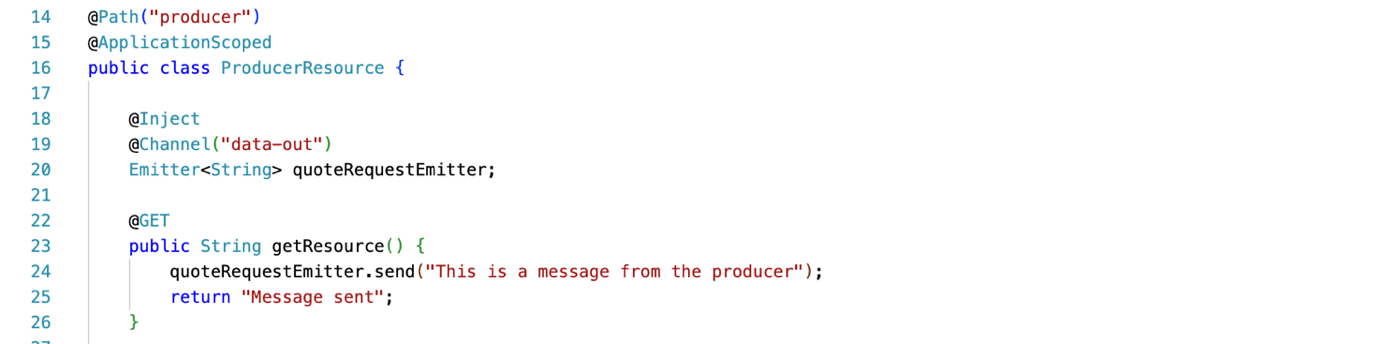
In this example, the emitting object emits a payload message to the data-out channel. The data-out channel is configured in the MicroProfile properties configuration (resources/META-INF/microprofile-config.properties) as follows:
mp.messaging.outgoing.data-out.connector=smallrye-amqpindicates that the outgoing channel is managed by the SmallRye AMQP connector.mp.messaging.outgoing.data-out.address=DEV.QUEUE.1specifies the destination address for the emitted message and the topic to which messages should be published.
When the producer Emitter object sends a message into the data-out channel, the SmallRye AMQP connector of the producer application receives the message payload and transmits it to the specified channel address as well as the DEV.QUEUE.1 topic. The delivery of the message to the DEV.QUEUE.1 queue within the MQ queue manager causes a change (event) in the state of this AMQP broker and generates a new event for the DEV.QUEUE.1 topic that will be used to send the message to the consumer subscribed to this same address.
Consuming a message
The SmallRye AMQP connector is crucial for retrieving AMQP messages from the IBM MQ broker. Whenever a new event occurs on the address (topic) of the broker that the consumer application channel is subscribed to (DEV.QUEUE.1), the SmallRye AMQP connector maps the messages that generated the event into a Reactive Messaging object and sends it to the configured consumer application incoming channel subscribed to that topic.
To handle the incoming messages for the incoming channel, the consumer resource defines the callback method that will be used to handle the payload of the incoming message. The @Incoming annotation lets the SmallRye connector know which callback method to send the retrieved messages to whenever there are incoming messages for the data-in channel.
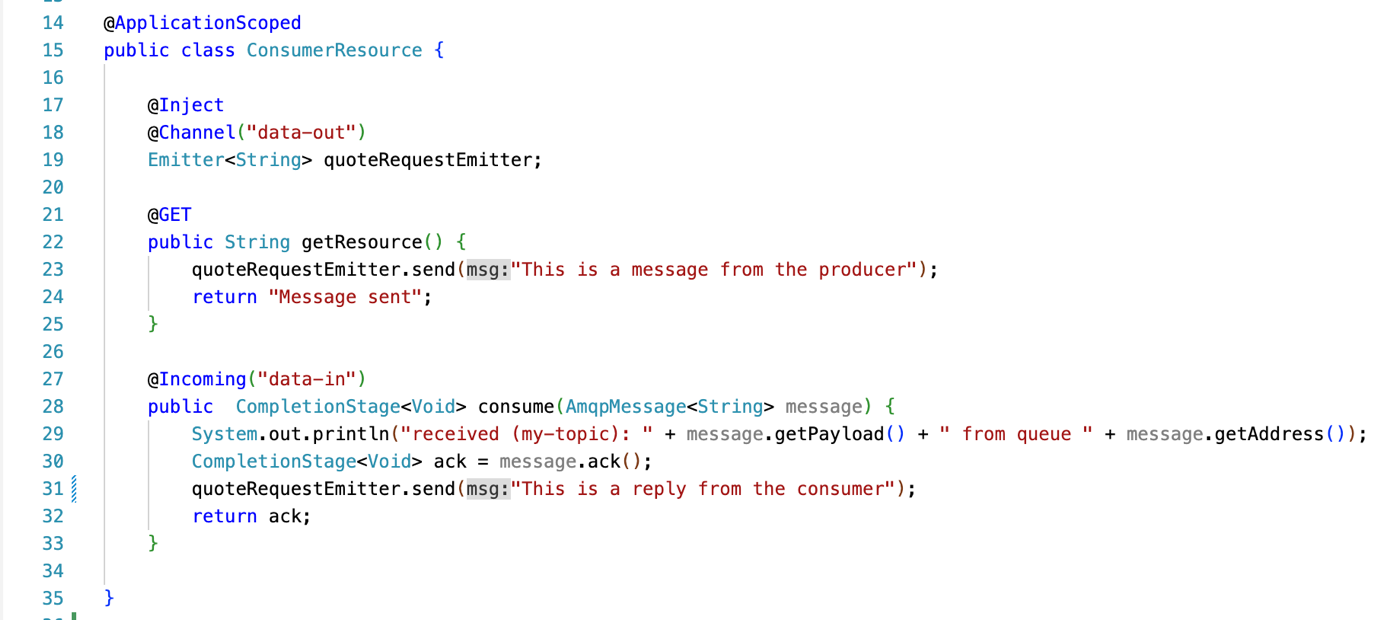
In this example, each incoming message for the data-in channel is sent to the callback function CompletitionState<Void> consume(AmqpMessage<String> message);. With the current data-in incoming channel configuration, there is an incoming message for the consumer only when an event occurs on the DEV.QUEUE.1 address of the AMQP broker (MQ), as well as every time a new message is produced into the queue DEV.QUEUE.1 of the queue manager.
The incoming channel for the consumer application is named data-in and its properties are configured in the MicroProfile properties configuration (resources/META-INF/microprofile-config.properties) as follows:
mp.messaging.incoming.data-in.connector=smallrye-amqpindicates that the incoming channel is managed by the SmallRye AMQP connector.mp.messaging.incoming.data-in.address=DEV.QUEUE.1specifies the SmallRye connector from which address (queue) messages should be retrieved. With this configuration, the consumer resource is subscribed to theDEV.QUEUE.1address (topic) with its incoming channeldata-in. When events occur onDEV.QUEUE.1, the SmallRye connector retrieves these messages and transports them to thedata-inchannel of the consumer application whose payload will be mapped to the specifiedcallbackmethod.
The flow of operations in the reactive messaging sample
In summary, the SmallRye AMQP connector enables reactive messaging by sending messages produced on the data-out channel of the producer resource to DEV.QUEUE.1 and forwarding them to the incoming consumer channel subscribed to DEV.QUEUE.1. This flow of operations occurs in the following order:

When the application starts, the consumer is subscribed to the topic DEV.QUEUE.1 with its incoming channel data-in. (1) the producer endpoint is triggered (2) A producer produced a message to the topic DEV.QUEUE.1 (queue within the MQ queue manager or AMQP broker) using its outgoing channel data-out. (3) A new event for the topic DEV.QUEUE.1 is created in the AMQP broker. (4) The produced message in the DEV.QUEUE.1 queue is automatically redirected to the consumer incoming channel (‘data-in’) already subscribed to the ‘DEV.QUEUE.1’ topic (step 1). (5) The message is transported back to the incoming consumer channel (data-in). (6) After the message reached the consumer channel, its payload is sent to the specified callback method.
This way of exchanging messages between applications eliminates the need for consumers to constantly check the queue manager for new messages, as they receive them in their channels as soon as they are produced in the subscribed queue.
Similarly, the consumer can send a response message by publishing it on its data-out outgoing channel with the address DEV.QUEUE.2. The producer is subscribed to this address with its incoming channel data-in. The SmallRye AMQP connector is responsible for routing the response message from the DEV.QUEUE.2 on the IBM MQ broker to the producer's incoming channel. This seamless communication between the producer and consumer resources is facilitated by reactive messaging, which allows for an immediate exchange of messages without the need for the producer of polling to receive a response.
Complete the following steps to configure, run, and test the sample.
Prerequisites
To complete this tutorial, you need to install or set up:
- Git, Maven, and Java JDK 11.
- An AMQP channel-enabled instance of IBM MQ. Follow the steps in Setting up AMQP with MQ.
Steps
- Clone and configure the Open Liberty producer and consumer apps
- Run the producer and consumer
- Test reactive messaging
Step 1: Configure the Open Liberty producer and consumer
First, you need to obtain the code and configure the IBM MQ broker and familiarize yourself with the MicroProfile configuration used for setting up the reactive messages between application channels.
The code for this tutorial can be found in the mq-dev-patterns repository.
Clone the mq-dev-patterns repository:
git clone https://github.com/ibm-messaging/mq-dev-patterns
Change to the directory for the cloned repository, and then in to the amqp-qpid/liberty-reactive-messaging directory where the samples reside.
The connection credentials of the IBM MQ AMQP broker must be configured in order to send and receive AMQP messages. To do so, the following properties in the MicroProfile description file (resources/META-INF/macroprofile-config.properties) must be set:
amqp-hostis your MQ Queue Manager hostamqp-portis the port used for MQ AMQP (5672 default)amqp-usernameis the user name for putting and consuming messagesamqp-passwordis your AMQP password
Step 2: Run the producer and consumer
After you set up the AMQP broker and start it, you can start the producer application. Change directories to the app-producer directory, and then issue this command:
mvn liberty:dev
This command installs all the required dependencies using the pom file and starts the producer application in dev mode, where you can update your application and see the changes immediately.
In another terminal window, you can start the consumer application. Change directories to the app-consumer directory, and then issue this command:
mvn liberty:dev
Step 3: Test reactive messaging
After you have started both the producer and consumer applications, you can test the reactive messaging capabilities by calling the exposed endpoint of the producer. Open a new terminal window, and call the endpoint resource using the following command:
curl http://localhost:9080/app-producer/system/producer
After running this curl command, the terminal where you started the producer displays the following message reply from the consumer:

Summary and next steps
In this tutorial, you learned how to:
- Enable AMQP in an MQ container.
- Configure MicroProfile and SmallRye for reactive messaging.
- Run a reactive Open Liberty application that can put a message into an MQ queue using AMQP and MicroProfile Reactive Messaging.
- Run a reactive Open Liberty application that can receive messages from IBM MQ with AMQP using MicroProfile Reactive Messaging.
Learn more about reactive programming in this quick start guide. Or, learn how to use Message Driven Beans of JMS or Jakarta to enable reactive messaging between MQ and Liberty apps.