Article
Audit trail management in enterprise baseboard management controller (eBMC)
Enhance security, support troubleshooting, and ensure accountability using detailed audit logsThis article explains how the enterprise baseboard management controller (eBMC) monitors and records modifications made to system resources through various interfaces. By maintaining a detailed audit trail, eBMC not only simplifies troubleshooting when issues arise but also supports security best practices—helping to identify potential vulnerabilities and ensure accountability in system operations.
The design proposes using the Linux kernel audit subsystem for recording an audit trail of events in bmcweb, which is a web server component of eBMC.
The Linux kernel audit subsystem records the following three key aspects:
Who performed the activity
What activity was performed
How the system responded
Event capture and retrieve
User-initiated Redfish API operations (such as DELETE, PATCH, POST, and PUT) are captured by the Linux kernel’s audit subsystem. These audit events can then be retrieved through the Redfish API, enabling GUIs (such as webui-vue) to display them and offer filtering options by date, Redfish schema, or other useful details.
Sample information in the audit.log file:
type=USYS\_CONFIG msg=audit(1668760379.078:1336): pid=9664 uid=0 auid=4294967295 ses=4294967295
msg='op=PATCH:/redfish/v1/AccountService/Accounts/test123 acct="admin" exe="/usr/bin/bmcweb" hostname=<hostname> addr=:: fIff:<hostname\_ip> terminal=?
res=success'UID="root" AUID="unset"

type= The "type" field contain the type of the record. "USYS\_CONFIG" value specifies that this record was triggered by a user system kernel.

msg= The "msg" field record contains a time stamp and a unique ID of the record in the form audit(time\_stamp:ID) 1668

pid= The "pid" field records the Process ID. In this case, 9664 is the PID of the bmcweb process.

uid= The "uid" field records the user ID of the user who started the analyzed process

auid= The "auid" field records the Audit user ID, that is the login uid. This ID is assigned to a user upon login and is inherit oy every process even when the user's identity changes.

ses= The "ses" field records the session ID of the session from which the analyzed process was invoked.

msg='op=PATCH:/redfish/v1/AccountService/Accounts/test123 (operation name= PATCH and URI= /redfish/v1/AccountService/Accounts/test 123)

acet= The "acct" field records the account name : admin.

exe= "/usr/bin/bmcweb" The "exe" field records the path to the executable that was used to invoke the analyzed process.

hostname= <hostname>

addr=::ffff:<hostname\_ip>

terminal=?

res=success

UID="root"

AUID="unset"
Audit log configuration
The audit log is stored in the file at: var/log/audit/audit.log
The var/log/audit/ directory contains the files with the log information stored by the Linux audit daemon (auditd).
The maximum storage of the audit log is up to 10 MB. The audit log gets auto deleted after reaching its maximum capacity and then it starts populating the new audit log file.
Access audit log using eBMC GUI
The Audit Log feature has been introduced in the BMC GUI as a dedicated component under Logs and Services.
It is possible to access and download audit logs using the eBMC GUI by users with admin, service, or read-only roles. The eBMC GUI is capable of storing up to 1000 audit log entries at a time.
After logging in with any of the supported user roles, you can view audit log entries that include details such as:
- Unique audit ID
- Type of event
- Date and timestamp
- Operation performed along with the URL
- Hostname and IP address
- System response
The downloaded audit logs provide a detailed view of the exact operations performed by users. Additionally, the interface supports searching and filtering logs based on:
- Type
- Operation
- URL
- IP address
- Username
- Date range (from/to)
This functionality enhances traceability, accountability, and simplifies auditing and troubleshooting activities.
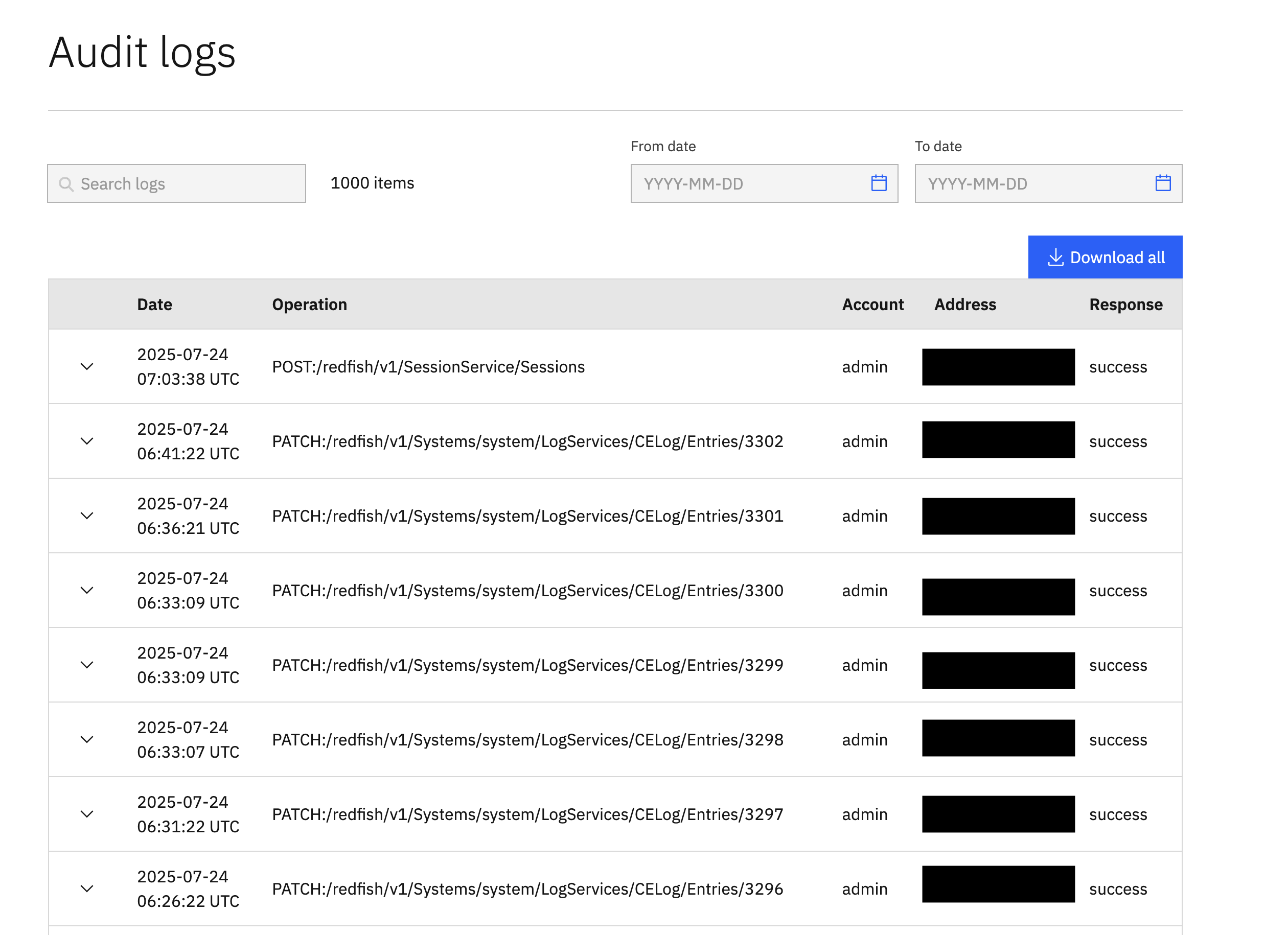
Figure. BMC GUI Audit logs page with examples
Summary
This article outlined the implementation of the audit trail functionality in eBMC, focusing on enhancing system security, improving troubleshooting, and ensuring accountability. The audit log includes essential metadata such as who performed the action, what action was performed, and how the system responded. The audit system helps track configuration changes, monitor access, and supports compliance requirements. Overall, the eBMC audit feature strengthens system integrity by providing a detailed and accessible history of user interactions.