Article
Use watsonx Orchestrate as an agentic control plane for external AI agents
Register a LangGraph agent running outside watsonx Orchestrate over the Agent2Agent (A2A) protocol, instrument it with standard OpenTelemetry, and govern it alongside native agents — without changing a line of the agent's codeIBM watsonx Orchestrate is evolving beyond an AI agent development platform into an enterprise agentic control plane that helps organizations discover, route, monitor, and govern AI agents across different frameworks and cloud environments.
Many organizations already run AI agents that are built with frameworks such as LangGraph, CrewAI, and Google ADK outside watsonx Orchestrate. While these AI agents can be deployed and operated independently, they often lack centralized visibility, governance, and observability. Platform teams need a consistent way to manage AI agents regardless of where they were built or where they run.
In this article, you will deploy a LangGraph AI agent on IBM Cloud Code Engine, expose it through the Agent2Agent (A2A) protocol, register it in watsonx Orchestrate, and add OpenTelemetry instrumentation. After completing these steps, the external AI agent appears in the same watsonx Orchestrate analytics and monitoring dashboards as AI agents built directly in the platform, without changing the AI agent source code.
This article explains how to bring external AI agents into a single governance and observability layer using watsonx Orchestrate. While the A2A and OpenTelemetry approaches are portable across platforms, the registration and analytics workflow described here is specific to watsonx Orchestrate.
Architecture overview
IBM watsonx Orchestrate has traditionally provided tools for building AI agents, including a no-code builder, the watsonx Orchestrate Agent Development Kit (ADK), tools, workflows, and knowledge sources. Recent releases expand that focus to support the entire Agent Development Lifecycle (ADLC). The Agent Development Lifecycle includes two continuous processes:
- Build-time lifecycle: Design, build, test, evaluate, and certify AI agents before deployment.
- Runtime lifecycle: Deploy, operate, monitor, observe, evaluate production usage, and optimize AI agents based on operational data.
The runtime lifecycle applies to AI agents regardless of where the AI agents were built. watsonx Orchestrate connects to external AI agents, tools, and models through open standards.
| Existing asset | Connection method |
|---|---|
| AI agents built with LangGraph, CrewAI, Google ADK, Agentforce, Amazon Q, Microsoft Copilot, or custom frameworks | Agent2Agent (A2A) protocol or an OpenAI-compatible chat completions endpoint |
| Tools hosted on any platform | Model Context Protocol (MCP) |
| Models hosted on watsonx, OpenAI, Anthropic, Amazon Bedrock, or Google Gemini | Standard model APIs through the AI Gateway |
After an external AI agent is registered in watsonx Orchestrate, orchestrator agents can use the external AI agent as a collaborator. This approach provides a single governed entry point for request routing, task planning, and agent selection.
After OpenTelemetry instrumentation is added, watsonx Orchestrate collects operational data from the external AI agent. The platform displays tool calls, model usage, latency, token consumption, and collaborator activity in the same monitoring dashboards used for native watsonx Orchestrate agents. These dashboards include:
- A tenant-wide analytics overview
- Per-agent dashboards with token, tool usage, and feedback metrics
- Conversation history views with complete execution traces
The rest of this article shows how to register, connect, and monitor an AI agent that was built outside IBM watsonx Orchestrate.
Architecture of an external LangGraph agent in watsonx Orchestrate
The following architecture shows how a LangGraph AI agent running outside IBM watsonx Orchestrate can be discovered, registered, and monitored through a central control plane.
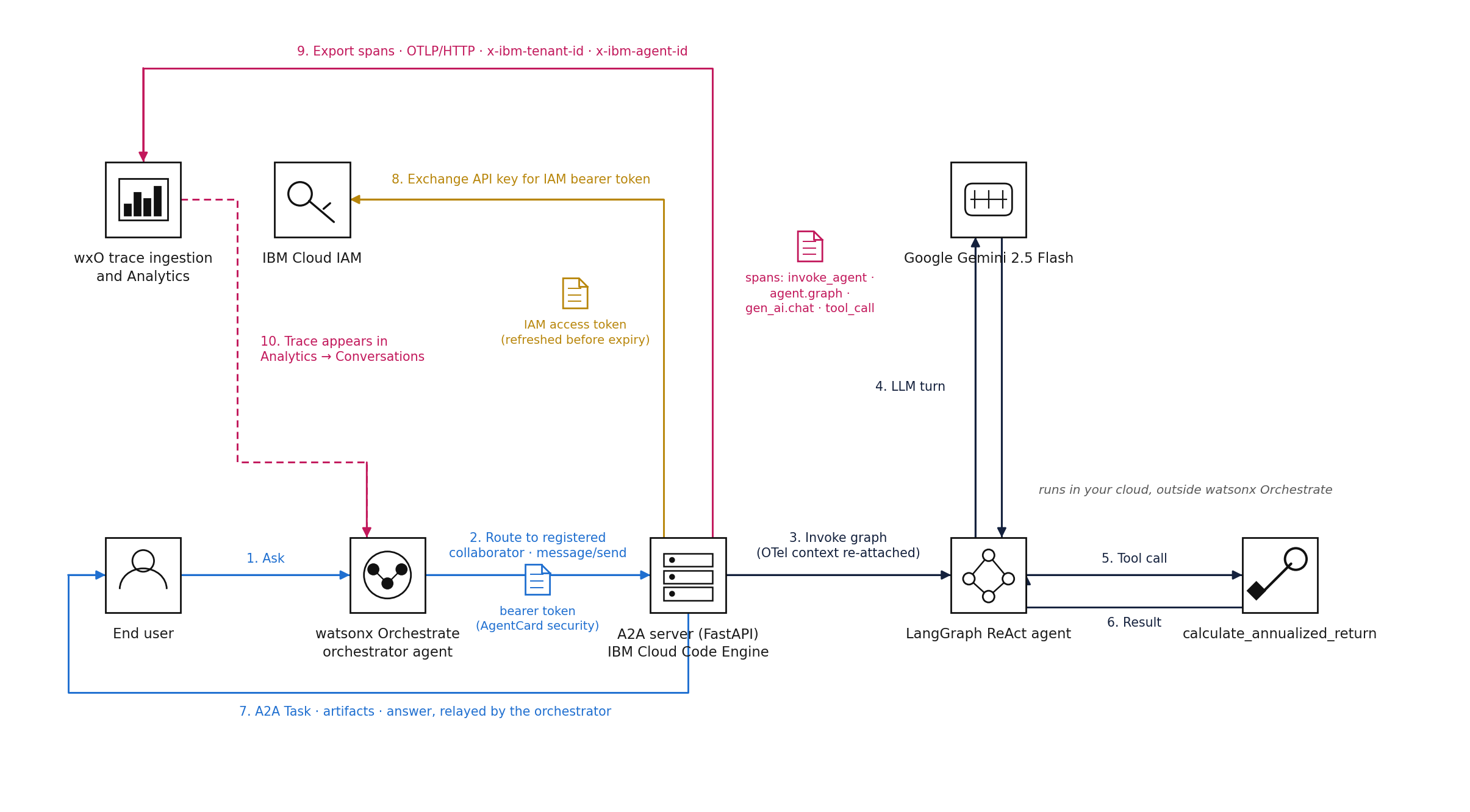 Figure: Reference architecture and request flow. watsonx Orchestrate calls the agent over A2A; the agent pushes OpenTelemetry spans back to the control plane, where the trace becomes the conversation the user started.
The only IBM-specific component in this architecture is the watsonx Orchestrate control plane. The AI agent uses LangGraph, the model uses Google Gemini, the application runs in a container platform, and the integration uses open standards such as A2A and OpenTelemetry. You can replace IBM Cloud Code Engine with Amazon EKS, Google Kubernetes Engine, or another container platform. You can also replace Gemini with another model without changing the integration approach.
The AI agent in this example is intentionally simple. The AI agent answers a financial question such as:
I invested $10,000 and the investment is now worth $13,500 after 18 months. What is the annualized return?
To answer the question, the AI agent calls a single calculation tool. The goal of this article is not to explain AI agent logic. The goal is to show how to connect, register, and monitor an external AI agent through watsonx Orchestrate.
The integration process consists of three steps:
- Expose the AI agent through A2A so that other platforms can discover and call the AI agent.
- Register the AI agent in watsonx Orchestrate so that the AI agent becomes part of the control plane.
- Add OpenTelemetry instrumentation so that execution traces, tool calls, model activity, latency, and other metrics appear in watsonx Orchestrate analytics dashboards.
The complete source code for this article is available in the GitHub repository. The repository contains the LangGraph AI agent, A2A server implementation, watsonx Orchestrate registration assets, OpenTelemetry integration code, and deployment configuration used throughout this article.
Key components of the solution
The solution includes the following components:
- A LangGraph ReAct AI agent
- A Google Gemini model
- A financial calculation tool
- A FastAPI A2A server
- An AgentCard for discovery
- An A2A JSON-RPC endpoint
- OpenTelemetry middleware and exporters
- IBM Cloud IAM authentication
- IBM Cloud Code Engine hosting
- IBM watsonx Orchestrate registration and analytics
Separation of responsibilities between agent teams and platform teams
The agent.py file contains a standard LangGraph ReAct workflow. The workflow uses a Gemini model, a tool for calculating annualized return, and a loop that continues until the model no longer requests a tool.
def create_react_agent():
    llm = ChatGoogleGenerativeAI(
        model=os.environ.get("GEMINI_MODEL", "gemini-2.5-flash"),
        temperature=0,
    )
    tools = [calculate_annualized_return]
    llm_with_tools = llm.bind_tools(tools)

    def agent_node(state: AgentState):
        return {"messages": [llm_with_tools.invoke(state["messages"])]}

    def should_continue(state: AgentState) -> Literal["tools", "end"]:
        last = state["messages"][-1]
        return "tools" if getattr(last, "tool_calls", None) else "end"

    workflow = StateGraph(AgentState)
    workflow.add_node("agent", agent_node)
    workflow.add_node("tools", ToolNode(tools))
    workflow.add_edge(START, "agent")
    workflow.add_conditional_edges("agent", should_continue, {"tools": "tools", "end": END})
    workflow.add_edge("tools", "agent")
    return workflow.compile(checkpointer=MemorySaver())
This design highlights an important separation of responsibilities:
- The AI agent team owns the AI agent implementation.
- The platform team owns the integration, registration, and observability layers.
Neither agent.py nor tools.py imports OpenTelemetry libraries or IBM watsonx Orchestrate components. The AI agent code remains unchanged. Because the integration is handled outside the AI agent, the AI agent team can update the LangGraph workflow independently. Registration, monitoring, and telemetry continue to work without requiring changes to the AI agent source code.
Deploy the external AI agent
Build the LangGraph AI agent
The LangGraph AI agent uses a ReAct workflow. The workflow sends the user request to Gemini, calls the annualized return tool when required, and returns the final response. The AI agent is deliberately simple because the article focuses on the platform components that surround the AI agent. These components include A2A discovery, agent registration, authentication, telemetry collection, and control-plane monitoring.
Keep the AI agent code unchanged
The platform integration does not require changes to agent.py or tools.py. The FastAPI server and OpenTelemetry implementation provide the required integration outside the LangGraph workflow. This approach allows the AI agent team to update the model, tools, or graph independently. The platform team can continue to manage registration, routing, authentication, and observability without changing the AI agent source code.
Deploy the AI agent on IBM Cloud Code Engine
The FastAPI server is packaged as a multi-stage python:3.12-slim container image and runs as a non-root user. The container image is deployed to IBM Cloud Code Engine with 1 vCPU and 4 GB of memory. The deployment automatically scales between one and five replicas based on demand. The A2A endpoint is protected with a bearer token (AGENT_API_KEY). The AgentCard exposes this authentication requirement through the securitySchemes configuration.
Expose the LangGraph agent through A2A
Add an A2A interface to the AI agent
The Agent2Agent (A2A) protocol makes a LangGraph application accessible as a discoverable AI agent that other AI agents can call. IBM watsonx Orchestrate supports A2A v0.3.0, so the LangGraph AI agent is exposed through a lightweight FastAPI server.
The FastAPI server provides:
- An AgentCard for AI agent discovery
- A JSON-RPC 2.0 endpoint for AI agent communication
- Support for:
message/sendmessage/stream(Server-Sent Events)tasks/gettasks/cancel
Create the AgentCard
The AgentCard describes the AI agent and its capabilities. During the discovery process, watsonx Orchestrate reads the AgentCard to understand how to communicate with the AI agent.
{
  "protocolVersion": "0.3.0",
  "name": "annualized-return-agent",
  "description": "A LangGraph-based AI agent that calculates the annualized rate of return for investments...",
  "url": "https://annualized-return-agent.<hash>.us-south.codeengine.appdomain.cloud",
  "capabilities": {
    "streaming": true,
    "pushNotifications": false,
    "stateTransitionHistory": true
  },
  "securitySchemes": {
    "bearerAuth": {
      "type": "bearer"
    }
  },
  "security": [
    {
      "bearerAuth": []
    }
  ],
  "skills": [
    {
      "id": "calculate-annualized-return",
      "name": "Calculate Annualized Rate of Return",
      "tags": ["finance", "investment", "returns"],
      "examples": [
        "I invested $10,000 and it's now worth $12,500 after 18 months. What's my annualized return?"
      ]
    }
  ]
}
Implement A2A discovery and messaging endpoints
The A2A specification expects the AgentCard at the following endpoint:
/.well-known/agent.json
However, the watsonx Orchestrate ADK discover command requests the following endpoint:
/.well-known/agent-card.json
To support both discovery methods, expose the same AgentCard through both endpoints:
@app.get("/.well-known/agent.json", response_model=AgentCard)
@app.get("/.well-known/agent-card.json", response_model=AgentCard)
async def agent_card():
    return _build_agent_card()
With these endpoints in place, watsonx Orchestrate can discover the LangGraph AI agent and communicate with the AI agent through the A2A protocol.
The message/send handler manages the lifecycle of an A2A Task object. A task moves through the following states:
submitted → working → completed | failed
The AI agent response is returned as both an Artifact and a status message.
The most important step is invoking the LangGraph workflow. Because LangGraph's invoke() method runs synchronously, the call must run in a thread pool. Before moving execution to a different thread, the OpenTelemetry context must be captured. This ensures that telemetry data is preserved throughout the request lifecycle.
async def _run_agent(user_text: str, thread_id: str) -> str:
    agent = get_agent()
    config = {"configurable": {"thread_id": thread_id}}
    ctx = otel_context.get_current()  # Capture OpenTelemetry context

    loop = asyncio.get_event_loop()
    response = await loop.run_in_executor(
        None,
        lambda: instrument_agent_invoke(
            agent,
            {"messages": [HumanMessage(content=user_text)]},
            config,
            ctx,
        ),
    )

    return format_response(response)
Register the external agent in watsonx Orchestrate
Registration connects the external AI agent to the watsonx Orchestrate control plane. After registration, watsonx Orchestrate can route requests to the AI agent, expose the AI agent to other agents, and collect analytics and telemetry data. watsonx Orchestrate supports two registration methods.
Option 1: Discover the agent automatically
The discovery process reads the AgentCard from the A2A endpoint and creates an agent registration automatically.
orchestrate agents discover -u https://annualized-return-agent.<hash>.us-south.codeengine.appdomain.cloud
Option 2: Register the AI agent with a YAML definition
You can also register the AI agent by importing a YAML file. This approach works well for version-controlled and GitOps-based deployments.
spec_version: v1
kind: external
name: annualized_return_agent
title: Annualized Return Agent
provider: external_chat/A2A/0.3.0

api_url: "https://annualized-return-agent.<hash>.us-south.codeengine.appdomain.cloud"

auth_scheme: BEARER_TOKEN
auth_config:
  token: "<AGENT_API_KEY>"

chat_params:
  sendHistory: true
  stream: false
  pushNotifications: false

config:
  hidden: false
  enable_cot: true

context_access_enabled: true
context_variables:
  - clientID
Import the definition with the following command:
orchestrate agents import -f agent.yaml
Enable AI agent collaboration and routing
After registration, watsonx Orchestrate assigns a unique Agent ID to the external AI agent. This Agent ID is used throughout the platform to:
- Route requests to the AI agent
- Expose the AI agent as a collaborator to other AI agents
- Associate analytics and telemetry data with the AI agent
After the registration process completes, users can interact with the external LangGraph AI agent through watsonx Orchestrate without knowing where the AI agent runs. watsonx Orchestrate handles request routing, agent selection, and policy enforcement while the AI agent continues to run on its original platform.
Add OpenTelemetry observability
Registration gives the external AI agent an identity and enables request routing. Telemetry adds monitoring and visibility. Without telemetry data, platform teams cannot understand how an AI agent behaves, performs, or uses resources.
Compare the Telemetry options
watsonx Orchestrate provides two ways for external AI agents to send telemetry data:
| Feature | OpenTelemetry Export | watsonx Orchestrate Observability SDK |
|---|---|---|
| Dependencies | Standard opentelemetry-* packages |
ibm-watsonx-orchestrate-sdk |
| Release status | Stable and generally available | Available as a pre-release package at the time of writing |
| Integration approach | Create tracers, exporters, and spans in application code | Use decorators such as trace_call, trace_tool_call, trace_llm_call, and trace_agent_call |
| Best use case | Teams using any AI framework and standard observability tools | Teams that want simplified tracing with the watsonx Orchestrate SDK |
| Authentication | Application code exchanges an API key for a bearer token and configures OTLP headers | Managed by the SDK |
| Result in watsonx Orchestrate | Analytics dashboards, conversations, and trace views | Analytics dashboards, conversations, and trace views |
This example uses OpenTelemetry export. The choice is based on architecture flexibility rather than technical limitations.
OpenTelemetry is a widely adopted observability standard. Many organizations already send telemetry data to platforms such as Instana, Datadog, Grafana Tempo, or Langfuse. Using OpenTelemetry allows the same TracerProvider to send traces to watsonx Orchestrate and other observability platforms at the same time.
This approach also avoids framework-specific dependencies. Any team using LangGraph, CrewAI, Google ADK, or another framework can export telemetry data to watsonx Orchestrate by using standard OpenTelemetry components without adding watsonx Orchestrate SDK dependencies to the AI agent application.
Configure Telemetry settings
To export telemetry data to watsonx Orchestrate, you must provide several configuration values. In this implementation, all watsonx Orchestrate variables use the WXO_ prefix to clearly separate them from other application settings, such as GOOGLE_API_KEY.
| Variable | Description | Source |
|---|---|---|
WXO_AGENT_ID |
Unique ID of the registered AI agent | Output from orchestrate agents discover or orchestrate agents import |
WXO_TENANT_ID |
Tenant identifier in the format <account-id>_<instance-id> |
watsonx Orchestrate UI → Profile → About → CRN |
WXO_API_KEY |
IBM Cloud API key with access to the watsonx Orchestrate instance | Created using ibmcloud iam api-key-create |
TOKEN_URL |
IBM Cloud IAM token endpoint | https://iam.cloud.ibm.com/identity/token |
OTEL_EXPORT_URL |
OpenTelemetry trace ingestion endpoint | watsonx Orchestrate instance endpoint |
ENVIRONMENT_NAME |
Environment label such as draft or live |
User-defined value |
WXO_AGENT_NAME |
Agent name used in trace spans | Optional; annualized_return_agent in this example |
See the .env.example file in the companion repository for the complete list of environment variables. Because these values are provided as environment variables, you can enable telemetry on an existing deployment without rebuilding the application. Update the deployment configuration and restart the application:
ibmcloud ce app update --name annualized-return-agent \
  --env WXO_AGENT_ID="${WXO_AGENT_ID}" \
  --env WXO_TENANT_ID="${WXO_TENANT_ID}" \
  --env ENVIRONMENT_NAME="draft" \
  --env WXO_API_KEY="${WXO_API_KEY}" \
  --env OTEL_EXPORT_URL="${OTEL_EXPORT_URL}"
Protect the WXO_API_KEY as a secret. Store the API key in a secrets manager or CI/CD secret store, and never commit the API key to source control.
Manage authentication for long-running services
The reference script exchanges the API key for a bearer token when the application starts. This approach works for short-lived jobs, but it is not suitable for long-running services. IBM IAM tokens expire after a limited time, so telemetry exports will eventually fail if the token is not refreshed.
To avoid this problem, the application uses a custom SpanExporter that automatically refreshes the bearer token when needed. The exporter checks the token expiration time and creates a new OTLPSpanExporter before the token expires. This approach keeps the service running without interruption.
class RefreshingOTLPSpanExporter(SpanExporter):
    """Refresh the bearer token and rebuild the OTLP/HTTP exporter as needed."""

    def _get_delegate(self) -> OTLPSpanExporter:
        with self._lock:
            if self._delegate is not None and time.time() < self._expires_at - 120:
                return self._delegate

            token, expires_at = _exchange_token()

            new_delegate = OTLPSpanExporter(
                endpoint=self._endpoint,
                headers={
                    "Authorization": f"Bearer {token}",
                    "x-ibm-tenant-id": self._tenant_id,
                    "x-ibm-agent-id": self._agent_id,
                    "x-langfuse-ingestion-version": "4",
                },
            )

            old_delegate, self._delegate, self._expires_at = (
                self._delegate,
                new_delegate,
                expires_at,
            )

            if old_delegate is not None:
                old_delegate.shutdown()

            return new_delegate

    def export(self, spans):
        return self._get_delegate().export(spans)
Exchange the API key for a bearer token
The token exchange process calls IBM IAM and retrieves a bearer token. Two implementation details are important:
- IBM IAM expects an
application/x-www-form-urlencodedrequest body, not a JSON payload. - For watsonx Orchestrate SaaS deployments on IBM Cloud, use
iam.cloud.ibm.comas the token endpoint.
def _exchange_token() -> tuple[str, float]:
    payload = urlencode({
        "grant_type": "urn:ibm:params:oauth:grant-type:apikey",
        "apikey": _required("WXO_API_KEY"),
    }).encode("utf-8")

    request = Request(
        _required("TOKEN_URL"),
        data=payload,
        method="POST",
        headers={
            "Accept": "application/json",
            "Content-Type": "application/x-www-form-urlencoded",
        },
    )

    with urlopen(request, timeout=30) as response:
        body = json.loads(response.read().decode("utf-8"))

    token = body.get("token") or body.get("access_token")

    return token, _jwt_expiry(token) or time.time() + float(
        body.get("expires_in", 3000)
    )
Configure trace attribution
The exporter sends three custom headers with every telemetry request:
Authorizationidentifies the caller.x-ibm-tenant-ididentifies the watsonx Orchestrate tenant.x-ibm-agent-ididentifies the registered AI agent.
These headers allow watsonx Orchestrate to associate incoming telemetry data with the correct tenant and registered AI agent, ensuring that analytics, traces, and monitoring data appear in the appropriate dashboards.
Configure the OpenTelemetry tracer
The configure_wxo_telemetry() function in wxo_otel.py creates a single global TracerProvider for the application. The tracer provider defines the AI agent identity, configures the telemetry exporter, and ensures that trace data is sent to watsonx Orchestrate.
The tracer provider uses a Resource object to store metadata about the AI agent and deployment environment. It also uses a BatchSpanProcessor with the custom RefreshingOTLPSpanExporter to export traces efficiently. Finally, it registers provider.shutdown with atexit so that any remaining telemetry data is flushed when the application stops.
resource_attributes = {
    "service.name": os.getenv("OTEL_SERVICE_NAME", "external-agent"),
    "service.version": os.getenv("OTEL_SERVICE_VERSION", "2.0.0"),
    "tenant.id": settings.tenant_id,
    "agent.id": settings.agent_id,
    "environment.name": settings.environment_name,
    "deployment.environment": settings.environment_name,
}

provider = TracerProvider(
    resource=Resource.create(resource_attributes)
)

provider.add_span_processor(
    BatchSpanProcessor(
        RefreshingOTLPSpanExporter(
            endpoint=_required("OTEL_EXPORT_URL"),
            tenant_id=settings.tenant_id,
            agent_id=settings.agent_id,
        )
    )
)

trace.set_tracer_provider(provider)
atexit.register(provider.shutdown)
Create resource attributes at runtime
The integration guide shows an example that sets resource attributes through the OTEL_RESOURCE_ATTRIBUTES environment variable:
OTEL_RESOURCE_ATTRIBUTES="tenant.id=${TENANT_ID},..."
However, IBM Cloud Code Engine does not expand ${VAR} references inside environment variable values. As a result, unresolved values may be passed to OpenTelemetry.
To avoid this issue, build the resource attribute dictionary in application code by reading the resolved environment variables at runtime. This approach ensures that the correct tenant, agent, and environment values are included in every trace.
Create a root span for each conversation request
Instead of creating spans in multiple request handlers, create a single root span around each A2A request. The FastAPI application uses an ASGI middleware that wraps the entire request lifecycle. Register the middleware last so that it becomes the outermost layer and captures all application activity.
app.add_middleware(WxoA2ATraceMiddleware)
The middleware creates one SERVER span named invoke_agent <agent_name> for every HTTP request. In watsonx Orchestrate, each root span appears as a single conversation entry in the Conversations view.
Capture request and response data
ASGI applications can read a request body only once. However, the middleware needs access to the JSON-RPC request payload to extract the conversation ID and user input. The FastAPI application also needs access to the same request body.
To solve this problem, the middleware reads the request body into a buffer and replays it to the FastAPI application. The middleware also captures the response so that output values and status information can be added to the span after the request completes.
span_name = f"invoke_agent {self.settings.agent_name}"

with self.tracer.start_as_current_span(
    span_name,
    kind=SpanKind.SERVER
) as span:

    span.set_attribute("agent.id", self.settings.agent_id)
    span.set_attribute("environment.name", self.settings.environment_name)
    span.set_attribute("message.id", context["message_id"])
    span.set_attribute("langfuse.user.id", context["user_id"])

    if context["thread_id"]:
        span.set_attribute("thread.id", context["thread_id"])
        span.set_attribute("langfuse.session.id", context["thread_id"])
        span.set_attribute("conversation.id", context["thread_id"])

    if self.settings.capture_content:
        span.set_attribute("input", context["input"])

    try:
        await self.app(scope, replay_receive, capture_send)

    finally:
        response_payload = _decode_json(bytes(response_body))

        span.set_attribute(
            "http.response.status_code",
            status_code
        )

        output = _response_text(response_payload)

        if self.settings.capture_content and output:
            span.set_attribute("output", output)

        failure = _technical_failure(
            response_payload,
            status_code
        )

        if failure:
            span.set_attribute(
                "agent.execution.status",
                "error"
            )
            span.set_status(
                Status(StatusCode.ERROR, failure[1][:1000])
            )
        else:
            span.set_attribute(
                "agent.execution.status",
                "success"
            )
            span.set_attribute(
                "agent.business_outcome",
                "failed"
                if _find_business_failure(response_payload)
                else "success"
            )
Correlate multi-turn conversations
The A2A contextId is mapped to multiple span attributes:
thread.idlangfuse.session.idconversation.id
This mapping ensures that all requests in the same conversation appear as a single session in watsonx Orchestrate dashboards instead of separate, unrelated requests.
Distinguish technical failures from business failures
The telemetry implementation records both technical failures and business failures.
A technical failure occurs when the request fails because of an infrastructure or application problem, such as:
- HTTP 500 errors
- JSON-RPC errors
- Unhandled exceptions
A business failure occurs when the request succeeds but the business operation fails, such as:
{
  "success": false
}
Both outcomes are recorded as span attributes:
agent.execution.statusagent.business_outcomeagent.business_error.code
This distinction helps operations teams identify whether an issue requires platform support or application-level investigation.
Control prompt and response collection
Content capture is configurable. To disable content capture, set the following environment variable. The middleware does not store input and output content in span attributes:
WXO_CAPTURE_CONTENT=false
This setting is useful for workloads that process sensitive information. The platform continues to collect telemetry such as latency, execution status, and usage metrics without storing prompts or responses in the control plane.
Create child spans for LangGraph execution, LLM calls, and tool calls
The root span captures the complete HTTP request. Child spans show the work performed by the AI agent, including the LangGraph execution, each LLM interaction, and each tool call.
LangGraph runs the synchronous invoke() method in a thread-pool executor. OpenTelemetry context is local to each thread. Without context propagation, spans created in the executor thread would become separate traces instead of child spans of the HTTP request.
The instrument_agent_invoke() function solves this problem by attaching the OpenTelemetry context captured from the asynchronous thread before invoking the LangGraph workflow.
def instrument_agent_invoke(agent, inputs, config, ctx):
    tracer = trace.get_tracer("wxo-server", "2.0.0")
    token = otel_context.attach(ctx)

    try:
        with tracer.start_as_current_span(
            "agent.graph",
            kind=SpanKind.INTERNAL
        ) as graph_span:
            try:
                response = agent.invoke(inputs, config)
            except Exception as exc:
                graph_span.record_exception(exc)
                graph_span.set_status(
                    Status(StatusCode.ERROR, str(exc))
                )
                raise

            messages = response.get("messages", [])

        _emit_message_spans(tracer, ctx, messages)

    finally:
        otel_context.detach(token)

    return response
The _emit_message_spans() function processes the final list of LangGraph messages and creates spans for LLM interactions and tool calls.
Each AIMessage creates a gen_ai.chat span. The span includes the OpenTelemetry gen AI attributes that watsonx Orchestrate uses to display model and token usage:
gen_ai.systemgen_ai.request.modelgen_ai.response.modelgen_ai.usage.input_tokensgen_ai.usage.output_tokensgen_ai.usage.total_tokensgen_ai.tool_calls
Each ToolMessage creates a tool_call <name> span. The tool span includes:
tool.nametool.outputtool.business_outcome
The tool.business_outcome value is set to failed when the tool response contains "success": false.
with tracer.start_as_current_span(
    span_name,
    kind=SpanKind.CLIENT,
    start_time=span_start_ns
) as span:
    span.set_attribute("gen_ai.operation.name", "chat")
    span.set_attribute("gen_ai.system", "google_gemini")
    span.set_attribute("gen_ai.request.model", model_name)
    span.set_attribute("gen_ai.response.model", model_name)

    usage = getattr(msg, "usage_metadata", None) or {}

    if usage:
        span.set_attribute(
            "gen_ai.usage.input_tokens",
            int(usage.get("input_tokens", 0))
        )
        span.set_attribute(
            "gen_ai.usage.output_tokens",
            int(usage.get("output_tokens", 0))
        )
        span.set_attribute(
            "gen_ai.usage.total_tokens",
            int(usage.get("total_tokens", 0))
        )
This implementation creates child spans after the LangGraph workflow finishes by processing the returned messages. This approach keeps the AI agent code unchanged and works with different LangGraph workflows.
Because the spans are created after the workflow completes, the child spans use estimated timestamps. Each span starts one millisecond after the previous span so that watsonx Orchestrate displays the spans in execution order.
Use LangGraph callback handlers or watsonx Orchestrate SDK decorators when accurate timing for each LLM interaction and tool call is required. The root span duration and token usage values remain accurate with the approach shown in this article.
Verify the integration in watsonx Orchestrate
Test the AI agent through the A2A endpoint
You can test the AI agent in two ways:
- Through the watsonx Orchestrate chat, where an orchestrator agent routes requests to the registered external AI agent.
- By sending requests directly to the A2A endpoint.
The direct A2A approach is the fastest way to verify the complete integration path, including AI agent execution, telemetry collection, and trace ingestion. You only need the application URL and the bearer token configured for the AI agent.
export APP_URL="https://annualized-return-agent.<hash>.us-south.codeengine.appdomain.cloud"
export AGENT_API_KEY="<agent bearer token>"

curl -s -X POST "${APP_URL}/" \
  -H "Content-Type: application/json" \
  -H "Authorization: Bearer ${AGENT_API_KEY}" \
  -d '{
    "jsonrpc": "2.0",
    "id": "req-001",
    "method": "message/send",
    "params": {
      "message": {
        "kind": "message",
        "role": "user",
        "messageId": "mid-001",
        "parts": [
          {
            "kind": "text",
            "text": "I invested $5,000, now worth $7,000 after 40 months. Annualized return?"
          }
        ]
      }
    }
  }' | python3 -m json.tool
This request uses the A2A message/send method, which waits for the AI agent to finish processing before returning a response. A successful response returns an A2A Task object with a status of completed. The AI agent response appears in both the task artifacts and the task status message.
To continue an existing conversation, add a contextId value to the message object. The telemetry middleware maps this value to thread.id and langfuse.session.id, allowing all conversation turns to appear as a single session in watsonx Orchestrate.
You can also use message/stream instead of message/send to receive the response through Server-Sent Events (SSE). The companion repository includes a send_message.sh script that prompts for the application URL, bearer token, and message text.
Verify Telemetry export
After a request is processed, the Code Engine application log records a message similar to the following:
wxO trace queued trace_id=<32-hex> thread_id=<uuid> status=success
Within a few seconds, the trace appears in:
Analyze → Annualized Return Agent → Conversations
The trace view shows the complete execution flow:
invoke_agent annualized_return_agent
├─ agent.graph
├─ gen_ai.chat → calculate_annualized_return
├─ tool_call calculate_annualized_return
└─ gen_ai.chat
The spans represent the following activities:
invoke_agent annualized_return_agentrecords the complete A2A request.agent.graphrecords the LangGraph workflow execution.gen_ai.chat → calculate_annualized_returnrecords the LLM decision to call a tool.tool_call calculate_annualized_returnrecords the tool execution and tool output.gen_ai.chatrecords the final AI agent response.
This trace confirms that the external LangGraph AI agent is registered, monitored, and visible in the watsonx Orchestrate control plane.
Monitor the AI agent in watsonx Orchestrate
The following screenshots show where you can view traces and analytics data in the watsonx Orchestrate control plane.
Sign in to watsonx Orchestrate. The home page provides an overview of activity across the entire instance, including message volume, deployment status, evaluation results, and items that require attention. The page includes both AI agents built in watsonx Orchestrate and external AI agents registered with the platform.
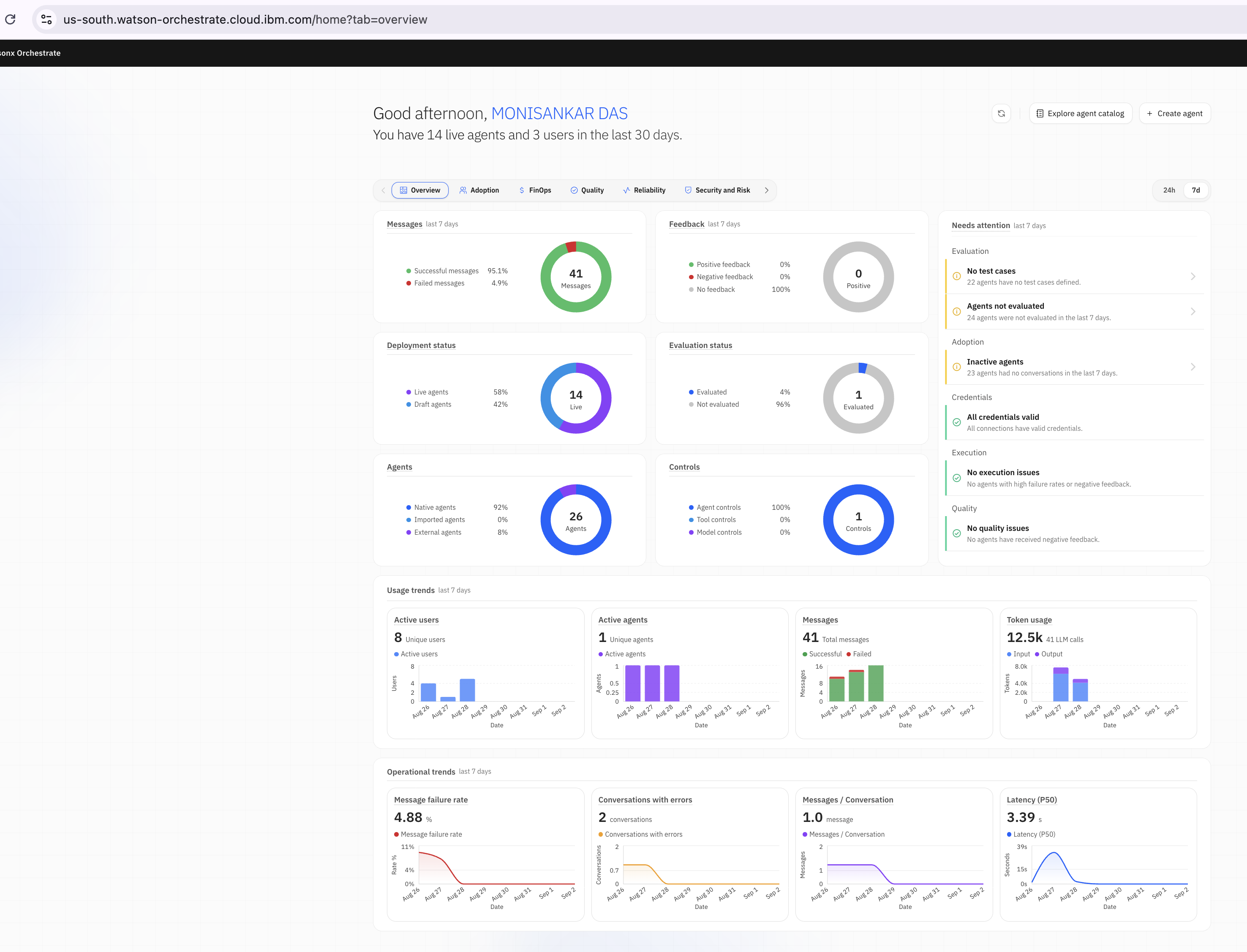 Figure 1: watsonx Orchestrate home page
View tenant-wide analytics
Open Analyze from the menu in the upper-left corner. The analytics dashboard displays metrics for all registered AI agents, including conversations, users, average conversation duration, and user feedback. The dashboard also provides per-agent metrics, allowing you to compare external AI agents with AI agents built directly in watsonx Orchestrate.
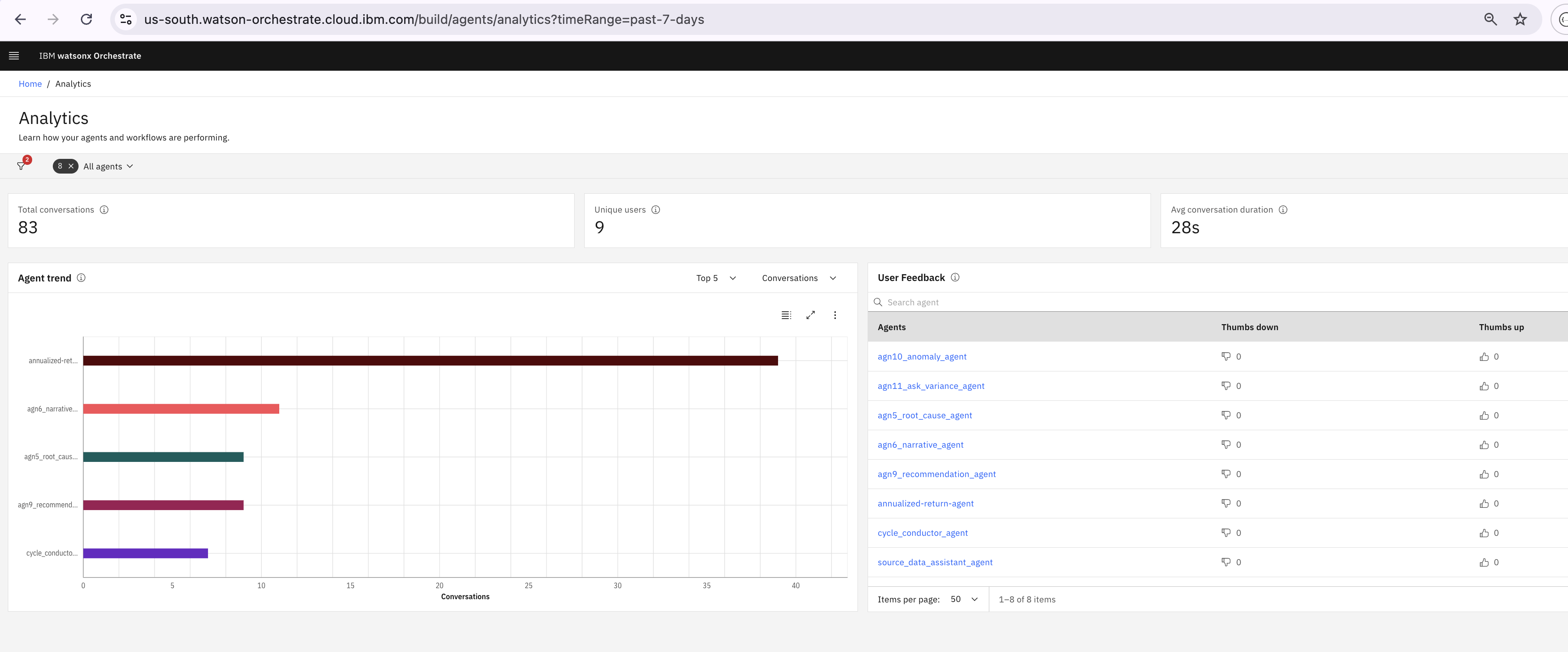 Figure 2: Tenant-wide analytics dashboard. The external LangGraph AI agent running on Code Engine appears alongside AI agents built in watsonx Orchestrate.
View AI agent metrics
Select the external AI agent to open its dedicated dashboard. This dashboard shows metrics for that AI agent only, including conversation volume, token usage, tool activity, and user feedback.
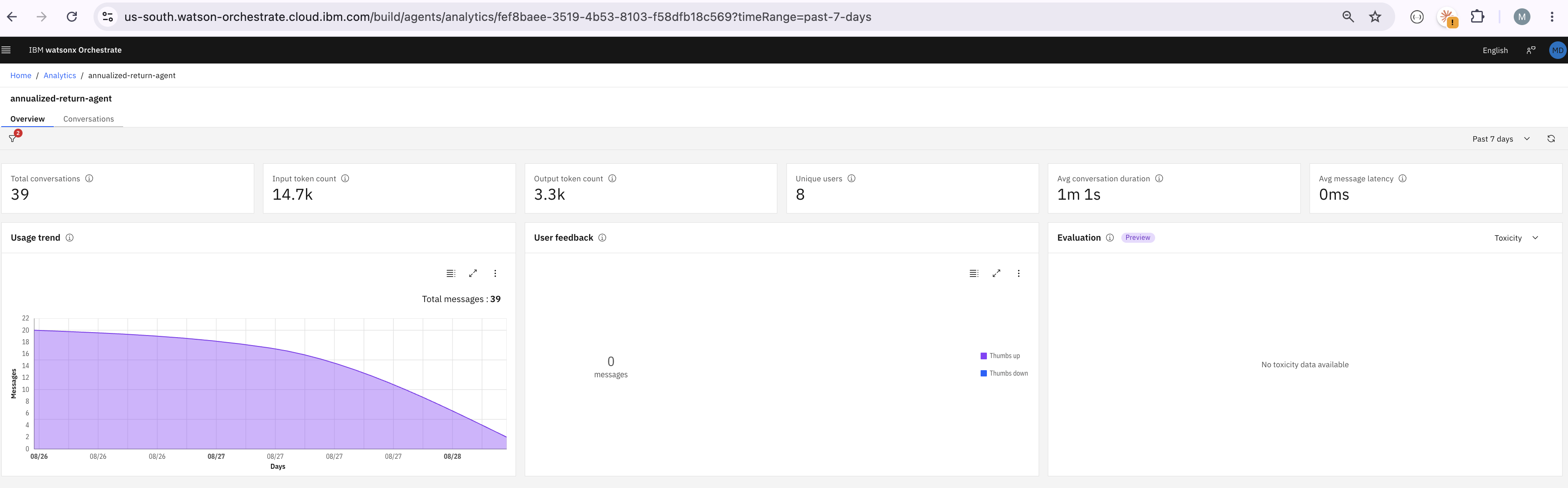 Figure 3: Dashboard for the external AI agent.
View conversations and trace data
Open the Conversations tab to view all conversations handled by the AI agent. You can filter conversations by environment and date range. Conversations are grouped using the thread.id value derived from the A2A contextId, ensuring that all messages from the same session appear together.
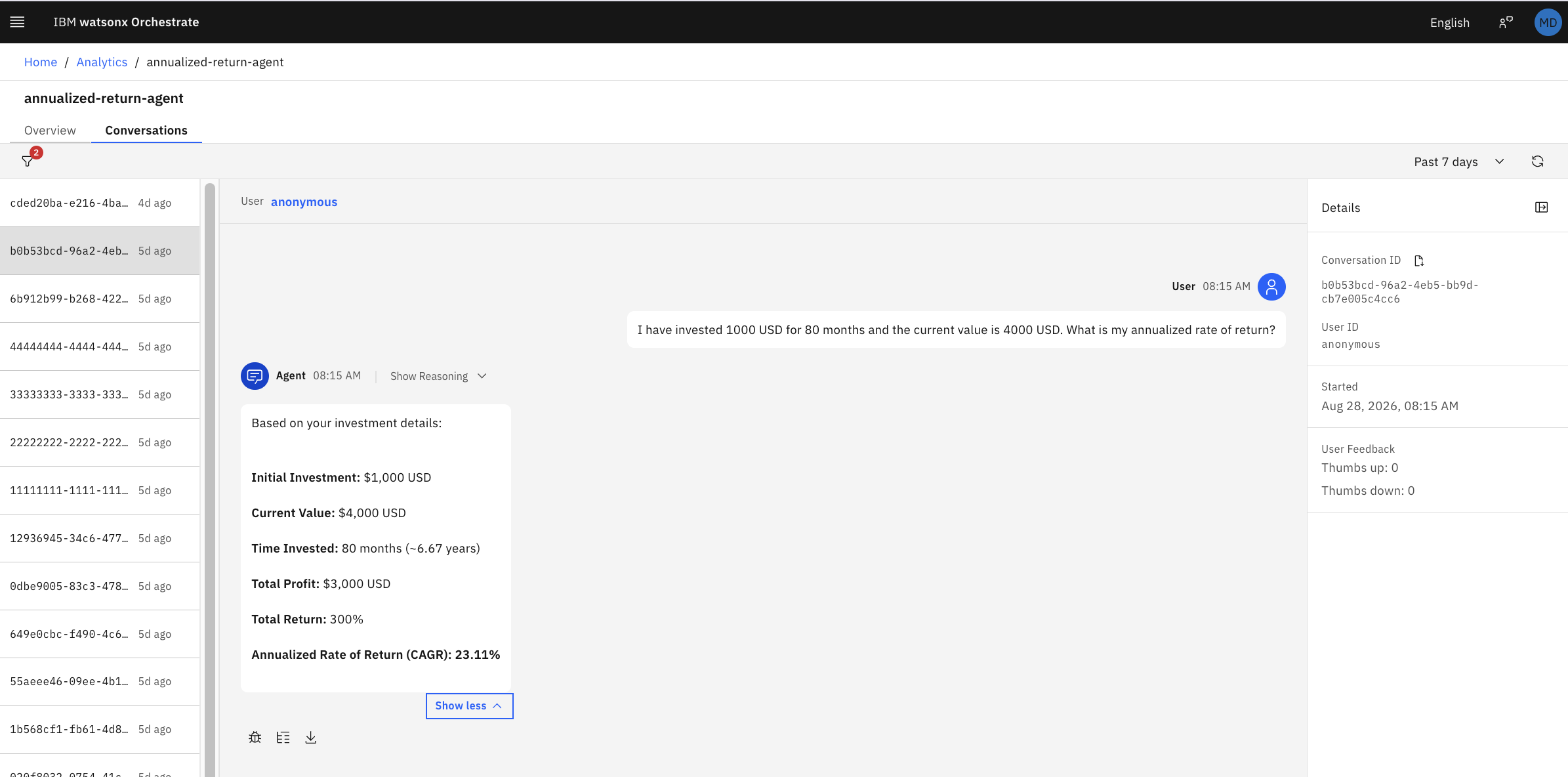 Figure 4: Conversation history for the external AI agent.
Select a conversation and open the Trace view to inspect the complete execution flow. The trace includes the root invoke_agent span with the user input and AI agent response, the agent.graph span, and individual gen_ai.chat and tool_call spans. Each span contains execution details such as attributes, duration, and token usage.
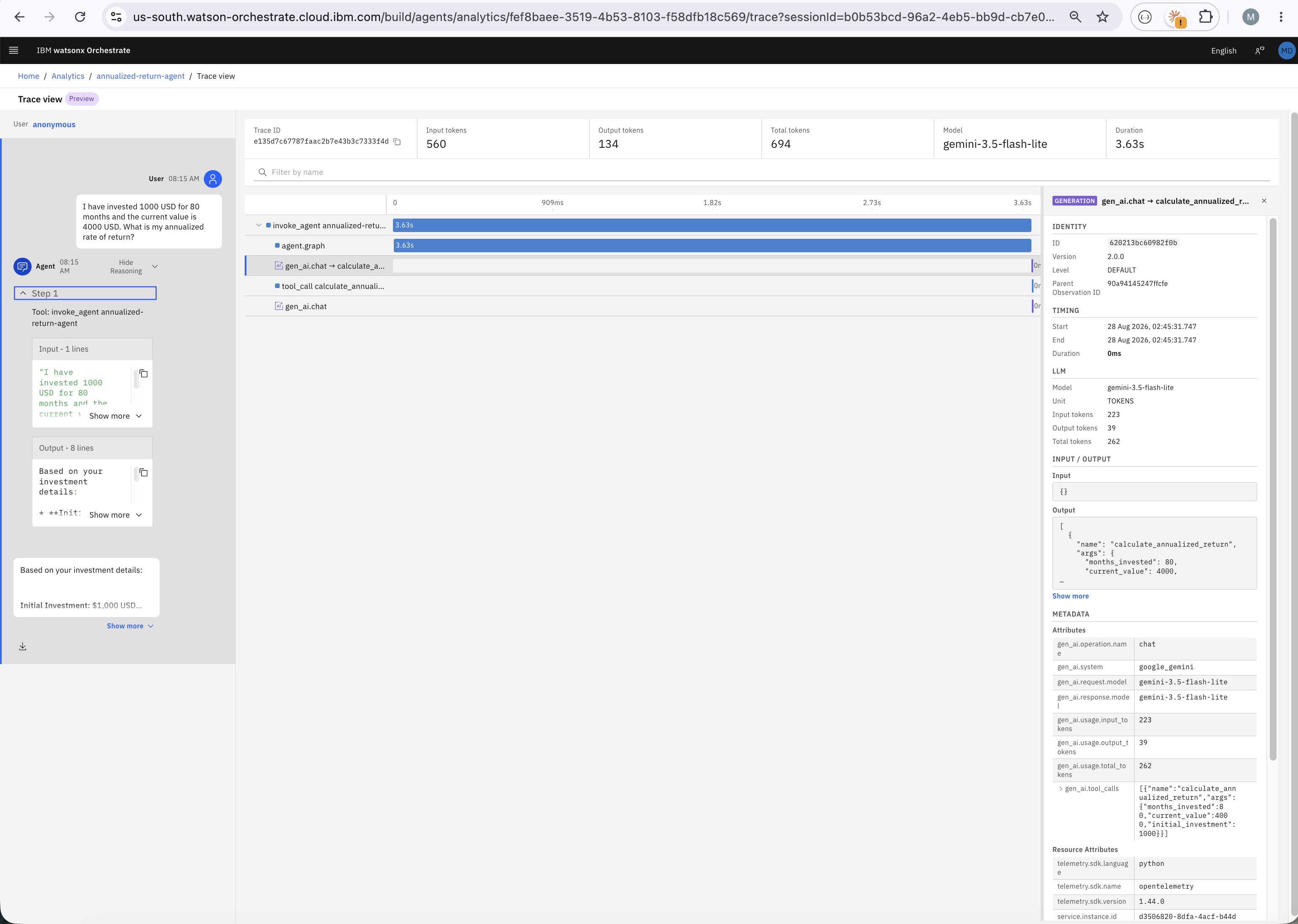 Figure 5: Detailed trace showing the root span, LLM spans, and tool-call spans.
The trace data, which can also be accessed through the watsonx Orchestrate Trace API, provides detailed visibility into an AI agent that was built outside the platform. The trace includes information such as:
- User input
- AI agent output
- Session ID
- Model details
- Input and output token counts
- Environment information
- Agent ID
- Tenant ID
All of this data can be searched, analyzed, and exported from the control plane.
After the AI agent is registered and instrumented, it benefits from the same runtime monitoring capabilities as AI agents built in watsonx Orchestrate. These capabilities include usage trends, conversation duration metrics, token consumption analysis, tool execution metrics, user feedback scores, and evaluation metrics for task success, reliability, and safety.
Implementation considerations
Common issues and troubleshooting tips
The following tips are based on lessons from implementation and can help reduce troubleshooting time.
Use only
agent.idfor agent identification: Do not send bothagent.nameandagent.idin resource attributes or span attributes.Using both attributes can cause the telemetry ingestion pipeline to classify the trace differently. As a result, the root span
outputvalue may be converted into a chat message object, causing the Trace View to display:[object Object]Use only
agent.idfor agent attribution. It provides all the information required by watsonx Orchestrate.Avoid
gen_ai.input.messagesandgen_ai.output.messages: Do not add the following attributes to any span:gen_ai.input.messages gen_ai.output.messageswatsonx Orchestrate uses these structured attributes to build conversation output data. If they are present, they can conflict with the root span
outputattribute and lead to incorrect trace display.Other
gen_ai.*attributes are safe to use, including:gen_ai.operation.namegen_ai.systemgen_ai.request.modelgen_ai.response.modelgen_ai.usage.input_tokensgen_ai.usage.output_tokensgen_ai.usage.total_tokensThese attributes populate the model and token usage panels in the watsonx Orchestrate dashboard.
Use simple
inputandoutputattributes: Store user requests and AI agent responses in the root span by using:input outputDo not use attributes such as:
```text
gen_ai.input.value
gen_ai.output.value
```

The Trace View expects simple string values for chat messages. Using plain `input` and `output` attributes ensures that prompts and responses are displayed correctly.
Flush Telemetry before shutdown: The
BatchSpanProcessorexports telemetry data asynchronously.For long-running services, register the tracer provider shutdown handler:
atexit.register(provider.shutdown)For short-lived scripts, call the following method before the application exits:
provider.force_flush()Without these steps, the final batch of trace data may not be exported.
Register the agent before exporting telemetry: External AI agents must be registered in watsonx Orchestrate before telemetry can be exported. Registration creates the Agent ID required by the telemetry pipeline.
You can register an AI agent by:
- Using the watsonx Orchestrate user interface
- Running the
discovercommand Importing an agent definition file
After registration, the Agent ID can be used in telemetry configuration.
Benefits of using watsonx Orchestrate as an agentic control plane
The code is only part of the story. The real value comes from what the integration enables. An AI agent built with LangGraph, running on a non-IBM model and deployed on a standard container platform, becomes:
- Discoverable and identifiable. The AI agent has a managed identity in the enterprise agent catalog instead of being represented only by an application URL.
- Accessible through a governed entry point. Orchestrator agents can route requests to the AI agent, and AI Gateway policies are applied to incoming requests.
- Observable at multiple levels:
- Tenant level: conversation volume, agent usage, and user sentiment
- Agent level: token usage, tool activity, feedback scores, and execution duration
- Conversation level: complete trace data, including inputs, outputs, and execution outcomes
- Governable. Trace data includes business outcomes, error information, session identifiers, and environment labels. This data supports monitoring, evaluation, auditing, and cost tracking from a central location.
- Portable. The telemetry implementation uses standard OpenTelemetry components, allowing the same instrumentation to work with different observability platforms.
These capabilities are achieved with a small amount of platform integration code and no changes to the AI agent itself.
This separation of responsibilities is important:
- AI agent teams own the AI agent implementation.
- Platform teams own integration and observability components.
- The control plane provides governance, monitoring, and operational visibility.
This model scales well as organizations deploy more AI agents across different frameworks and cloud platforms.
The value of an agentic control plane becomes clear when an external LangGraph AI agent appears in the same dashboard as a native watsonx Orchestrate AI agent. Both AI agents share the same analytics views, token usage metrics, conversation history, and trace data. Teams no longer need to choose between development flexibility and centralized governance. Teams can build AI agents with the tools and frameworks that best fit their needs while managing and monitoring those AI agents through a single control plane.
Summary
IBM watsonx Orchestrate can provide a central control plane for AI agents built with different frameworks, models, and cloud platforms. In this article, an external LangGraph AI agent was exposed through A2A, registered in watsonx Orchestrate, and instrumented with OpenTelemetry.
The integration gives the external AI agent a managed identity, enables governed request routing, and provides detailed analytics and trace data. The LangGraph AI agent code remains unchanged because the FastAPI wrapper and telemetry layer manage the platform integration.
This approach allows AI agent teams to choose the frameworks and models that meet their requirements while platform teams manage routing, monitoring, and governance from one place.
Next steps
For platform and architecture teams managing a growing number of AI agents, a good next step is to start with an external AI agent that is already running in production and apply this approach.
The value becomes clear when leadership can answer important questions from a single dashboard:
- Which AI agents are running?
- Who uses the AI agents?
- What business purpose does each AI agent serve?
- How is each AI agent performing?
A centralized control plane makes it possible to manage, monitor, and govern AI agents from one place.
Acknowledgments
This article was produced as part of the IBM Open Innovation Community initiative: Agentic AI (AI for Developers and Ecosystem).
The author, Monisankar Das, deeply appreciates the support of Ela Dixit and Bindu Umesh for reviewing and contributing to this tutorial.