Tutorial
Build reactive messaging between IBM MQ and Open Liberty applications
Use JMS and Jakarta message-driven beans to connect IBM MQ applications with Open Liberty applications for reactive messagingThis tutorial shows how to build reactive messaging between IBM MQ and Open Liberty applications by using JMS (Java EE 8) and Jakarta (Jakarta EE 9) message-driven beans (MDBs). In this tutorial, you configure listeners, activation specifications, and sample applications that exchange messages asynchronously through IBM MQ.
Reactive messaging is a programming paradigm that promotes building applications with asynchronous and non-blocking communication patterns. It helps to create more scalable and resilient systems by allowing components to interact with each other through message streams.
Reactive messaging enables event-driven communication between systems, allowing decoupled services to communicate by triggering events. In modern applications, this type of architecture is often implemented using microservices.
The event-driven architecture comprises three key components: event producers, event brokers (like IBM MQ), and event consumers. An event can be defined as a change in state, such as a message being placed in a queue. The producer publishes an event to the broker, which filters and pushes the events to consumers. This method of exchange messaging replaces message-driven communication, where applications need to poll to receive the next available message.
This tutorial shows how Open Liberty applications asynchronously send and receive reactive messages using IBM MQ as the JMS provider and Jakarta MDBs.
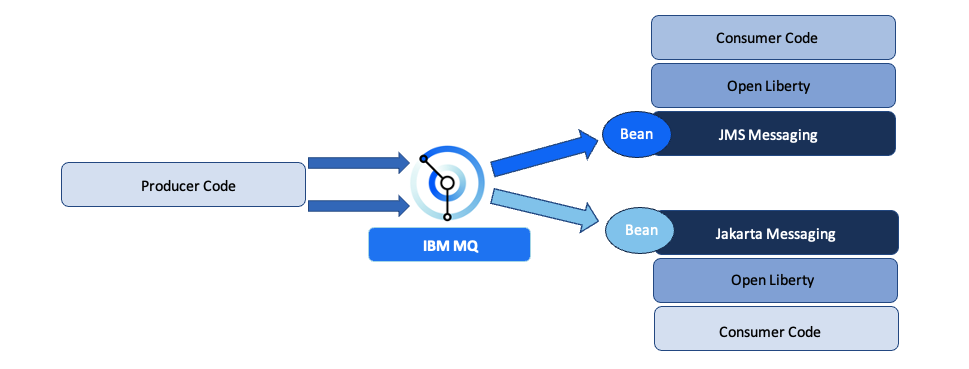
Message-driven beans (MDBs) are a part of the Enterprise JavaBean (EJB) component of Java JEE 8.0 and Jakarta. MDBs handle asynchronous messages from message-oriented middleware, such as IBM MQ, in a decoupled and scalable way. MDBs act as message listeners that get activated when a message arrives at the specified destination, as specified within the Activation Specification of the MDB application. A message-driven bean (DDB) is a component attached to an application that is activated each time a message is received by the messaging system. The onMessage() callback method within the bean executes in response to this event. The onMessage() method of an MDB can perform a wide range of tasks, such as displaying the received data in a browser or processing the data and forwarding it to another queue.
In this tutorial, you learn how to use Java EE 8.0 and Jakarta which can efficiently react to messages using IBM MQ as the JMS provider.
Explore the IBM MQ and Open Liberty reactive messaging sample
Let’s walk through the code in this reactive messaging sample.
This tutorial uses an example from the IBM MQ sample patterns repository. The code for this tutorial is in the OpenLiberty-MDB directory and consists of 3 subdirectories: producer, jms-2-mdb, and jakarta-3-mdb. This codebase includes a JMS-based listener and a Jakarta-based listener that react to consumer messages that the producer puts on IBM MQ queues.
The jms-2-mdb listener is an Open Liberty application based on the JMS footprint, whereas the jakarta-3-mdb listener is an Open Liberty application based on the Jakarta footprint. Both applications react when the standard JMS producer application places a new message on an IBM MQ queue.
Reactive messaging consumer applications require two main elements: the MessageListener and its associated JMS activation specification.
A JMS activation specification, or ActivationSpec, is a Java configuration object that defines the settings an MDB needs to connect to IBM MQ as a JMS provider. It is part of the Java EE Connector Architecture (JCA) and acts as a bridge between the JMS provider and the MDB in the Open Liberty consumer application. An ActivationSpec contains the properties needed to establish a connection and listen for messages from a JMS destination, such as a queue or topic. These properties can include JNDI names for the connection factory and destination, the destination type, message selectors, and provider-specific settings.
Configure the JMS ActivationSpec for Java EE 8
The JMS-2-mdb consumer is an Open Liberty application based on the JAVA EE 8.0 footprint.

The MessageListener is located in JMS2Listener.java and its related JMS ActivationSpec within server.xml for the consumer JMS application.
The JMS consumer initializes the MDB (listener) by specifying the @javax.ejb.MessageDriven annotation and its related ActivationSpec in its constructor.

JMS2ListenerMDB is the ActivationSpec name whose definition is in the server.xml file.

The ActivationSpec consists of the wmq.jmsra-9.3.2.0.rar properties which are libraries that contain IBM MQ classes for JMS. With these properties in the ActivationSpec, the JMS application listener can configure the connection with the IBM MQ manager and consumer messages through its MDB. A notable property within this configuration is destinationRef. This property uses the JNDI to specify the destination queue (DEV.QUEUE.2) that the MDB listens on for incoming messages, as well as the connection factory parameters required to establish a connection with IBM MQ.
The MessageListener interface specifies an onMessage() method for processing incoming messages. In this sample, messages placed in DEV.QUEUE.2 are forwarded to the app-consumer MDB, where they are processed as javax.jms.Message objects within the onMessage() method.

The server.xml file describes the connection with the IBM MQ queue manager using a JMS Connection Factory. This configuration is not directly used by the consumer, but it shows how to set the connection to enable the consumer to produce a message as a reply.

Configure the Jakarta ActivationSpec for Jakarta EE 9
The mechanism to enable reactive messaging for the Jakarta Open Liberty consumer application is similar to that needed for the JEE 8 consumer.
The jakarta-3-mdb consumer is an Open Liberty application based on the Jakarta (JEE 9) footprint:

For the Jakarta-based consumer application, the MessageListener is in the Jakarta3Listener.java file and its related JMS ActivationSpec is in the server.xml file.
The Jakarta-based consumer initializes the MDB (listener) by specifying the @jakarta.ejb.MessageDriven annotation and its related ActivationSpec in its constructor.

Jakarata3ListenerMDB is the ActivationSpec name whose definition is in the server.xml file.

The ActivationSpec consists of the wmq.jakarta.jmsra-9.3.2.0.rar properties which are libraries containing IBM MQ classes for Jakarta. With these properties in the ActivationSpec, the Jakarta application listener can configure the connection with the IBM MQ manager and consumer messages through its MDB. A notable property within this configuration is destinationRef. This property uses the JNDI to specify the destination queue (DEV.QUEUE.1) that the MDB should listen to for incoming messages, as well as the connection factory parameters required to establish a connection to IBM MQ.
The MessageListener interface specifies an onMessage() method for processing incoming messages. In this example, messages placed in DEV.QUEUE.1 are forwarded to the jakarta-3-mdb consumer where they are processed as jakarta.jms.Message objects in the onMessage() method.

The server.xml describes the connection to the IBM MQ queue manager using a JMS Connection Factory. This configuration is not directly used by the consumer, but it shows how to set the connection to enable the consumer to produce a message as a reply.

Understand the reactive messaging flow
The following image shows how reactive messaging using MDBs is achieved and the components involved in the communication and the sequence of messages.
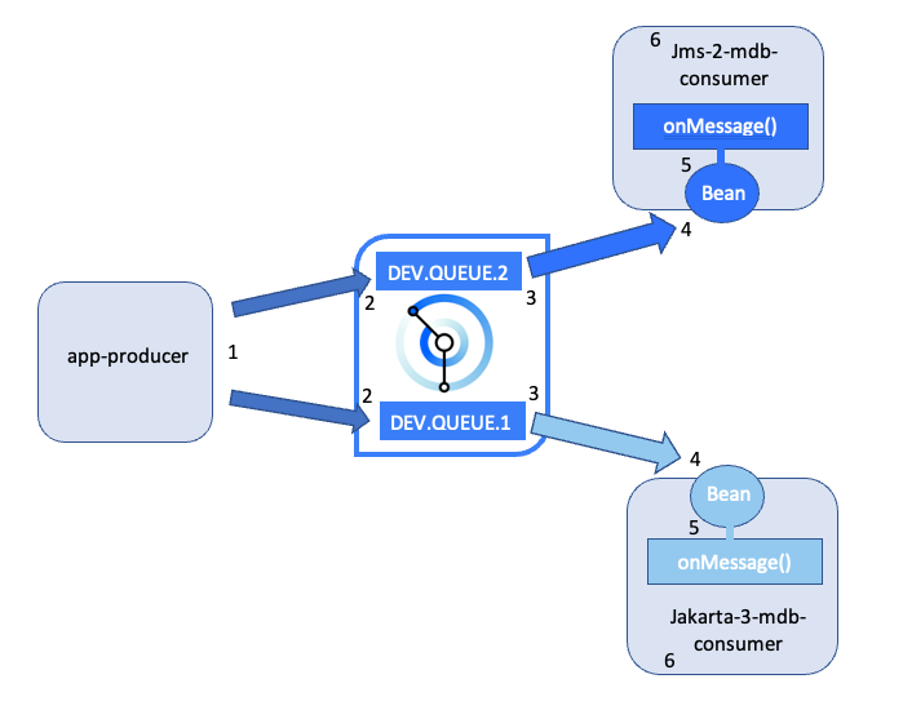
Both applications react to messages from an IBM MQ queue (2) produced by the producer application (1). Reactive messaging consumer applications (6) require a MessageListener and its associated JMS Activation Specification. The Activation Specification defines the settings for connecting an MDB (4) to a message provider (IBM MQ), DEV.QUEUE.1 for JMS and DEV.QUEUE.2 for Jakarta (3) and the Activation Specification includes properties like connection factory and destination information. Both consumers use the MessageListener interface's onMessage() method (5) to process incoming messages.
Prerequisites
To complete this tutorial, you’ll need to install or set up:
- Git, Maven, and Java JDK 11.
- A local IBM MQ queue manager. Follow the steps in this tutorial.
Steps
- Get the reactive messaging sample code
- Run the consumer application
- Test reactive messaging
Step 1: Get the reactive messaging sample code
In this first step, you obtain the code and familiarize yourself with the configuration described above for setting up messaging between a JMS producer and reactive Open Liberty Message Driven Beans (MDBs) using IBM MQ as the JMS provider.
The code for this tutorial can be found in the mq-dev-patterns repository.
Clone the mq-dev-patterns repository:
git clone https://github.com/ibm-messaging/mq-dev-patterns
Change to the directory for the cloned repository, and then in to the OpenLiberty-MDB directory where the samples reside.
Step 2: Run the consumer application
To run the consumer applications successfully, configure the ActivationSpec in the server.xml file and set the username, password, and MQ hostname in the application.properties file. After you set up and start the IBM MQ broker, start the JMS and Jakarta consumer applications so that they can subscribe to DEV.QUEUE.1 and DEV.QUEUE.2 and receive incoming messages.
Run the JMS consumer application
Before running the consumer application, you need to set the ActivationSpec for your queue manager in the server.xml file. The server.xml file is in /jms-2-mdb/src/main/liberty/config/. This file defines the connection configuration to connect to and authenticate with the queue manager.
For a successful connection, the consumer needs: a username (server-ibmmq-username), a corresponding password (server-ibmmq-password), and the hostname or IP address of the MQ server (server-ibmmq-hostName). You have to set these properties in the application.properties file (OpenLiberty-MDB/jms-2-mdb/src/main/liberty/config/variables/application.properties). Edit this file to configure these connection parameters correctly. Replace these values with your username, password, and MQ hostname.
After the IBM MQ broker has been set up and started, you can start the JMS (JEE 8) consumer application. Change directories to the jms-2-mdb directory, and then issue this command:
mvn liberty:dev
This installs all the required dependencies using the .pom file and starts the application in dev mode where you can update your application and see the changes on the fly. After the consumer app is started, the first thing the consumer does is subscribe its MDB to the destination topic (baseQueueName) specified in the properties.wmqjmsra field within the server.xml file.

With this configuration, the JMS consumer application will receive incoming messages using reactive messaging every time a new message is placed in ‘DEV.QUEUE.2’.
Run the Jakarta consumer application
In the same way that you specified the MQ connection parameters for the ActivationSpec of the JMS consumer, you can set this configuration for the Jakarta consumer in the application.properties file, located at OpenLiberty-MDB/jakarta-3-mdb/src/main/liberty/config/variables/. For a successful connection, the consumer needs: a username (server-ibmmq-username), a corresponding password (server-ibmmq-password), and the hostname or IP address of the MQ server (server-ibmmq-hostName). Edit the application.properties file to configure these connection parameters correctly. Replace these values with your username, password, and MQ hostname.
After the IBM MQ broker has been set up and started, you can start the JMS (JEE 8) consumer application. Change directories to the jakarta-3-mdb directory, and then issue this command:
mvn liberty:dev
This installs all the required dependencies using the .pom file and starts the application in dev mode where you can update your application and see the changes on the fly. After the consumer app is started, the first thing the consumer does is subscribe its MDB to the destination topic (baseQueueName) specified in the properties.wmqjmsra field within the server.xml file.

With this configuration, the Jakarta consumer application will receive incoming messages using reactive messaging every time a new message is placed in DEV.QUEUE.1.
Step 3: Test reactive messaging
After your Open Liberty consumers are started, you can now configure the JMS producer app used to test the reactive messaging pattern.
The producer sends the same message to 2 queues: DEV.QUEUE.1 and DEV.QUEUE.2. By default, these values are set in the ~/producer/env.json file, which also contains the queue manager host, app user, and app password that is needed to connect to IBM MQ.

If your MQ HOST, APP_USER, and APP_PASSWORD are different to the default one replace those values accordingly.
After this configuration is set, you can now compile and start the producer. Open a new terminal in the ~/producer directory and type:
mvn clean package
java -cp target/mq-dev-patterns-0.1.0.jar: com.ibm.mq.samples.jms.JmsPut
By executing these commands, the producer places a new message into the DEV.QUEUE.1, where the Jakarta consumer application has subscribed its MDB, and it also puts a message into DEV.QUEUE.2, where the JMS consumer has subscribed its bean.
On producing a message in the two queues, the consumer’s subscriptions (the JMS consumer subscribed to DEV.QUEUE.2 and the Jakarta consumer subscribed to DEV.QUEUE.1) are triggered and the messages are redirected to the respective consumer application beans.
The producer produces the same message for both DEV.QUEUE.1 and DEV.QUEUE.2:

The message that was put into DEV.QUEUE.1 is redirected to the Jakarta consumer MDB and then to the Open Liberty app which handles and prints the incoming message in the console as:

Similarly, the message was put into DEV.QUEUE.2 is redirected to the JMS consumer MDB and to the Open Liberty app which handles and prints the incoming message in the console as:

Summary and next steps
In this tutorial, you learned how to:
- Configure a message-driven bean (MDB) listener.
- Configure the Activation Spec (for JMS and Jakarta) for reactive messaging.
- Run a JMS and Jakarta app for Open Liberty that can consume a message from an IBM MQ queue.
Learn more about reactive programming in this quick start guide. Or, learn how to use MicroProfile Reactive Messaging 3.0 with SmallRye connectors and AMQP to enable reactive messaging between MQ and Liberty apps.