Learning Path
Modernizing applications to use IBM WebSphere Liberty
Use IBM Application Modernization Accelerator (AMA) to scan your Java application estate, assess modernization complexity and effort, and generate a Liberty migration plan before you change any code.
AMA automates the analysis and planning work that typically precedes modernizing a Java application. Instead of manually inventorying applications and estimating effort, you get an objective, auditable view of your estate. This view includes dependencies, shared libraries, complexity scores, and effort estimates.
AMA covers 4 phases of the modernization journey: Discover (scan the environment), Visualize (map application and infrastructure dependencies), Plan (assess modernization complexity and estimate effort per application), and Generate (produce a downloadable migration plan with ready-to-use configuration artifacts). A 5th phase, Execute, is handled by the companion AMA Developer Tools.
In this tutorial, you use AMA with a sample application called ModResorts, a web application originally deployed on WebSphere Application Server 9.0.5, to walk through the first 4 modernization phases. This tutorial helps you produce a migration plan for the target destination, Liberty. You learn how to:
Visualize the application estate, including database dependencies, message queue dependencies, and application libraries.
Interpret the complexity assessment and estimated effort for each application.
Generate a migration plan and download the associated artifacts, such as
server.xml,Containerfile, destination-specific migration plans, and configuration artifacts.
Prerequisites
Follow the instructions in the AMA documentation to install IBM Application Modernization Accelerator locally on your laptop and start AMA by running the launch script. Open the AMA dashboard in your browser at https://localhost:443.
Step 1. Discover your application estate
AMA scans your existing application server environment to produce a comprehensive inventory: application artifacts, technology usage, Java versions, Java EE API versions, shared libraries, and infrastructure dependencies, such as databases and message queues.
In this tutorial, the sample data was obtained by using the Discovery Tool to scan a set of sample applications and upload the results to AMA. You create a workspace containing this sample data in the remainder of this tutorial.
In the AMA dashboard, click Create workspace. Name it "AMA_tutorial", click Include sample data, then click Create. A new tile labeled AMA_tutorial is added to the page.
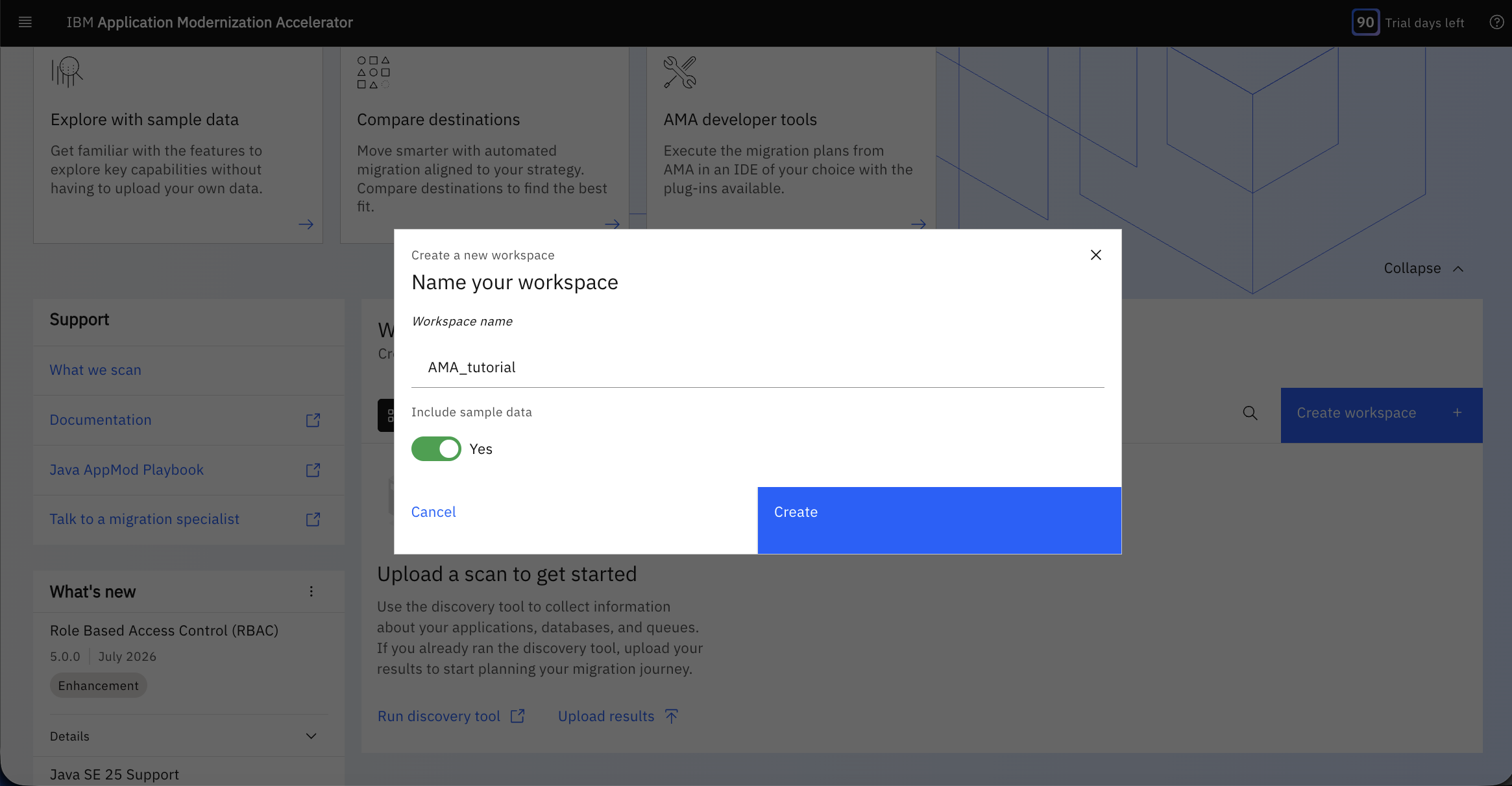
Click the new AMA_tutorial tile.
In the Manage destination dialog, review the modernization destinations (Liberty, Modernization Runtime Extension for Java (MoRE), and WebSphere Application Server) and their supported APIs. Click Liberty, and then click Confirm.
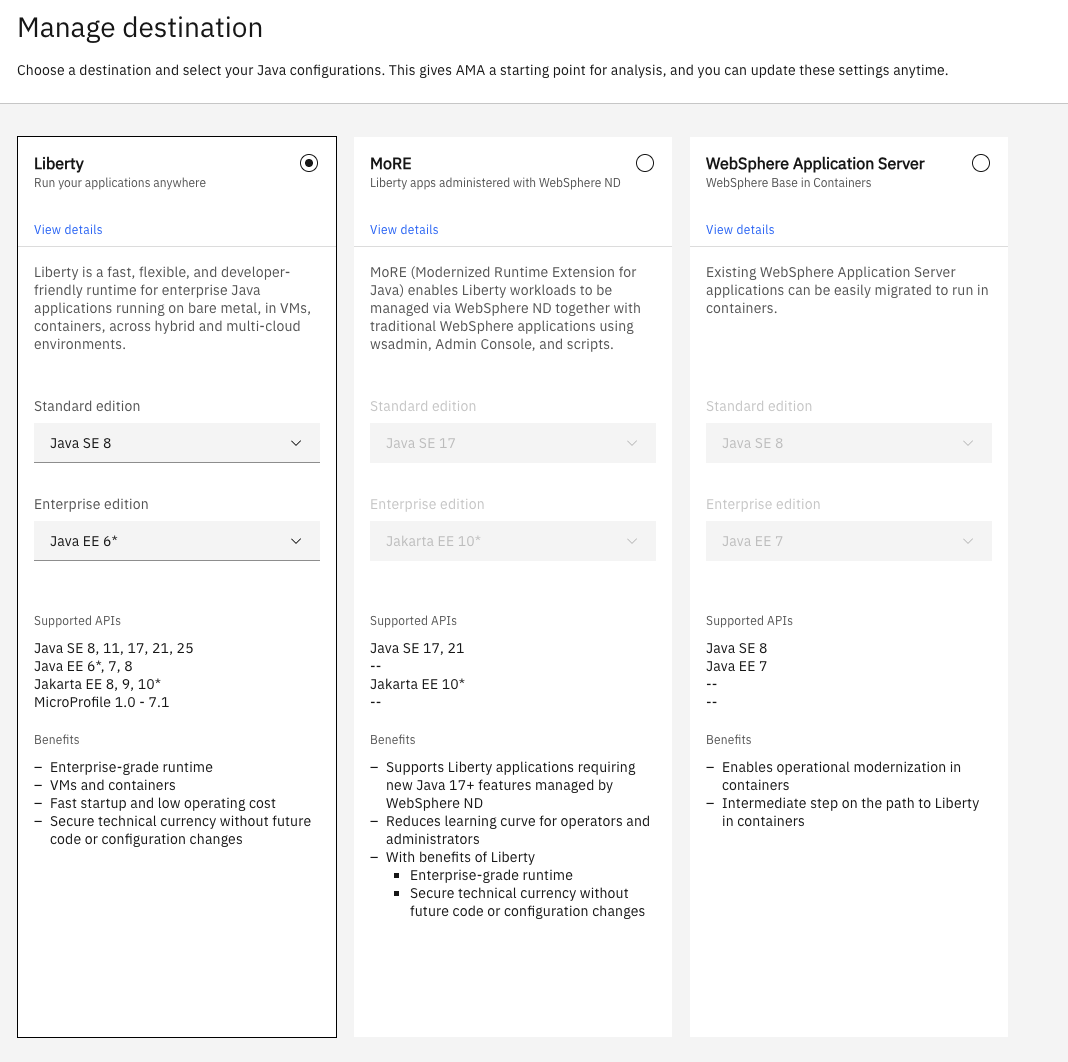
The sample data is analyzed for the Liberty destination and displayed on the Visualization page.
Step 2. Visualize your application estate
The Visualization view shows a visual map of your application estate, including how the individual applications share infrastructure, such as databases and message queues.
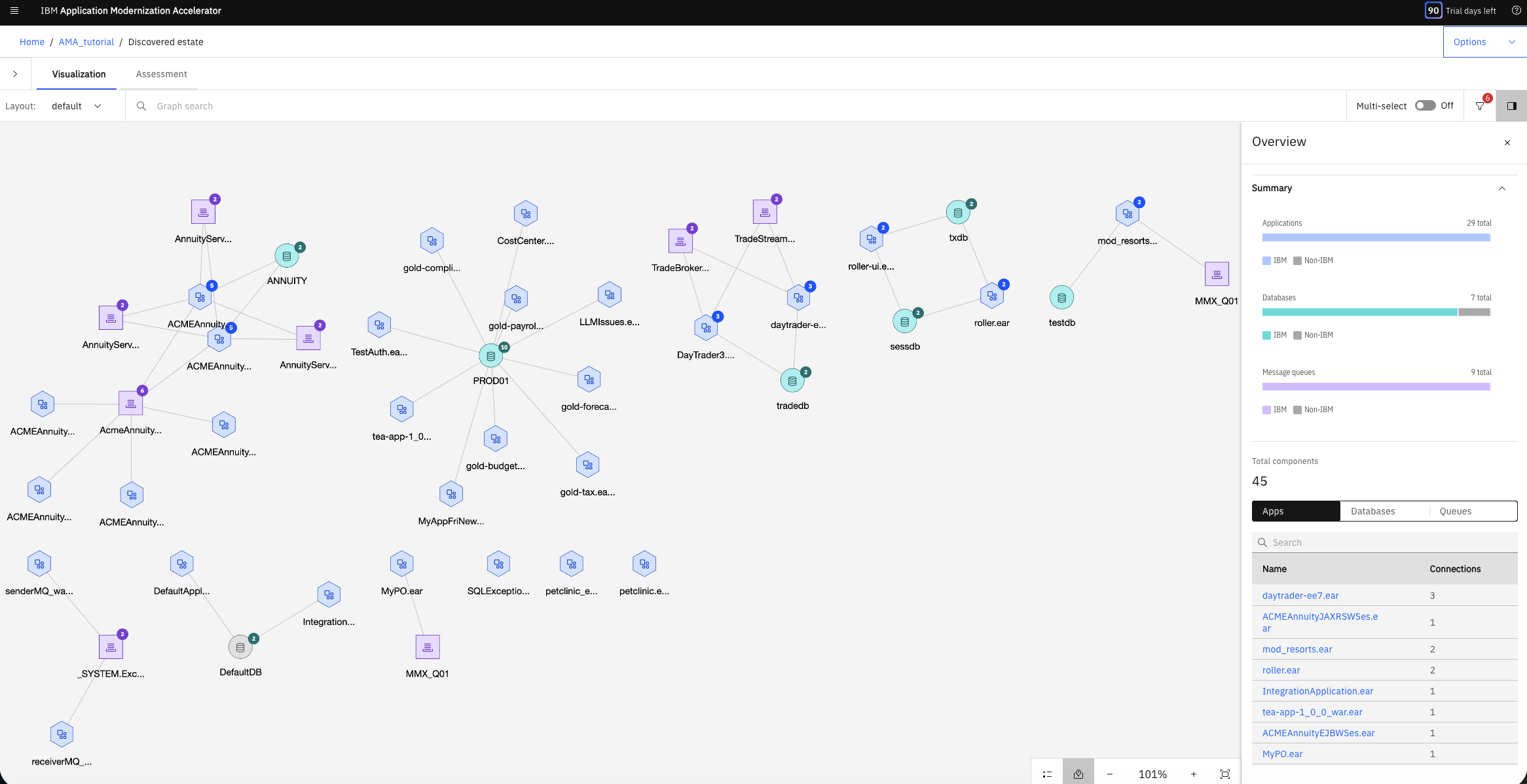
In the Overview panel, the Apps tab displays the number of connections each application has. Click any row in the table and the visualization section highlights that application's connections. Return to the Overview to remove the highlighting.
In the Visualization view, click the modresorts.ear app. The Overview panel for that node opens and summarizes the modernization complexity, issues, and estimated effort for modernizing modresorts.ear from WebSphere Application Server to Liberty.
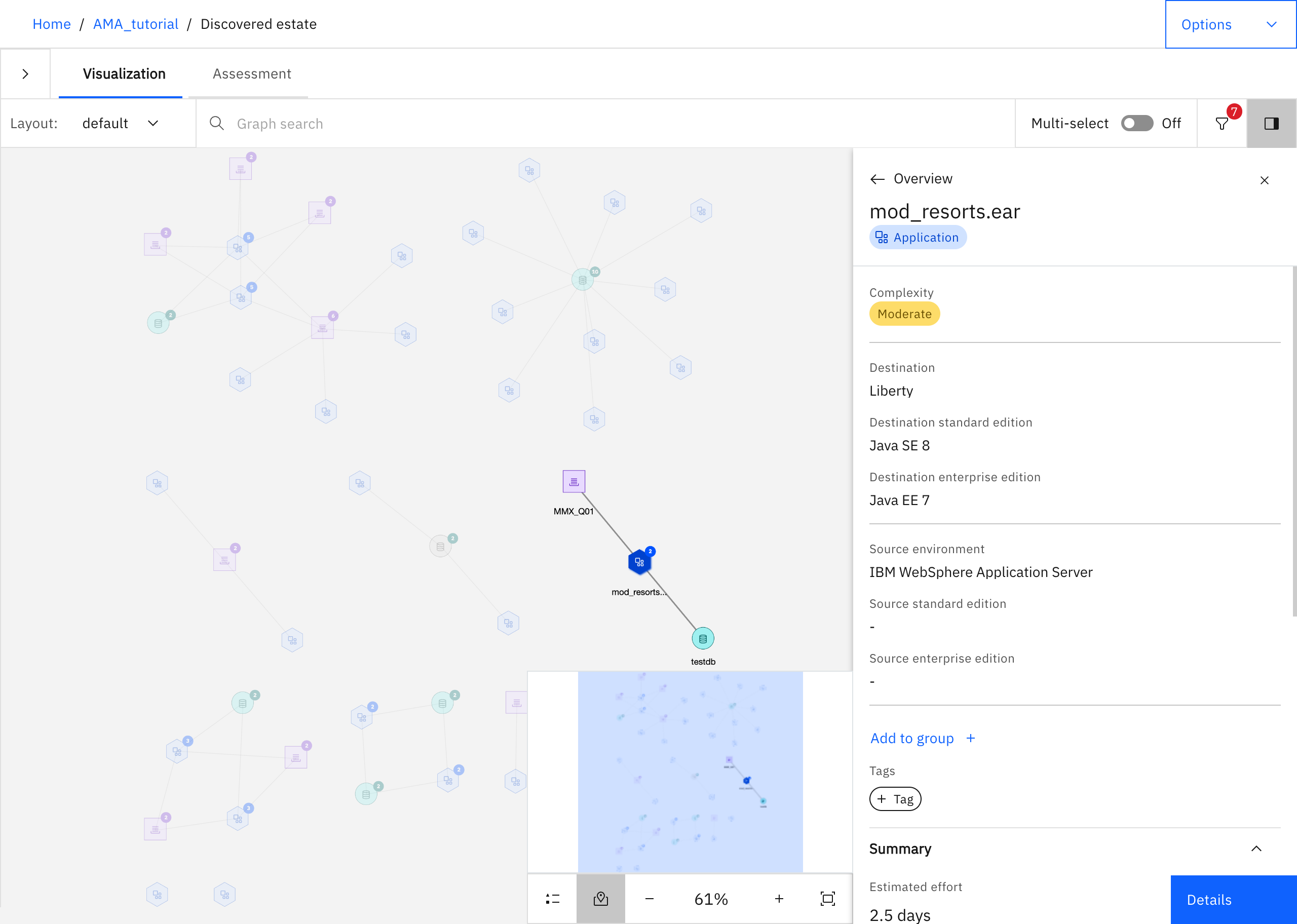
Step 3. Plan the modernization
The Assessments view provides the detailed analysis you need before generating a migration plan.
Click the Assessments tab (next to the Visualization tab).
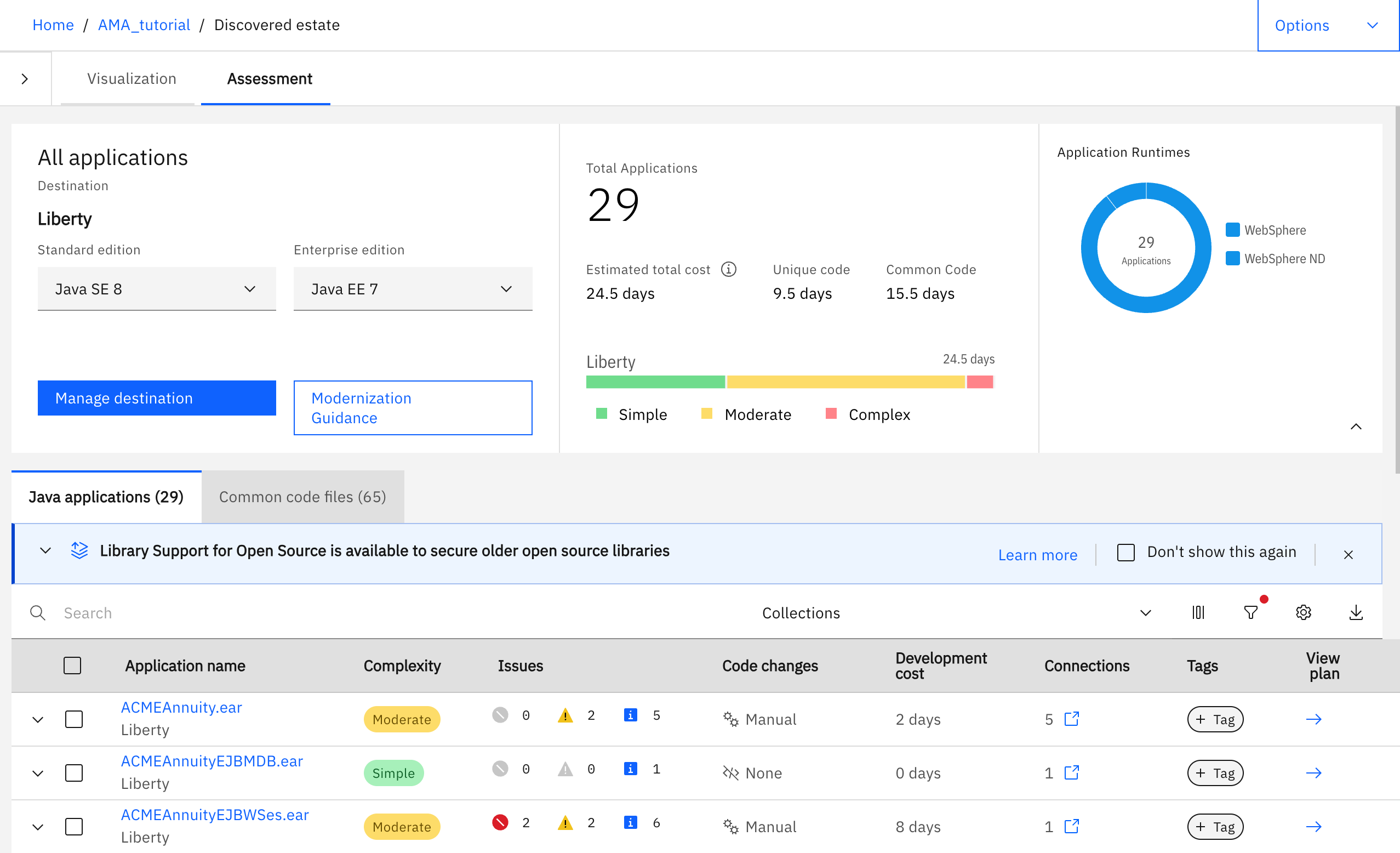
The estimated total cost for modernizing the 29 sample applications to run on Liberty is about 24.5 days, where most code changes are simple and moderate fixes.
Click the Common code files tab. The 65 common code files that AMA identified in the 29 applications are listed in the table. Altogether, the common code is estimated to take about 15.5 days to modernize. Common code files are files that are common to multiple applications, so modernizing a common code file benefits more than 1 application.
In many cases, the common code JAR files require no code changes to run on Liberty; those files are marked as Simple complexity. Files such as
gold-server-utils-1.0.8.jarare marked as Moderate complexity because code changes are required, though AMA can provide automated code changes in some cases and guidance for other fixes that cannot be automated. AMA estimates that modernizing thegold-server-utils-1.0.8.jarfile takes approximately 2.5 days. If you expand the row, you can see that 3 applications use this JAR file, so all 3 applications benefit from that effort.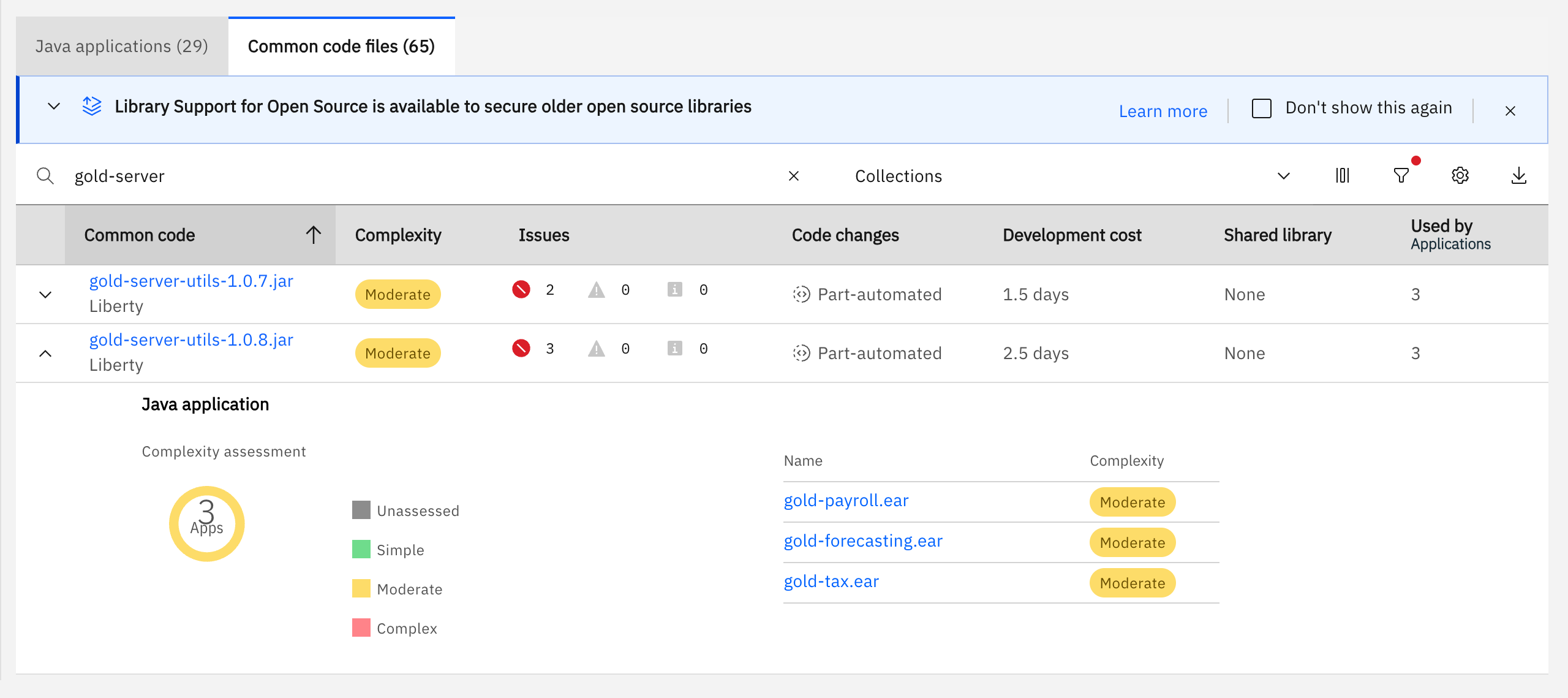
Click gold-server-utils-1.0.8.jar to open its full information page and scroll down to the Common code files section.
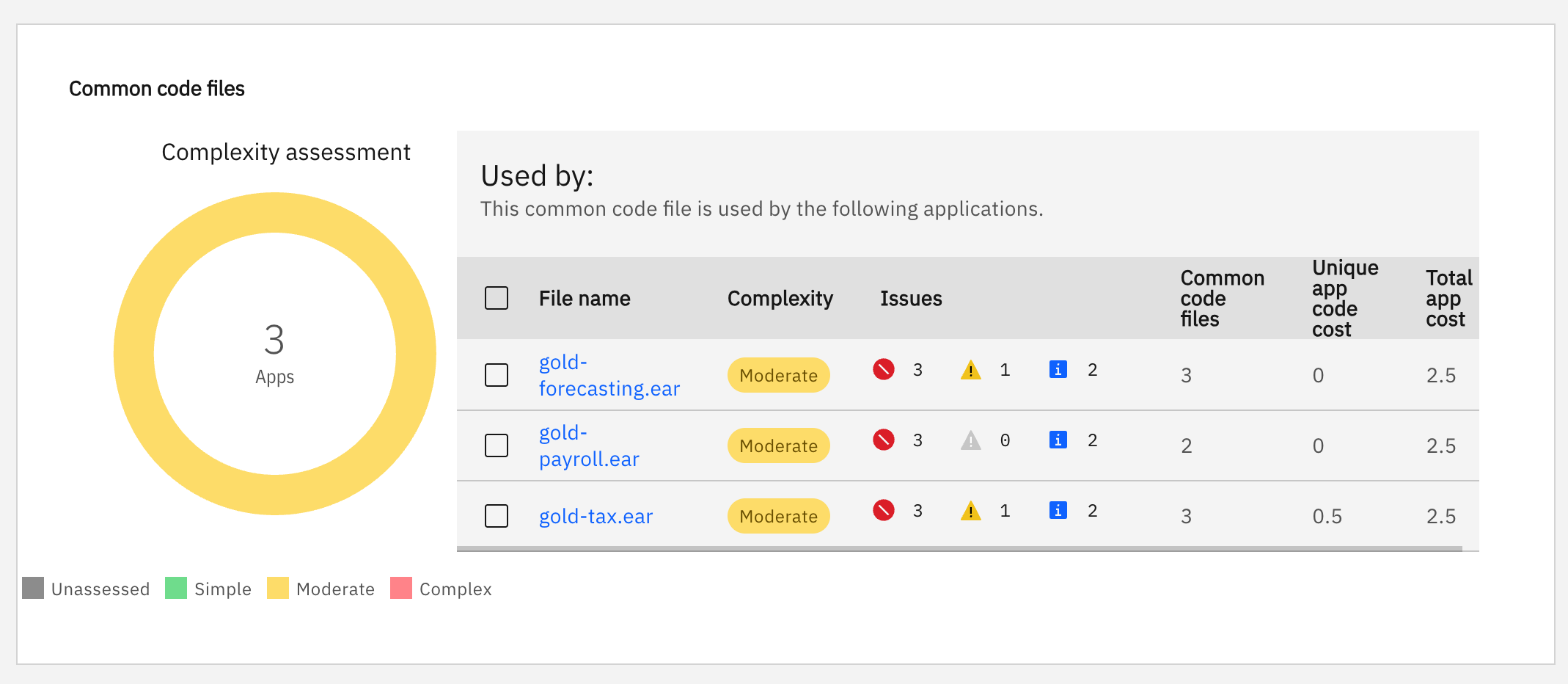
The 3 apps shown in the table all share common code, which includes the
gold-server-utils-1.0.8.jarfile. AMA estimates that each of the 3 apps takes about 2.5 days of effort to modernize. However, thegold-payroll.earandgold-forecasting.earapps have no unique app code, so they share the exact same common code. When you modernize thegold-payroll.earapp, no further work is required to modernize thegold-forecasting.earapp other than including the JAR files that you already modernized for the first app. You save the 2.5 days that are shown for thegold-forecasting.earapp.The
gold-tax.earapp also shares some of the same common code JAR files and benefits from the fixes you made to thegold-payroll.earapp. However, the Unique app cost field in the table shows that thegold-tax.earapp has other unique code that needs modernizing, and AMA estimates that takes 0.5 days.Instead of 7.5 days of effort to fix all 3 apps (2.5 + 2.5 + 2.5), identifying and fixing the common code across the apps takes about 3 days of effort (2.5 + 0.5), saving 4 days of effort.
Click AMA_tutorial in the top-left of the window to return to the Java Applications tab. In the filter, type
mod_resortsto display only themod_resorts.earfile.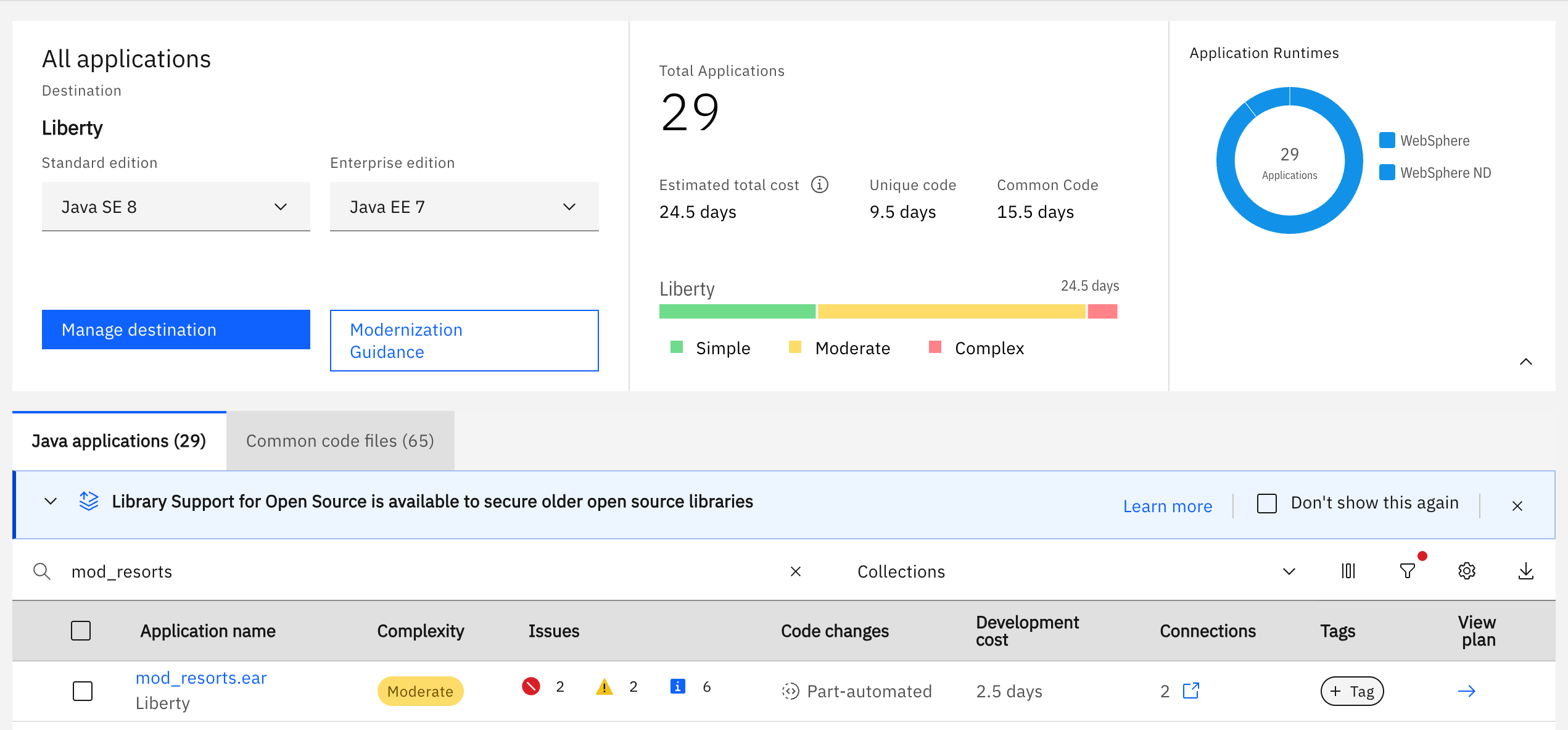
Click modresorts.ear to open its detailed analysis. Scroll down to the Issues section.
modresorts.earhas issues of type Moderate complexity that must be addressed before modernization. Expand Technology issues and then expand The WebSphere Runtime APIs and SPIs are unavailable. The rule details are provided, such as the reference to the location in the application code that flagged the rule.Expand External dependencies to see that
modresorts.earhas 4 external dependencies to verify during testing: Java Message Service, Databases, Remote EJB providers, and Java EE security. Connections to these external dependencies must be updated before the application can run correctly on Liberty. For the sample application, AMA lists each issue together with the description, severity, development cost, and number of occurrences.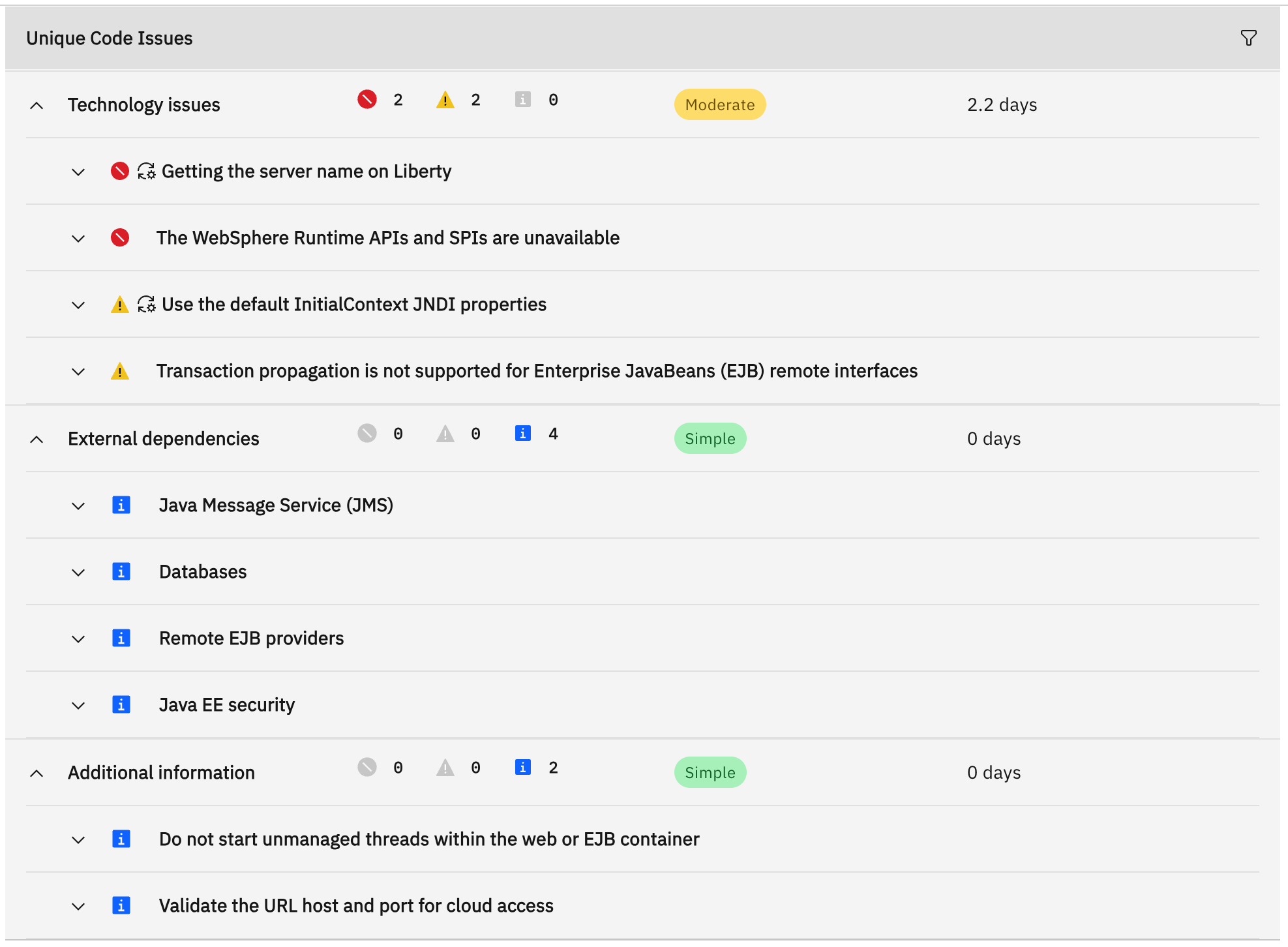
Understanding and addressing a modernization issue
The following example goes through a selection of findings to show how AMA identifies incompatible WebSphere-specific patterns, explains the impact on Liberty, and guides you through remediation. Each issue includes the affected code location, the reason for the flag, and the recommended fix.
Use the default InitialContext JNDI properties issue
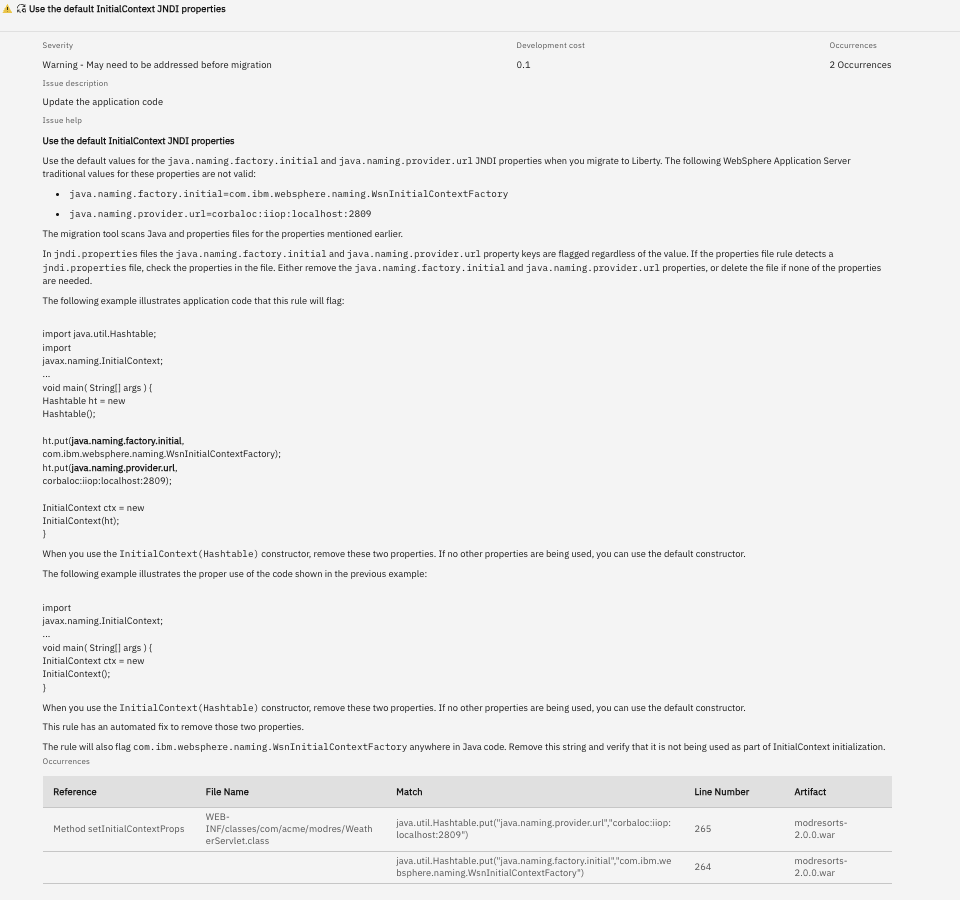
The issue titled "Use the default InitialContext JNDI properties" is flagged as a warning, with a development cost of 0.1 days to fix the 2 occurrences. Expand the Use the default InitialContext JNDI properties issue to show that the rule flagged the setInitialContextProps method of WeatherServlet, where line 265 sets java.naming.provider.url to corbaloc:iiop:localhost:2809 and line 264 sets java.naming.factory.initial to com.ibm.websphere.naming.WsnInitialContextFactory on a Hashtable that is then passed to InitialContext. These are WebSphere Application Server values and are not valid on Liberty, so the application code must be updated.
AMA describes potential solutions to resolve this issue. You can implement these solutions inside your IDE. If you use the AMA Developer Tools IDE extension, automated fixes are available to make the code changes for you. AMA suggests removing the 2 flagged properties from the Hashtable in WeatherServlet. If they were the only entries, remove the Hashtable as well and use the InitialContext constructor that takes no arguments, which applies the default values. The rule also flags the com.ibm.websphere.naming.WsnInitialContextFactory string wherever it appears in Java code, so remove any remaining reference and confirm it plays no part in initializing a context. The same rule applies to a jndi.properties file: if the application contains one, remove the 2 property keys or delete the file if none of its other properties are needed. AMA provides an automated fix for this rule, after which the lookup in WeatherServlet resolves correctly on Liberty.
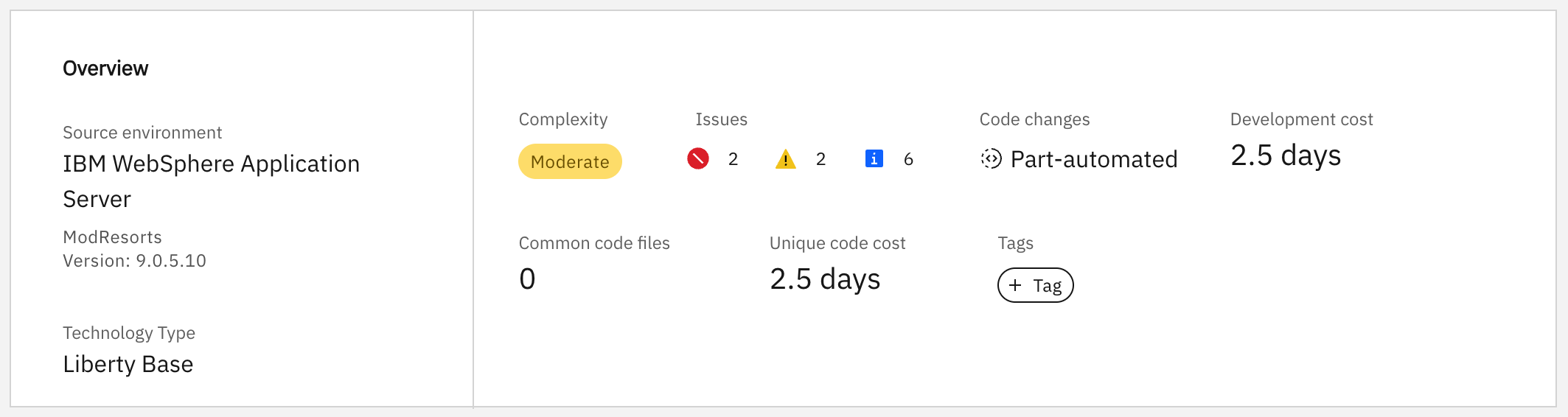
In the Overview section at the top of the page, AMA estimates that it takes about 2.5 days to modernize the mod_resorts.ear code to run on Liberty. You can use these estimates to help with project planning and resource allocation.
AMA reports for the ModResorts application
AMA also makes 3 detailed reports available for mod_resorts.ear, each providing additional analysis that helps identify potential modernization issues before remediation begins. The AMA dashboard Assessment tab focuses on what needs to change and how much effort it takes. The reports go deeper into what the application contains, where it can run as-is, and which fixes can be automated versus completed manually.
The Application Inventory Report reveals the internal architectural composition of the application. The Application Technology Evaluation Report depicts the cross-destination compatibility. The Detailed Migration Analysis Report provides a remediation-oriented breakdown. You can find the 3 reports under the Reports section on the left.
Application Inventory Report
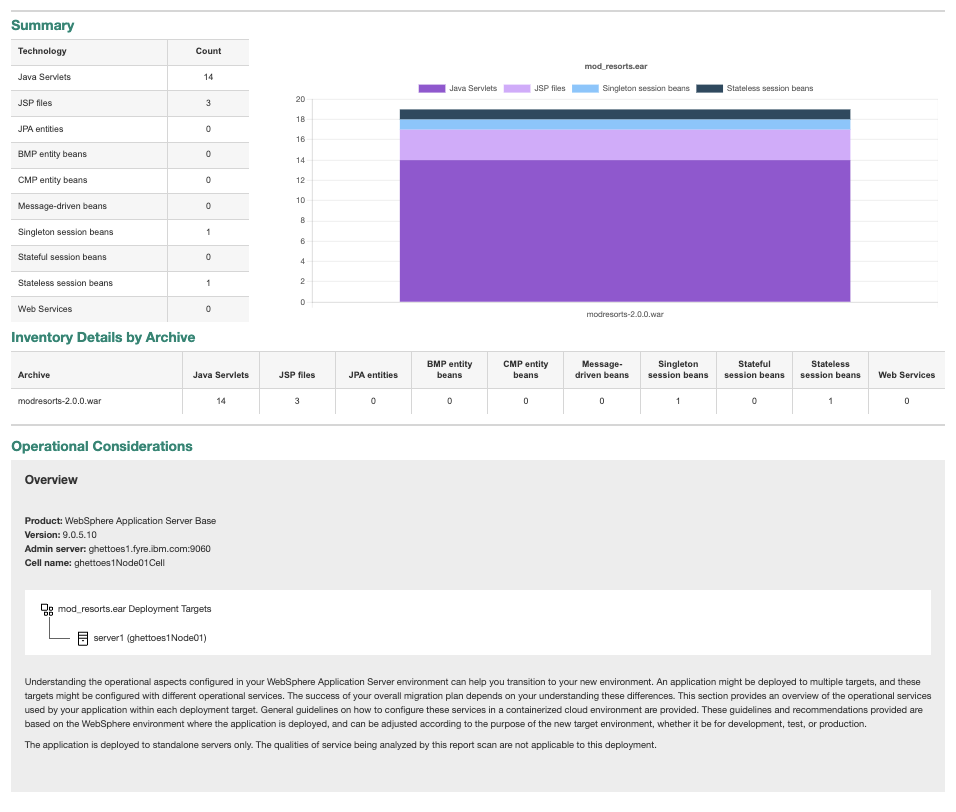
The Application Inventory Report shows that mod_resorts.ear contains 14 Java Servlets, 3 JSP files, 1 singleton session bean, and 1 stateless session bean. You can use this information to estimate modernization effort, plan testing strategies for the web tier components, and understand the application's architectural footprint.
The Operational Considerations section shows that mod_resorts.ear is deployed to a single standalone server running WebSphere Application Server base 9.0.5.10. Because this is a standalone deployment, AMA notes that qualities of service, such as high availability or workload management, are not applicable to this configuration and can be set according to the needs of the target environment. High availability typically requires a cluster of servers, a load balancer, or session replication.
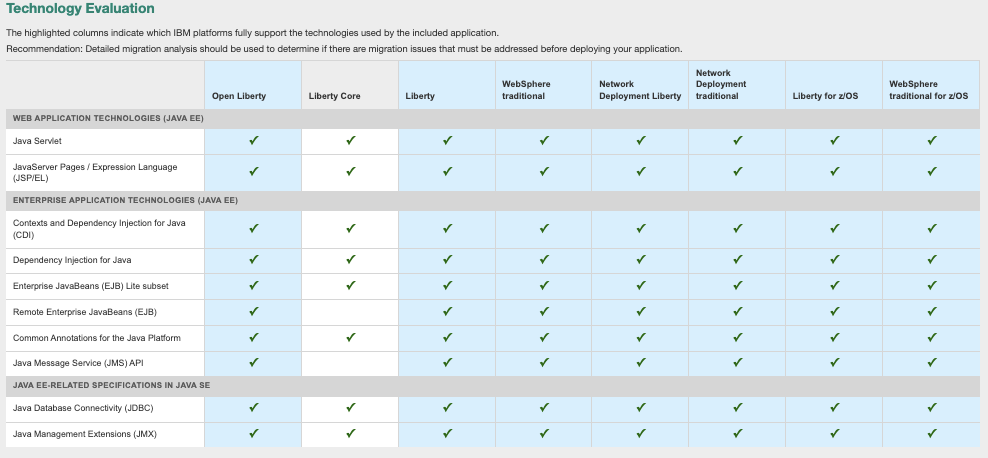
Application Technology Evaluation Report
The Application Technology Evaluation Report shows 10 Java EE technologies for modresorts.ear, such as Java Servlet, JavaServer Pages/Expression Language (JSP/EL), Contexts and Dependency Injection for Java (CDI), Dependency Injection for Java, Enterprise JavaBeans (EJB) Lite subset, Java Database Connectivity (JDBC), and Java Management Extensions (JMX). Most technologies are fully supported across all 8 IBM deployment destinations (Open Liberty, Liberty Core, Liberty, WebSphere Application Server base, Network Deployment Liberty, WebSphere Application Server Network Deployment, Liberty for z/OS, and WebSphere Application Server for z/OS), indicating broad compatibility for modernization. This report helps you understand what technologies are supported or must be changed in mod_resorts.ear before committing to a modernization strategy.
Detailed Migration Analysis Report
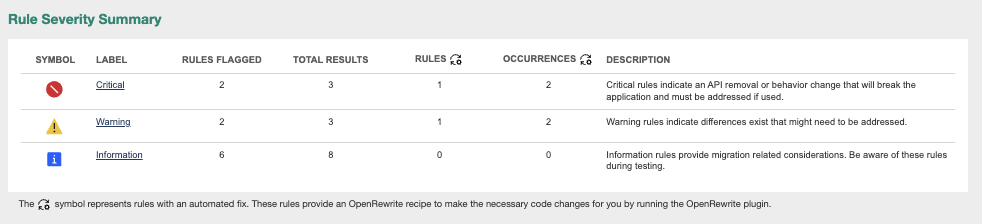
The Detailed Migration Analysis Report provides a comprehensive detailed modernization analysis for modresorts.ear, revealing critical insights about the modernization from WebSphere Application Server to Liberty. For example, in the following screenshot, the Rule Severity Summary clearly distinguishes between rules that have automated fixes and those requiring manual intervention. This categorization enables development teams to prioritize remediation efforts efficiently by using automated OpenRewrite recipes. The analysis identifies 2 critical rules flagged that occur a total of 3 times, with 1 automated fix available through OpenRewrite recipes. These critical rules indicate API removals or behavior changes that break the application and must be addressed before deployment. Additionally, the report flags 6 informational rules and 2 warnings. While these informational rules do not break the application, they provide important modernization-related considerations that you should review during testing to ensure optimal mod_resorts.ear behavior on Liberty.
Step 4. Generate a migration plan
With the assessment complete, you are ready to generate the migration plan. This step packages all of AMA's analysis into a downloadable bundle that gives the development team everything they need to modernize the application.
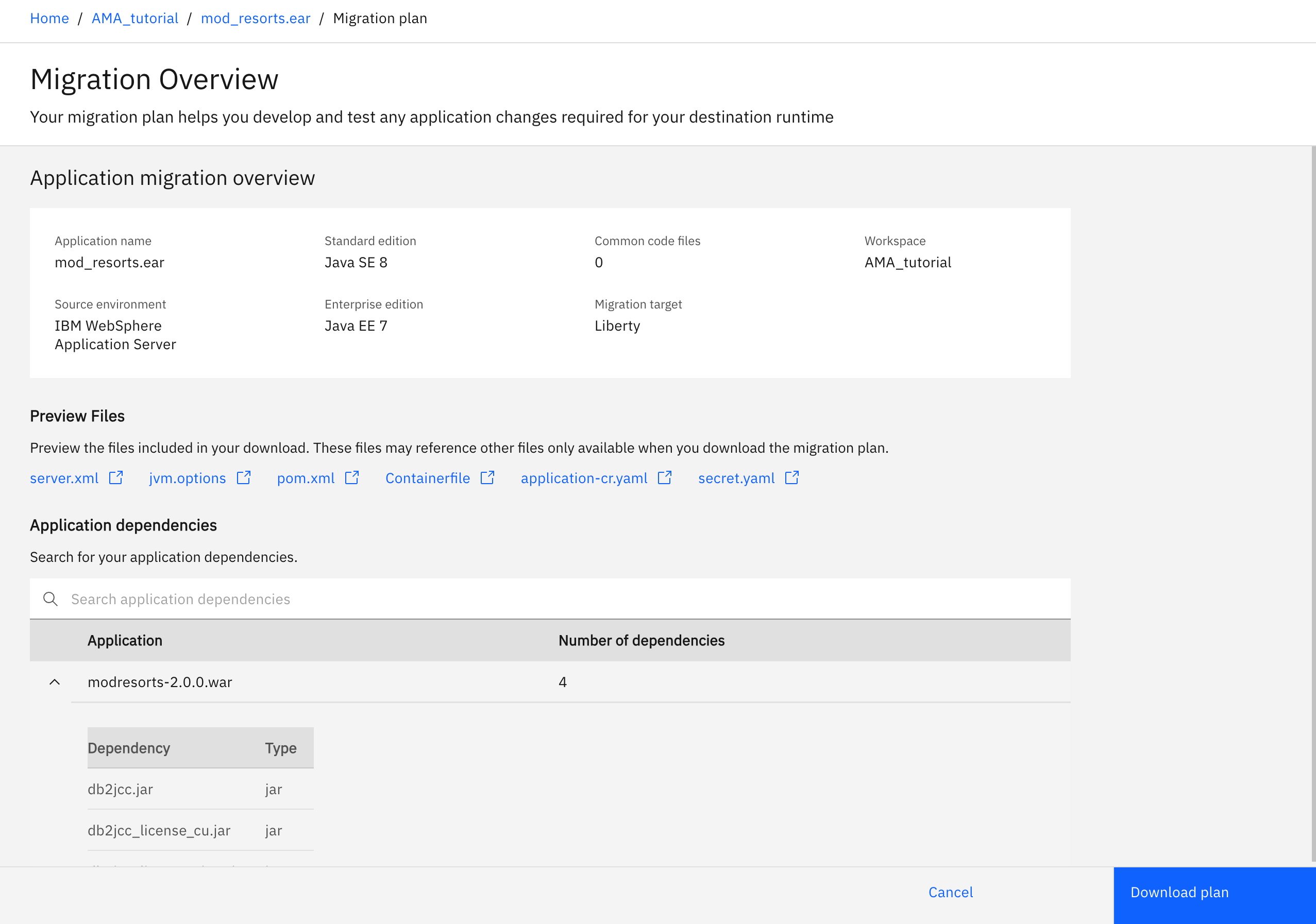
The migration plan covers the Java code and application packaging changes needed to deploy mod_resorts.ear on Liberty. In addition, the bundle includes configuration files ready for use in the development environment:
server.xml: a Liberty server configuration file that contains Liberty features, data source definitions, and environment variables corresponding to the WebSphere Application Server configuration discovered during the scan.Containerfile: a container image build file that packages the application with a Liberty base image for containerized deployment.
Click View migration plan.

To download the generated migration plan for mod_resorts.ear, scroll to the top of the page, check that Standard edition is set to Java SE 8 and Enterprise edition is set to Java EE 7, then click View migration plan. Wait a moment for the plan to be generated, then click Download plan. Save the mod_resorts.ear_migrationPlan.zip file locally. Provide this file to the developer who modernizes the application. You can also import this migration plan into AMA Developer Tools in your IDE.
Click Dismiss, then Cancel to return to the application analysis details.
You have completed the 4 phases of application modernization that AMA supports.
Step 5. Execute a migration plan
To execute the migration plan, import it into AMA Developer Tools. AMA Developer Tools is an IDE extension that runs automated code fixes and guides you through self-directed fixes. To learn more, see Easily modernize Java applications in your IDE with AMA Dev Tools.
Summary and next steps
Congratulations. You have used AMA to complete the assessment and planning phases of an application modernization project for the ModResorts sample application. Specifically, you have:
Visualized the application estate.
Reviewed the Assessments tab to understand the issues in ModResorts across the analysis dimensions.
Generated and downloaded a migration plan along with the generated destination configuration artifacts.
Your development team now has a fact-based migration plan ready for implementation.
What next? Contact your IBM Sales representative to extend your trial by requesting a Proof-of-Concept access key, which enables you to apply what you learned to your own applications and to implement generated migration plans by using AMA Developer Tools.