Learning Path
Modernizing applications to use IBM WebSphere Liberty
Java application modernization can be time-consuming, complex, and difficult, but it doesn't have to be. With the right tools, you can analyze your entire application estate, automate code fixes, and migrate to a modern runtime like Liberty with confidence.
Whether you're modernizing to use the latest innovations, keeping up with new frameworks like Spring Framework, or moving off Java 8, the path forward isn't always clear. Your estate might span dozens of applications with tangled dependencies, or your code might rely on legacy, deprecated APIs that need rewriting. Whatever your starting point, the tools covered in this article make your Java application modernization journey straightforward.
JSphere Suite for Java contains a set of tools which, along with complementary agentic AI tools like IBM Bob and the IBM Bob Premium Package for Java Modernization, makes these modernization journeys much easier. Whether you are modernizing from traditional WebSphere Application Server (tWAS) or from other Java application servers, tools like IBM Application Modernization Accelerator (AMA) can analyze your application estate and then, with Application Modernization Accelerator Developer Tools (AMA Dev Tools), automatically make fixes or guide you to manually modify your application code as needed.
Java application modernization tools
To modernize Java applications to more performant runtimes and up-to-date frameworks, Java architects and developers can use the following tools:
- Application Modernization Accelerator (AMA). An enterprise modernization planning tool that can analyze application estates, identify modernization complexity and application dependencies, and generate automated, actionable migration plans.
- Application Modernization Accelerator Developer Tools (AMA Dev Tools). An IDE-based tool that helps developers to modernize their application code to Liberty using a deterministic and consistent set of rules to automate fixes and provide step-by-step guidance.
- Liberty Tools. A set of IDE-based development tools that streamlines the development, testing, and deployment of Liberty applications.
- Mono2Micro. An AI-based, semi-automated tool that accelerates the modernization of monolithic Java applications into microservices.
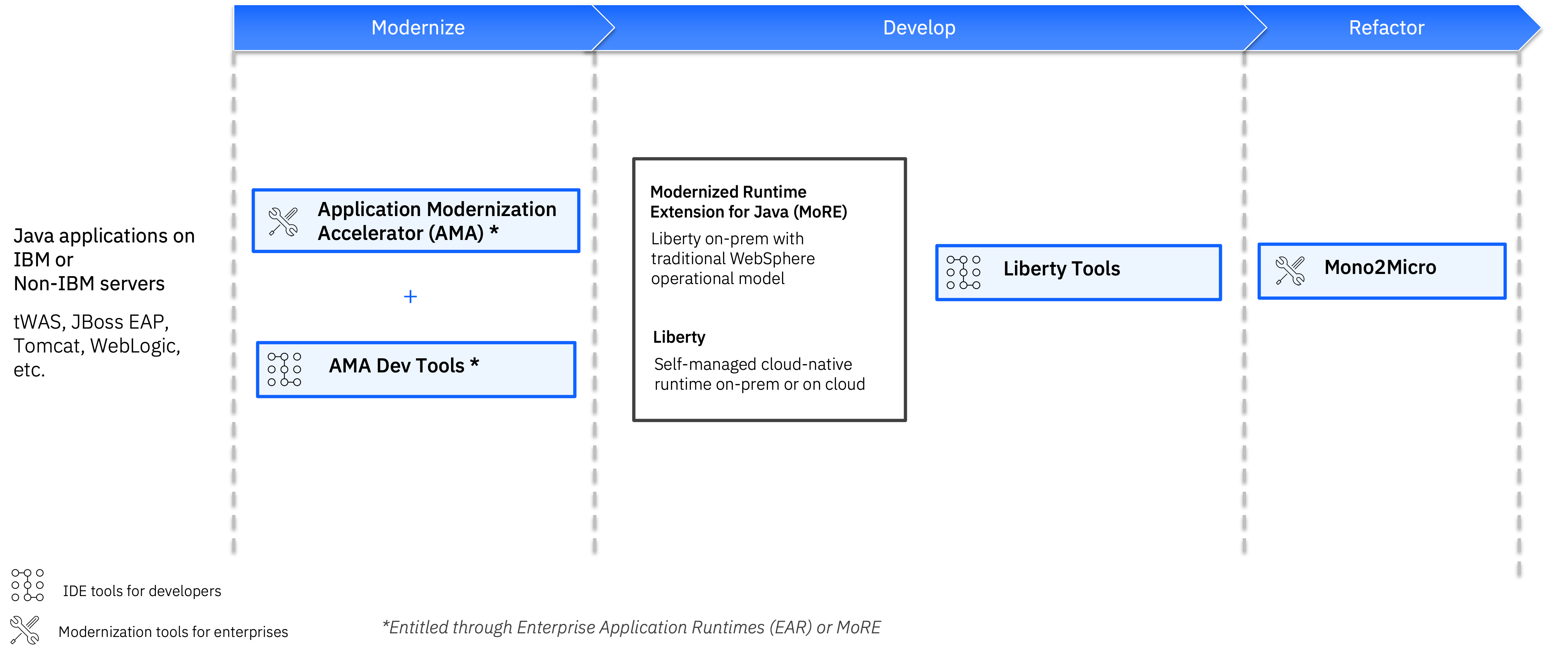
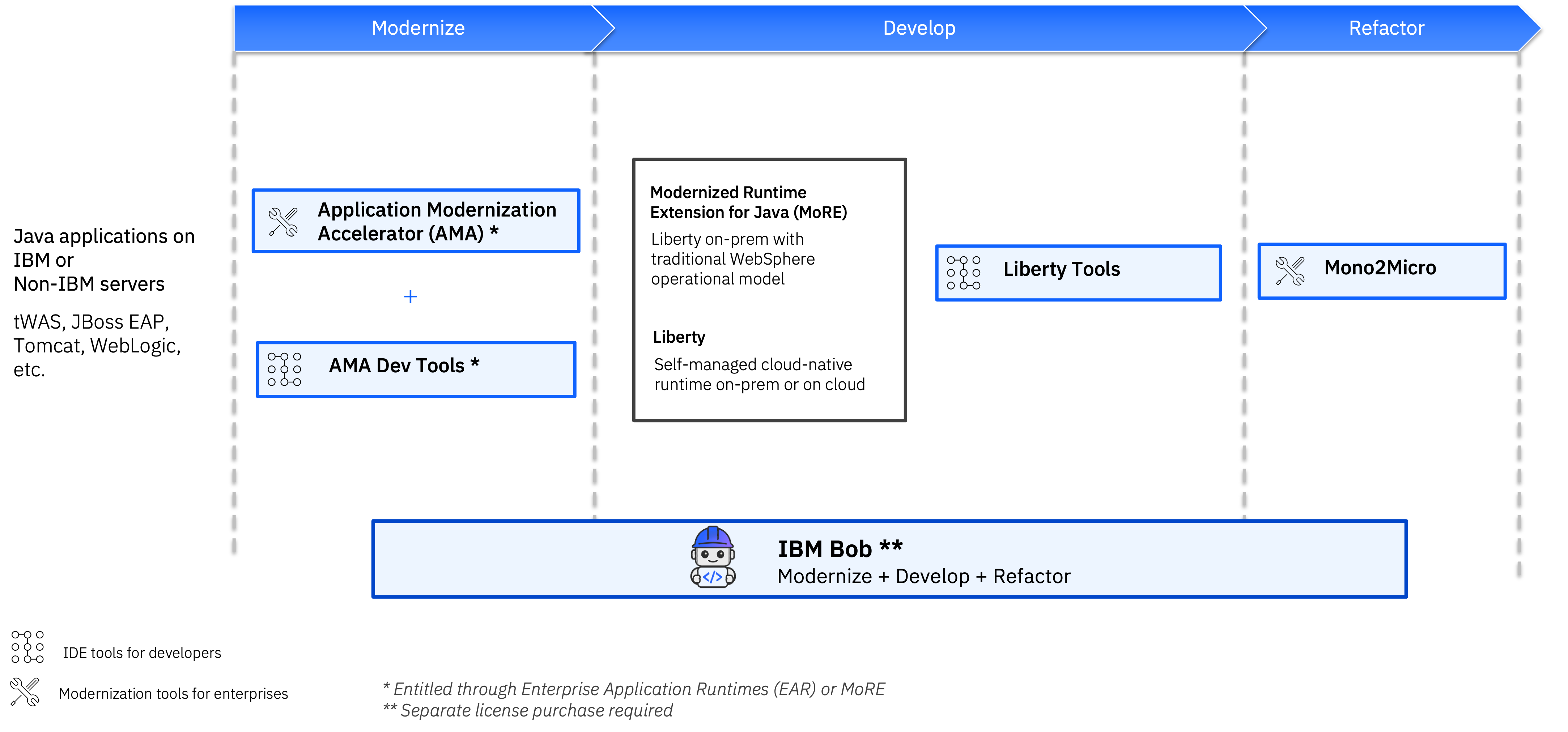
These tools can be used effectively together to achieve an end-to-end holistic Java application modernization, covering all three core phases of application modernization:
- Modernize. This phase includes modernizing application runtimes, Java/Jakarta EE versions, frameworks, APIs, and more.
- Develop. After migrating an application to its modernization target destination, further development continues as defined in its application strategy or roadmap.
- Refactor (optional). This phase captures the work that is needed to change the architectural style or pattern of an application (for example, refactoring a monolith to microservices).
The following diagram highlights how each tool helps with the three core phases. Enterprises and developers can use AMA and AMA Dev Tools together to modernize their Java applications. Once modernized, developers can use Liberty Tools to continue developing the application. If refactoring is required, developers can use Mono2Micro to modernize a monolithic Java application to microservices.
Java runtimes to use these tools with
Developers can use these application modernization tools with a variety of source runtimes to help them migrate to modern, performant target runtime destinations.
Source runtimes
Applications that currently use either WebSphere, JBoss EAP, Tomcat, or WebLogic runtimes can all make use of these modernization tools. The scanning capabilities in AMA enable applications that are running on all of these runtimes to be scanned and analyzed. Developers can then use the migration plans that AMA generated to help them move the applications to a target runtime destination.
Target runtime destinations
Two target runtime destinations are available when using these application modernization tools to modernize a Java application: Liberty and IBM Modernized Runtime Extension for Java (MoRE).
Liberty (WebSphere Liberty and Open Liberty) is a lightweight, modular, and highly performant Java application server designed for cloud-native applications, microservices, and modernizing traditional Java enterprise applications. Built on the open-source Open Liberty project, WebSphere Liberty offers rapid startup times (< 2s), low memory usage, and seamless integration with community frameworks and specifications such as Jakarta EE, MicroProfile, Kubernetes, Docker, and DevOps pipelines. Liberty's versatile support for a range of application architectures and deployment environments, along with the wide variety of supported APIs, and its zero migration architecture make it an ideal destination for applications undergoing modernization. Read other our article to find out more about why developers love Liberty.
IBM Modernized Runtime Extension for Java (MoRE) enables you to deploy and administer Java 17 (including Jakarta EE 10) applications on Liberty servers in the same cell as traditional tWAS servers by using the WebSphere Application Server Network Deployment operational model. By preserving the traditional WebSphere operational model, MoRE enables gradual application modernization without disrupting existing business operations, helping ensure continuity and reduce disruption.
These target runtime destinations are included within the JSphere Suite portfolio, bundled under the Enterprise Application Runtimes (EAR) license.
Modernize with AMA and AMA Dev Tools
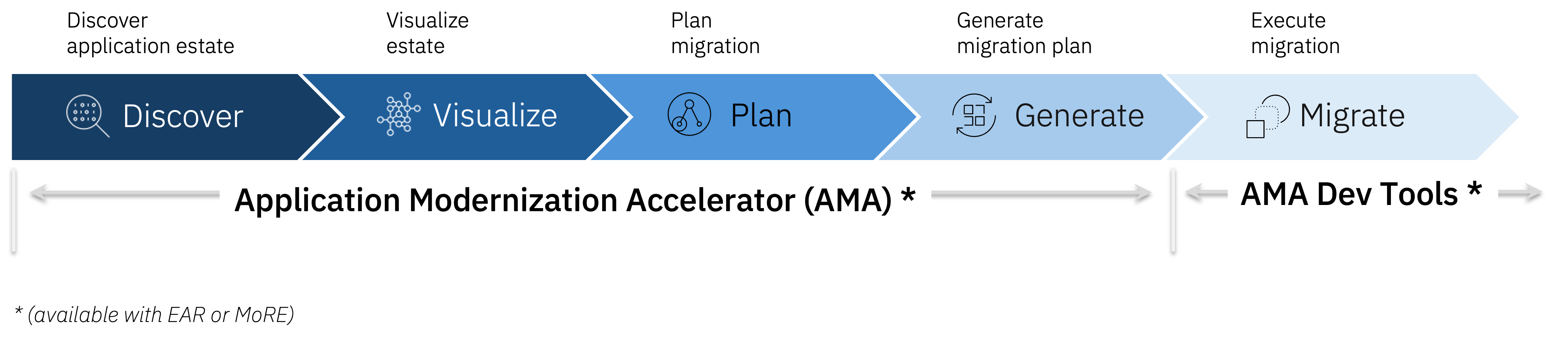
Modernizing a Java application or application estate requires effective planning and then implementation of this modernization plan. This modernization journey, shown in the following diagram, spans from initial discovery of the application estate through to making any code and configuration changes that are needed to migrate applications to their final destination and state.
Developers can use AMA and AMA Dev Tools together to significantly decrease the time and effort required to plan and execute this modernization journey. This modernization can include modernizing the runtime that the applications are running on, Java/Jakarta EE modernizations (for example moving from Java 8 to Java 11, 17, 21, or 25), and framework version upgrades (such as Spring Framework).
Architects use AMA to analyze and plan modernization
AMA enables architects to discover and visualize their application estate, on application runtimes including IBM WebSphere, Tomcat, JBoss EAP, WebLogic, and with messaging and database dependencies on IBM MQ, IBM Db2, and non-IBM database and integration dependencies.
AMA enables architects to more effectively plan their migration by identifying candidate applications for modernization, by considerations such as complexity, cost estimates, and dependencies. Architects can then add their own domain knowledge through custom tagging.
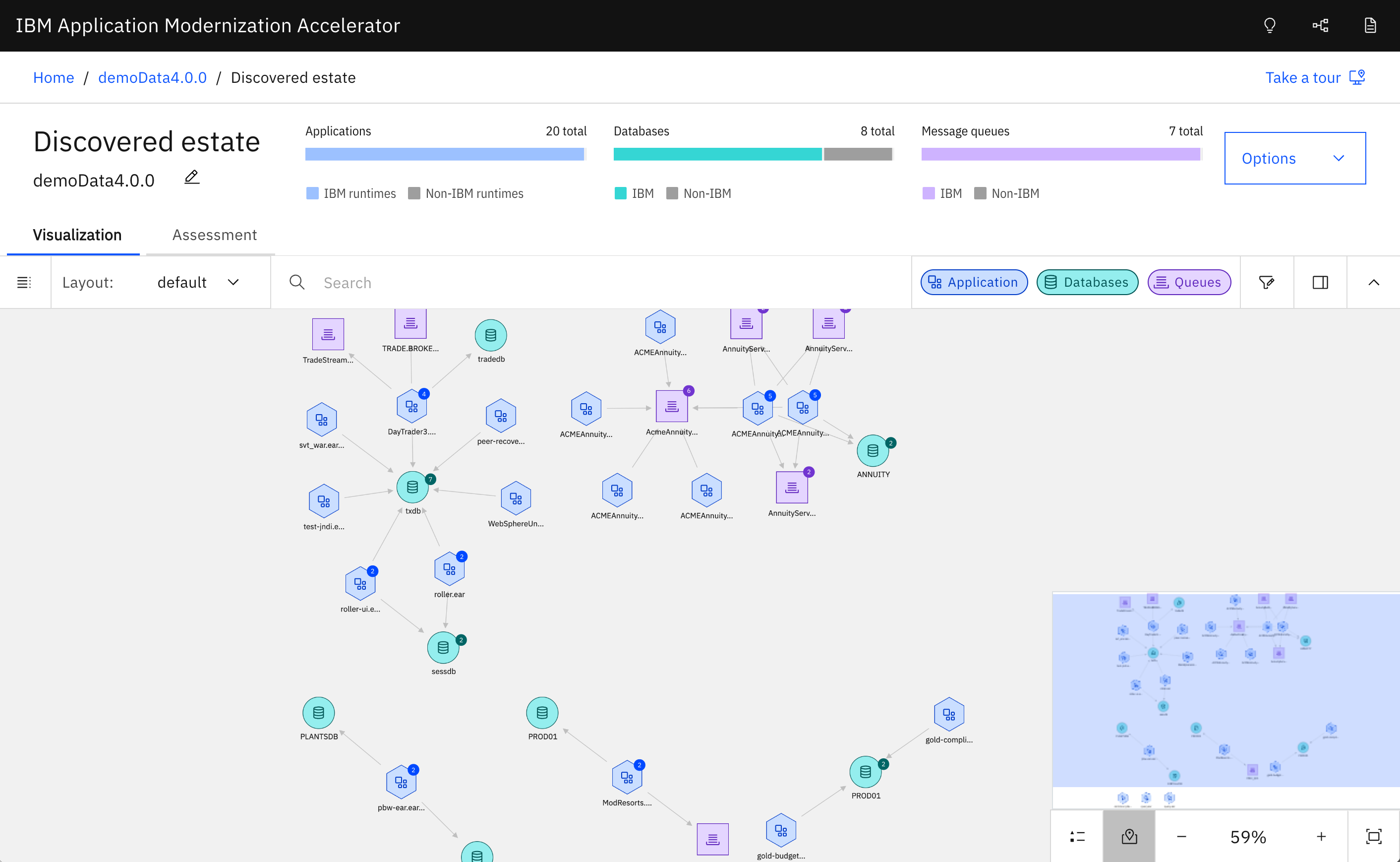
Based on architects’ decisions, AMA generates both application-specific migration plans that application development teams can use with AMA Dev Tools to accelerate code changes and configuration artifacts that administrators can customize further for production deployments.
AMA Dev Tools for developers to execute modernization plans
While AMA supports the Discover, Visualize, Plan, and Generate phases, AMA Dev Tools supports the Execute stage of this modernization journey and is focused on helping developers implement the migration plan that AMA generated. AMA Dev Tools uses the migration plan to help automate much of the required migration actions by running automated rules-based fixes (through the use of OpenRewrite recipes, which are automated code transformation rules) and by providing step-by-step guidance for fixes that require further manual intervention.
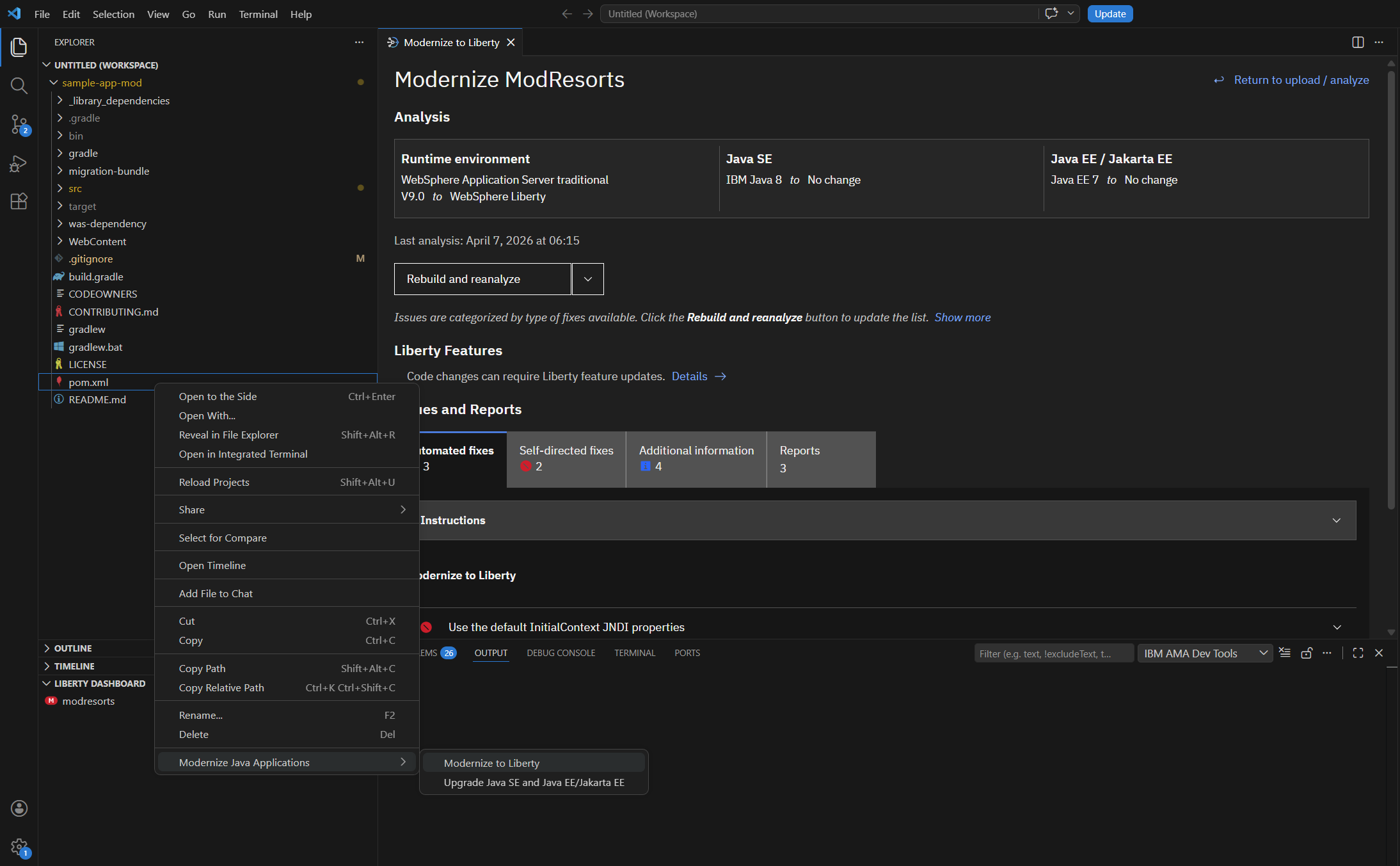
AMA Dev Tools is an integrated development environment (IDE) plugin that is available to install in IntelliJ IDEA, Visual Studio Code, or Eclipse IDE, so that developers can modernize the applications within their preferred environment. To explore the capabilities provided by AMA Dev Tools in more detail, see Easily modernize Java applications in your IDE with AMA Dev Tools.
Customers using AMA and AMA Dev Tools have been able to save more than 600 hours (~79%) in their Java application modernization efforts.
Develop your modernized apps with Liberty Tools
After developers modernize the applications and migrate to Liberty, they can continue to develop their applications to deliver key features and capabilities as part of their application roadmap and strategy. To make this easier, Java applications running on Liberty can be developed by using the IDE-based Liberty Tools. Liberty Tools are a set of intuitive developer tools that provide a simplified yet powerful development experience.
Liberty Tools enhance the development experience by enabling you to build, test, debug, and manage applications entirely within your IDE. They provide a centralized Liberty Tools Dashboard to discover and manage Liberty projects, support rapid iterative development through Liberty dev mode, and allow effective testing and debugging without switching environments. In addition, they offer strong editing assistance for configuration files and intelligent coding support for Jakarta EE and MicroProfile APIs, including validations, quick fixes, and code completions, helping you develop applications more efficiently and accurately.
The tools are provided as a plugin or extension within popular IDEs including IntelliJ IDEA, Visual Studio Code and Eclipse IDE. Liberty Tools is now also available in the Open VSX registry, allowing developers making use of forks of VS Code to download and install Liberty Tools.
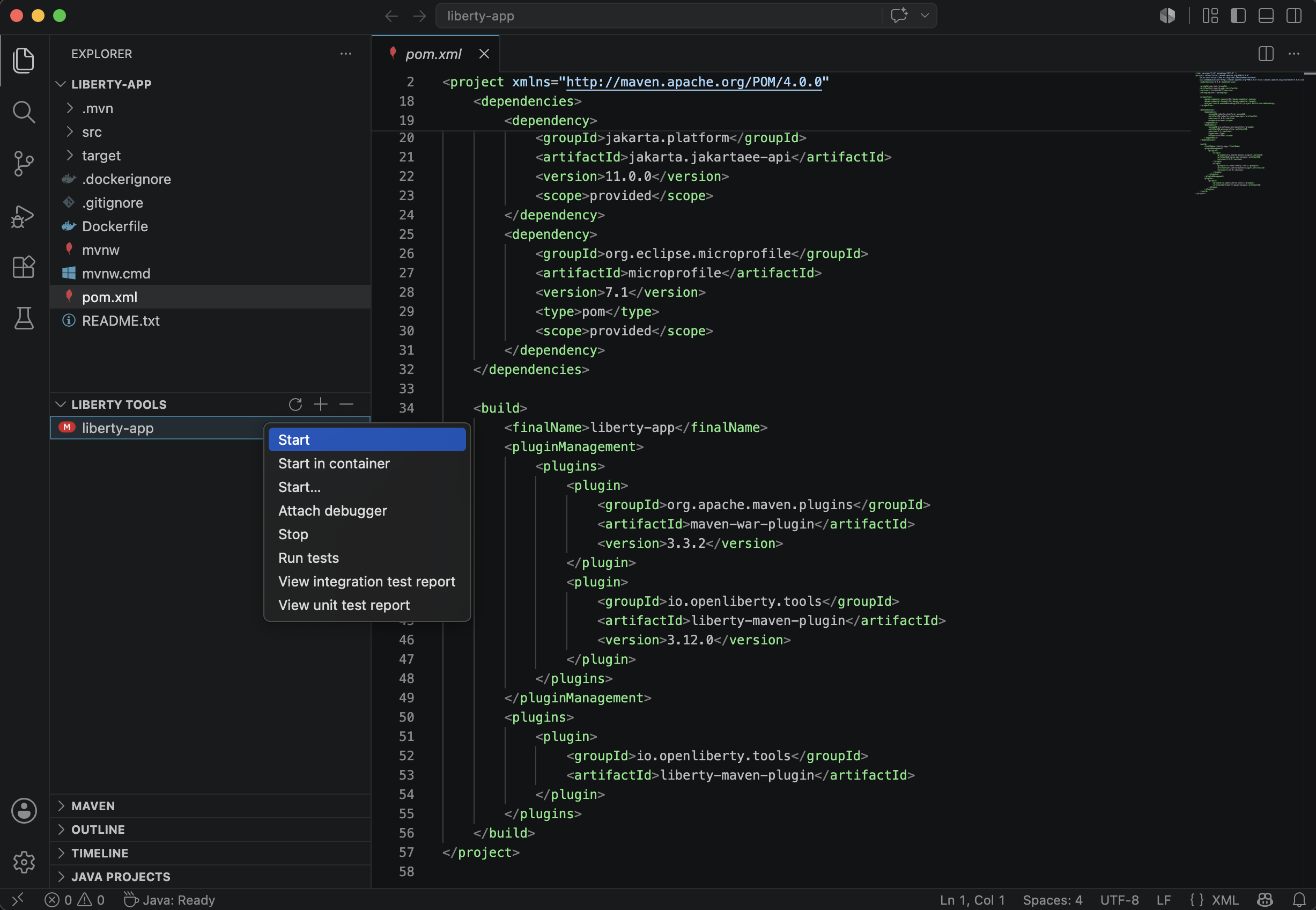
To find out more about Liberty Tools, see the IDE-specific articles:
- Effective cloud-native Java app development with Liberty in IntelliJ IDEA
- Effective cloud native development with Liberty in Visual Studio Code
- Effective cloud-native Java app development with Open Liberty in the Eclipse IDE
Refactor monolithic Java apps with Mono2Micro
For applications that need restructuring architecturally (the Refactor stage), the Mono2Micro tool is available to help. IBM Mono2Micro uses AI to refactor monolithic Java applications into microservices. Machine learning and AI make the refactoring process semi-automated, so that you don't have to rewrite your entire application code to create a microservice architecture.
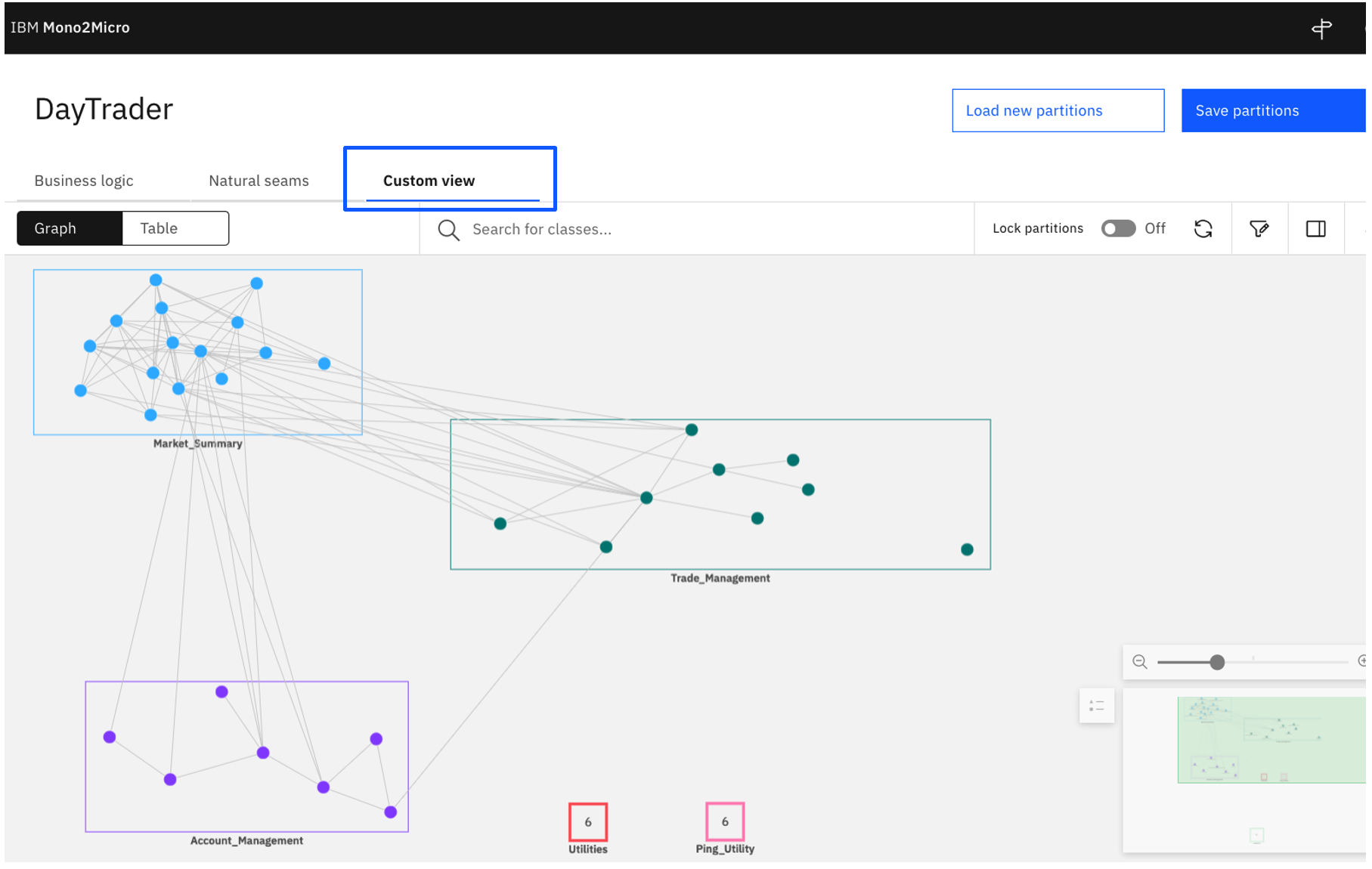
To learn more about Mono2Micro and how best to use this tool, check out the Introduction to IBM Mono2Micro learning path.
Enhancing modernization with agentic AI
Agentic AI development tools, like IBM Bob and the IBM Bob Premium Package for Java Modernization, further accelerate modernization of legacy application code. When combined with insights from AMA, the IBM Bob Premium Package for Java Modernization enables enterprise Java developers to guide legacy applications across the modernization finish line.
The Liberty Replatforming feature that is available through the IBM Bob Premium Package for Java Modernization takes an application's migration plan from AMA, analyzes the application code for the chosen migration path, and then applies the fixes efficiently through a mix of deterministic rules and agentic AI. The Liberty Replatforming feature first applies all of AMA's automated rules-based code fixes without unnecessarily consuming large language model (LLM) tokens, then applies AMA's domain insights along with generative AI to resolve the more complex migration issues, and then works agentically to address any outstanding issues and validate that the modernized application will successfully run on Liberty.
Combining AMA with the IBM Bob Premium Package for Java Modernization gives enterprises a trustworthy and scalable solution to discover, assess, visualize, plan, and execute application modernization efforts across enterprise application estates reliably and efficiently.
The IBM Bob Premium Package for Java Modernization also offers features like Java SE Upgrade and UI Modernization that Java developers will find useful.
Summary
Real customer data shows how impactful modernization tools can be, reducing the time and effort required to complete application modernization journeys by a substantial margin. Application Modernization Accelerator, AMA Dev Tools, Liberty Tools, and Mono2Micro, along with the IBM Bob Premium Package for Java Modernization, support you in your Java application modernization journey from discovery and planning all the way through to execution, refactoring, and getting you to a destination where you can stay current, be secure, and innovate faster.
Next steps
To try out AMA for yourself, sign up for an AMA free trial.